Notification Cube

LED Notification Cube Is A Good First Project

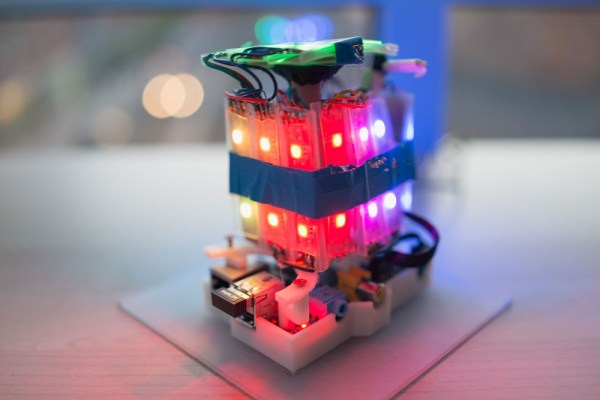
Two years ago, [Matt] made a move away from his software hacks and into the physical world. He was part of a pilot program to provide mentorship to children as part of the Maker Education Initiative. This program gave him access to 3D printers, CNC machines, and laser cutters within the New York Hall of Science makerspace. [Matt] chose to build an illuminated notification cube for his first physical project. The idea being that smart phones have so many alerts, many of which are unimportant. His project would help him to visualize and categorize each alert to better understand its importance.

The brain of the system is a Raspberry Pi. [Matt] found a Python library that allowed him to directly control an RGB LED strip based on the LPD8806 chip. He wired the data pins directly to the Pi and used an old 5V cell phone charger to power the LEDs. The strip was cut into smaller strands. Each face of the cube would end up with three strands of two LEDs each, or six LEDs per side. [Matt] found a mount for the Pi on Thingiverse and used a 3D printer to bring it into existence. The sides were made of frosted laser cut acrylic. The frosted look helps to diffuse the light from the LEDs.

Over time [Matt] found that the cube wasn’t as useful as he originally thought it would be. He just didn’t have enough alerts to justify the need. He ended up reprogramming the Pi to pull weather information instead, making use of the exact same hardware for another, more useful purpose.
Glowing LED Cubes From The Future

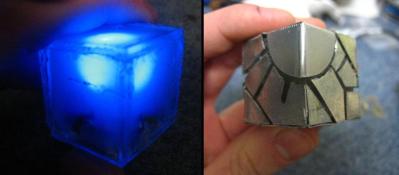
Sometimes people don’t believe you when you tell them something. You may have to go out of your way to convince those skeptics. Well, [AlexTheGreat] was having a hard time convincing people that he was from the future. He thought building some cool looking glowing LED cubes would help his story.

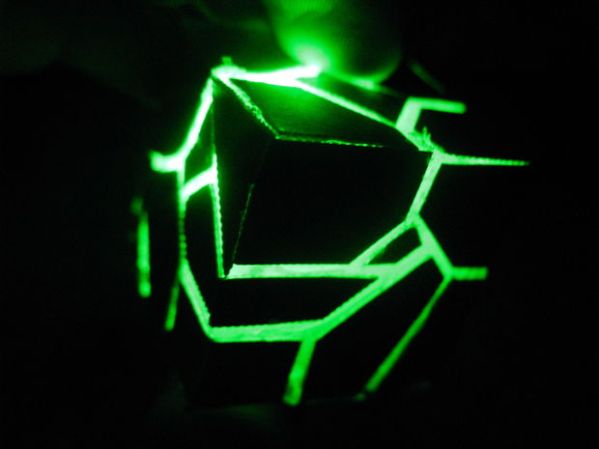
Underneath the fancy exterior covering is a cube made from pieces of clear acrylic sheet that are hot-glued together. There isn’t much inside the cube, just an LED, resistor, button cell battery and an on/off switch. A hole in one of the cube sides allows access to the on/off switch. Once all the components are verified to work, the interior of the cube is filled with hot glue to diffuse the light.

LED Cube from the futureThe exterior is thin sheet metal cut into cool shapes and bent around the plastic cube. Like the rest of the components, these metal covers are held on with hot glue. They do a great job of blocking the LED light ensuring it shines out of the creatively arranged gaps. We’re not sure if these will convince anyone that [AlexTheGreat] is from the future but they are certainly darn cool looking!

 

NeXT Cubes And LCD Monitors

The NeXT slabs and cubes were interesting computers for their time, with new interesting applications that are commonplace today seen first in this block of black plastic. Web browsers, for example, were first seen on the NeXT.

Running one of these machines today isn’t exactly easy; there are odd video connectors but you can modify some of the parts and stick them in an LCD monitor. It’s a tradeoff between a big, classic, heavy but contemporary CRT and a modern, light, and efficient LCD, but it’s still a great way to get a cube or slab up and running if you don’t have the huge monitor handy.

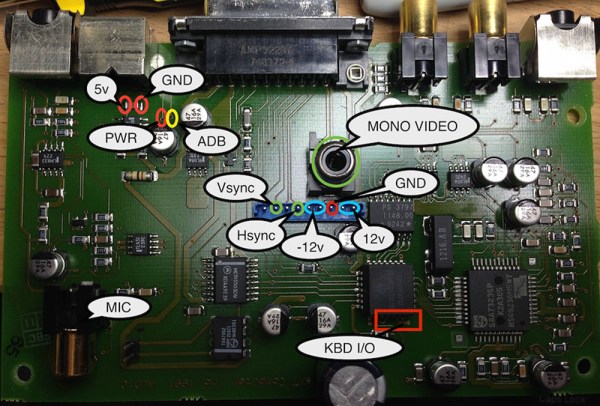
The NeXT cube doesn’t have a single wire going between the computer and the monitor; that would be far too simple. Instead, a NeXT Sound Box sits between the two, providing the user a place to plug the monitor, keyboard, mouse, and audio connectors into. [Brian] took the board from this Sound Box and put it inside an old NEC LCD monitor he had sitting around. 12V and 5V rails were wired in, the video lines were wired in, and [Brian] created a new NeXT monitor.

There are two versions of the NeXT Sound Box – one for ADB peripherals (Apple IIgs and beige Macs), and another for non-ADB peripherals. [Brian] also put together a tutorial for using non-ADB peripherals with the much more common ADB Sound Board.

L3D Cube Takes The Work Out Of Building An LED Cube

Building an LED cube usually means a heck of a lot of delicate soldering work. Bending jigs, assembly jigs, and lots of patience are the name of the game. The problem multiplies if you want to build with RGB LEDs. [Shawn and Alex] are hoping to change all that with their L3D cube. Yes, L3D is a Kickstarter campaign, but it has enough good things about it that we’re comfortable featuring it here on Hackaday. What [Shawn and Alex] have done is substitute WS2812b surface mount LEDs for the 5mm  or 3mm through hole LEDs commonly used in cubes. The downside is that the cube is no longer visible on all sides. The upside is that it becomes a snap to assemble.

The L3D cube is open source hardware. The source files are available from separate software and hardware Github repositories. Not next week, not when they hit their funding goal, but now. We seriously like this, and hope all crowdfunding campaigns go this route.

The L3D cube uses an open source Spark Core as its processor and WiFi interface. Using WS2812b’s means less I/O pins, and no LED driver chips needed. This makes it perfect for a board like Spark or Arduino.  On the software side, the team has created a Processing Library which makes it easy to create animations with no coding necessary.

L3D has all the features one would expect from an LED cube – a microphone for ambient sound visualizations, and lots of built in animations. It seems [Shawn and Alex] have also created some sort of synchronization system while allows multiple cubes to work together when stacked. The team is hoping someone will come up with a 3D printed light diffuser to make these cubes truly a 360 degree experience.

The L3D cube campaign is doing well, [Shawn and Alex] are close to doubling their $38,000 goal. Click past the break to check out their Kickstarter video!

Continue reading “L3D Cube Takes The Work Out Of Building An LED Cube”

Hand-Machined Companion Cube Can Be Destroyed And Rebuilt

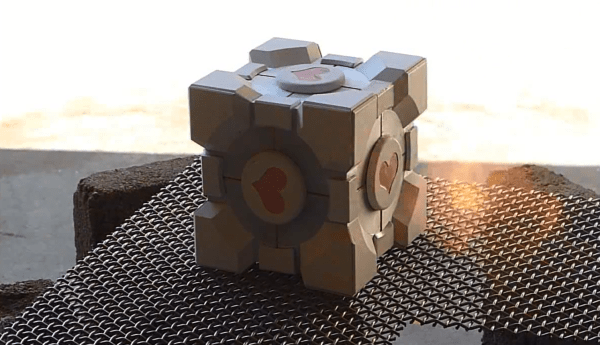
[Michael Gainer] is a big fan of Portal, and it shows in the Weighted Companion Cube he made. [Michael] hand-machined the many pieces that comprise the Cube’s body and medallions out of 6061 aluminum. Dykem was used to transfer the marks for accurate machining, and the color is powder-coated to a heat tolerance of 400F. A CNC was used to make the distinctive hearts. [Michael] notes the irony was “very Portal” in having them cut by a heartless machine when everything else was done manually. The attention to detail is striking, the level of design more so when [Michael] proceeds to incinerate the poor Companion Cube with a brush burner. In the video shown at the link above, the Cube falls apart as the glue holding it together melts. When all is said and done, just grab more glue to bring that Cube back to its six-sided glory. Repeat to your heart’s content. Huge success! We have to be honest, after seeing all those pieces, we aren’t sure we’d want to do this very often. Companion Cubes have been featured in various iterations on Hackaday before, but they were never built with the idea of repeatedly destroying and rebuilding them. This novel take would make GlaDOS proud.

[Michael] has plans to put an Android device inside it with some light and temperature sensors. He wants to give it a voice resembling Portal’s turrets so it can whine when it needs to be charged or scream when it’s too hot or cold. He dubs this next project the “Overly Attached Weighted Companion Cube.” It wouldn’t be a good idea to incinerate this upcoming version, though we’d probably be inclined to if it demanded so much of our attention!


LED Cube In An Elongated Cube Be Jammin’

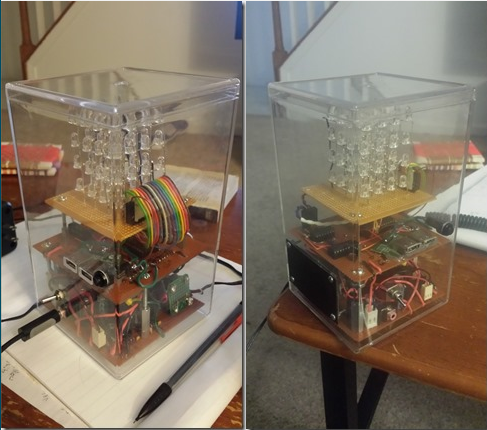
LED cube and drive electronics inside an acrylic case

We get a lot of tips about LED cubes. They’re a great build to explore a lot of different things, from the circuit design, to current source and sink, and of course there’s the firmware. Why don’t we see a million of them on the front page? Well, we have seen a lot, but most of what is sent our way doesn’t exhibit such a clean build. It’s obvious that [Justin] took a lot of pride in his work on this 4x4x4 single-color cube.

Hidden away under one of the protoboards is an Arduino that drives it. A lot of the components were salvaged from the e-waste bin at his University. This includes the 12V AC wall wart he uses to power the device. A bridge rectifier converts to DC, and in addition to powering the LEDs there are a couple of USB charging ports. After the break you can see and hear it in action. The cube pulses to the music but the flip of a switch will disconnect the speaker if you want some peace and quiet to go with the light show.

If you’re looking for a challenge, this 8x8x8 RGB offering is several orders of magnitude harder to pull off… block out a lot of extra time if you do decide to take the plunge. We also heard that [Benchoff] might try to make a cube with some of those through-hole ws2812 pixels.

Continue reading “LED Cube In An Elongated Cube Be Jammin’”

Rubik’s Cube Solver Made Out Of Popsicle Sticks And An Arduino

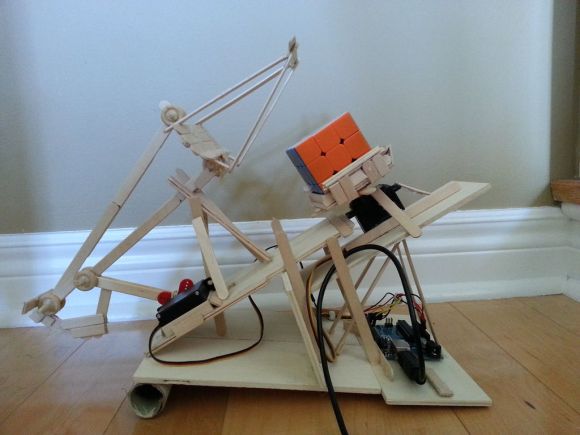
rubix cube solver

[Matt] recently learned both how to solve a Rubik’s cube and the basics of an Arduino. Putting the two together, he decided to try his hand at making an automatic Rubik’s Cube solver!

We’ve seen this done quite a few times using LEGO Mindstorms, but we’re much more impressed with [Matt’s] clever use of popsicle sticks and mechanical linkages…. The device uses just two servos. One to rotate the base, and the second to flip the cube over.

He’s using an Arduino UNO (R3) with 2 Hitec HS-311 hobby servos, some popsicle sticks, hot glue, a paper towel roll, and a bit of plywood. He wrote the code to solve the cube himself, and has shared it on GitHub — but he didn’t stop there and decided to create a GUI to go with it using Python.

It’s not that fast, but it’ll solve a cube in about 20 minutes — stick around after the break to see it in action!

Continue reading “Rubik’s Cube Solver Made Out Of Popsicle Sticks And An Arduino”