Arduino’s Pluggable Discovery Programs With Any Protocol

The first Arduino was serial, and over the decade and a half, this has been the default way to upload code to an Arduino board. In 2008, support for in-circuit programmers was added, and later port detection was added. The latest version of the Arduino IDE adds something new: pluggable discovery. Now any protocol is supported by the Arduino IDE.

This feature is the brainchild of [Paul Stoffregen], creator of the Teensy. If you’ve ever used a Teensy, you’ll remember the Teensyduino application used to upload code to the board. The Teensy uses HID protocol instead of serial for uploading. After working to improve the integration between the Teensy and Arduino IDE, [Paul] stated extending the DiscoveryManager. After some discussion with the Arduino developers, this feature was then added to Arduino 1.8.9, released a month or so ago.

There are some issues with Pluggable Discovery, most importantly that it doesn’t yet exist in the Arduino Command Line Interface (yeah, that exists too). If you’re looking to contribute to Open Source, that would be a nice project to pick up.

With the right JSON, and configuration, it is now theoretically possible to extend the Arduino IDE to any sort of protocol. This means (again, theoretically), it’s possible to update the firmware in your DIY MIDI synth over SysEx message, or a parallel port, maybe. Someone is going to upload to an Arduino board over PCIe, eventually.

Edge Lit Pendant, Is, Well… Lit

Acrylic is a great material. It’s not cheap, but it comes in a wide variety of colours and styles and can be used to make some very attractive projects. [Geek Mom Projects] is a big fan, and whipped up some fun pendants for a high school Maker Faire.

[Geek Mom] has long been a fan of edge-lighting, as it’s a great way to make beautiful glowy projects out of acrylic. In this case a fluorescent acrylic is used with white LEDs to generate an eerie green glow, though it’s also noted that the project can be done with clear acrylic and color-shifting LEDs instead for an equally cool look. If you’re filming a low-budget sci-fi film, this could be just what you need.

The pendants made a great project for young makers to learn about LEDs, electronics, and technologies such as lasercutting that were used to produce the parts. With copper tape used instead of soldering and a CR2032 battery used to eliminate the need for a current limiting resistor, it’s a very accessible project that most teens were able to complete without assistance.

It’s not the first time we’ve seen edge-lit pendants, either. Alternatively, if you need your acrylic bent, there’s a tool for that, too.

Arduino Leonardo Gets A Lockable Bootloader

Security is something that’s far too often overlooked in embedded devices. One of the main risks is that if the device doesn’t verify the authenticity of incoming firmware updates. [Walter Schreppers] was working on a USB password storage device, so security was paramount. Thus, it was necessary to develop a secure bootloader.

[Walter]’s device was based upon the Arduino Leonardo. Starting with the Caterina bootloader, modifications were made to enable the device to be locked and unlocked for programming. This can be done in a variety of ways, depending on how things are setup. Unlocking can be by using a secret serial string, an onboard jumper, and [Walter] even suspects a SHA1 challenge/response could be used if you were so inclined.

It’s never too soon to start thinking about security in your projects. After all, we must stave off the cyberpunk future in which leather-clad youths flick all your lights on and off before burning your house down in the night by overclocking the water heater. Naturally, we’ve got a primer to get you going in the right direction. Happy hacking!

The Sampler That Fits In Your Pocket

The future of the music instrument industry lies in synthesizers, and nowhere is this more apparent than the suite of tiny, pocket-sized synths more than capable of making bleeps and bloops. You’ve got tiny Korgs and Pocket Operators, and the time is ripe for people to wake up to tiny, pocket-sized synths.

The latest in a wide, diverse range of pocketable synthesizers is the Bitty. It’s a pocket-sized drum machine that’s the closest we’ve seen to a pocketable MPC to date. It’s a Kickstarter project that’s already completely funded only a day into the campaign.

The core of the Bitty is built around the Arduino, and for good reason. The last few years have seen some incredible advances in Arduino audio libraries, and this is no exception. The Bitty is built around the Mozzi library that gives it actual oscillators and ready-made wavetables. The Bitty comes with ‘software packs’ that include the Theremin Bitty, Techno Bitty, Basement Bitty, Trap Bitty, Lofi Bitty Bitty, and Beach Bitty. All of these are different sounds and samples, turning this tiny device into an all-in-one sampling solution. Seriously: look at how many Pocket Operators there are, how much they sell for, and realize this is a device that can download new samples and sounds. There’s a market here.

The Arduino-compatible Bitty is available on Kickstarter right now, with the base reward starting at under $100, with delivery in February, 2020. You can check out the video demo below.

Continue reading “The Sampler That Fits In Your Pocket”

A Quite Obscure C128 Video Mode Hack

30 years ago, [Dave] found himself up a C128D creek without a paddle. His main monitor was on the fritz, and he needed to use his C128D in 40-column mode to run old C64 programs for development purposes. Normally this is only possible through the low quality composite out, but no composite monitor was available. Needs must, so he got to coding a workaround that would allow the C128D to output in 40 column mode through the higher-quality RGBI output. 

It’s a proper old-school hack in the spirit of the 8-bit era. The C64 ROM is copied into RAM, where it’s then modified to instead update a 40-column image that’s sent to the RGBI display hardware. The original C64 character ROM is also copied over to ensure everything displays correctly.

It’s not bulletproof, and a few pokes to the wrong memory locations have a high likelihood of crashing the system, seeing as the ROM is now in RAM. However, it does allow the user to enable FAST mode and use all the C128 extended keys. [Dave] recommends experimenting in an emulator first, lest you scare your vintage monitor with angry signals it can’t understand.

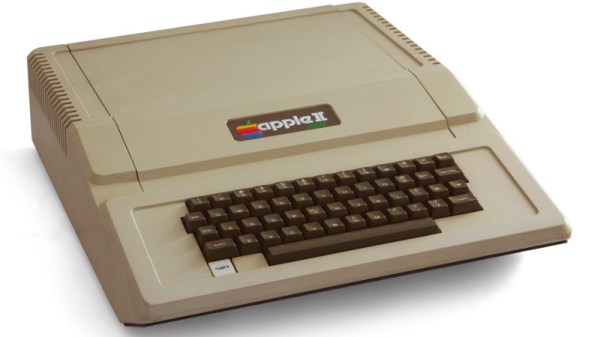
The C128 was Commdore’s last 8-bit computer on the market, and there’s a heck of a story behind its creation.

Building Keyboards With Resin Printers

Aside from putting a whole lot of tact switches on a board, no one has quite figured out how to make very small keyboards for wearable projects. [Madaeon] might have the answer, and it’s using a resin-based 3D printer to create a flexible keyboard without silicone.

The world of small keyboards is filled with what are effectively the squishy parts of a remote control. This uses a piece of silicone and tiny carbon ‘dots’ on the underside of each button. Press the button, and these carbon dots bridge two traces on a PCB, closing a switch. No one has yet mastered home-casting silicone, although the people behind the ESP32 WiPhone have been experimenting with aluminum molds.

Instead of going down the path of casting and curing silicone, [Madaeon] decided to use 3D printing, specifically resin 3D printing, using a very flexible resin. The build process is what you would expect — just some button-shaped objects, but this gets clever when it comes to bridging the connections on the keyboard matrix. This is done with conductive paint, carefully applied to the underside of each button.

Right now this is a viable means of getting a tiny keyboard easily. The color is a garish pink, and the labels on each button aren’t quite as visible as anyone would like, but the latter can be fixed with silkscreening, just like how it’s done on the silicone buttons for remote controls.