Ethernet Over Telephone Wire

When [Bobo1on1] upgraded his Internet connection from ADSL to Fiber he ran into an issue of actually getting that speed to his desktop computer though his LAN setup. Before he had been using a telephone extension wire which ran from where the DSL entered the house, through a splitter, to his computer where the modem was located. Now that the router used by the fiber system is located at teh entry point, he has no easy way to run Ethernet cable to his computer room. Wifi is predictably slower than the 50mbit WAN connection, and he was unable to use the telephone cable as Ethernet directly.

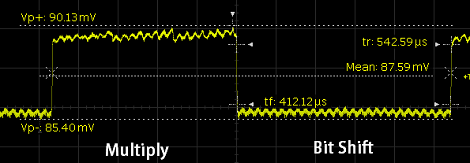
The solution turns out to be a pair of TP-Link home plug adapters. These are designed to use your home’s mains wiring for data transfer. But [Bob] rigged it up so that they can push 224 mbits/sec over the telephone wire. Since you can’t run mains voltage through the telephone wire he had to hack a method to separate power for the devices from the data I/O. This was done with an external power supply and some passive components for filtering. The drawback is that this is half-duplex so up/down communications cannot happen at the same time.

Steam Fife

This auto-flute does it with steam. Well, electricity gets its piece of the action too as the tone holes are opened and closed using a set of solenoids.

We’re at a loss on how the sound is actually produced. We would think that a penny whistle has been used here, except if that were the case the solenoid nearest the kettle would have no use. Then again, after watching the demo after the break we’re not sure that it does have much of an effect. It may be meant to stop the sound but it doesn’t really work all that well.

At any rate we’d love to see some spin-off hacks. Assuming the plastic can stand up to the steam heat this would be a perfect robot controller for recorder controlled snake. You can get a recorder for a buck at the right dollar store, and solenoids can be made out of simple materials. If you know of a way to produce the sound yourself, all it takes are a few careful calculations to place the tone holes.

Continue reading “Steam Fife”

Robotic Whiteboard Writes Your Wall On The Wall

[Dave’s] drawbot writes his Facebook wall messages on a whiteboard. The setup is pretty simple, depending on a pair of stepper motors and common household goods. As you can see in the image, the stylus is a plain old dry-erase marker held by a big spring clip (the kind that holds a stack of papers together). What you can’t see is that there’s a kick stand to hold the writing head away from the board when moving to the next plot point.

In this example a cursive font is being used, but [Dave] included two other fonts in the code. Those require the felt tip to be frequently lifted from the board, and a servo motor does this by pressing a cotton swab against the surface. This does erase any marker lines it slides past, but it’s a pretty small area that is lost. To control the motors [Dave] is using the EiBotBoard which was originally designed for the EggBot. It’s got a USB mini-b connector which lets a computer push messages scraped from the Internet. Don’t miss the video demonstration embedded after the break.

A small modification would make this into a pretty nifty light painting rig.

Continue reading “Robotic Whiteboard Writes Your Wall On The Wall”

Fifty Dollars To Make Your Car Audio Bluetooth Compatible

We’re rather impressed with the work [Aaron] did to add Bluetooth connectivity to his 2008 Honda. He used an aftermarket kit, but rolled in his own revisions to make it look and feel like an original feature.

After being disappointed by an expensive docking system he grabbed a Jensen BT360 kit for about $35. It comes with an external speaker which would look horrid mounted on the dash. That speaker is meant to play your telephone audio via Bluetooth, while music from the phone is sent to the car stereo using an FM transmitter. Since he planned on hiding the control unit under the dash anyway, it wasn’t too hard to add some wires which intercept the audio being fed to that FM transmitter. From there he added a couple of relays to automatically route the audio signals (when present) and patched the whole thing into the Aux input. This way he doesn’t need the extra speaker, and all sound is feed to the head unit via wire instead of radio transmissions.

The final setup works pretty well. If a phone call comes in it automatically mutes the volume, or pauses the iPod if that’s what’s currently playing through the Aux port. [Aaron] thinks the bass from music played via Bluetooth is not quite as rich as when using the Aux port, but if you don’t mind the cables that’s still an option too.

Chess Board Step Sequencer

[tinkartank] wrote in to tell us about the chess board step sequencer he built. It’s a great piece of work that combines the wonderful classical erudition a set of chess pieces confers with modern technological musical equipment such as a monome.

The build began by routing small holes underneath each square and fitting very small and fragile reed switches. Sixty four of these switches are wired into rows and columns then attached to the digital inputs of an Arduino Mega. To close these reed switches, magnets are implanted into the base of each chess piece so whenever a piece is on the board is moved a circuit closes.

On the control side of things, [tinkartank] built a very nice control panel to change the key being played*, the tempo, an ‘arpeggio dial,’ number of steps, and if there is a whole or half step in between notes. With this control panel, [tinkartank] can play just about any scale.

How does it sound? Well, the Arduino Mega outputs MIDI so realistically it can sound like anything imaginable. From the video demo (available after the break), we really like the interface and a reed switch array chess board is slowly climbing up our ‘to build’ list, if only for all the cool stuff you can do with one.

Continue reading “Chess Board Step Sequencer”

Preparing Sushi With The Help Of Lasers

It’s not too often that we cover food here on Hackaday, but when we saw how a laser cutter was being used to help enhance the look of sushi, we decided to share. Even if you don’t enjoy sushi, it’s hard not to argue that it can often be more like edible art than simply food. The preparation that goes into well-made sushi is extensive, and this laser cut maki certainly takes things up a notch.

In the wake of the 2011 tsunami many businesses were suffering, including Umino Seaweed whose primary product is nori – the ubiquitous green seaweed wrapper found in/on many sushi rolls. They were looking for something to attract attention to the brand, while remaining respectful to the centuries-old tradition of making sushi.

They sent their request to ad agency I&SBBDO who came up with the fancy looking nori you see above. Each sheet of seaweed is laser cut with traditional Japanese imagery, from the Sakura (cherry blossom) to the Kumikikkou (tortoise shell). We’re not sure if these sheets of nori are actually for sale or have just been put together for solely advertising, either way we think this is a novel and frivolous, but awesome use for a laser cutter. Also, we’re pretty hungry now – anyone up for grabbing some sushi?

[via Make]

Reading Credit Cards With A Tape Head

A company called Square is giving out free credit card readers that turn any iPhone or iPad into a Point of Sale terminal. [Steve] got a hold of one of these tiny peripherals and did what any sane person would do: tear it apart and learn how it works. This bit of hardware is a little unimpressive; unsurprising because Square is giving them away. With simplicity comes an ease in understanding, and [Steve] was able to successfully read his own credit card with this tiny and free credit card reader.

[Steve]’s work in decoding credit card data builds off [Count Zero]’s article from the bbs days. Basically, each credit card has two or three tracks. Track three is mostly unused, whereas track one contains the card holder name, account number, cvc code and other ancillary data. Track two only contains the credit card number and expiration date.

The only components in the Square card reader are a head from a tape player and a 1/8″ microphone jack. The magnetic head in the Square card reader is positioned to only read track two. With a small shim, it’s possible to re-align the head to get the data from track one. After recording an audio file of him sliding his card though the Square reader, [Steve] looked at the number of times the waveform flipped from positive to negative. From this, he was able to get the 1s and 0s on the card and converted them to alphanumeric using the 6-bit ANSI/ISO alpha format.

[Steve] isn’t going to share the code he wrote for Android just yet, but it should be relatively easy to replicate his work with the Android tutorial he used. Also, yes, we did just pose the question of how these Square credit card readers work just hours ago. Good job being on the ball, [Steve]. Tips ‘o the hat go out to [Bobby], [Leif], [Derek] and anyone else we might have missed.

EDIT: [Stephen] sent in his teardown minutes after this post went live. Hackaday readers are too fast at this stuff.