Improved 3D Printer Cannibalizes Two Older Printers

In the late 2010s, the Ender 3 printers were arguably the most popular line of 3D printers worldwide, and for good reason. They combined simplicity and reliability in a package that was much less expensive than competitors, giving a much wider range of people access to their first printers. Of course there are much better printers on the market today, leaving many of these printers sitting unused. [Irbis3D] had an idea that with so many of these obsolete, inexpensive printers on the secondhand market, he could build something better with their parts.

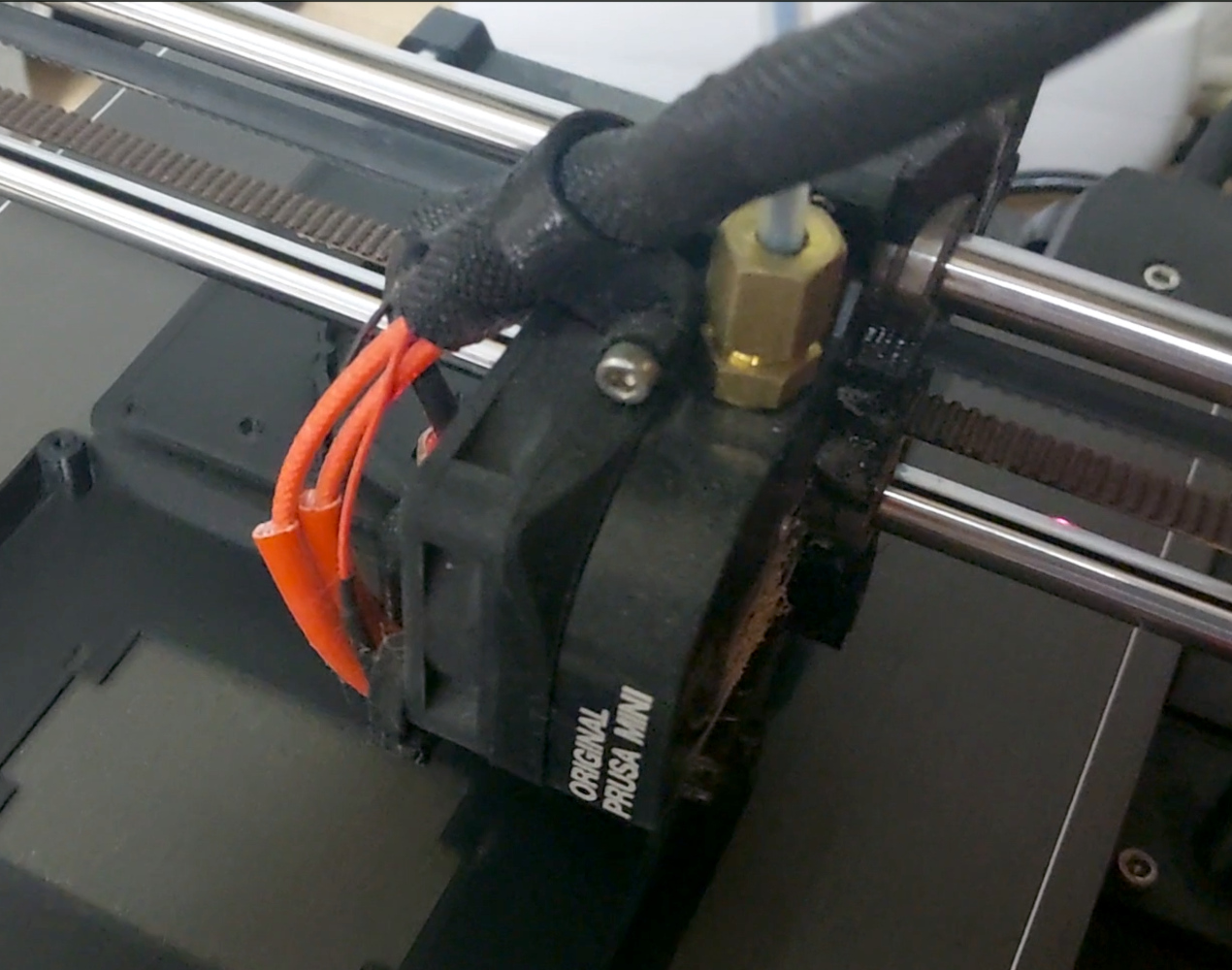
The printer he eventually pieces together takes parts from two donor Ender printers and creates a printer with a CoreXY design instead of the bedslinger (Cartesian) design of the originals. CoreXY has an advantage over other printer topologies in that the print head moves in X and Y directions, allowing for much faster print times at the expense of increased complexity. There are some challenges to the design that [Irbis3D] had to contend with, such as heating problems with the extruder head that needed some modifications, as well as a resonance problem common with many printer designs which can generally be solved by replacing parts one-by-one until satisfactory prints are achieved.

Of course, not all of the parts for the new printer come from the old Ender printers. The longer belts driving the print head needed to be ordered, as well as a few other miscellaneous bits. But almost everything else is taken from these printers, which can be found fairly cheaply on the secondhand market nowadays. In theory it’s possible to build this version for much less cost than an equivalent printer as a result. If you’re looking for something even more complicated to build, we’d recommend this delta printer with a built-in tool changer.

Thanks to [BusterCasey] for the tip!

Continue reading “Improved 3D Printer Cannibalizes Two Older Printers”

Blocky tread, yellow hub-- yep, it looks like LEGO

10″ LEGO Tyre Is Practical Nostalgia

If there’s one thing that has come to define the generations after the baby boom, it’s probably nostalgia. It’s heavily marketed and weaponized by the market: yearning for better, simpler times seems to be a core thread of the consumer economy these days. [Makerneer] combined his xilennial love of LEGO bricks with the flat tires on his log splitter to produce a 10″ TPU tyre will never go flat, and provide a dopamine release every time he sees it.

The tyre is a custom model to fit his particular rims, but he does provide STEP and F3D files if you’d like to try modifing it for your own purpose — they’re at Step 6 of the Instructable. Props to [Makerneer] for truly open-sourcing the design instead of just tossing STL files online. His build log also takes the time to point out the ways he had to modify the LEGO tyre profile to make it amenable to 3D printing: notably chamfering some of the tread pattern to eliminate bridging, which is a bit of a no-no with TPU.

As you can see in the (unfortunately vertical) demo video below, it’s a bit quite a bit squishier than a regular run-flat tyre, but that was part of [Makerneer]’s design goal. He didn’t like how rigid the non-pneumatic tyres he’d tried were, so endevoured to design something himself; the whole LEGO thing was just for fun. If you wanted to replicate this tyre with a bit less skoosh, you need only tune the infill on your print.

While only time will tell how long this LEGO-inspired add-on will continue adding whimsy to [Makerneer]’s log-splitting, we have tests to show it will outperform any other plastic he might have printed. This project is probably more practical than a 3D printed bicycle tyre, which doesn’t even have the side benefit of whimsy. Continue reading “10″ LEGO Tyre Is Practical Nostalgia”

Dodecahedron Speaker Is Biblically Accurate

Once upon a time, many radios and TVs only came with a single (mono) speaker. Then someone decided all audio hardware should have as many speakers as we have ears. That was until [Olivia] came along, and whipped up a dodecahedron speaker as an educational piece for workshops. Really, it shows us that twelve speakers should be the minimum standard going forward.

The speaker relies on a 3D-printed frame. The dodecahedron shell is assembled from 12 individual faces, each of which hosts a small individual speaker. Multichannel audio fans shouldn’t get too excited—all twelve speakers are wired to the same input in four groups of three, making this essentially an exceptionally complicated mono device. It might sound silly, but it’s actually a great way to deliver audio in many directions all at once. [Olivia] even went to the effort of running some sweep tests in anechoic and reverberation chambers to see how they performed, which is a fun bit of extra detail in the build log.

[Olivia] notes that these unique speakers are great as a beginner workshop build. They’re easy to modify in various ways to suit different ideas or levels of ability, and they can be made for less than $30 a pop. We’d love to see an advanced version that maybe packed in a lithium battery and a Bluetooth module to make them a standalone audio device. Video after the break.

Continue reading “Dodecahedron Speaker Is Biblically Accurate”

Build Your Own 6K Camera

[Curious Scientist] has been working with some image sensors. The latest project around it is a 6K camera. Of course, the sensor gives you a lot of it, but it also requires some off-the-shelf parts and, of course, some 3D printed components.

An off-the-shelf part of a case provides a reliable C mount. There’s also an IR filter in a 3D-printed bracket.

Continue reading “Build Your Own 6K Camera”

Smooth! Non-Planar 3D Ironing

Is 2025 finally the year of non-planar 3D printing? Maybe it won’t have to be if [Ten Tech] gets his way!

Ironing is the act of going over the top surface of your print again with the nozzle, re-melting it flat. Usually, this is limited to working on boring horizontal surfaces, but no more! This post-processing script from [Tenger Technologies], coupled with a heated, ball-shaped attachment, lets you iron the top of arbitrary surfaces.

At first, [Ten Tech] tried out non-planar ironing with a normal nozzle. Indeed, we’ve seen exactly this approach taken last year.  But that approach fails at moderate angles because the edge on the nozzle digs in, and the surrounding hot-end parts drag.

[Ten Tech]’s special sauce is taking inspiration from the ball-end mill finishing step in subtractive CNC work: he affixed the round tip of a rivet on the end of a nozzle, and insulating that new tool turned it into an iron that could smooth arbitrary curvy top layers.

One post-processing script later, and the proof of concept is working. Check out the video below to see it in action. As it stands, this requires a toolhead swap and the calibration of a whole bunch of new parameters, but it’s a very promising new idea for the community to iterate on. We love the idea of a dedicated tool and post-processing smoother script working together in concert.

Will 2025 be the year of non-planar 3DP? We’ve seen not one but two superb multi-axis non-planar printer designs so far this year: one from [Joshua Bird] and the other from [Daniel] of [Fractal Robotics]. In both cases, they are not just new machines, but are also supported with novel open-source slicers to make them work. Now [Ten Tech]’s ironer throws its hat in the ring. What will we see next?

Thanks to [Gustav Persson] for the tip!

Continue reading “Smooth! Non-Planar 3D Ironing”

3D Modeling With Paper As An Alternative To 3D Printing

Manual arrangement of the parts in Pepakura Designer. (Credit: Arvin Podder)

Although these days it would seem that everyone and their pets are running 3D printers to churn out all the models and gadgets that their hearts desire, a more traditional approach to creating physical 3D models is in the form of paper models. These use designs printed on paper sheets that are cut out and assembled using basic glue, but creating these designs is much easier these days, as [Arvin Poddar] demonstrates in a recent article.

The cool part about making these paper models is that you create them from any regular 3D mesh, with any STL or similar file from your favorite 3D printer model site like Printables or Thingiverse being fair game, though [Arvin] notes that reducing mesh faces can be trickier than modelling from scratch. In this case he created the SR-71 model from scratch in Blender, featuring 732 triangles. What the right number of faces is depends on the target paper type and your assembly skills.

Following mesh modelling step is mesh unfolding into a 2D shape, which is where you have a few software options, like the paid-for-but-full-featured Pepakura Designer demonstrated, as well as the ‘Paper Model’ exporter for Blender.

Beyond the software used to create the SR-71 model in the article, the only tools you really need are a color printer, paper, scissor,s and suitable glue. Of course you are always free to use fancier tools than these to print and cut, but the bar here is pretty low for the assembly. Although making functional parts isn’t the goal here, there is a lot to be said for paper models for pure display pieces and to get children interested in 3D modelling.

Inside and outside the Contrib Cal.

Reify Your GitHub Commit History With Contrib Cal

Over on Instructables, [Logan Fouts] shows us the Contrib Cal GitHub desk gadget. This build will allow you to sport your recent GitHub commit activity on your wall or desk with an attractive diffuse light display backed by a 7×4 matrix of multicolor LEDs. Motivate yourself and impress your peers!

This humble project is at the same time multifaceted. You will build a case with 3D printing, make a diffuse screen by gluing and cutting, design a LED matrix PCB using KiCad, solder everything together, and then program it all with Python. The brains of the operation are a Raspberry Pi Zero W.

The Instructables article will run you through the required supplies, help you to print the case, explain how to solder the LEDs, tell how to install the heat-set inserts for high quality screw attachments, explain wiring and power, tell you about how to use the various screws, then tell you about where to get more info and the required software on GitHub: Contrib Cal v2.

Of course this diffuse LED matrix is only one way to display your GitHub progress, you can also Track Your GitHub Activity With This E-Ink Display.