3D Printing Vacuum Tube Sockets

tubes

With the popularity of 3D printers and the current cult of vacuum tubes, it’s shocking we haven’t seen someone do this before.

[Peter] printed his own sockets for a few vacuum tubes he had lying around. After designing them on his computer, [Peter] printed them out on his local hackerspace’s 3D printer.

After printing out the plastic parts, [Peter] needed to add a few strips of metal for a conductor. He used a few pieces of an ATX power supply; a little difficult to fit, but something that works all the same.

So far, [Peter] has whipped up a few sockets for UX5 and VT76 tubes, UX6, B7G (7 pin mini), and B9D  Magnoval tubes. No Nixie sockets yet, but it’s enough diversity to build your own tube amp using the most common designs. Now if we could only make our own transformers with laser cutters and 3D printers…

Signing Your 3D Prints

print

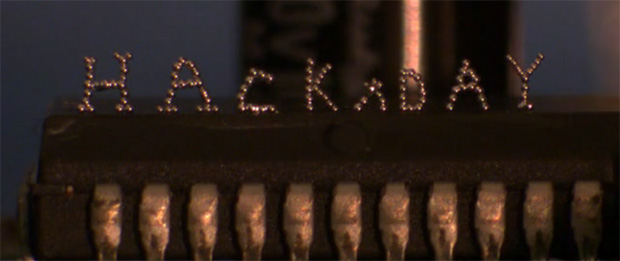
For all the 3D models out on the Internet, including the STL files on Thingiverse that are copied by other makers every day, there hasn’t been a good way to put your John Hancock on a three-dimensional piece of plastic you’ve designed. [Chris] has been thinking about the fact that an STL file released on the Internet is completely out of the creator’s hands for a while now, and he finally came up with a good solution to signing 3D prints.

[Chris] had been looking into ‘stamping’ a maker’s mark on the first few layers of a print, but this wasn’t always practical. Sometimes the bottom of a print needs to be a smooth surface, so [Chris] moved his initials up a few layers into the main body of the print.

By subtracting a 1.0 mm-thick version of his initials from the interior of a print, [Chris] is able to put his maker’s mark on the inside of a 3D object, visible only for a short time during the production process.

The signature isn’t impossible to remove, but it does give a little bit of credit to the original designer, all without some strange DRM scheme or metadata attached to an STL file.

You can check out [Chris]’ printer laying down a few layers of his logo after the break.

Continue reading “Signing Your 3D Prints”

Touchscreen Control For A Reprap

display

After you’ve got your Reprap running smoothly with acceptable resolution and good quality prints, the next order of business for any 3D printer hobbyist is headless printing. While the greatest and newest 3D printers come with controls to allow jogging, homing, temperature control, and printing from an SD card, the home-built versions will require an add-on attached to the electronics board. [Marco] has been spending his time improving the character LCD control panel projects we’ve seen for Repraps with an awesome graphical version that emulates the control interface found in the Pronterface control software.

The biggest problem with adding a control interface to a Reprap is the number of pins available on the electronics board. While an electronics board like RAMPS has enough spare I/O pins to drive a display, other boards such as the Sanguinololu and the Melzi are extremely limited in their expansibility. To get around this limitation, [Marco] used a 4D Systems serial touchscreen display.

This display only requires two pins to fully interact with a printer running the Marlin firmware; the graphical processing, communication, and SD card access is handled by the on-board PICASO micocontroller, leaving the ATMega on the electronics board free for important things like printing stuff out of plastic.

[Marco] has a git full of modified Marlin firmware and firmware for the 4D Systems display. There’s also a neat printed case for the display, making a very professional-looking standalone controller a weekend project instead of a months-long ordeal.

Thanks [Antonio] for sending this one in.

[Prusa] Interviews A Whole Bunch Of RepRappers

prusa

Any time a media outlet or conference wants an expert on 3D printing there are two people to turn to. The most famous is [Bre Pettis] of MakerBot. The other is an awesome guy named [Prusa], designer of the most popular RepRap and possibly the most popular 3D printer of all time. He’s been putting his fame to use by interviewing all the big names in 3D printing and putting them all up on his YouTube account.

First up is [Kliment], RepRap core dev and creator of the Sprinter firmware and Pronterface host.

[Ruben Lubbes], RepRap community guru, tells [Prusa] about his collection of RepRap parts from famous RepRappers. It sound like a quite interesting collection that’s probably very valuable from a historical perspective. Who knows, in a few years it could be as interesting as [Gutenberg]’s first printing press or [Tim Berners-Lee]’s NEXT cube.

Next up is [Tonokip]. He developed the original Tonokip firmware, the firmware that all major RepRap firmwares are based on.

[Prusa] also interviewed [Jordan Miller] a.k.a. [jmil] of the Philly hackerspace Hive76 and the University of Pennsylvania. He made his name in the RepRap community for 3D bio printing.

Wrapping up the most interesting people, there’s also an interview with [Sound], developer of the Slic3r firmware. We’ve seen an interview of [Sound] before, and this interview continues the earlier one by talking about multiple extruders and how awesome the RepRap community is.

Lastly, and unfortunately, is a short video of [Prusa] interviewing me at the world Maker Faire last September[Prusa] is a huge fan of Hackaday, so this interview is just two guys being star struck at each other.

Actually, the 2012 World Maker Faire had the largest number of current and former Hackaday alumni in one place ever. A group interview of  [Ian] (now of Dangerous Prototypes), [Phillip Torrone] (Adafruit), [Phil Burgess] (Adafruit), current Hackaday boss man [Caleb] and myself would have been awesome. We’ll try harder next year.

You can check out the good videos after the break.

3D Printing Records

3D Printed Record

This is a working record created with a 3D printer. [Amanda] came up with a process that converts audio files into 3D models. These models can be printed and played on a standard record player.

The real work is done by a Processing sketch that creates a STL file. [Amanda] started off by trying to create a sine wave. She used this test to optimize the printing process. Then she used Python to extract audio data from WAV files and modified the processing script to process the data. After more tweaking, she was able to get a reasonable signal to noise ratio and minimize distortion.

The resulting records have a sample rate of 11 kHz and 5-6 bit resolution. The sound quality isn’t going to be the same as commercially pressed vinyl, but you can still make out the song.

Objet Connex 500 was used to print the records. This UV printer has a 600 dpi resolution, which is means it’s more accurate than extrusion printers. Your mileage may vary using different printers, but all of the Processing and Python code is available with the project write up.

After the break, watch [Amanda] spin some 3D printed records.

Continue reading “3D Printing Records”

3D Printed Christmas Cookies

3d-printing-christmas-cookies

Here is yet another way to get into the holiday spirit at your local Hackerspace (or at home if you’re happen to have your own 3D printer). [Ralph Holleis] wrote in to show off his 3D printed Christmas cookies. The majority of the info on this project comes from the video embedded after the break. The extruder head he’s using includes a syringe which is filled with what we assume is Spritz Cookie dough. It is squeezed out in a pattern before heading to the oven for baking.

[Ralph] mentioned that he’s using UNFOLD Pastruder as the print head. We looked and couldn’t find that exact design, but it seems like it might be related to this Claystruder head designed by a user named [Unfold]. If you have the exact link to the extruder design seen above please let us know in the comments section.

If you don’t already have this type of head it’s just a matter of printing the mounting brackets and buying a syringe to match. But you’ll also need compressed air and a valve to regulate the flow of dough. It might be easier just to print your own cookie cutters. This is a great project for people who don’t have access to a laser cutter for gingerbread house work.

Continue reading “3D Printed Christmas Cookies”

An Interview With The Creator Of Slic3r

[youtube=https://www.youtube.com/watch?v=vA6jmg_zcQo&w=580]

When in Rome, most people visit great works of art, see masterpieces of architecture, or simply try to convince random tourists that a modern recreation of naval battles in the Colosseum would be really cool and somebody should really get on that. [Andrew] had a different idea, though. He thought meeting up with Slic3r developer [Alessandro Ranellucci] would be just as educational and entertaining as visiting a basilica and thoughtfully decided to film his interview for all to see.

Whenever a file of a 3D object is sent to a 3D printer, the object must first be converted into GCode – the language of lines, circles, and computer aided design that all 3D printers speak. To convert 3D objects to GCode, every piece of 3D printer software from Pronterface, ReplicatorG, and Repetier must first ‘slice’ the file up so the object can be printed one layer at a time.

As the lead dev for Slic3r, [Alessandro], a.k.a. [Sound] goes over the current happenings of his STL to GCode converter – he’s even getting a little support from the very cool people at LulzBot – and the future of Slic3r. There’s still a lot of work to be done optimizing the current software, improving the user interface, and getting rid of all those nasty edge-case bugs.

For as much as we at Hackaday focus on the hardware half of 3D printers, it must be said the current state of the art in desktop manufacturing wouldn’t be where it is without [Alessandro] and other software devs. There’s still a lot of room for improvement – try printing a single wall thickness cylinder without a seam, for example – but without software projects like Slic3r, 3D printing wouldn’t be where it is today.