Hacklet 49 – Weather Display Projects

Everyone wants to know what the weather is, and what it is going to be. Today’s internet enabled forecasts give us continuous streams of current weather data and predictions from any of several computer models. Couple that with data from an on-site station, and you’ve got a lot of information to display! It makes sense that weather display projects would be popular with hackers, makers and engineers. What do you do after you build the worlds most awesome clock? Build the worlds most awesome weather display (and then incorporate a clock in there as well!).

Last week on The Hacklet I mentioned that there are two basic types  of weather projects on Hackaday.io: Sensing and Display projects. There was a bit of foreshadowing there, as this week’s Hacklet covers some of the best weather display projects on Hackaday.io!
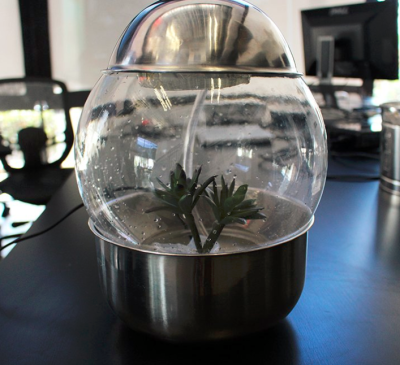
geoWe start with [Ashley Hennefer] and G.E.O, a project which is out of this world – literally. Geological Environment Observer, or G.E.O was created for NASA’s Space Apps Challenge. G.E.O’s mission is to keep astronauts on long-distance space flight missions connected with their home city (and planet). An astronaut programs the device with their home city and G.E.O takes it from there. Inside a glass globe, G.E.O creates weather patterns mirroring the programmed city. It does this with Adafruit NeoPixel LEDs, a water pump, a mist generator, and a wave shield. An Intel Edison controls the system. For now, weather data and programming are completed using a web interface. Once G.E.O launches though, data will be streamed via NASA’s deep space network.

flaps[Sephen DeVos] keeps track of the weather with a glance at his Internet Split Flap Weather Clock. Lots of weather apps use simple icons to display the current conditions. [Sephen] placed those icons on a mechanical split flap display which lets him know the conditions outside. The project’s case came from a donor clock given to [Sephen] by his parents. He then 3D printed an entire split flap mechanism, including the gears! Each 50 mm x 100 mm flap forms half an image.  A small stepper drives the flaps, while an IR detector lets the system know when it has reached a home position. Control is handled by an Arduino Nano and companion Ethernet shield. The Arduino checks the weather every 30 minutes. If conditions have changed, it flips to the right icon. Genius!
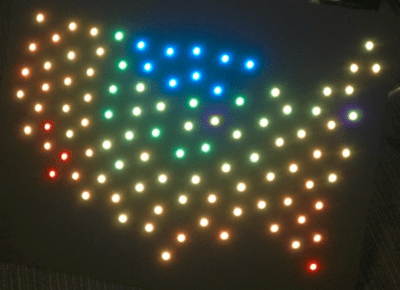
usmap[Dan Fein] is keeping track of the temperature across the entire USA with Weather Map. [Dan] works for Weather Underground, so it’s no surprise that he uses their API (accessed via a node.js script) for weather data. The data is fed into a spark core which then drives a string of 100 WS2812 LEDs. Each LED is mapped to a specific point in the continental USA. Color indicates the current temperature at that location. [Dan] does caution that you’ll have to slow down access to Weather Underground  if you’re using a free API key. Even with slower updates, this is still an awesome project!
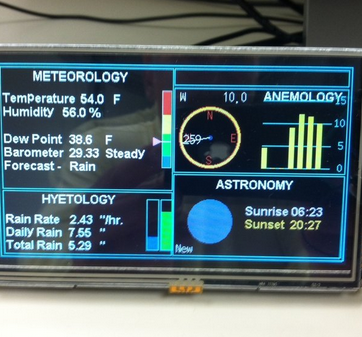
yaws[Jeff Thomas] went the traditional route with YAWS – (Yet Another Weather Station). YAWS uses a 5 inch TFT LCD to display weather data from a number of sensors. [Jeff] got his display and the driver board from buydisplay.com. The driver board uses the venerable RA8875 display driver chip. The RA8875 handles all the hard parts of driving an LCD, like video RAM, refresh, and clocks. This allows a relatively slow Arduino to drive all those pixels. [Jeff] created a very handsome interface to display all his data, but he has a small problem – a memory leak causes the system to freeze up every 18 hours! We’re hoping [Jeff] will share his source code so the Hackaday.io community can help him find that pesky bug!

If you want to see more projects like these, check the Weather Display Projects list on Hackaday.io. That’s it for this week’s Hacklet, As always, see you next week. Same hack time, same hack channel, bringing you the best of Hackaday.io!

Hackerspace Happenings: Santa Barbara Hackerspace Moving

Occasionally we get a few tips on our hotline telling us of hackerspace happenings. Either a space is moving, they need some help to install a moat around the space, or there’s a mini-conference of weird and esoteric technology happening sometime soon. The latest such tip is from the Santa Barbara Hackerspace. They’re moving, the new space doesn’t have a leaky roof, and they’re looking for some people to help out.

The new space features necessary hackerspace upgrades like no carpet, 120, 220, and 440 Volt outlets, actual parking, and a non-leaky roof. You can get by with a leaky roof in Santa Barbara, but having a roof that doesn’t have holes in it is always a bonus.

Add this to the space’s existing battery of equipment – everything from laser cutters, bandsaws, and welders to oscilloscopes, an amateur radio station, and a forge and anvil, there’s a lot anyone can do in this space.

Caption CERN Contest – Dr. Frankenstein Would Be Proud

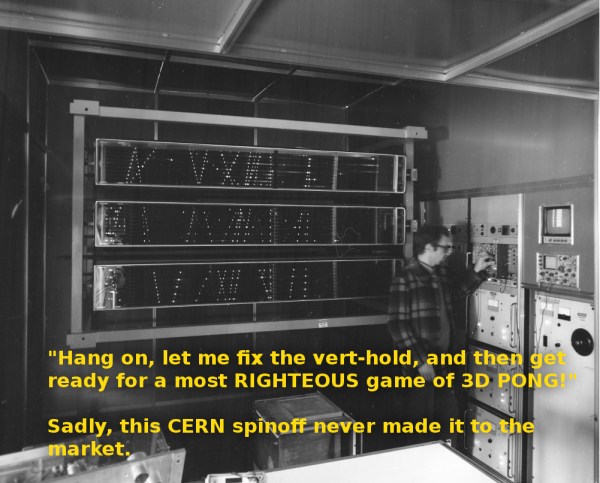
Week 16 of the Caption CERN Contest just flew by, but not without sparking some cosmic comic genius in the minds of everyone who wrote a comment. Thanks to everyone who entered! If you followed last week’s blog post, you already know that this image isn’t an early POV display, or some sort of strange data display technique. It’s actually a spark chamber. Spark chambers use high voltage and noble gases to create a visible trail of cosmic rays. Since this image is dated 1979, well after spark chambers were used for hard science, we’re guessing it was part of a demonstration at CERN’s labs.

The Funnies:

  • “Here we see Doug playing a Massively multiplayer Pong game against his peers in the next building over.” – [John Kiniston]
  • “It said “Would you like to play a game?” and I said yes. Are those missile launch tracks?”- [jonsmirl]
  • “Before Arduino you needed a whole room full of equipment to blink LEDs!” – [mjrippe]

After two weeks as a runner-up, this week’s winner is The Green Gentleman with “‘Hang on, let me fix the vert-hold, and then get ready for a most RIGHTEOUS game of 3D PONG!’ Sadly, this CERN spinoff never made it to the market”

We’re sure [The Green Gentleman] will be very courteous to his fellow hackers in sharing his new Bus Pirate From The Hackaday Store! Congratulations [The Green Gentleman]!

Week 17

cern-17-smCoils, gleaming metal, giant domes, now this is a proper mad scientist image! The CERN scientists in this image seem to be working on a large metal device of some sort. It definitely looks like an electrode which would be at home either at CERN or the well equipped home lab of one Dr. Frankenstein’s. We don’t have a caption, but we do have a rough date of August, 1961. What is happening in this image? Are these scientists setting up an experiment, or plotting world domination?

You tell us!

This week we’re giving away a Logic Pirate from The Hackaday Store.

Add your humorous caption as a comment to the contest log. Make sure you’re commenting on the contest log, not on the contest itself.

As always, if you actually have information about the image or the people in it, let CERN know on the original image discussion page.

Good Luck!

$50k In Play: Awarding 65 Stickvise This Week

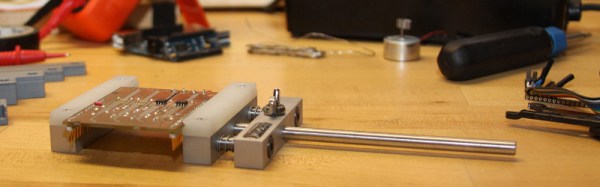
Pushing your circuit boards around the bench while trying to solder the components is a fools game. Clamp that board in place with a Stickvise you won from Hackaday! This week we’ll choose 65 projects to receive one of these PCB clamps. You must submit your project as a Hackaday Prize entry to be eligible. Do it now and you’ll be considered for our weekly prizes all summer long — they total $50,000 that we’re putting into your hands.

We’re particularly proud of the Stickvise story. It was posted as a project on Hackaday.io and immediately caught our eye as an interesting idea. We worked with [Alex Rich] as he made his way through the process of getting it ready for manufacturing and it just became available in the Hackaday Store.

Regarding your entry to win one: find a problem facing your community and start a project that helps to solve it. We’ve seen many great entries so far, but with so many prizes your chances of winning are still really good! We recommend adding a project log each week that discusses your progress and perhaps mentions what you would use the Stickvise for while progressing toward a working prototype. Even if you don’t think your idea can win one of the big prizes, a great idea and solid write up is definitely a contender for our $50k in Play weekly prizes. Just look at the projects that won last week:

Last Week’s 20 Winners of a Bulbdial Clock Kit

bulbdial-clock-50k-in-play-prize-blogview

Congratulations to these 20 projects who were selected as winners from last week. You will receive a Bulbdial Clock Kit. It takes the concept of a sundial and recreates it using different colors of LEDs for each hand of the clock. This is our favorite soldering kit. It ventures a bit away from our mission of awarding tools and supplies to help with your entry, but sometimes you just need to have some fun!

Each project creator will find info on redeeming their prize as a message on Hackaday.io.


The 2015 Hackaday Prize is sponsored by:

quadcopter

Ask Hackaday: Long Endurance Quadcopter

Quadcopters are useful little flying machines. They can be used in all sorts of applications, from mapping, to inspecting long pipelines, to border surveillance, or simply for fun. They all have one thing in common, however – a relatively short battery life. Because quadcopters use brute force to churn through the air, they require a lot of energy. More energy for longer flights means more batteries. More batteries means more weight to carry, which requires even more energy. If you want longer flight times, something has to change. Or does it?

A small start-up company called Horizon Unmanned Systems based out of Singapore claims their quadcopter can fly for up to four hours on a single charge, or up to two and a half hours carrying a 2.2 pound load. They claim to be able to pull this off with a novel approach. First, they fill the hollow frame of the quadcopter with hydrogen gas. They use that gas to power a cute little miniaturized fuel cell LiPo battery hybrid gizmo. And that’s about it. The rest is just standard quadcopter stuff.

The secret to all of this is the miniaturized fuel cell, and how it works. Unfortunately, this is as close as we’re going to get (pdf) for a datasheet. Fuel cells are nifty devices that take hydrogen and oxygen and convert them into water, along with electricity. While that sounds simple, making one is not. And making a miniature one light enough for a quadcopter is down right hard.

How would you increase the flight time of quadcopters? Fuel cells are a great idea, but is this technology within the reach of the modern hacker? We’ve seen people make them from scraps out of a junkyard, but how would you miniaturize it and make it light enough to be used as a practical power supply for a quadcopter?

Thanks to [Joseph Rautenbach] for the tip!

Retrotechtacular: Hand-Synthesized Sound

When you think of early sound synthesis, what technologies come to mind? The Hammond Organ?  Or perhaps its predecessor, Thaddeus Cahill’s Telharmonium? In the early 1920s and 30s, many Bauhaus artists were using paper and film to synthesize musical instruments.

A few of them experimented with the optical film soundtrack itself, drawing waveforms directly upon it. [Evgeny Sholpo] created an optical synthesizer he called the Variophone. It used cardboard disks with intricate cutout patterns that resembled spinning, sonic snowflakes.

During the early 1930s, an artist named [Nikolai Voinov] created short animated films that incorporated the cut paper sound technique. [Voinov]’s soundtrack looked like combs of varying fineness. For his animated figures, [Voinov] cut and pieced together characters from paper and made them move in time to his handmade paper soundtrack.

In [Voinov]’s “Dance of the Crow”, an animated crow struts his stuff from right to left and back again while working his beak in sync with the music. The overall effect is like a chiptunes concertina issuing forth from a crow-shaped pair of bellows. It’s really not to be missed.

Thanks for the tip, [Leo]!

Retrotechtacular is a weekly column featuring hacks, technology, and kitsch from ages of yore. Help keep it fresh by sending in your ideas for future installments.

Review: DSLogic Logic Analyzer

Logic analyzers historically have been the heavy artillery in an engineer’s arsenal. For many of us, the name invokes mental images of large HP and Tektronix iron with real CRT screens. Logic connections were made through pods, with hundreds of leads weaving their way back to the test equipment. The logic analyzer came out when all else failed, when even a four channel scope wasn’t enough to figure out your problems. Setting them up was a pain – if you were lucky, the analyzer had a PC keyboard interface. If not, you were stuck typing your signal names into the front panel keyboard. Once setup though, logic analyzers were great at finding bugs. You can see things you’d never see with another tool – like a data bus slowly settling out after the read or write strobe.

There have been a number of USB based logic analyzers introduced in recent years, but they didn’t really catch on until Saleae released their “Logic” line of devices. Low cost, high-speed, and easy to use – these devices were perfect. They also inspired an army of clone devices based upon the same Cypress Semiconductor parts. DSLogic designed by DreamSource Labs, can be thought of as an open source evolution of the original Saleae device.

DSLogic appeared in 2013 as a Kickstarter campaign for an open source logic analyzer with an optional oscilloscope extension. I think it’s safe to say that they did well, raising $111,497 USD, more than 10 times their initial goal of $10,000 USD. These days both the DSLogic and the oscilloscope extension are available at The Hackaday Store. In this review we’re focusing on the logic analyzer portion of the tool. 

Click past the break for the full story!

Continue reading “Review: DSLogic Logic Analyzer”