Controlling Vintage Mac OS With AI

Classic Mac OS was prized for its clean, accessible GUI when it first hit the scene in the 1980s. Back then, developers hadn’t even conceived of all the weird gewgaws that would eventually be shoehorned into modern operating systems, least of all AI agents that seem to be permeating everything these days. And yet! [SeanFDZ] found a way to cram Claude or other AI agents into the vintage Mac world.

The result of [Sean]’s work is AgentBridge, a tool for interfacing modern AI agents with vintage Mac OS (7-9). AgentBridge itself runs as an application within Mac OS. It works by reading and writing text files in a shared folder which can also be accessed by Claude or whichever AI agent is in use. AgentBridge takes commands from its “inbox”, executes them via the Mac Toolbox, and then writes outputs to its “outbox” where they can be picked up and processed by the AI agent. The specifics of how the shared folder work are up to you—you can use a network share, a shared folder in an emulation environment, or just about any other setup that lets the AI agent and AgentBridge access the same folder.

It’s hard to imagine any mainstream use cases for having a fleet of AI-controlled Macintosh SE/30s. Still, that doesn’t mean we don’t find the concept hilarious. Meanwhile, have you considered the prospect of artificial intelligence running on the Commodore 64?


Turning A GDB Coredump Debug Session Into A Murder Mystery

Debugging an application crash can oftentimes feel like you’re an intrepid detective in a grimy noir detective story, tasked with figuring out the sordid details behind an ugly crime. Slogging through scarce clues and vapid hints, you find yourself down in the dumps, contemplating the deeper meaning of life and  the true nature of man, before hitting that eureka moment and cracking the case. One might say that this makes for a good game idea, and [Jonathan] would agree with that notion, thus creating the Fatal Core Dump game.

Details can be found in the (spoiler-rich) blog post on how the game was conceived and implemented. The premise of the game is that of an inexplicable airlock failure on an asteroid mining station, with you being the engineer tasked to figure out whether it was ‘just a glitch’ or that something more sinister was afoot. Although an RPG-style game was also considered, ultimately that proved to be a massive challenge with RPG Maker, resulting in this more barebones game, making it arguably more realistic.

Suffice it to say that this game is not designed to be a cheap copy of real debugging, but the real deal. You’re expected to be very comfortable with C, GDB, core dump analysis, x86_64 ASM, Linux binary runtime details and more. At the end you should be able to tell whether it was just a silly mistake made by an under-caffeinated developer years prior, or a malicious attack that exploited or introduced some weakness in the code.

If you want to have a poke at the code behind the game, perhaps to feel inspired to make your own take on this genre, you can take a look at the GitHub project.

The Sweetest Programming Language: MNM

Admit it. If you haven’t created your own little programming language, you’ve probably at least thought about it. [Muffed] decided to create a unique — and sweet — programming language that uses M&M (or, at least, M&M-like) candies as the building block of programs.

If this sounds strange, it is because, honestly, it is. It all started when a packet of GEMS (the Cadbury’s version of M&Ms)  spilled and randomly fell in the shape of an arrow. There are only six symbols corresponding to the colors in a package. You create your program by arranging the candies and creating a digital image of the result. In practice, you’ll probably use ASCII text to represent your candy layout and let the compiler render the image for you.

The main way of encoding things is by the number of colored candy pixels in a row. So three blue morsels in an opcode, while four is a different opcode. Red candies encode integer literals with one candy being zero, two being one, and so on. Blue indicates control flow, green candy handles variables and stack operations, yellow is for math, and so on.

Continue reading “The Sweetest Programming Language: MNM”

Linux Hotplug Events Explained

There was a time when Linux was much simpler. You’d load a driver, it would find your device at boot up, or it wouldn’t. That was it. Now, though, people plug and unplug USB devices all the time and expect the system to react appropriately. [Arcanenibble] explains all “the gory details” about what really happens when you plug or unplug a device.

You might think, “Oh, libusb handles that.” But, of course, it doesn’t do the actual work. In fact, there are two possible backends: netlink or udev. However, the libusb developers strongly recommend udev. Turns out, udev also depends on netlink underneath, so if you use udev, you are sort of using netlink anyway.

If netlink sounds familiar, it is a generic BSD-socket-like API the kernel can use to send notifications to userspace. The post shows example code for listening to kernel event messages via netlink, just like udev does.

When udev sees a device add message from netlink, it resends a related udev message using… netlink! Turns out, netlink can send messages between two userspace programs, not just between the kernel and userspace. That means that the code to read udev events isn’t much different from the netlink example.

The next hoop is the udev event format. It uses a version number, but it seems stable at version 0xfeedcafe. Part of the structure contains a hash code that allows a bloom filter to quickly weed out uninteresting events, at least most of the time.

The post documents much of the obscure inner workings of USB hotplug events. However, there are some security nuances that aren’t clear. If you can explain them, we bet [Arcanenibble] would like to hear from you.

If you like digging into the Linux kernel and its friends, you might want to try creating kernel modules. If you get overwhelmed trying to read the kernel source, maybe go back a few versions.

A Live ISO For Those Vibe Coding Experiments

Vibe coding is all the rage at the moment if you follow certain parts of the Internet. It’s very easy to dunk upon it, whether it’s to mock the sea of people who’ve drunk the Kool-Aid and want the magic machine to make them a million dollar app with no work, or the vibe coded web apps with security holes you could drive a bus through.

But AI-assisted coding is now a thing that will stick around whether you like it or not, and there are many who want to dip a toe in the water to see what the fuss is about. For those who don’t quite trust the magic machines in their inner sanctum, [jscottmiller] is here with Clix, a bootable live Linux environment which puts Claude Code safely in a sandbox away from your family silver.

Physically it’s a NixOS live USB image with the Sway tiling Wayland compositor, and as he puts it: “Claude Code ready to go”. It has a shared partition for swapping files with Windows or macOS machines, and it’s persistent. The AI side of it has permissive settings, which means the mechanical overlord can reach parts of the OS you wouldn’t normally let it anywhere near; the point of having it in a live environment in the first place.

We can see the attraction of using an environment such as this one for experimenting without commitment, but we’d be interested to hear your views in the comments. It’s about a year since we asked you all about vibe coding, has the art moved forward in that time?

Building A Dependency-Free GPT On A Custom OS

The construction of a large language model (LLM) depends on many things: banks of GPUs, vast reams of training data, massive amounts of power, and matrix manipulation libraries like Numpy. For models with lower requirements though, it’s possible to do away with all of that, including the software dependencies. As someone who’d already built a full operating system as a C learning project, [Ethan Zhang] was no stranger to intimidating projects, and as an exercise in minimalism, he decided to build a generative pre-trained transformer (GPT) model in the kernel space of his operating system.

As with a number of other small demonstration LLMs, this was inspired by [Andrej Karpathy]’s MicroGPT, specifically by its lack of external dependencies. The first step was to strip away every unnecessary element from MooseOS, the operating system [Ethan] had previously written, including the GUI, most drivers, and the filesystem. All that’s left is the kernel, and KernelGPT runs on this. To get around the lack of a filesystem, the training data was converted into a header to keep it in memory — at only 32,000 words, this was no problem. Like the original MicroGPT, this is trained on a list of names, and predicts new names. Due to some hardware issues, [Ethan] hasn’t yet been able to test this on a physical computer, but it does work in QEMU.

It’s quite impressive to see such a complex piece of software written solely in C, running directly on hardware; for a project which takes the same starting point and goes in the opposite direction, check out this browser-based implementation of MicroGPT. For more on the math behind GPTs, check out this visualization.

Continue reading “Building A Dependency-Free GPT On A Custom OS”

C64 Gets A Modern Interactive Disassembler

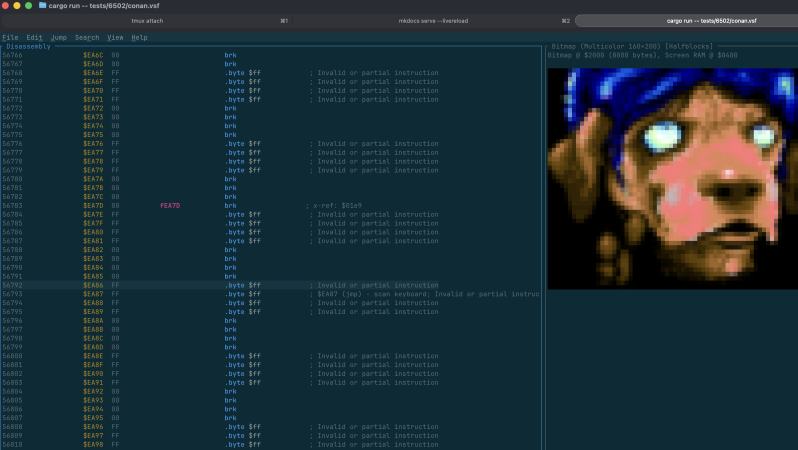
If you want to pull apart a program to see how it ticks, you’re going to need a disassembler. [Ricardo Quesada] has built Regenerator 2000 for just that purpose. It’s a new interactive disassembler for the Commodore 64 platform.

Naturally, Regenerator 2000 is built with full support for the 6502 instruction set, including undocumented op-codes as well. It’s able to automatically create labels and comments and can be paired with the VICE C64 emulator for live debugging. You can do all the usual debug stuff like inspecting registers, stepping through code, and setting breakpoints and watchpoints when you’re trying to figure out how something works. It can even show you sprites, bitmaps, and character sets right in the main window.

Files are on Github if you’re ready to dive in. You might find this tool to be a useful companion to C64 assembly tools we’ve featured previously, as well. If you’re pulling off your own retro development hacks, be sure to notify the tipsline.

[Thanks to Stephen Waters for the tip!]