Reliving The BBS Days With A Propeller

Back before the world wide web, self-proclaimed geeks would get our compute on by dialing in to bulletin board systems. In their heyday, these BBSes were filled with interesting people and warez to fill the most capacious 10 Megabyte hard drive. In an attempt to relive the days of the Internet before the Eternal September, [Jeff Ledger] whipped up a tutorial for dialing up BBSes with an updated classic computer.

Instead of doing this tutorial with a C64 or an Apple II, [Jeff] used the Propeller powered Pocket Mini Computer he designed. This computer features 32Kb of RAM inside an eight-core Parallax Propeller along with a BASIC interpreter to run your own programs.

This Mini Computer can connect to BBS systems, but seeing as how acoustically coupled modems are rare as hen’s teeth these days, [Jeff] thought it would be a good idea to log in to the many Internet connected BBS servers using his desktop as a bridge between the Propeller and the Internet.

After [Jeff] got his Propeller computer up and running on a BBS, he was free to play Trade Wars or slay grues in one of the many MUDs still running. Not bad for a demonstration of the Internet of old, and made even better by the use of a Propeller.

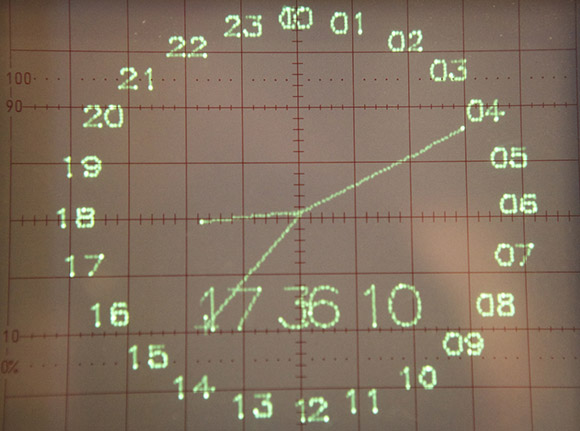
Retrotechtacular: Simulating Weather Patterns With A Logic Chip Computer

In 1975, [D. L. Slotnick], CS professor at University of Illinois at Urbana-Champaign faced a problem: meteorologists were collecting a lot more data than current weather simulations could handle. [Slotnick]’s solution was to build a faster computer to run these atmosphere circulation simulations. The only problem was the computer needed to be built quickly and cheaply, so that meant using off-the-shelf hardware which in 1975 meant TTL logic chips. [Ivan] found the technical report for this project (a massive PDF, you have been warned), and we’re in awe of the scale of this new computer.

One requirement of this computer was to roughly 100 times the computing ability of the IBM 360/95 at the Goddard Institute for Space Studies devoted to the same atmospheric computation tasks. In addition, the computer needed to be programmable in the “high-level” FORTRAN-like language that was used for this atmospheric research.

The result – not to overlook the amazing amount of work that went into the design of this machine – was a computer built out of 210,000 individual logic chips at a total cost of $2.7 Million dollars, or about $10 Million in 2012 dollars. The power consumption of this computer would be crazy – about 90 kilowatts, or enough to power two dozen American houses.

We couldn’t find much information if this computer was actually built, but all the work is right there in the report, ready for any properly funded agency to build an amazingly powerful computer out of logic chips.

Digital Zoetrope Uses 18 LCD Displays

[Jasper] sent in a project he, [Quinten], and [Mr. Stock] have been working on for a while. It’s called the Pristitrope and brings the classic 19th centrury paper-based animation device into the 21st century with 18 LCD displays.

The lazy suzan portion of the build was fabricated out of plywood cut on a CNC router and fastened together with the help of a slip ring to transfer power between the stationary and spinning portions of the device. For the electronic part of the build, eighteen LCD displays were connected together on a data bus with each display independently addressable by a microcontroller.

One really interesting feature of the Pristitrope is its ability to detect if it is currently rotating clockwise or counterclockwise. While [Quinten]’s video doesn’t show off the full possibilities of this feature, the spin sensor makes it possible to always have an animation played in the right direction regardless of how the Pristitrope is spun.

Continue reading “Digital Zoetrope Uses 18 LCD Displays”

Giving The TRS-80 CoCo A 44 Color Display

As a relic of the early 80s, the TRS-80 Color Computer couldn’t display very many colors. By default, the CoCo could only display 8 colors on the screen at a time, but [John] figured out a way to increase the number of colors displayed using a very simple trick that surprisingly isn’t found in original CoCo games.

The TRS-80 Color Computer uses a Motorola 6847 video display generator to produce color graphics on its display. There are several graphics modes available to CoCo programmers, including a high-resolution black and white mode, and two four-color modes using red, green, blue, and yellow or buff, cyan, magenta, and orange.

These color palettes are extremely limiting, and usually switching between these modes produces a lot of flicker. [John] figured out if he switched the color pallets every 1/60th of a second (i.e. during the vertical blanking interval), he could display 44 colors on the CoCo.

It’s a clever little hack to increase the color palette of the CoCo, and in our opinion should be in the running for winning this season’s Retrochallenge. Sadly, [John] is judge for the Retrochallenge this time around, so he’ll have to settle for earning a Hackaday merit badge.

4004 ROM Emulator Allows Fast Development On Slow Computers

Developing for extremely old computers is a chore; not only are you limited by assembly or pure machine language, there’s also the issue of burning ROMs to actually run your programs. [Frank Buss] came up with a neat solution to developing for the venerable 4004 CPU – build a ROM emulator using a modern microcontroller.

The build started off with a ZIF socket for the 4004 CPU and a 256 byte 4001 ROM chip emulated on a PIC micro. The CPU looked a little lonely sitting in the ZIF socket all by its lonesome, so [Frank] updated his board to allow a 4002 RAM chip to be plugged in as well.

Because [Frank] chose a 4004 for his entry for this season’s retrochallenge competition, we need to point we’re offering a prize for loading our retro site with this CPU. Yes, it’s most likely impossible but nothing worth doing is easy.

You can check out a video [Frank]’s ROM emulator after the break.

Continue reading “4004 ROM Emulator Allows Fast Development On Slow Computers”

Arduino Taipan! Clone Stays True To The Original

taipan

Fans of vintage Apple ][ and TRS-80 games will undoubtedly recognize the image above in short order. Taipan! was a popular game in its time, and [Simon] decided it was a great title to try recreating with an Arduino.

His goal was to use a standard Arduino Duemilanove to reproduce the game, rather than opting for a Mega or something like the Raspberry Pi. Seeing those two options as “too easy”, he ventured into the project with some self-imposed limitations, making it a more fruitful adventure.

In the end, [Simon] had to use two Arduinos – one to control the gameplay and another to run the display. Simon tucked both boards, a keypad, and an LCD screen inside a first run copy of Tai-Pan, a move that is sure to please Apple aficionados and Xzibit fans alike.

[Simon] made sure that no detail was overlooked during the port, making sure to include every line of text as well as every bug found in the original game.

Check out a video of the finished project below, and be sure to swing by his site for a very thorough build log.

Continue reading “Arduino Taipan! Clone Stays True To The Original”

Reading Punch Cards With An Arduino And Digital Camera

[digitaltrails] wanted the data on a few old IBM 80-column punch cards he had lying around, but didn’t have decades old computer hardware in his garage. He decided to build his own out of LEGO, an Arduino, a digital camera, and a bit of Python.

The hardware portion of [digitaltrails] build includes a crank-operated feed mechanism made entirely out of LEGO. For each turn of the crank, the feed mechanism sends one card down a chute where a photodetector wired into an Arduino tells a camera to take a picture. After that, a servo is activated, sending the card into the ‘already scanned’ bin.

On the software side of the build, [digitatrails] used the Python Imaging Library to scan one row of pixels where each column is expected to be. The software outputs the code and data contained on the 80-column card as well as a very cool ASCII art version of each card.

Considering you just can’t go down to Fry’s and buy an IBM 80-column punch card reader, we’re loving [digitatrails]’ clever way of getting data off an otherwise unreadable storage medium. Check out the video of the card reader in action after the break.

Continue reading “Reading Punch Cards With An Arduino And Digital Camera”