Pre-spun Hard Drives

This device is lovingly called the SPINmaster. [Linux-works] built it to spin up multiple hard drives before the motherboard starts up. It detects the power-up from the PSU and uses a relay to hold the motherboard in reset, indicated by the red LED. Each of four relays then spins up a hard drive and illuminates the green LED when ready. Once all green lights come on the reset relay shuts off and the bios starts up. This type of staggered startup takes a lot of the load off of an under-powered PSU. He’s posted firmware and there’s a schematic available too. We took a look at his video but there’s not much to see as it’s just the inside of the machine while it boots up.

Repurposing A Click Wheel

We think the click wheel is the biggest contributor to the success of the original iPods. The devices were a brick with a monochrome screen but the user interface was slick and easy to use. [Jason] decided he wanted to add a click wheel to his own project. After using a logic analyzer he discovered that it doesn’t implement a common protocol such as I2C, perhaps a deliberate move by Apple to keep the controller under wraps? He managed to get past this hurdle, as seen in the video after the break, by bit-banging the data in from the click wheel and then reverse engineering the protocol.

It’s connected to an AVR ATtiny88 with feedback shown on a character LCD screen. We’re glad that [Jason] tipped us off about this, but he doesn’t have any code available yet. We love to dive into the source so the sooner he gets it up the better! We’ve got an old 3rd generation with a bad board that is begging to have the wheel ripped out of it, not to mention the dirt-cheap replacements available on ebay. Continue reading “Repurposing A Click Wheel”

Propeller Takes Step-a-Sketch To A New Level

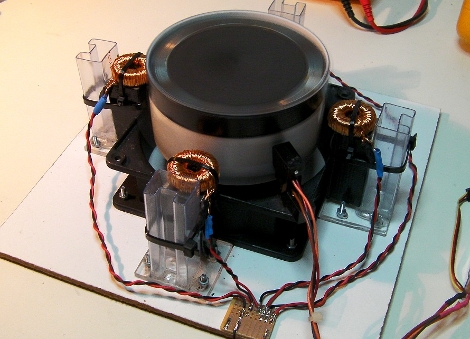
[Mpark’s] propeller controlled Etch-a-Sketch is well built and very accurate. He was inspired by the Step-a-Sketch project and he’s carried that design through to a stunning conclusion. The driver board was built around a Parallax Propeller P8X32A microcontroller. But this isn’t just a serial controller board for connecting the hardware to a PC running CNC software. He’s included TV out and a keyboard port so that programming can be done on the chip itself.

In the video after the break you can see how precise the plotting is on the Etch-a-Sketch. It is well mounted but also benefits from some software compensation for the toy’s imprecise controls. [Mpark] has also included an erase function that tilts the frame upside-down a few times. This is used not only to erase a drawing but to hide the line created when moving the stylus into its starting position.

Continue reading “Propeller Takes Step-a-Sketch To A New Level”

IM-ME Screen Reverse Engineered

[Dave] figured out the command set for the IM-ME terminal. It took a bit of sleuthing to get this pink plastic peripheral to give up these secrets. He used an oscilloscope to sniff out the SPI connections, then used a hacked IM-ME to capture the traffic from a factory-fresh unit. He managed to extrapolate how write data was being sent but he still couldn’t figure out how commands were differentiated from that data. With the info at hand he searched around the interwebs to find that the screen uses an ST7565S controller. Now he’s got custom firmware to make the LCD display do his bidding and we’re wondering what’s next?

Adding A Netbook Keyboard Light

[Vikash] was having trouble using his netbook in the dark so he added a keyboard light. He’s got a Dell Vostro A90 which is the same hardware as the popular Dell Mini 9. We agree that the condensed keyboard layout makes it hard to type without looking; just try to find the quotation mark, brackets, and tilde keys! He added an LED to the bezel around the LCD screen in order to shed light on the situation. Now the LED can be turned on using CTRL. An ATtiny13 microcontroller monitors pins 1 and 11 of the keyboard, waiting for the CTRL keypress, then turns on the light when it receives it. This hardware solution means it doesn’t matter if you’re running a Hackintosh (like he is), Ubuntu (like we are), or that other OS.

10,000 Watt Fluorescent Array

[youtube=http://www.youtube.com/watch?v=C_t2jrSsVXs&NR]

This is an array of flourescent tubes that form a display. The video above is just two modules of a ten module installation that [Valentin] and his team are showing at an exhibition in Berlin tomorrow. The connected modules form something of a scrolling 16-segment display (similar to the 17 segment display modules of the ninja party badges but much larger). They’re using triacs, optocouplers, DMX, and an Arduino to interface a computer with the 182 fluorescent tubes of the display. Check out a second video after the break to see (or be blinded by) all ten modules pulling 10,000 watts.

Continue reading “10,000 Watt Fluorescent Array”

Nanotouch: A Tiny AVR Media Thing

[youtube=http://www.youtube.com/watch?v=qLOQOTa4-aY]

[Rossum] is at it again. This time, he has created a super tiny media device to get us drooling. You might recall him from the 8-bit device we showed you before. The Nanotouch is roughly the dimensions of a 96×64 OLED screen(slightly larger than a quarter), with about 1/3 to 1/2 of an inch of stuff packed behind it.  The screen itself is mounted atop 4 buttons. This allows you to depress the screen edges for navigation.  He does mention that this design needs a little work to prolong the life of the screen, but we really like the intuitive way of navigating.  At its heart is an ATmega32u4.

We thought his last version was fantastic, but this one has us enamored. He states he’ll publish schematics and code, as he did before. We just didn’t want to wait to share.

[thanks Joakim]