Fubarino Contest: Hackaday In Your Soldering Iron

Solder

Besides a coffee pot, the most important tool on the electronic tinkerer’s workbench is the soldering iron. Surprisingly, though, we haven’t seen many people build their own soldering stations. [Pjkim] did, and went so far as to include an easter egg for our Fubarino contest.

A few years ago, [Pjkim] received a free Soldering Iron Driver from Dangerous Prototypes. This awesome kit provides everything you could want out of a soldering iron – USB and serial data logging, a 2×16 display, compatibility with a whole bunch of solder tips, and it’s completely reprogrammable.

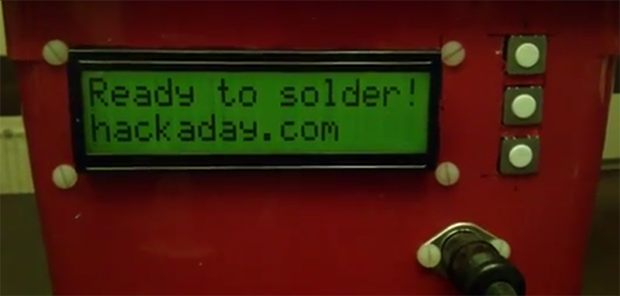
[Pjkim]’s task for the Fubarino contest was to put an easter egg somewhere in the soldering iron. He did that by having the Hackaday URL display when the iron is ready for use. This isn’t the only firmware modification, either: the new firmware also debounces the button presses and adds auto repeat.

If you’re looking for some code, [Pjkim] put everything up on the Hackaday forums. There’s also a video showing off the easter egg available below.


This is an entry in the Fubarino Contest for a chance at one of the 20 Fubarino SD boards which Microchip has put up as prizes!

Continue reading “Fubarino Contest: Hackaday In Your Soldering Iron”

Fubarino Contest: A Sculpted Room With LEDs

[Sisam] and [Mclien] are a father and son team that built this sculptural room with an organic looking built-in seating area and sculpted lamp shades. When you have a room that looks this cool, the only option you have is to fill it with RGB LEDs, and it just so happens their light controller has a great Hackaday Easter egg.

The room lighting is provided by a Shifty VU shield, OctoBar LED controller, and a few of these RGB LED modules. All pretty standard for an RGB LED project, but where this contest submission really shines is the controller for all the room lights. It has three sliders for the red, green, and blue channels, beefy toggle switches for each light location, an LCD for showing the program mode, a rotary switch, and push buttons for cycling through stored setups.

The Easter egg for this project comes into play whenever the color value of the lights is set to Hackaday green, #00c100. When that happens, the Hackaday URL is displayed on the controller’s display.

Awesome work, and a really cool-looking room. We wouldn’t mind a tutorial on how you sculpted it, [Sisam].


This is an entry in the Fubarino Contest for a chance at one of the 20 Fubarino SD boards which Microchip has put up as prizes!

Fubarino Contest: A Really, Really Old Plotter

DCF 1.0

Decades ago, [Vegipete] found an old drum plotter at a university used equipment sale. This plotter was old in the 80s, so like any great tinkerer, [Vegi] reverse engineered the plotter’s circuitry and got it working with his Apple ][.

The years went by, dust accumulated, and in 2010 [Vegipete] found himself doing some work with linear acceleration on a PIC microcontroller. Remembering his old plotter, [Vegi] realized he could build an embedded version of his old Apple ][ circuit. He built a circuit that turned the plotter into something that can be controlled with an FTDI adapter. A small update to the code added the an Easter egg. When the Konami code is entered on the plotter’s buttons it responds in the spirit of our Fubarino contest.


This is an entry in the Fubarino Contest for a chance at one of the 20 Fubarino SD boards which Microchip has put up as prizes!

Continue reading “Fubarino Contest: A Really, Really Old Plotter”

Fubarino Contest: Network Nodes, Door Lock, And Smoker Controller

fubarino-contest-nodes-lock-smoker

Here’s a round-up of three different Fubarino Contest entries; a video of each is available after the break.

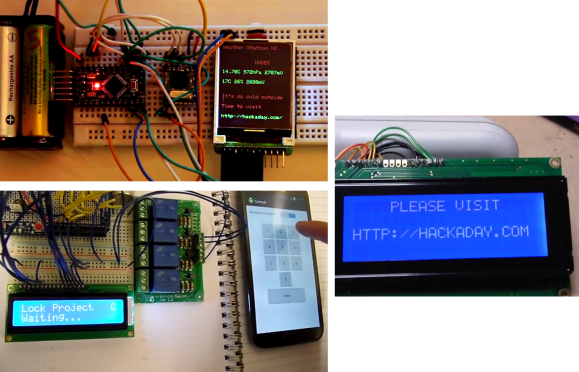
On the upper left are the beginnings of a network node monitoring system developed by [Stephane]. When the network checks the weather, it may determine that it’s far too harsh outside and time to go in to see what’s new on Hackaday. There’s only sparse information available on the hardware. Each node uses an ATtiny84 and an RFM12B—different sensors connected to each are used to build up the network’s data collection capabilities.

In the lower left is [Brett’s] Bluetooth door lock controller. The Arduino, a cheap Bluetooth module, and a relay board make up the base station which will eventually connect to an electronic lock. [Brett] uses a smart phone to punch in the access code, and entering “1337” four times in a row unlocks the Easter egg, displaying our URL on the character LCD. Here’s the code repository for his project.

To the right is the display for [Andy’s] smoker controller used for cooking. He already had some hidden features on the controller used to calibrate the thermocouple. For the contest, he simply added an additional button to extend the original menu access method.


This is an entry in the Fubarino Contest for a chance at one of the 20 Fubarino SD boards which Microchip has put up as prizes!

Continue reading “Fubarino Contest: Network Nodes, Door Lock, And Smoker Controller”

Fubarino Contest: The Problem Of Being Very Good At Foosball

hachaoay [Sebastian] works at an engineering company testing car ECUs, head units, and all the confusing wiring harnesses found in the modern-day automobile. It’s good work, but not exactly fun, so [Sebastian]’s bosses bought a foosball table so the employees could unwind. The foosball tables have been there for several years, and now everyone at the company is really, really good at twirling little football players on a stick. With their current rule set (at least 6 goals and 2 goals ahead), matches last at least twenty minutes.

[Sebastian] came up with a solution to this problem: a KickerClock – something between a chess clock and an automated score keeper for foosball. The device has two seven-segment displays for each team, and a countdown timer for both of the four and a half minute rounds. All the documentation is up in [Sebastian]’s Google Drive, and he plans on adding a few neat features such as automated score keeping.

The easter egg for this submission? The buttons for scoring each goal are used as combination lock. By scoring eight black team goals (H=8), one silver team goal (A=1), three black goals (C=3), and eleven silver goals (K=11), the Hackaday URL shows up on the seven-segment displays. Extremely well hidden, and a great way to efficiently waste time at work.

Video of the KickerClock, and the easter egg, available below.


This is an entry in the Fubarino Contest for a chance at one of the 20 Fubarino SD boards which Microchip has put up as prizes!

Continue reading “Fubarino Contest: The Problem Of Being Very Good At Foosball”

Fubarino-Contest: 1980’s CD Player With MPD

fubarino-cd-shelf-player

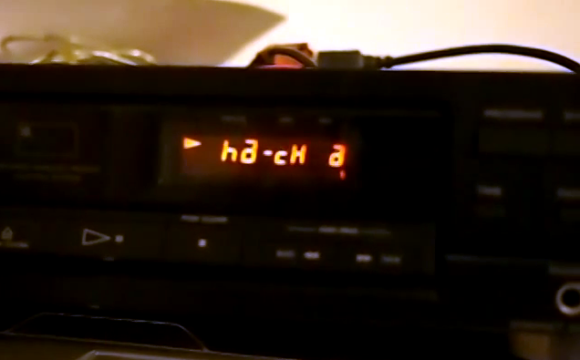
[Ronald] had to scramble to get his submission in, but we’re glad he did. His demo video shows the display of a 1980’s CD player working with Music Player Daemon. It’s really just the original display itself that works, but the project is not yet finished. However, is far enough along to show our URL when a track reaches the 22:00 mark.

The display is driven by an ATmega32 chip which uses a USB connection to receive commands from the computer running MPD. [Ronald] had troubles figuring out how to send int values over USB so he hacked his own protocol that just uses the LSB of each byte coming over the bus. After the break you can see the video, and read the description which he included with his submission. There is also a code package available here.


This is an entry in the Fubarino Contest for a chance at one of the 20 Fubarino SD boards which Microchip has put up as prizes!

Continue reading “Fubarino-Contest: 1980’s CD Player With MPD”

Fubarino Contest: Minecraft, Zelda, Arduinos, And Hackaday

song

In a clever bit of pandering to the gamer crowd for the Fubarino Contest, [Laurens] has combined The Legend of Zelda, Minecraft, and an Arduino to create something really, really cool.

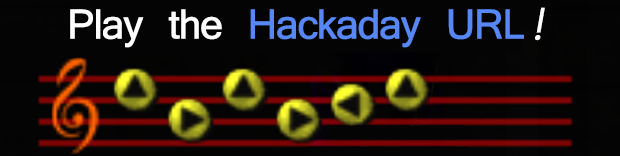
[Laurens] cobbled together an Arduino, MIDI connector, and LCD display that will read a MIDI keyboard and detect when one of the songs from Ocarina of Time/Majora’s Mask is played. The Arduino then plays back the song slower and longer, just like in the game.

Here’s where things get cool: Since [Laurens] has an Arduino that knows when an OoT/MM song is played, he can have the Sun Song control the lights, or the Song of Storms turn his sprinkler system on. He chose to pipe all these commands into Minecraft, where the Song of Healing gives some health to the Minecraft character, the Song of Storms controls the rain, and other awesome mashups of Zelda and Minecraft.

This project offers more than enough to stand on its own, but [Laurens] also added a Hackaday easter egg. When playing the letters HAD in ASCII on the keyboard, our favorite URL shows up on the Arduino and inside Minecraft.

Here’s an image gallery and the source code (dropbox, so don’t spam it) for [Laurens]’ awesome project.


This is an entry in the Fubarino Contest for a chance at one of the 20 Fubarino SD boards which Microchip has put up as prizes!

Continue reading “Fubarino Contest: Minecraft, Zelda, Arduinos, And Hackaday”