While audiophiles might spend gazillions of hours finely honing a microphone stand that isolates their equipment from the trials and perturbations of the world, most of us who use a microphone don’t need anything so elaborate. Hackaday contributing editor [Jenny List] hacked together some thrift store finds into a snazzy adjustable mic setup as you can see in the video below the break.
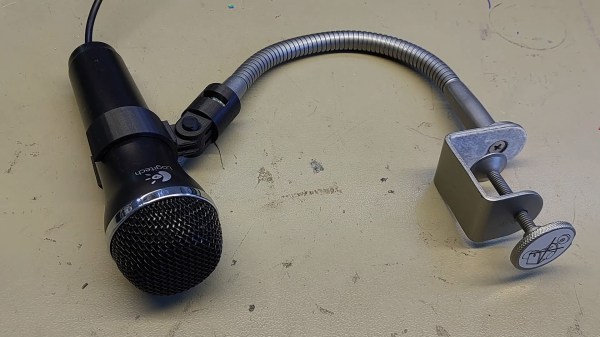
Using the flexible neck and clamp of an IKEA Kvart as a base, [Lists]’s mic stand looks like a simple, but exceedingly useful tool. She first removed the lamp, shade, and cord before designing a 3D-printed mount to attach to the lamp’s neck. Since the bolted lamp end of the connection goes straight to an action camera mounting system, we can see this being handy for mounting any number of other things besides microphones. Another 3D-printed mount attaches the Logitech gaming microphone to the action camera connector, and the whole thing can either be bolted together or use a printed pin. All the parts can be found in a GitHub repository.
If you follow audiophile reviewers, you’ll know that their stock-in trade is a very fancy way of saying absolutely nothing of quantifiable substance about the subject while sounding knowledgeable about imagined differences between devices that are all of superlative quality anyway. If you follow us, we’ll tell you that the only reviews that matter are real-world measurements of audio performance, and blind listening tests. We don’t have to tell you how to listen to music, but perhaps it’s time in our Know Audio series to look at how audio performance is measured.
Before reaching for the bench, it’s first necessary to ask just what we are measuring. What are the properties which matter in an audio chain, or in other words, just what is it that makes an audio device good?
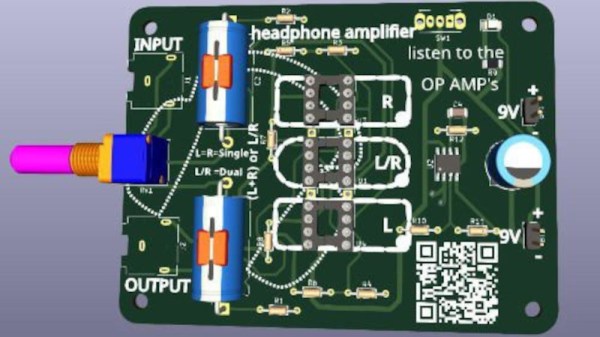
In the world of audiophilia there are arguments that rage over the relative merits of particular components. Sometimes this can reach silly levels as in the high-end ALPS pot we once saw chosen as a volume control whose only task was to be a DC voltage divider feeding a pin on a DSP, but there are moments where such comparisons might have a bit of merit. To allow the comparison of different op-amps in a headphone amplifier, [Stephan Martin] has created a stereo amplifier board complete with sockets to take single or dual op-amp chips.
The circuit is based upon a design from the 1990s which as far as we can see is a pretty conventional non-inverting amplifier. It has an on-board op-amp to create a virtual ground, and three sockets for either two single or one dual op-amp to create a stereo headphone amplifier.
So the burning question is this: will you notice a difference? We’re guessing that assuming the op-amps under test are to a sufficient specification with a high enough impedance input and enough output current capability, the differences might be somewhat imperceptible without an audio analyser or the hearing of a ten-year-old child.
Whatever the first computer you used to manipulate digital audio was, the chances are it came with dedicated sound hardware that could play, and probably record, digitized audio. Perhaps it might have been a Commodore Amiga, or maybe a PC with a Sound Blaster. If you happen to be [NICKMANN] though, you can lay claim to the honor of doing so on a machine with no such hardware, because he managed it on an unmodified Sinclair ZX81.
For those of you unfamiliar with the ZX, it embodied Clive Sinclair’s usual blend of inflated promises on minimal hardware and came with the very minimum required to generate a black-and-white TV picture from a Zilog Z80 microprocessor. All it had in the way of built-in expansion was a cassette interface, 1-bit read and write ports exposed as 3.5 mm jacks on its side. It’s these that in an impressive feat of hackery he managed to use as a 1-bit sampler with some Z80 assembler code, capturing a few seconds of exceptionally low quality audio in an ’81 with the plug-in 16k RAM upgrade.
From 2023 of course, it’s about as awful as audio sampling gets, but in 1980s terms it’s pulling off an almost impossible feat that when we tried it with a 1-bit PC speaker a few years later, we didn’t succeed at. We’re impressed.
The ’81 may be one of the simplest of the 8-bit crop, but in its day it set many a future software developer on their career path. It’s still a machine that appears here today, from time to time.
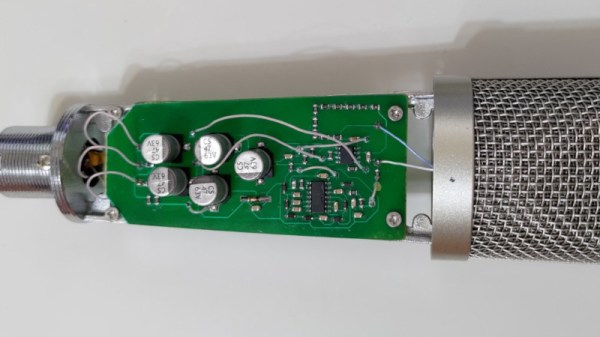
As the Internet has turned so many of us into content creators, we’ve seen the quality of webcams and microphones steadily increase to the point at which even a fairly modestly-equipped YouTuber now captures their wisdom at a quality far exceeding that you might have found in some broadcast studios not so long ago. Still, decent quality costs money, and for that reason [Spirit532] has built his own high quality condenser microphone for less expenditure.
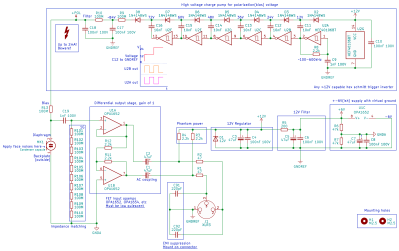
The capsule and body are off-the-shelf items — what he’s produced is the bias voltage supply and preamplifier. In both cases these are the interesting parts of a condenser microphone, so their circuit bears a second look.
The condenser microphone takes a diaphragm and turns it into one side of a capacitor. If you apply a charge to this capacitor, the voltage over it changes minutely with the capacitance as the diaphragm vibrates. Thus to have a usable audio signal level a high-voltage bias supply is required to provide the charge, and a very high impedance preamplifier circuit to catch the signal without draining the capacitor.
His bias supply is a charge pump using a string of diodes and capacitors fed by a chain of CMOS inverters, with an RC filter and resistor chain to provide that super-high impedance. The preamplifier meanwhile is a unity gain high-impedance op-amp with an inverting stage to provide a balanced connection. For good measure the circuit also includes a phantom power supply.
There’s something rewarding about building your own DIY audio hardware. Knowing you put it together yourself gives you faith in the construction, and psychosomatically makes the music sound all that much sweeter. If you’re into that kind of thing, you might like to give [Eric Sorensen’s] Denmark amplifier module a look.
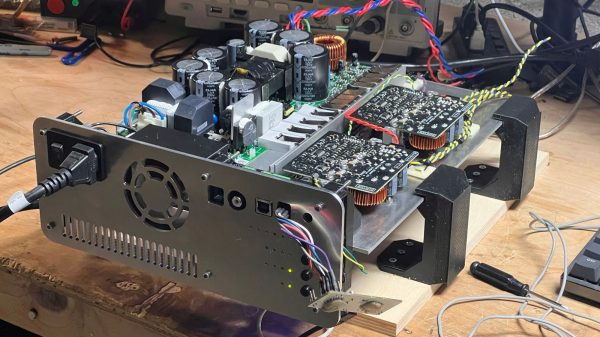
The amplifier is intended to be used in a 3-way system, running a subwoofer, woofer, and tweeter. It uses a 1000 W ICEpower module to run the subwoofer, with a pair of 500W ICEpower modules to run the woofer and tweeter respectively. Meanwhile, a MiniDSP 2x4HD is used to accept optical audio input. It also offers digital signal processing and serves as a crossover to split the signal across the three speakers. An STM32F401 is used to run the show, controlling all the various modules and the necessary status LEDs. It’s a feature-rich build, too, with overtemperature monitoring, fan control, and clipping warnings built in.
The whole setup is built on to a sturdy aluminium backplate. The CNC-machined panel has simple tactile buttons for control. There’s also a nifty use of clear PETG 3D printer filament as a light pipe for LEDs. It’s effective, and it looks great. The whole module is designed to slide into the bottom of a 3-way speaker housing like a drawer.
Overall, if you’re building a big set of 3-way speakers, you might find the Denmark amplifier module is perfect for your needs. Alternatively, you could experiment with a different kind of speaker entirely. Video after the break.
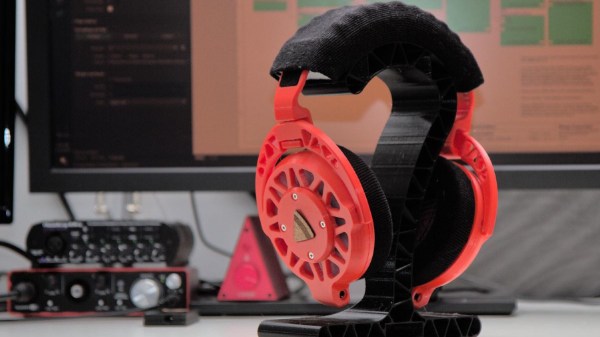
We’ve seen many DIY headphones projects on these fair pages over the years, but not many that are quite as DIY as the Ploopy Headphones. What makes this project interesting is the sheer depth of the construction, with every single part being made from what we might call base materials. Materials such as 3D printer filament, foam and felt, and the usual metallic vitamins.
The electronics are fairly straightforward, with an RP2040 functioning as the USB audio interface and equalizer function. Audio samples are emitted as I2S into a PCM3050 24-bit stereo codec which generates a pair of differential output audio signals. These are then converted from differential to single-ended signals and passed on to the coil drivers. The coil drivers consist of no fewer than eight-paralleled opamps per channel. All of this is powered by the USB-C connection to the host computer. Whilst a kit of parts is available for this, you can make your own if you wish, as the full source (Altium designer needed for tweaks) is available on the Ploopy headphone GitHub.
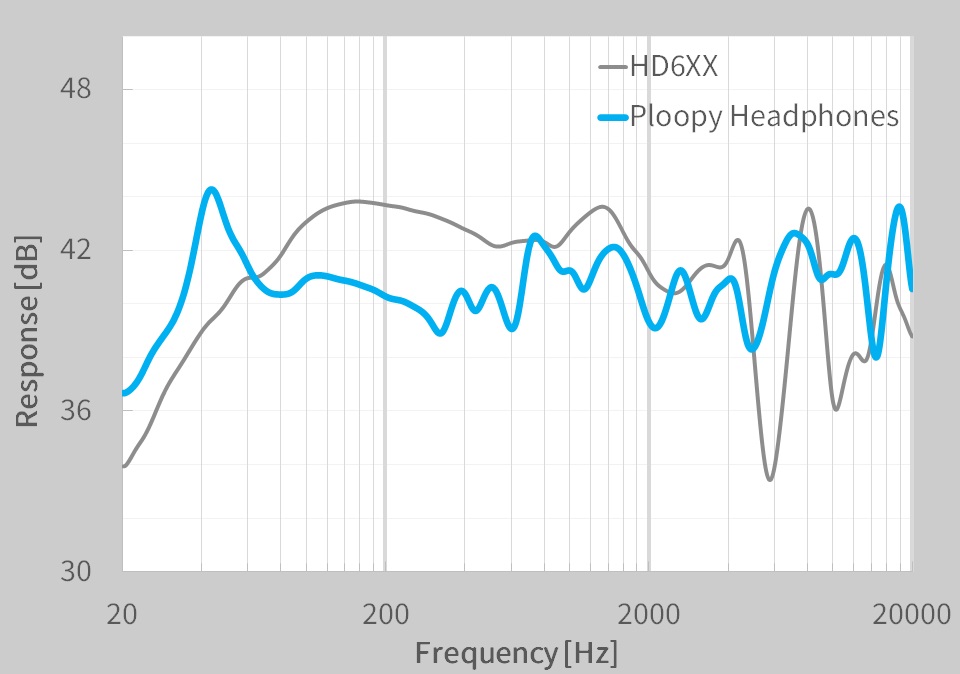
A pretty ploopy response
Many DIY headphone builds would likely be using off-the-shelf speaker units, with large parts of the ear cups being taken from spare parts kits for commercial offerings. But not the Ploopy. The drivers are constructed from flex PCB coils with a standard TRRS jack on each side. Magnets for these coils to react against are held in a 3D-printed frame that is attached to the outer cover. The coils are aligned with a special jig and bonded to the ‘driver foam’ with some 3M VHB tape.
The ear cups are constructed with some 3D printed rings, foam pieces, and simple woven material. The resonator plates push into the inner side of the cup, and the assembly simply screws to the driver assembly. The incredibly detailed assembly wiki makes it look easy, but we reckon there are a few tricky steps in there to trip the unwary. The headband again consists of printed spring sections, some woven material, and foam with a few metallic vitamins thrown in. That makes it sounds simple, but it isn’t.
On the whole the build looks fantastic, but what does it sound like? The Ploopy team has tested them against a pair of Sennheiser HDRXX giving a broadly comparable response, but we’re no audio experts, and the proof, as always, is in the wearing. This project seems to be the ultimate in audio tweakability, with the punchy RP2040 capable of running six audio filters at the full 48 KHz, 16-bit audio, though, the PCM3050 is capable of more.
Want to build some headphones, but need a Bluetooth interface? We got you covered. Can 3D printed headphones ever compare to the big names? We’ll see.



 The capsule and body are off-the-shelf items — what he’s produced is the bias voltage supply and preamplifier. In both cases these are the interesting parts of a condenser microphone, so their circuit bears a second look.