Oscilloscope Doubles As A Serial Terminal

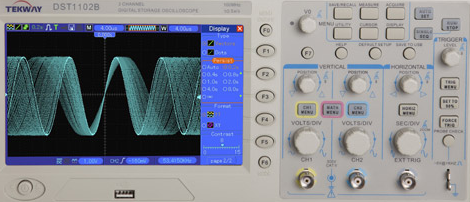
PC-based USB oscilloscopes are fast becoming all the rage. [Matt Sarnoff’s] Terminalscope takes the reverse approach, adapting an oscilloscope into a full serial terminal. You may have seen something similar before in the Dutchtronix/SparkFun O-Clock, but [Matt’s] project goes one further by adding a PS/2 keyboard port for full bidirectional serial communication, and with much sharper display resolution to boot.

The mostly VT-100 compatible Terminalscope is built around two AVR microcontrollers: an ATmega328P runs full-tilt to generate the video signal and handle serial I/O, while an ATtiny45 handles keyboard input to avoid interrupting the ’328’s duties. Rather than vector trace each character, a raster-scanning approach is used: the beam follows a fixed X/Y path (like a television), while modulating the Z input (beam intensity) to form an image. The device can be connected to a PC via serial port or USB-to-TTY adapter, or directly to another microcontroller to debug serial output.

We recently showed an oscilloscope being used as a multichannel digital logic display. The Terminalscope provides yet another use for this essential bench tool and could nicely round out a “poor man’s” testing setup. The schematic and full source code are available for download.

STM8S-Discovery: Microcontrollers Reach A New Low

A complete microcontroller development kit for little more than the cost of a bare chip? That’s what STMicroelectronics is promising with their STM8S-Discoveryseven dollars gets you not only a board-mounted 8-bit microcontroller with an decent range of GPIO pins and functions, but the USB programmer/debugger as well.

The STM8S microcontroller is in a similar class as the ATmega328 chip on latest-generation Arduinos: an 8-bit 16 MHz core, 32K flash and 2K RAM, UART, SPI, I2C, 10-bit analog-to-digital inputs, timers and interrupts and all the usual goodness. The Discovery board features a small prototyping area and throws in a touch-sense button for fun as well. The ST-LINK USB programmer/debugger comes attached, but it’s easy to crack one off and use this for future STMicro-compatible projects; clearly a plan of giving away the razor and selling the blades.

The development tools are for Windows only, and novice programmers won’t get the same touchy-feely community of support that surrounds Arduino. But for cost-conscious hackers and for educators needing to equip a whole classroom (or if you’re just looking for a stocking stuffer for your geeky nephew), it’s hard to argue with seven bucks for a full plug-and-play setup.

[thanks Billy]

Hackable Geiger Counter

SFE_Geiger_Counter

[Aaron] A.K.A. [A1ronzo] at SparkFun has put together a hackable USB Geiger Counter. In his tutorial, he gets the Geiger counter to work as a random number generator. Later, he analyzes and discusses how well it works as a random number generator.  In the past, we have seen a number of radiation detectors hacks such as the Mr. Fission digital Geiger counter, a count accumulator, and a Polonium detecting pen,  Besides our inital thoughts of speeding up the number generation, and using it as a special character device, what else can you come up with to do with this device?

Easter Egg Challenge

Beer

Often, hardware designers include nonfunctional additions into designs to make them feel more personal. Commonly known as easter eggs, these additions can often go unnoticed by the public for years. While taking apart an Atari San Francisco Rush: The Rock sound board, reader [Jason] noticed a hidden message on the PCB (see above). Other more recent hardware easter eggs include the inside of the Zune HD, which has the inscription “For our Princess” to commemorate a development team member who passed away, or the Amiga 1000 which features the signatures of the design team on the inside if the case (Pictures after the break).

What we want from you: We want to see the best HARDWARE easter eggs you have found or seen. Leave us a comment with a video, picture, or article that explains what you found, and possibly the background story behind it. Anyone can google easter eggs, and we all know about the easter eggs all over DVDs, video games, etc, but we prefer the kind you find when you are busy voiding your hardwares warranty.

Edit: good catch, that was the Amiga 1000 not an Atari 1000. Thanks to all the commentors.

Continue reading “Easter Egg Challenge”

USB Isolation

[Oleg] over at Circuits@Home has made a USB isolator for his hacking needs. This isolator separates the signal, ground, and power lines of a USB host device, such as a PC, from a USB device like a USB oscilloscope or logic analyzer. This might be useful for Keyboard sniffing, ECG, EEG or diagnosing the control system on the positive ground of your autonomous Ford 8N. What other applications can you come up with for this tool?

Look At Your Gerber Files With Gerbv

gerbv_with_loaded_gerber_files

Tired of making kindergarten macaroni art PCBs? Check your Gerber files before you send them off to a fab house with a Gerber file viewer. Viewplot , GerbTool’s Viewer , and FAB 3000 Free DFM are all free versions of for-pay software to view your Gerber files. If you use Windows and demo software, these are nice options. If not, you can use gerbv. Allied with gEDA, Gerbv is free, open source software that you can use to view all of your RS-274X Gerber files and Excellon-type drill files. Still being worked on with an active development group, gerbv does not have all the bells and whistles, it does have the ability to delete objects. Check it out after the break. Continue reading “Look At Your Gerber Files With Gerbv”

Homebrew Carputer

Avbrand's Carputer

Though not from scratch, [Avbrand] integrated a powerful set of tools into his Subaru station wagon. The system was compiled from off the shelf electronics, such as a Compaq notebook, 3G USB modem, touch screen, and an assortment of other peripherals. It is based around Windows XP, though most of the carputer-specific applications, such as backup camera integration, Google Maps – based car tracking, and automatic volume control had to be custom coded by [Avbrand] himself. Perhaps the single most impressive and useful feature of the system is synchronization with highway traffic cameras. The system streams video of segments of the highway before [Avbrand] gets to them, allowing him to make more informed navigational choices. He documents it pretty well on his website.