Giving Siri Control Of Some Smart Bulbs

After getting his hands on the Philips Hue smart lightbulb [Brandon Evans] cracked open some of the hardware to see what is inside. He also spent time working out the software tricks necessary to use Siri to control light bulbs from iOS.

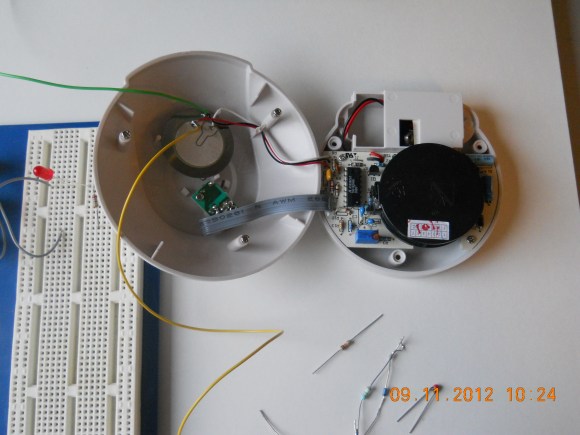
If you haven’t heard of the Hue product before it’s an LED bulb that fits in a standard medium base whose color and intensity can be controlled wirelessly. Included in each unit is Zigbee compatible hardware that lets the bulbs form their own mesh network. [Brandon] didn’t crack open the bulb since these things cost a pretty penny and disassembly requires cutting. But he did point us to this post where [Michael Herf] shows what the bulb’s case is hiding. We do get to see the other piece of the puzzle as [Brandon] exposes the internals on the base unit that bridges the mesh network to your home network via Ethernet. An STM32 chip is responsible for controlling the base unit.

Aside from a look at the guts [Brandon] hacked Siri (Apple’s voice activated virtual assistant) to control the system. You can see a demonstration of that in the clip after the break. The details are found in the second half of his post which is linked at the top. The code is found in his siriproxy-hue repository.

Continue reading “Giving Siri Control Of Some Smart Bulbs”

Bathroom Fan That Switches Itself On When It Gets Steamy Or Smelly

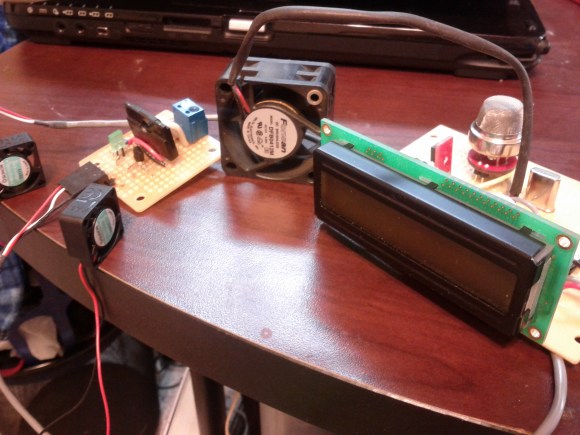
At first we thought that [Brandon Dunson] was writing in to tell us he’s too lazy to fix his bathroom fan. What he really meant is that simply replacing the unit isn’t nearly enough fun. Instead, he developed his own bathroom fan trigger based on stinky or humid air conditions. He didn’t publish a post about the project but we’ve got his entire gallery of build images after the break.

The initial inspiration for the project came from a twitter-connected fart sensing office chair. Hiding behind the character display you can see the MQ-4 methane gas sensor which he picked up for the project. But since there’s also a shower in the bathroom he included a humidity sensor with the project. Both are monitored by an ATmega328 which averages 10 readings from each sensor before comparing the data with a set threshold. If the sensors read above this level a relay turns on the bathroom fan.

Don’t be confused by the small DC fans seen above; [Brandon] is still using a proper exhaust fan. These are just used to help circulate the air around the sensors so that low-hanging smells will still trigger the system. This has got to be the perfect thing for a heavily used restroom.

Continue reading “Bathroom Fan That Switches Itself On When It Gets Steamy Or Smelly”

Developing A Thermostat For A Heat Pump That Only Has A Timer

The heat pump which cools [Chris LeBlanc’s] home lacks the sort of control he was looking for. It’s just got a timer, which switches it off automatically. He wanted to the ability to schedule the cooling cycle like you would with a thermostat-driven arrangement. He ended up build his own controller to automate the cooling process.

The heat pump came with an IR remote control which provides the access point for the project. [Chris] set out to emulate the remote protocol which saved him the trouble of having to crack open the unit and wire in a controller. He went with the IR Toy from Dangerous Prototypes as this device is able to record and transmit IR signals — it’s basically a universal remote for your USB port. His Raspberry Pi, seen to the left, controls the system. It’s connected to the red IR Toy board via a USB hub which is used to interface a WiFi dongle as well. The system works alongside Google Calendar to allow [Chris] to schedule his home’s cooling just by adding an appointment. A Python script queries the calendar, then selects and sends the appropriate IR command. He shows off the build in the clip after the break.

Continue reading “Developing A Thermostat For A Heat Pump That Only Has A Timer”

Nyan Cat Built Into The Wall Of A House

You’re going to need your best negotiating skills if you want to convince your significant other to let you add your own Nyan Cat to the kids’ room. This goes a bit deeper than just mounting something on the wall. The LEDs which light up this Nyan Cat installation are actually in the wallboard itself.

Luckily, this is actually a ‘playground for grown-up kids’. [Schinken] and his fellow hackerspace members built it at their location in Bamberg, Germany. It started as a Nyan Cat scarf, which was easy enough to hang on the wall. To make it sparkle they added sixteen LEDs. But you won’t see the wires from either side. A hole was drilled at the location of each diode, with a trench chiseled between them. This makes room for the wires, and was covered with spackle before painting. It turned out to be a pretty simple way to add a focal point to the room, and it certainly has the appropriate level of geekiness for a hackerspace.

Directing An Alarm System Straight To The Internet

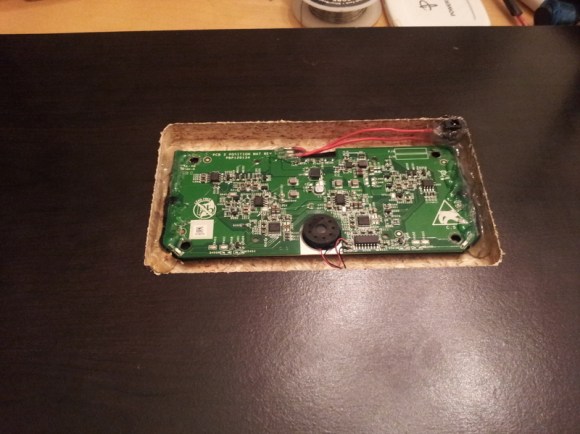
[Scott] has a pretty nice alarm system at his house – it will give the operator at his alarm company enough information to determine if it’s a fire alarm, burglary, or just a cat walking in front of a sensor. [Scott] wanted to cut out the middle man and receive notifications from his alarm system on his phone. He did just that, with the help of a trusty Arduino and the very cool Electric Imp.

[Scott]’s build began with an Arduino attach to a Raspi to monitor state changes in the alarm system. Because the designers of the alarm system included a very helpful four-wire bus between the alarm panels and the part connected to the phone line, [Scott] found it fairly easy to tap into these lines and read the current alarm status.

Dedicating a Raspberry Pi to the simple task of polling a few pins and sending data out over WiFi is a bit overkill, so [Scott] picked up an Electric Imp Arduino shield to transmit data over WiFi. We’ve played around with the Imp before, and [Scott] would be hard pressed to come up with a cleaner solution to putting his alarm monitor on the Internet.

Now [Scott] has a very tidy alarm monitor that sends updates straight to his cell phone, no middle man required. A very neat build, and an excellent use of a very cool WiFi device.

Open Source Android Thermostat

Put that old Android phone to good use by mounting it on the wall as a smart thermostat. This open source hardware and software project lets you replace your home’s thermostat with an Android device which adds Internet connectivity and all that comes with the increase in computing power.

The brunt of the hardware work is taken care of by using an IOIO board which makes it easy to interface any Android device with the simple hardware which switches your HVAC equipment. We’ve been waiting for the launch of the new IOIO design and if it comes in at a lower price as has been rumored that makes this project in the price range of the least expensive of programmable thermostats (assuming you already have an Android device to devote to it). Simply etch your own board to host the relays and voltage rectifier and you’re in business.

There is a client and server app, both free in the Play Store. The server runs on the wall-mounted device with the client offering control via a network connection. The features of the system are shown off quite well in the video after the break.

This sounds like a perfect use for that phone you ripped out of the pages of a magazine.

Continue reading “Open Source Android Thermostat”

Sensor Based Dehumidifier System For Your Home

The apartment [Angus] lives in must be sealed up pretty tight. It was so humid during the winter that there was a mold issue. We usually have the opposite problem, needing to add humidity to the air in the colder months. To combat the issue he bought a small dehumidifier, but wanted to automate the system a bit more than what was built into its meager controls. He combined a set of wireless sensors and remote control outlets to switch the dehumidifier automatically.

The sensors are from a weather station he bought on eBay. It came with a base station and three remote units, all of which monitor both temperature and humidity. He wanted a system that could compare temperature with dew point and make decisions based on a simple look-up table. An Arduino with a custom milled shield reads these measurements from the sensors and feeds them to a router which is running a cron job script every minute. When that script judges the time and weather conditions warrant a change it tells the Arduino to switch the wireless outlet to which the dehumidifier is connected.