An Elegant Timepiece From Paper And A Fistful Of Servos

papercraftClock

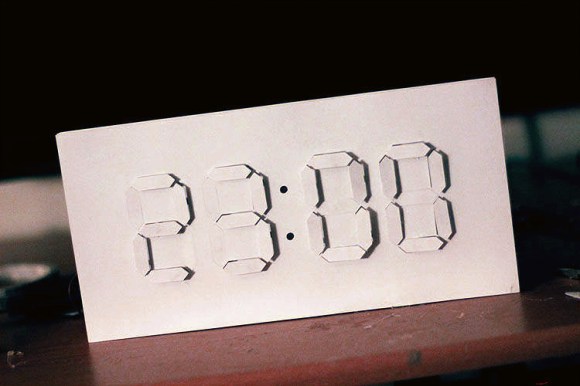
Segments rise from a sheer white surface to reveal the time in this papercraft digital / analog clock build by [Jacky Mok].

New York-based designer [Alvin Aronson] is responsible for the original, titled “D/A Clock,” which he built as a student at RISD using Corian instead of paper. [Aronson]’s design is also massive in comparison. It measures one meter wide by a half meter tall. Without access to either a 3D printer or to a laser cutter, [Jacky] instead reduces the scale of his interpretation and relies on cardstock as the primary construction material. His experience with papercraft typography leads to a design that anyone with an Exacto knife and a slice of patience should find manageable. [Jacky] ignores the Exacto option, however, and cuts his pieces with a tool we saw earlier this year: the Silhouette Portrait.

The clock’s electronics include an Arduino Uno, a servo motor controller, twenty-eight servos and an RTC breakout board that handles timekeeping. Each servo drives its own segment by sliding a paperclip forward or backward inside a small, hollow aluminum rod. Though we’re still holding out for a video of the finished papercraft build, you can watch a video of Aronson’s original clock after the break and see what inspired [Jacky’s] design.

Need another clock to envy? Last month’s build by [ebrithil] uses twenty-two servos to individually spin the segments. If you prefer that your clocks light up, [Aaron’s] o-scope transformation has you covered.

Continue reading “An Elegant Timepiece From Paper And A Fistful Of Servos”
The Cramp: A MSP430-powered Crane Lamp

theCramp

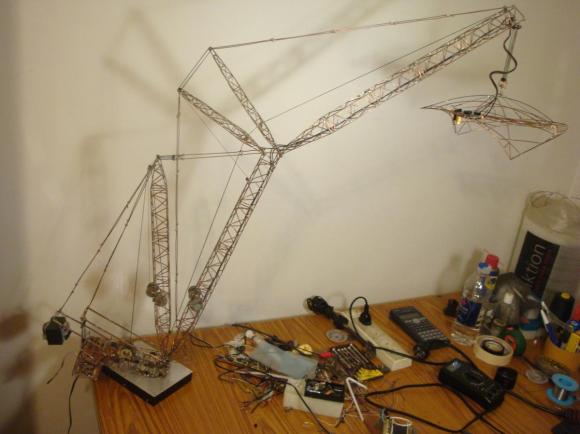
If you think your last project required a lot of soldering, take a look at [Multivac’s] remote controlled and fully-articulable desktop crane lamp. Sure, it’s a 430 microcontroller combined with an LED driver, 32 LEDs, PWM control, and some moving parts: but take a closer look at the structure. The Cramp uses an old HDD as its base, with the crane spinning around the main bearing that previously supported the platter. A system of spools and pulleys provides a reasonable range of motion to the rest of the build. Relocating the entire assembly, however, is evidently an unpleasant task.

[Multivac] based his design on a Liebherr LR1750 Crawler Crane, which he meticulously pieced together using leftover copper salvaged from an upgrade to his home’s mains wiring. A mountain of solder secures what must include several hundred joints—possibly more. The head of the lamp is an elegant exoskeleton-interpretation of industrial designer Eero Saarinen’s TWA Flight Center. You can see the Cramp in action in the video below.

Continue reading “The Cramp: A MSP430-powered Crane Lamp”

Taming STM32 Discovery Boards For Regular Use

taming-discovery-boards

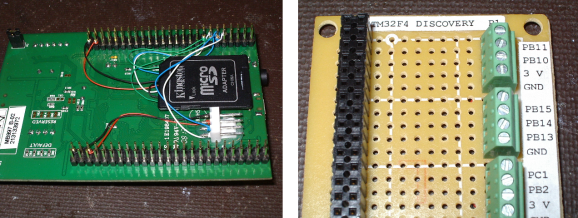
We think [Karl Lunt] has a point when he says that the STM32 Discovery Boards are cool and inexpensive, yet not hobby friendly. But it’s nothing that a little big of creativity can’t solve. Above are pictured three of the hacks he used to tame the Discovery boards.

The first is the addition of a microSD card adapter. He soldered wirewrap wire to each of the contacts on the adapter. He recommends a low iron setting to make sure you don’t melt the plastic adapter housing. He then used double stick foam tape to adhere it to the bottom of the dev board. The other ends of the wire are wrapped around the appropriate pins on the dual-row pin header. Similarly, the UART3 connections are broken out from the pin headers to that white quick connect socket. This lets him access serial data without having to solve the USB issues that were vexing him.

Finally, he made his own daughter board to break out the dual row headers into screw terminals. We’ve been hit with problems interfacing hardware with the board’s native connections — jumpering to IDE cables just never worked reliably. This breakout board not only makes it simple, but organizes the pins into groups based on their alternate functions.

Do you remember seeing the hacksaw version of this Discovery board which gives you two dev boards for the price of one?

Rekindling Forth With A Propeller Jupiter Ace

Jupiter

The Jupiter Ace was a small membrane keyboard, cassette tape drive computer akin to the ZX Spectrum released in 1982. Priced at £90, it was a little more expensive than its home computer contemporaries, but had a very interesting feature: instead of BASIC, the Ace ran Forth. This interpreted stack-based language is far more capable than the BASIC variants found on home computers of the day, but unfortunately the Ace failed simply because Forth was so foreign to most consumers.

Not wanting to let a good idea die, [prof_braino] is bringing Forth back into the modern age. He’s using a Parallax Propeller to emulate a simple home computer running Forth. Instead of a book-sized computer, the new Propeller version runs on a single chip, with 8 CPU cores running 24 times faster than the original, with 32 times more RAM and an SD card for basically unlimited storage.

Electric Imp As An Internet To RF Gateway

a-little-automation-with-the-electric-imp

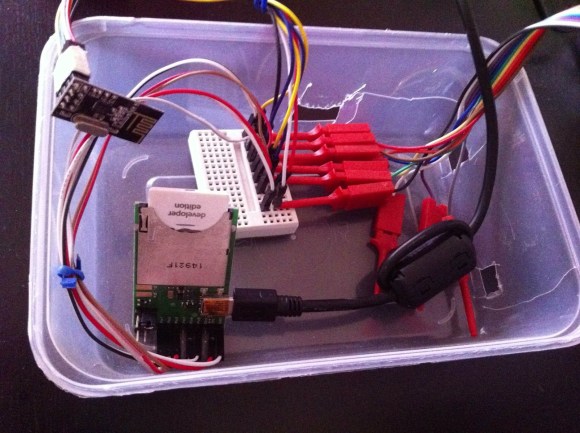
This project is a study in connecting several different families of hobby electronic hardware. The image above shows the Electric Imp side of things. It bridges its Internet connection with the RF connections of the rest of the project.

The Imp is a peculiar (intriguing?) piece of hardware. Take a look at [Brian Benchoff’s] hand’s on experience with the SD form factor hardware which is not an SD card at all. It’s an embedded system which uses light programming and a cloud-based software setup to bring wireless Internet to your projects.

In this case [Stanley Seow] started wondering if he needed multiple Imps to connect different parts of his setup. A bit of head scratching led him to the use of nRF24L01 modules which are cheap and easy to use Radio Frequency transceiver boards. He took a partially finished driver project and brought it home to play nicely with the Imp. Now he can use the system to communicate with other components which will eventually be used for home automation. Right now his proof of concept issues wireless commands to an Arduino driving a strip of LEDs.

Using 30 Year Old Microcontrollers

chips

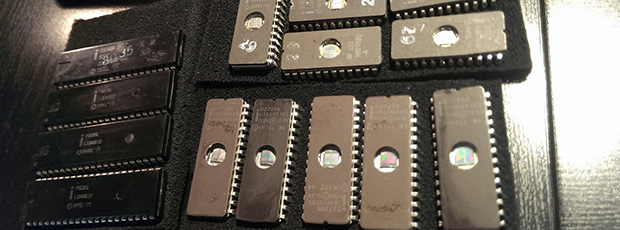
Like a lot of electronic tinkerers, [Andrew] has a lot of ancient components floating around his parts bin. His latest rediscovery in his cornucopia of components are a few Intel MCS-48 microcontrollers, dating back to 1977. Along with a few old EPROMs, [Andrew] decided it was worth getting these chips running again, if only for a historical curiosity.

[Andrew]’s had a few Intel 8035L microcontrollers on his hands, but this particular model of MCS-48 micros lacks any way to store code. This is where the EPROMs come in. With a modern EPROM programmer, [Andrew] was able to write some code to the extremely common for their vintage 27256 EPROMs. Erasing them, though, does require a UV lamp.

With the ROM programmed and the chips connected, [Andrew] was able to make a simple blinking LED circuit. Sure, it’s the simplest thing you can do with a microcontroller, but [Andrew]’s off to a great start in his explorations of older hardware.

Embedded DMX Controller For Burning Man

embedded-dmx-controller

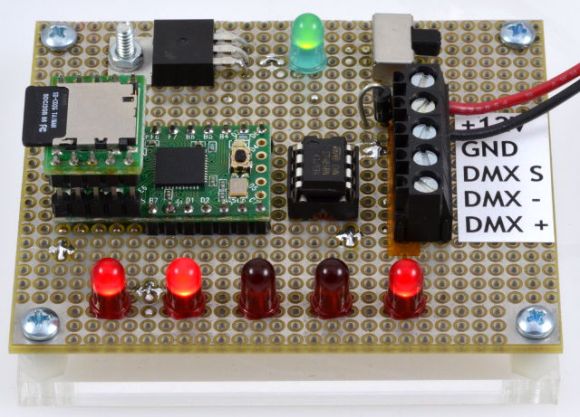
This is the lighting controller [Paul Stoffregen] built for Burning Man. They wanted to go with DMX controlled lighting this year but that most often includes a computer to run the lighting sequences. This board runs the preprogrammed DMX sequence using a hacked lighting design file.

The choreography for the lighting was planned out using a program called Vixen 2. There is one newer version of the software, but [Paul] needed to translate the output file for use with a microcontroller and version 2 makes this a bit easier than version 3. Speaking of conversion, he didn’t want to start from square one and a bit of searching led to a tutorial which [Bill Porter] posted last year on converting Vixen files for use with Arduino. It wasn’t exactly what he had in mind, but most of the ground work was there.

A few code tweaks bent the script to [Paul’s] will. He changed the XML parsing function to ignore all but the main channels in the file. He also had it output a text file which can be stored on the SD card. Because the output is not being flashed to a chip this greatly increases the storage available paving the way for much longer and more complex shows.

Want to learn more about the protocol used by DMX equipment? Check out this primer.