Bananaphone Lets You Use Fruit And Other Things As Switches

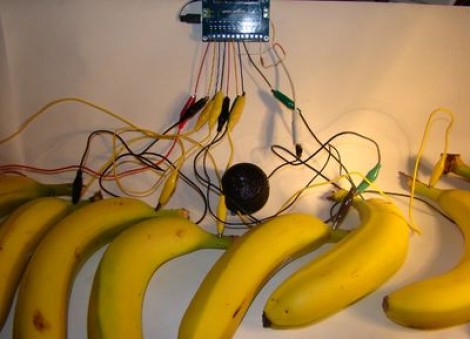
We’re used to [Sprite_TM] rolling out his own hacks hot on the heels of new concepts. Now we’re glad to see that [Jeff Ledger] is doing the same thing here. He was inspired by a Kickstarter project which vows to let you use fruit, clay, and a number of other common (but weird for this use) substances to interface with electronic projects. The mess you see above is the Bananaphone, a synthesizer played with touch sensitive bananas. Think of them as keys on a piano.

The interface works by measuring R/C decay. Each banana is connected to its own input pin on the Propeller board. The capacitance of the bananas rise when you touch them, and this results in a longer R/C decay measurement. Calibrate the target decay period, and you’ve got a reliable capacitive touch sensor which also happens to be delicious. Check out the results which [Jeff] achieves in the video after the break.

Continue reading “Bananaphone Lets You Use Fruit And Other Things As Switches”

Controlling A TV With A Microcontroller

Here’s two builds that print text to a TV with only two pins:

Still Alive with an Arduino

After seeing all the builds that play Still Alive, [Bob] decided to take a 1972 amber monitor and recreate the cut scene at the end of PortalThe build uses the TVout library for Arduino. There were a few problems with running the Unix and Still Alive animations at the same time, so [Bob] flips a bit in the EEPROM at the end of the command line animation and restarts into GLaDOS’ report. You can check out the old school color monitor here

ATMega Video Text Generator

[Stian] didn’t think his build was good enough for Hackaday, but his friend [Mikael] thought otherwise. [Stian] wrote a library to generate an NTSC video signal in real time. It’s a text-based build with 37×17 character resolution and only requires about 3kB of RAM. As a bonus, it only takes up two pins on [Stian]’s ATMega128.

You can check out the videos for both these builds after the break.

Continue reading “Controlling A TV With A Microcontroller”

Morse Code Interpreter

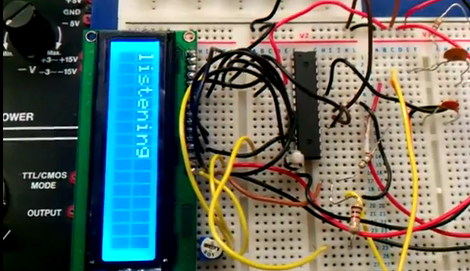
[Sulaiman Habsi] and two classmates put together a Morse Code interpreter as a class project at Sultan Qaboos University. The system listens to a morse code signal using a microphone, then translates that input to text which is displayed on this character LCD.

The breadboarded circuit feeds an audio signal from the microphone, through an OpAmp, to the ADC of an ATmega8 microcontroller. The captured signal is stored as a byte in a special way. The three least-significant bits signify how many total dots or dashes are contained in the character, the remaining bits represent those dots and dashes with zeros and ones. A full description of this process is included in a PDF linked in the article above. As you can see in the video after the break, the hardware waits to process all of the signals once the full message has been received.

This would be a great add-on for a Morse Code practice keyer.

Continue reading “Morse Code Interpreter”

One Wire Reads The Keypad From The APRS Radio Mic

[Shane Burrell] decided to spend some time learning how the keypad on the his Kenwood TM-710A APRS radio mic works. It uses a different technique than you might think. Normally a grid of buttons is scanned as a matrix to detect keypresses, but this hardware actually counts pulses on a serial wire to take each reading.

The stock radio sends a steady digital pulse to the handset and with each pulse the mic pulls the line low. It then uses a 4017 decade counter to see what comes back. If the edge count matches it means nothing is pressed, but a change in the number of pulses returning to the base unit can be used to extrapolate which button has been pressed.

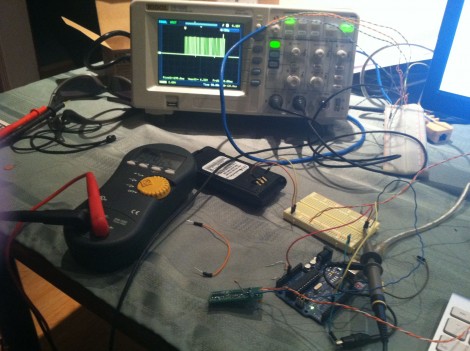
[Shane] went on to implement this control technique using an AVR chip in place of the  radio base unit. He used the data gained from measuring the pulse behavior using an oscilloscope to write the firmware for the project. He filmed a bit of a demo after the break which shows his findings.

We’re not quite sure how this would translate into your own home-brew projects, but the thought of scanning a keypad with two pins of a uC is quite desirable. Sure there is the 555-timer frequency technique, but we’re always down with new ideas.

Continue reading “One Wire Reads The Keypad From The APRS Radio Mic”

Level Conversion With Plenty Of Options

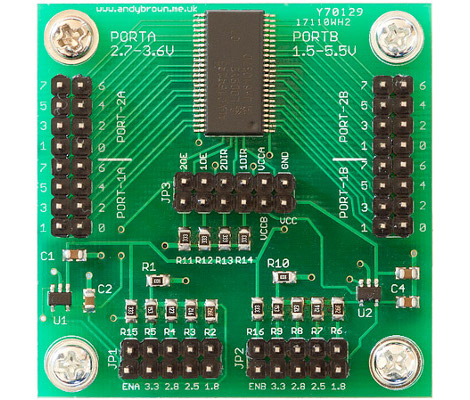
[Andy Brown] wanted one level converter to rule them all, so he set out to build his own which included plenty of options.

The chip at the top and center is a pretty neat little device. It’s an NXP 74ALVC164245DL. In addition to having an incredibly long and seemingly meaningless part number, it contains a pair of bi-directional octal ports. It runs very fast (about 333 MHz) and supports voltages up to 5V on one side, and up to 3.3V on the other. As long as you stay below those maximums you can choose your own target voltages. To do so, he included a couple of adjustable voltage LDOs which are set using jumpers.

But wait, [Andy’s] not finished quite yet. If the jumpers don’t offer the target voltage you’re looking for he also included breakout pins so that you may inject the voltage using an external source. He even included the option to use the LDOs on their own, without the level converter. How do you keep all of these configurations straight? He build a little web form that lets you set your desired parameters and it tells you which jumper should be connected.

Music Visualization Generator With A Propeller

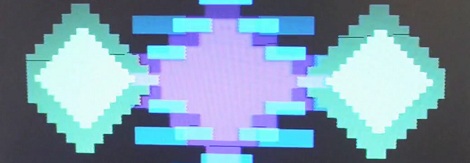
The folks over at Gadget Gangster have been working on a music visualization system using a Parallax Propeller. The visualizations are awesome in their early-90s demoscene way, and of course we love anything using the oft under-appreciated Propeller.

The project is called Video Beats and it generates music visualizations in the style of a blocky but very complex Atari 2600 game. There’s really not much to the build – just two RCA jacks for the audio input and video output along with a couple of resistors – but we do appreciate how nicely this project would fit in at a chiptunes show.

The Gadget Gangster team says the input isn’t limited to just audio – a potentiometer, accelerometer, or even a light sensor can be added to the build for a more dynamic output. After the break, you can see the demo of Video Beats, and a [Family Sohn] music video that used an early version of this circuit.

Continue reading “Music Visualization Generator With A Propeller”

Metal Detection Using An Inductor Instead Of A Clock Crystal.

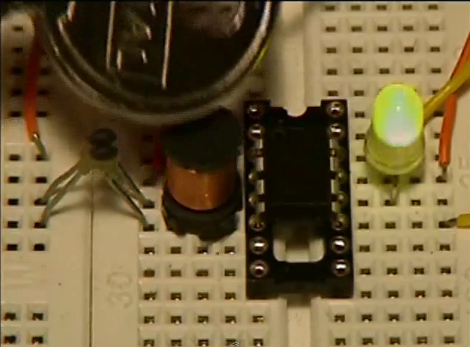
This project from a few years back is an interesting take on a metal detector. Instead of building a detection circuit, [Bruno Gavand] replaced the external clock crystal with an inductor. Here you can see the inductor coil next to the PIC 12F683. You can see two components jumping from one breadboard to the other. These are smoothing capacitors on the inductor lines.

The watchdog timer for the chip is run by the internal RC oscillator. When the external crystal receives a pulse due to metal inducing a current in the coil, the value of the watchdog timer is compared to it. This data is filtered and if the proper parameters are present the green LED blinks. This is bicolor LED. If the inductor circuit is functioning properly it will blink red at power up. [Bruno] says that results will vary based on that inductor so you may need to try a few to get the calibration light to blink.

We’re thinking this would make a simple stud finder (by detecting where the nails/screws are in the wall). Check out the demo after the break, then let us know what you would use this for by leaving a comment.

Continue reading “Metal Detection Using An Inductor Instead Of A Clock Crystal.”