ANT+ Networks Using An MSP430 Chip And Android Phone

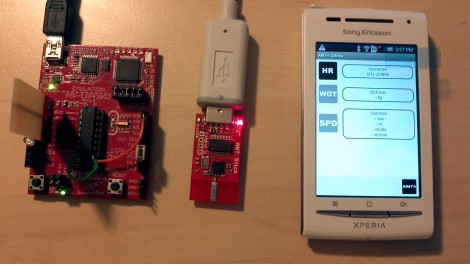
[Jbremnant] wanted to try his hand with ANT+ wireless networks. This protocol is designed for light-weight and low-power consumer electronics, like heart rate chest straps and bicycle computers (Garmin brand devices for example). There are already libraries out there for Arduino, but [Jbremnant] found that most of them were written as slave-only code. He set out to use an MSP430 to drive a fully functioning ANT network including a computer and an Android phone.

The TI Launchpad is used as the master node in the network. [Jbremnant] chose the smaller of the two MSP430 processors that came with the dev platform. After starting down this road he realized that chip didn’t have a hardware UART needed to communicate with the SparkFun ANT board (based on the nRF24AP1 radio chip). Rolling with the punches, he used a software UART he had previously worked with. Now he’s able to transmit test data from the Launchpad. It is picked up by both a USB dongle on his computer and the Android phone seen above. Check out his demo video after the break.

Continue reading “ANT+ Networks Using An MSP430 Chip And Android Phone”
ARM Programming Primer; Getting The USART Running

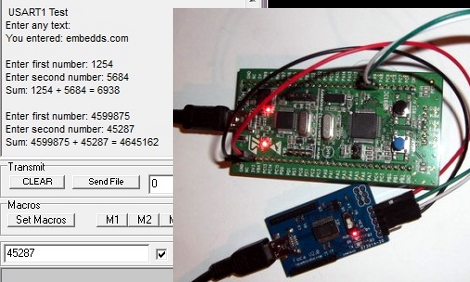
We find it interesting that PIC and AVR programming is very common in hobby electronics but ARM doesn’t have nearly the same foothold. This is partly because there’s a knowledge barrier involved with making the transition (the other part is probably the lack of DIP packaged chips). But if you’ve worked with 8-bit microcontrollers you can certainly make the jump into the 32-bit realm. Here’s a great opportunity to get your feet wet. This guide will show you how to get the USART on an STM32 Discovery Board working, which makes it easy to get feedback about what’s going on in your program.

One difference you’ll notice when moving to ARM microcontrollers is that there is almost always a library bundle available from the manufacturer which includes all of the functions you need for hardware control (USART, USB, Ethernet, ADC, etc.). That’s the case here, so simply including the USART library makes it a snap to finish the rest of the program. Once you hook up your communications hardware (an FTDI cable in this case) just use the library initialization functions, followed by the send and receive commands and you’ll be pushing messages to a computer terminal in no time.

If you’re trying to use the STM32 Discovery Board with a Linux box here’s a shove in the right direction.

Full Featured Security Lock Demonstration

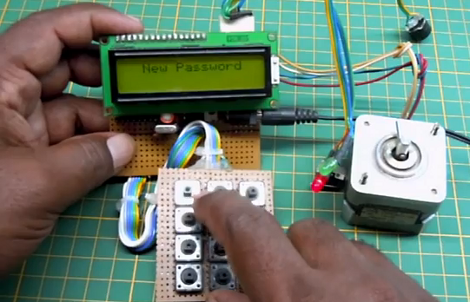
[Arshad Pathan] let us know about his latest project, a modular code lock that can be adapted to many different situations.

The user interface is made up of a character LCD screen and a 3×4 keypad. For this example [Arshad] is using a stepper motor as the locking mechanism. When the board is first powered up it runs the stepper in one direction until receiving input from a limiting switch. In this way, the microcontroller calibrates itself to ensure the lock is in a known position. From there it waits for user input. An unlocked door can be locked at any time by pressing the * key. Unlocking requires entry of the correct password. And a password can be changed by entering 9999 (followed by the old password when prompted).

In the video after the break [Arshad] does a great job of demonstrating the various modes which he has programmed. This stands on its own, but we always love to have more details so we’ve asked if [Arshad] is willing to share a schematic and the source code. We’ll update this post if we hear back from him.

Update: [Arshad] sent in a couple of schematics which can be found after the break.

Continue reading “Full Featured Security Lock Demonstration”

Reading Inputs From Shift Registers Using Just One Single Pin

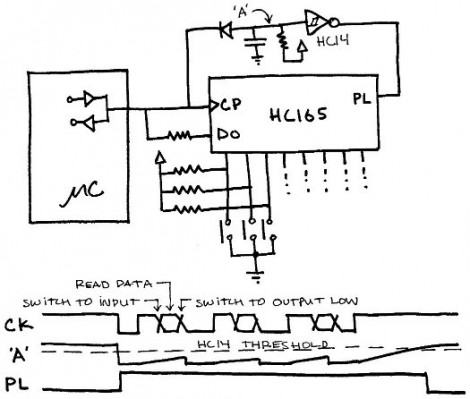
Here’s an interesting article about reading data from shift registers using less than three pins. 74HC165 shift registers are a popular choice for adding inputs to a microcontroller. They have a parallel input register which can be read using the latch, then shifted into a microcontroller via the data and clock pins. For those counting, that’s the three pins normally associated with driving these devices.

This hack first does away with the latch pin. The addition of a carefully trimmed RC circuit (capacitor is charged by the clock pin, then the resistor lets that cap slowly discharge) means that the device will not latch until after the clock stops toggling. This technique drops the control down to just two pins (data and clock). You can still use hardware SPI to read the data using this method. It’s the same as using SPI to drive 595 shift registers except the microcontroller reads data instead of writing it.

But wait, there’s more! The diagram above actually shows a way of reading this shift register with just one pin. Notice that the clock and data pins are now connected to just one of the microcontroller pins. The data pin has an added resistor, which keeps the current low enough that it will not compete with the clock signal coming from the microcontroller. In between clock pulses, the microcontroller switches from output to input to read the data pin on each cycle. Give it a try, it’s a fun experiment!

C Bit Field Structures For Microcontroller Multitasking

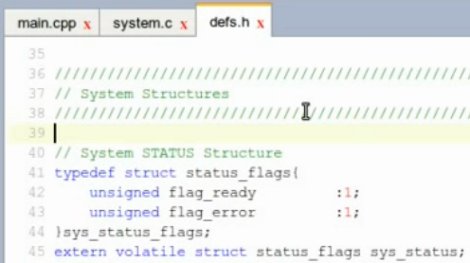
So you’re getting better at programming microcontrollers and now you want to do several things at once? You know better than that, microcontrollers are only capable of processing one thing at a time. But if you’re clever with your coding you can achieve something that behaves as if several things are going on at once. The most common way to do this is to set a flag using an interrupt, then use the main loop to check for that flag. [S1axter] posted a tutorial on this topic where he uses bit field structures to help simplify time sensitive events.

We think [S1axter] did a fantastic job of explaining this moderately difficult topic clearly and quickly. In the video after the break he begins by explaining what a bit field is and how it is defined. Basically you’re using a C structure to track a flag using just one bit of storage. This way the flag is either set or not. We suggest you pay careful attention to how he declares the structures as volatile, so you don’t have unexpected behavior when you try it yourself.

Continue reading “C Bit Field Structures For Microcontroller Multitasking”

Pushing FPGA Config Files Via Serial Using ‘cat’

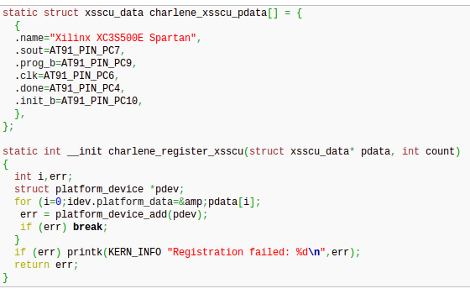
[Andrew] is trying to buckle down and hammer out his PhD project but was surprised by the sorry state of the configuration options for his FPGA/ARM dev board. Using JTAG was painfully slow, so he studied the datasheet to see if there was another way. It turns out the Xilinx FPGA he’s using does have a slave serial mode so he came up with a way to push configuration from the ARM to the FPGA serially.

Four of the connects he needed were already mapped to PortC pins on the AT91SAM9260 ARM System on a Chip. He ended up using the EN_GSM pin on the FPGA, since there is no GSM module on this board; connecting it to the microcontroller with a piece of wire. Now he can SSH into the ARM processor, grabbing information on the FPGA from /dev/fpga0. When it comes time to program, it’s as easy as using the cat command on the binary file and redirecting the output to the same hook.

FIGnition FLINT Is A Stripboard Build Of The Simple Computer

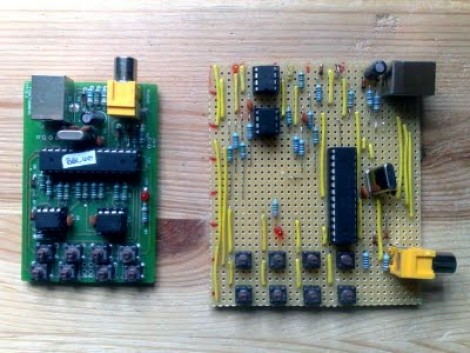
If you want people to really be impressed by your projects it’s often better not to have a fully finished look. In this case, we think hooking the stripboard version of FIGnition up to your TV will raise a lot more eyebrows than the PCB version will.

[Julian] put together a guide to building the computer on strip board. He’s using his own Java application for laying out circuits on this versatile prototyping substrate. This tool is worth a look as it may simplify those point-to-point solder prototypes you’ve been agonizing over. You’ll have to do some poking around on his site to gather all of the knowledge necessary to complete the build. Most of the components are easy to source, but unless you have them on hand, you’ll need put in a parts order for the crystal, the ATmega168, the SRAM chip, and the flash memory chip.

For those not familiar, FIGnition is an 8-bit computer with composite TV-out for a display and rudimentary input from the eight momentary push buttons.