ATtiny Hacks: Look Ma, No Batteries!

ATtiny Hacks Theme Banner

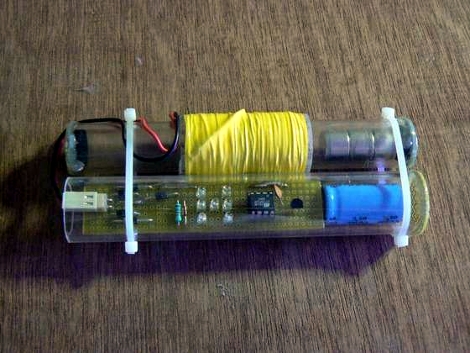
[Gadre] built his own ATtiny project without using any batteries. It’s an electronic Dice (or die if you’re being critical) which uses induction to charge a storage capacitor to act as the power source. The voltage generator is made from a tube of Perspex which houses a set of rare-earth magnets. At the enter of the tube [Gadre] machined a channel wich accepts about 1500 windings of 30 AWG magnet wire. When someone shakes the tube back and forth the magnet passes the wire, inducing a current.  The product is stored in a 4700 uF capacitor, which feeds a boost converter to power the rest of the circuit.

The ATtiny13V that controls the circuit is running its internal RC oscillator at 128 kHz, the lowest setting possible in order to minimize power consumption. After a good shake the user can press a button to roll the die, which is then displayed for several seconds on a group of seven LEDs. See for yourself in the video after the break.
Continue reading “ATtiny Hacks: Look Ma, No Batteries!”

Spinning UV Light Writer

uv_light_writer_ring

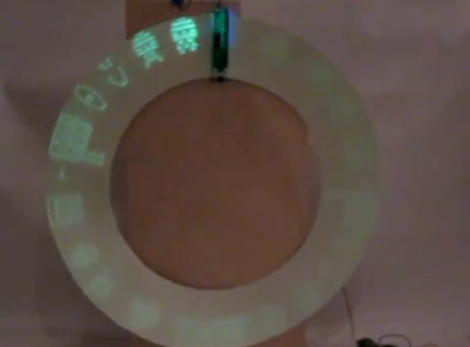
[David] has always wanted use UV LEDs to write on a phosphorescent surface ever since saw an article about it on Make. He accidentally purchased UV LEDs when he meant to buy purple ones, so he figured that his mistake was all the reason he needed to give UV light writing a try.

He built a PIC16F628 UV POV board using the LEDs, and while manually swiping the writer across various glow in the dark surfaces was cool, he wanted to keep the POV board stationary, moving the writing medium instead. He bought some phosphorescent vinyl, but found that it wasn’t too flexible, meaning he could not use a conveyor belt approach for his display. One day it dawned on him that a vinyl ring might work pretty well, and using a motor from an old cassette player, he constructed the UV writer you see above.

It seems to work pretty well despite a small flaw in the UV ring, and while [David] is happy with the results, he already has plenty of ideas in mind for the second revision.

Check out the video of his UV light ring in action after the jump.

[Thanks, Riley]

Continue reading “Spinning UV Light Writer”

Google ADK On An EvalBot

evalbot_google_adk

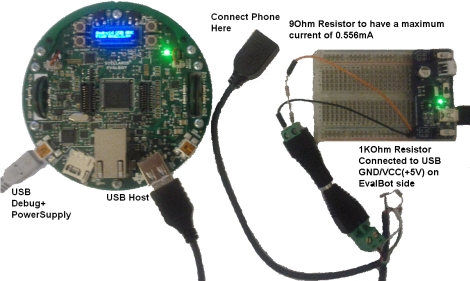
After learning that Google’s ADK relied on using an Arduino-compatible board, [Benjamin] was disappointed that other microcontroller platforms weren’t invited to the party. Rather than switch camps, he took it upon himself to get the ADK working with his EvalBot. In fact, his modifications should allow the ADK to work with nearly any Stellaris ARM kit.

The hack is composed of two parts. The first, and most important bit is the USB host driver he developed to work with the ADK. The code borrows some bits from Texas Instruments, and will be published on GitHub once he gets a chance to clean up the source a bit. To get his phone working with the EvalBot, he also had tweak the external USB power supply in order to provide the current required to operate properly with other USB-connected hardware.

It’s always nice to have more options when working with Google’s ADK, and [Benjamin’s] work is likely a welcome addition to any Stellaris developers toolkit.

Continue reading to see a quick video of his EvalBot ADK demo.

Continue reading “Google ADK On An EvalBot”

Virtual Machine For Microcontrollers Lets You Run Python On AVR Chips

[Clifford Wolf] wrote in to let us know about a project he recently completed called EmbedVM. It’s a virtual machine for AVR microcontrollers. The package has a relatively small overhead, taking up about 3kB of program memory. The VM can execute 74,000 instructions per second, and runs asynchronously from the microcontroller. As [Clifford] demonstrates in the videos after the break, this can be handy for preloading commands to prevent slowdown during heavy VM processor loads.

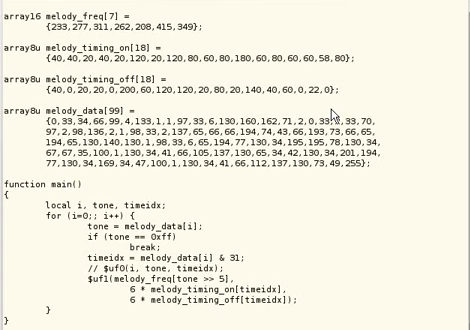
The snippet in the image above is an example program written in the C-like VM code which will play some [Rick Astley] on a speaker. This code can be run from RAM, EEPROM, or even external storage like an SD card. Recently there was a supplemental compiler project that even takes Python code and compiles it into VM byte-code. What a nice abstraction tool for making inexpensive microcontroller-based designs easily programmable for those that have a bit of Python experience.

If you don’t recognize the name, [Clifford Wolf] is also the author of OpenSCAD, a tool that is quite popular with 3D printing.

Continue reading “Virtual Machine For Microcontrollers Lets You Run Python On AVR Chips”

VGA Video Output With An ATtiny

vga_video_attiny

[Fernando] is working on creating a game at home, with live scoring displayed on a large LCD TV. He’s keeping mum as to what the game entails, but he was more than happy to spill the details on how he planned to use the television as a wireless scoreboard.

The writeup is the first part in what will likely be a substantial series of progress reports, covering how he used an ATtiny45 to drive his LCD display. Eventually, the scoreboard will use a Bluetooth adapter for wireless input, but his immediate goal was to get the display running properly.

He explains how he uses the tiny micro and its limited set of I/O pins to drive the display, dipping into some of the technical details along the way. He discusses how he worked out the timings of the VSYNC and HSYNC pulsing, as well as how how the characters are actually drawn on the screen.

The article isn’t overly heavy on the technical details, and he has sample code available so you can take a look at how the VGA magic was done, so be sure to check it out.

Vowel Recognition Using An ATmega644

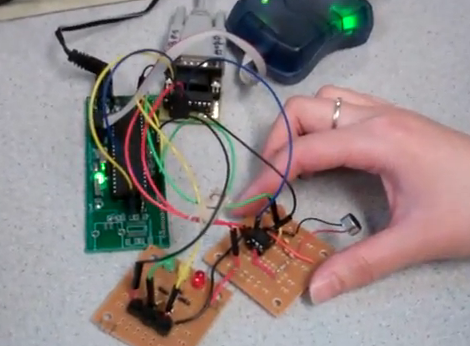
[Youchun Zhang] and [Annie (Wei) Dai] found a way to differentiate vowel sounds using an ATmega644 as their final project for a microcontroller design class. Voice recognition is not out of the ordinary, but most of the time it uses a computer, smart phone, or specially designed hardware. This implementation uses an ATmega644, a microphone connected via an op-amp, and a few buttons. In the demonstration after the break you’ll see that they’re outputting status data to Putty via an RS232 connection, but that’s just so you can see what’s going on inside the chip. It’s what’s doing all of the hard work.

In order to tell the difference between vowels, the waveforms of each sound were analyzed using MATLAB during the research phase. That analysis allowed the team to assemble data for each sound that contained the peaks least often found in the other sounds. Now the microcontroller analyzes incoming sound, comparing it to that data set. The analysis is snappy, happening in real-time thanks to the team’s use of the Fast Walsh Transform. It turns the sound into a set of square waves and presents them as a 64 bit sample. The result can be used as a password protection scheme, but as far as we can tell this doesn’t key to just one person, anyone who knows the vowels of the password can use it.

Continue reading “Vowel Recognition Using An ATmega644”

Making Oscilloscopes From ARM Development Boards

If you’ve got an ARM development board gathering dust in the corner of your shop, perhaps you could repurpose it as an oscilloscope. [Arend-Paul Spijkerman] was able to use an mbed and LPCXpresso as the hardware end of an oscilloscope. He didn’t use a standalone screen as a display, instead opting to push the scope readings from the hardware to a computer for display. This was greatly simplified by using StampDock as a basis for the GUI.

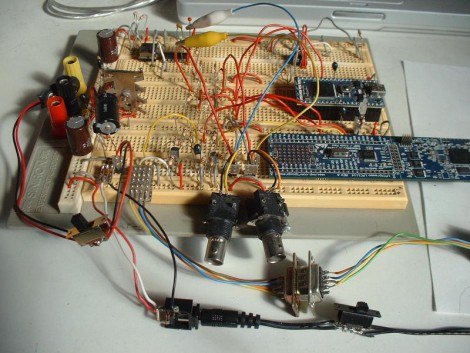
His circuit diagrams calls for an RS-232 connection for the LPCXpresso but not for the mbed. We’re not quite familiar enough with the mbed to know why, but perhaps those in the know can clue us in by leaving a comment. The probe connections are quite simple, each made up of a voltage divider and a pair of diodes. But the breadboard above looks much busier because it has two oscilloscope circuits built on it, and there’s a 10 MHz clock and a 4040 ripple counter which were used to provide a test signal.