Avoid Missed Connections With The Connectorbook’s Web Tool

Connectors are wonderful and terrible things. Wonderful, in that splicing wires every time you need to disassemble something is really, really annoying. Terrible in that it can be just such an incredible pain-in-the-assets to find the right one if you’re stuck with just a male or a female for some unfortunate reason. We’ve all been there, and all spent time growing increasingly frustrated poring over the DigiKey catalog (or its local equivalent) trying to figure out what the heck we were dealing with. That’s why [Davide Andrea]’s The Connectorbook exists–and even better, the free web service they call Identiconn.

The tool isn’t super new–the Wayback Machine has snapshots of it dating back to 2021–but it’s still very much worth highlighting. There’s a “quick pick” option that lets you narrow it down with photos, or if you want to get specific there are dozens of filters to try and help you find your exact part. You can filter based on everything from the pitch and geometry of the connectors, to how it terminates, attachments, latches, et cetera. While we can’t guarantee the database is fully exhaustive, it looks pretty darn big, and using it is going to be a lot less exhausting than pouring through catalogs hoping that particular vendor or manufacturer lists the matching part.

Some might argue that this database is not a hack, but it’s certainly going to enable a certain amount of hacking. That’s why we’re grateful to [Alex] for the tip! If you’ve got a know tool you think we all should know about that hasn’t been shared yet, please let us know.


What Happened To Running What You Wanted On Your Own Machine?

When the microcomputer first landed in homes some forty years ago, it came with a simple freedom—you could run whatever software you could get your hands on. Floppy disk from a friend? Pop it in. Shareware demo downloaded from a BBS? Go ahead! Dodgy code you wrote yourself at 2 AM? Absolutely. The computer you bought was yours. It would run whatever you told it to run, and ask no questions.

Today, that freedom is dying. What’s worse, is it’s happening so gradually that most people haven’t noticed we’re already halfway into the coffin.

Continue reading “What Happened To Running What You Wanted On Your Own Machine?”

Open Source Hack Lets The Razer Nari Headset Work With Linux

The Razer Nari is a decent wireless headset, but it’s a little oddball—because it uses a bespoke USB dongle for pairing. This is all well and good if you’re using a supported configuration; plug it into a Windows PC, run the utility, and you’re good to go. If you’re a Linux user, though, you were out of luck—but [JJ] has just solved that problem.

The tool was created by reverse engineering the pairing protocol used by Razer’s own proprietary software. [JJ] figured out the necessary pairing command, and how to send it to both the dongle and the headset. The headset itself must be connected by a USB cable when initiating the pairing process.

[JJ] believes the tool should work with any Razer Nari and dongle variant. However, the Nari Ultimate and Nari Essential models are yet to be tested, with verification still required. However, the pairing commands were extracted from Razer’s own tool and don’t appear to differ so it should probably work across the boardSetup is still a little fussy, particularly to get both the Game Audio and Chat Audio outputs working under Linux. However, [JJ] has helpfully provided the necessary detail to get everything up and running with PulseAudio and PipeWire setups.

Proprietary hardware can be frustrating to work with at times, but that’s never stopped hackers from reverse engineering their way to success before. If you’ve got your own projects in this vein, don’t hesitate to notify the tipsline!

Blinking An LED With A Single Transistor

Let’s say you want to blink an LED. You might grab an Arduino and run the Blink sketch, or you might lace up a few components to a 555. But you needn’t go so fancy! [The Design Graveyard] explains how this same effect can be achieved with a single transistor.

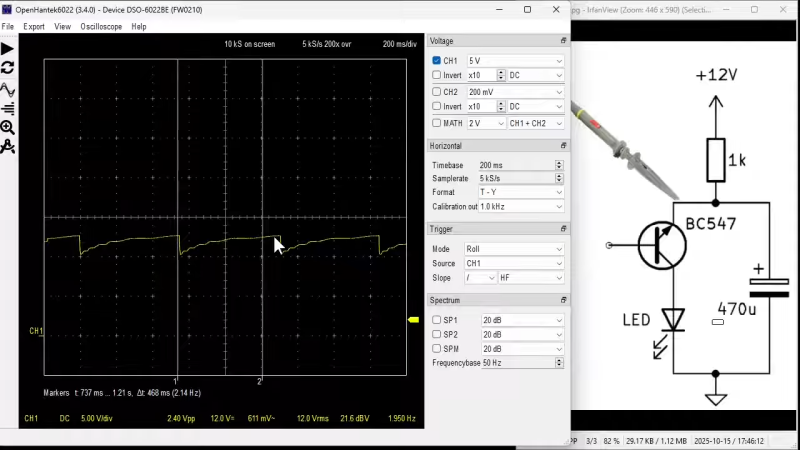
The circuit in question is rather odd at first blush. The BC547 NPN transistor is hooked up between an LED and a resistor leading to a 12V DC line, with a capacitor across the emitter and collector. Meanwhile, the base is connected to… nothing! It’s just free-floating in the universe of its own accord. You might expect this circuit to do nothing at all, but if you power it up, the LED will actually start to flash.

The mechanism at play is relatively simple. The capacitor charges to 12 volts via the resistor. At this point, the transistor, which is effectively just acting as a poor diode in this case, undergoes avalanche breakdown at about 8.5 to 9 volts, and starts conducting. This causes the capacitor to discharge via the LED, until the voltage gets low enough that the transistor stops conducting once again. Then, the capacitor begins to charge back up, and the cycle begins again.

It’s a weird way to flash an LED, and it’s not really the normal way to use a transistor—you’re very much running it out of spec. Regardless, it does work for a time! We’ve looked at similar circuits before too. Video after the break.

Continue reading “Blinking An LED With A Single Transistor”

Classy Desk Simulates Beehive Activity

Beehives are impressive structures, an example of the epic building feats that are achievable by nature’s smaller creatures. [Full Stack Woodworking] was recently building a new work desk, and decided to make this piece of furniture a glowing tribute to the glorious engineering of the bee. (Video, embedded below.)

The piece is a conventional L-shaped desk, but with a honeycomb motif inlaid into the surface itself. [Full Stack Woodworking] started by iterating on various designs with stacked hexagons made out of laser cut plywood and Perspex, filled with epoxy. Producing enough hexagons to populate the entire desk was no mean feat, requiring a great deal of cutting, staining, and gluing—and all this before the electronics even got involved! Naturally, each cell has a custom built PCB covered in addressable LEDs, and they’re linked with smaller linear PCBs which create “paths” for bees to move between cells.

What’s cool about the display is that it’s not just running some random RGB animations. Instead, the desk has a Raspberry Pi 5 dedicated to running a beehive simulation, where algorithmic rules determine the status (and thus color) of each hexagonal cell based on the behavior of virtual bees loading the cells with honey. It creates an organic, changing display in a way that’s rather reminiscent of Conway’s Game of Life.

It was a huge build, but the final result is impressive. We’ve featured some other great custom desks over the years too. Video after the break.

Continue reading “Classy Desk Simulates Beehive Activity”

Decoding A 350 Year Old Coded Message

Usually, a story about hacking a coded message will have some computer element or, at least, a machine like an Enigma. But [Ruth Selman] recently posted a challenge asking if anyone could decrypt an English diplomatic message sent from France in 1670. Turns out, two teams managed it. Well, more accurately, one team of three people managed it, plus another lone cryptographer. If you want to try decoding it yourself, you might want to read [Ruth’s] first post and take a shot at it before reading on further here: there are spoilers below.

No computers or machines were likely used to create the message, although we imagine the codebreakers may have had some mechanized aids. Still, it takes human intuition to pull something like this off. One trick used by the text was the inclusion of letters meant to be thrown out. Because there were an odd number of Qs, and many of them were near the right margin, there was a suspicion that the Qs indicated a throw-away character and an end of line.

Continue reading “Decoding A 350 Year Old Coded Message”

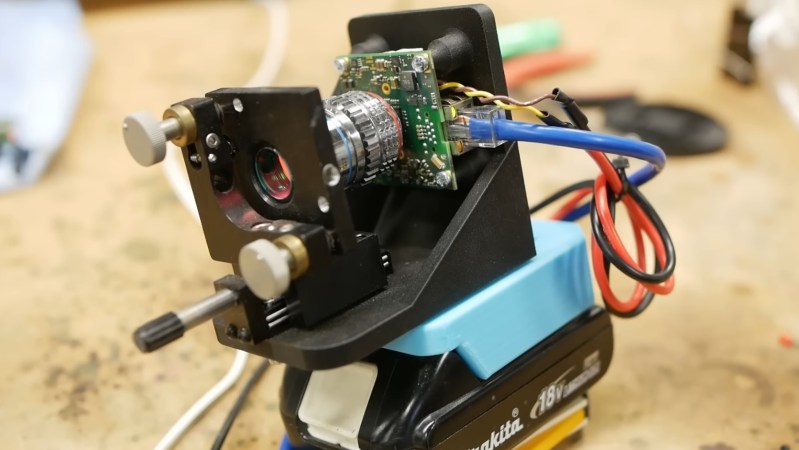
A photo of the camera.

F/0.38 Camera Lens Made With Oil Immersion Microscope Objective

Over on YouTube [Applied Science] shows us how to make an f/0.38 camera lens using an oil immersion microscope objective.

The f-number of a lens indicates how well it will perform in low-light. To calculate the f-number you divide the focal length by the diameter of the aperture. A common f-number is f/1.4 which is generally considered “fast”.

We are told the fastest commercial lens ever used had f/0.7 and was used by Stanley Kubrick to shoot the film Barry Lyndon which was recorded only with candle light.

A microscope objective is a crucial lens that gathers and magnifies light to form an image. It plays a key role in determining the quality and clarity of the final magnified image produced by a microscope.

Continue reading “F/0.38 Camera Lens Made With Oil Immersion Microscope Objective”