WISP Needs No Battery Or Cable

One of the problems with the Internet of Things, or any embedded device, is how to get power. Batteries are better than ever and circuits are low power. But you still have to eventually replace or recharge a battery. Not everything can plug into a wall, and fuel cells need consumables.

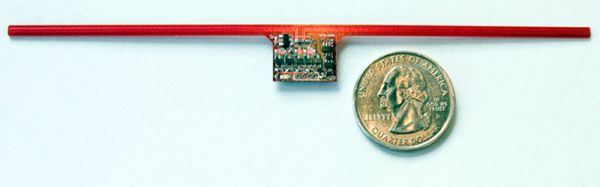
University of Washington researchers are turning to a harvesting approach. Their open source WISP board has a sensor and a CPU that draws power from an RFID reader. To save power during communication, the device backscatters incoming radio waves, which means it doesn’t consume a lot of its own power during transmissions.

The big  news is that TU Delft has contributed code to allow WISP to reprogram wirelessly. You can see a video about the innovation below. The source code is on GitHub. Previously, a WISP had to connect to a PC to receive a new software load.


Continue reading “WISP Needs No Battery Or Cable”

The MakerBot Obituary

MakerBot is not dead, but it is connected to life support waiting for a merciful soul to pull the plug.

This week, MakerBot announced it would lay off its entire manufacturing force, outsourcing the manufacturing of all MakerBot printers to China. A few weeks ago, Stratasys, MakerBot’s parent company, released their 2015 financial reports, noting MakerBot sales revenues have fallen precipitously. The MakerBot brand is now worth far less than the $400 Million Stratasys spent to acquire it. MakerBot is a dead company walking, and it is very doubtful MakerBot will ever be held in the same regard as the heady days of 2010.

How did this happen? The most common explanation of MakerBot’s fall from grace is that Stratasys gutted the engineering and goodwill of the company after acquiring it. While it is true MakerBot saw its biggest problems after the acquisition from Stratasys, the problems started much earlier.

Continue reading “The MakerBot Obituary”

This Teddy Bear Steals Your Ubuntu Secrets

Ubuntu just came out with the new long-term support version of their desktop Linux operating system. It’s got a few newish features, including incorporating the “snap” package management format. One of the claims about “snaps” is that they’re more secure — being installed read-only and essentially self-contained makes them harder to hack across applications. In principle.

[mjg59] took issue with their claims of increased cross-application security. And rather than just moan, he patched together an exploit that’s disguised as a lovable teddy bear. The central flaw is something like twenty years old now; X11 has no sense of permissions and any X11 application can listen in on the keyboard and mouse at any time, regardless of which application the user thinks they’re providing input to. This makes writing keylogging and command-insertion trojans effortless, which is just what [mjg59] did. You can download a harmless version of the demo at [mjg59]’s GitHub.

This flaw in X11 is well-known. In some sense, there’s nothing new here. It’s only in light of Ubuntu’s claim of cross-application security that it’s interesting to bring this up again.

xeyes

And the teddy bear in question? Xteddy dates back from when it was cool to display a static image in a window on a workstation computer. It’s like a warmer, cuddlier version of Xeyes. Except it just sits there. Or, in [mjg59]’s version, it records your keystrokes and uploads your passwords to shady underground characters or TLAs.

We discussed Snappy Core for IoT devices previously, and we think it’s a step in the right direction towards building a system where all the moving parts are only loosely connected to each other, which makes upgrading part of your system possible without upgrading (or downgrading) the whole thing. It probably does enhance security when coupled with a newer display manager like Mir or Wayland. But as [mjg59] pointed out, “snaps” alone don’t patch up X11’s security holes.

All Prior Art

Disclosed herein is a device for gauging medication dosage. The method may include displaying first, second and third navigation controls. A switch is connected in parallel to the relay contacts and is configured for providing a portion of the input power as supplemental load power to the output as a function of back EMF energy.

We’ve had patents on the mind lately, and have been reading a fair few of them. If you read patent language long enough, though, it all starts to turn into word-salad. But with his All Prior Art and All the Claims websites, [Alexander Reben] tosses this salad for real. He’s got computers parsing existing patents and randomly reassembling them.

Rather than hoping that his algorithm comes up with the next great idea, [Alexander] is hoping to nip the truly trivial ones in the bud. Because prior art — the sum of all pre-existing ideas — is enough to disqualify a patent, if an idea is so trivial that his algorithm could have come up with it, it’s sooner or later going to be off the table.

Most of the results are insane, of course. And it seems to be producing a patent at a rate of about one per 10-15 seconds, so we’re guessing that it’ll take quite a few years for these cyber-monkeys to come up with the works of Shakespeare. But with bogus and over-broad patents filtering through the system every day, it’s not implausible that some day it’ll prove useful.

[Via New Scientist, thanks Frank!]

Super Thin Display Makes Your Skin Your Screen

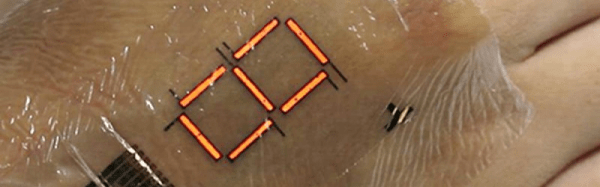
Researchers in Japan have created a 3-micrometer display that looks like plastic wrap and can make any part of your skin into an electronic display. The idea isn’t new, but this display is far thinner and more durable than previous devices. It also lasts longer (several days) and has increased brightness.

The display uses polymer LEDs to form a seven-segment digit, so you aren’t going to stream Netflix to the back of your hand anytime soon.  However, the team wants to build more advanced displays that could one day replace smartwatch or smartphone screens.

Continue reading “Super Thin Display Makes Your Skin Your Screen”

Morse Code Waterfall Is Cooler Than Your Fifth Grade Science Fair Project

For her science fair project, [David]’s daughter had thoughts about dipping eggs in coffee, or showing how dangerous soda is to the unsuspecting tooth. Boring. Instead she employed her father to help her build a Morse Code waterfall.

A more civilized wea-- tool from a more elegant age. Young Jed--engineer.
A more civilized wea– tool from a more elegant age. Young Jed–Engineer.

[David] worked with his daughter to give her the lego bricks of knowledge needed, but she did the coding, building, and, apparently, wire-wrapping herself. Impressive!

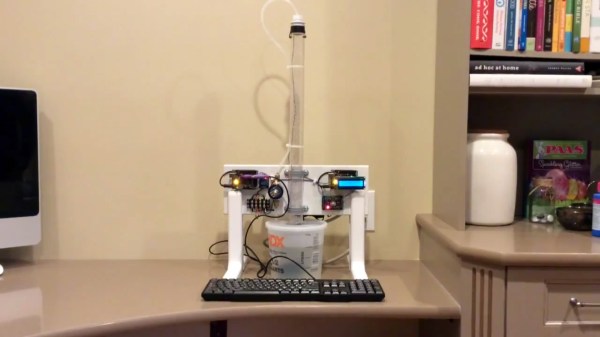
She did the trick with two Arduinos. One controls a relay that dumps a stream of water. The other watches with an optical interrupt made from an infrared emitter and detector pair to get the message.

To send a message, type it in the keyboard. The waterfall will drop spurts of water, and then show the message on the decoder display. Pretty cool. We also liked the pulse length dial. The solution behind the LEDs is pretty clever. Video after the break.

Continue reading “Morse Code Waterfall Is Cooler Than Your Fifth Grade Science Fair Project”

The AAduino Is An Arduino In An AA Battery

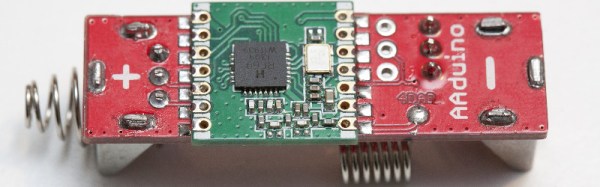
You might think that there could be no form factor that has not as yet had an Arduino fitted in to it. This morning a new one came our way. [Johan Kanflo]’s AAduino is an Arduino clone with an onboard RF module that fits within the form factor of an AA battery. Putting the Arduino inside its own battery pack makes a very neat and compact self-contained unit.

At the heart of the board is an ATmega328 clocked at 8MHz to reduce power consumption and fused to drop out at 1.7V. The radio module is a HopeRF RFM69C which as supplied is a little bit too big for the AA form factor so [Johan] has carefully filed away the edge of the PCB to make it fit. Enough room is left within the shape of an AA cell for a couple of DS18B20 temperature sensors and an indicator LED. He provides a handy buyer’s guide to the different versions of a 3xAA box with a lid, and all the files associated with the project are available in his GitHub repository.

Especially with the onboard radio module we can see that the AADuino board could be a very useful piece of kit. Perhaps for instance it could be used as a very low power self-contained UKHASnet node.

We’ve featured quite a few Arduino clones over the years that try to break the size mould in some way. This stripboard Arduino almost but not quite equals the AAduino’s size, as does this PCB version barely wider than the DIP package of its processor. But the AADuino is a bit different, in that it’s a ready-made form factor for putting out in the field rather than just another breadboard device. And we like that.