Working With The µOLED-128-G1 Display

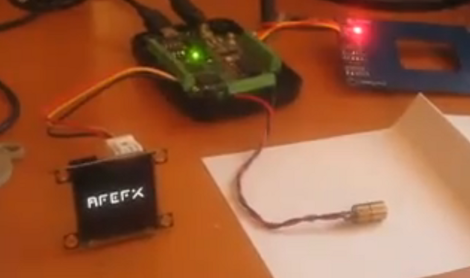
If you’re not already familiar with the 4D Systems µOLED-128-G1 display, [Gary] put together a project that shows some of the features it offers. This is a smart display, having its own onboard microcontroller and a microSD slot. The SD card stores image and video data, while the microcontroller takes care of displaying them based on simple serial commands it receives. This means you can hook it up to a computer or microcontroller and show still or animated sequences with minimal programming effort. We’ve embedded a video after the break, or you can look in on this slot machine project from last year that used the same module.

[Gary] is using a PIC microcontroller programmed with PIC Basic Pro. But most of the work is done with a 4D Systems program called Graphics Composer. You build out the images and animations you want to see on the screen, which are then formatted for the display and written to the SD card. [Gary] mentions that the card is not written using a traditional filesystem, so if you know of another way to write data to and from this card we’d love to hear about it in the comments. The image editing software will also spit out the serial commands necessary to pull your freshly minted graphics up on the display.

Continue reading “Working With The µOLED-128-G1 Display”

Weekly Roundup 9/24/11

In case you missed them, here are the most popular posts from this past week.

Our most popular post is about a hand-made security robot that any good hacker would be proud of. This robot was built by a father-daughter team and has an interesting holonomic drive train that allows it to drive in any direction at any time.

Our next most popular post was about eight breadboard hacks that let you do more with your breadboard than you previously thought possible.

Following that is a post dealing with what you can do with a dead laptop battery. Surprisingly, not all of the cells are dead so there is still useful life in some of them.

Next we have a post about an electronic cello that uses a combination of a magnetic pickup for the bow and resistive strips for the strings. There is even a video of it being played.

Finally, for those of you looking to grow things indoors throughout the year, we have a post about a hydroponic setup.

Modifying DD-WRT’s Protected GUI

hacking_the_ddwrt_gui

[Craig] is always keeping busy by deconstructing and poking around in various firmware images. This time around he has taken on the task of modifying the DD-WRT package, a popular replacement firmware for SOHO routers.

While the firmware is released under the GPL, [Craig] cites that it’s pretty difficult to build from source. Instead, he says that the typical course of action is to extract files from the firmware image, alter them, then reconstruct the image. This works for most things, but the DD-WRT GUI files are protected in order to prevent modification.

Since the phrase “you are not allowed to do that” doesn’t exist in his vocabulary, [Craig] set out to see if he could make his way around the protections and change the GUI code. It took quite a bit of digging around using IDA Pro and readelf, but he was eventually able to extract, tweak, then reinsert individual pages back into the firmware image.

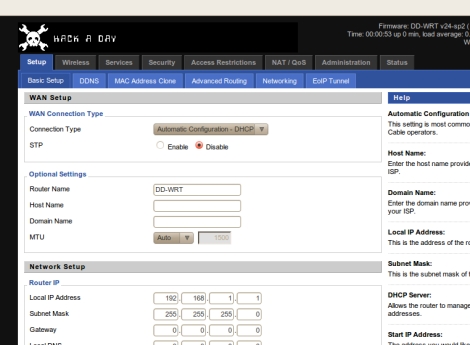
The process is pretty time consuming, so he put together a tool called webdecomp that automates the extraction and rebuilding of DD-WRT’s web page file. If you’re interested in rocking a custom Hackaday-branded router interface like the one shown above, be sure to swing by his site and grab a copy of webdecomp.

Video: Eagle CAD Layout

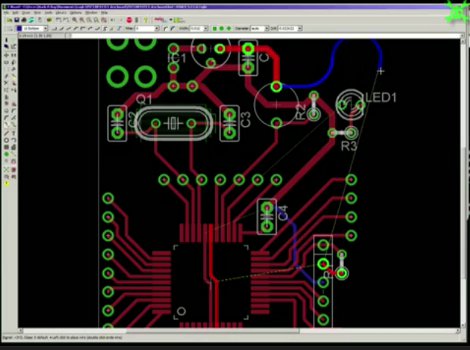
This week’s video is the last in a series of videos where we show how to use Eagle CAD. Today we will look a the Layout portion of the program and will create a circuit board from the schematic that we created previously. We start by creating a layout file and then moving all of the parts to appropriate places on the circuit board. After that, [Jack] shows how to route the traces. Along the way, he talks about the tools that he is using and various ways to use them. The end result is a prototyping board for the PIC18F44J11.

Like the others, this video is fairly long at 29 minutes, so make sure to have some time dedicated towards watching it if you do.

In next week’s video, we will be showing this board as it arrived to us from a manufacturer and will do a tutorial on how to solder.

If you have missed our previous videos, you can find them here:

Schematic part I
Schematic and Custom part creation
CAM Processor

We have also created many supplemental videos explaining how to use many of the tools in the tool palettes. You can find them on our Youtube channel:

Check out the video after the break!
Continue reading “Video: Eagle CAD Layout”

Hackaday Birthday Cake!

[Alex], aka [Grovenstien] turned 30 this weekend. After a conversation with his sister, where she asked: “what was that website with the skull that you always look at?”, he thought maybe he’d get a sticker or a shirt. She surprised him with this totally awesome birthday cake! There really aren’t any build details, but you can pretty much see that it has LEDs for eyes as well as some crazy sparkler effects going on as well. What we’re particularly impressed with is the fact that everything was hand cut, even that crisp text at the bottom. Happy Birthday [Grovenstien] and awesome job big sister!

check out the rest of the pictures after the break.

Continue reading “Hackaday Birthday Cake!”

Weekly Roundup 9/17/11

In case you missed them, here are our most popular posts from the past week.

Our most popular post from the past week was one where we show a project where [Linas] built his own CT scanner and then used those scans to create 3D models.

Our next most popular post was an Engine Hack from the previous theme where [Mike] built a jet out of pipe fittings and motorcycle parts.

Next up is a post that will be of interest to folks who like their privacy. This post shows a project that simulates a trip wire using a laser beam. The end result is the same though. Cross the beam, hear it scream.

Our forth most popular post was one about a robot that can climb walls and then parachute back down to do it again… provided that it has a team of students ready to catch it on a tarp at the bottom.

Finally, we have a post that describes how to create a circuit board out of a piece of glass. The author is using it for a touch-sensitive button interface.

Microchip Puts Up Two $1000 Prizes For USB And TCP/IP Stacks!

microchip_call_for_open_source

A couple of weeks ago we put up a post titled Addressing Microchip’s open source problem where we talked about some of their shortcomings as far as open source code goes, specifically the TCP/IP stack and the USB stack. The comments were predictably fairly negative. The interesting part here is that Microchip actually listened. If you read through all of the comments, you will get a bit of an inside look at what is going on internally at Microchip. At the very end, [Marc] from Microchip left a couple of comments outlining a pair of prizes for independently ported stacks for TCP/IP and USB. Microchip can’t fully open the ones that they have because of legal reasons so they need the help of the development community and they are putting up $1000 for each one to prove that they are serious. If you follow this link you will arrive at a page outlining the rules for the contest.

The gauntlet has been dropped! Do you have chops to pull this off and earn yourself a cool $1000?