Update: Androcade 2.0

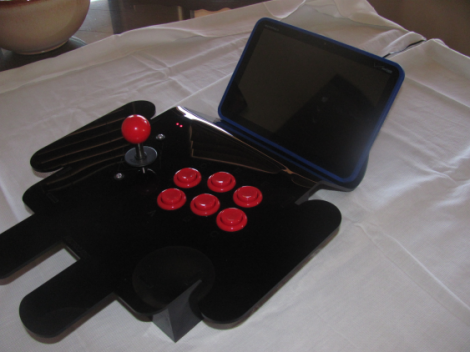
[Chris] has been going about his business, letting his interest guide him as it will. But always in the back of his mind is his Androcade project, and he’s spent the last year making improvements. It’s an arcade controller for playing games on an Android tablet. It connects to the device via Bluetooth, and includes a built-in stand.

His original version was featured here last year. It was made from wood (with a nice Android green finish) and included three buttons and a joystick. This time around he moved to some black laser-cut acrylic for the case, and has doubled up on the buttons. It also now enumerates as an HID Bluetooth device, whereas before it was pushing serial data over the BT connection.

He’s had enough interest from his friends to also create an iPad version all in white. It connects and works just the same as the Android flavor. Check out a bit of Donkey Kong gameplay after the break.

Continue reading “Update: Androcade 2.0”

NES Controllers For Any Bluetooth Application

[Dustin Evans] wanted to used his original NES controllers to play emulated games. The problem is he didn’t want to alter the classic hardware. His solution was to use the connectors and enclosure from a dead NES to build a Bluetooth translator that works with any NES controller.

Here he’s showing the gutted half of an original NES. Although the motherboard is missing, the connectors for the controllers are still there. They’ve been rewired to an Arduino board which has a BlueSMiRF modem. The controller commands are harvested by the Arduino and sent to whatever is listening on the other end of the Bluetooth connection. He also has plans to add a couple of SNES ports to the enclosure so that those unaltered controllers may also be used.

In the video after the break [Dustin] walks us through the hardware setup. He then demonstrates pairing the device with an Android phone and playing some emulators with the pictured controllers.

Continue reading “NES Controllers For Any Bluetooth Application”

Laptop Touchpad As A Standalone Peripheral

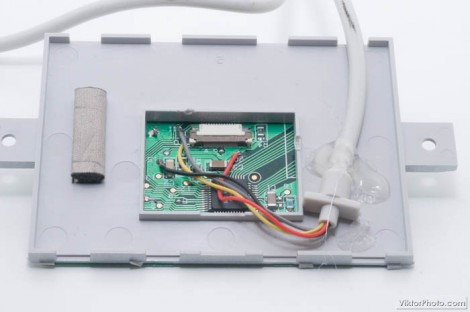
[Viktor] is working on salvaging parts from a dead laptop. In his eyes the biggest gem to be had is the touchpad, so he set out to see if he could make the touchpad a standalone device. You might be envisioning the many hells of interfacing this with a microcontroller and writing firmware to measure and translate the input to HID compatible commands. The good news is it’s quite a bit simpler than that, with just one gotcha.

He looked around to see what he could find about the chip that drives the touchpad. He couldn’t locate an exact match, but a datasheet from a similar family of controllers make him think that there should be a PS/2 data and clock output from the chip. After probing the test points on the board he found them, as well as the voltage and ground rails. Above you can see he soldered an old mouse cable to the board and it works when plugged in.

But we did mention the gotcha. There doesn’t seem to be any support for the right and left buttons. Those were housed on a flexible PCB which attached to the white connector seen above. That PCB also connected to the computer so we don’t know if they will work with this hack or not.

Self-Powered USB Host Mode On The HP Touchpad

touchpad-usb-host-power

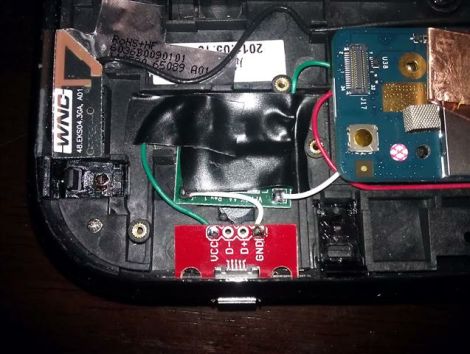
[ften] was having plenty of fun running Android on his HP Touchpad, but he soon discovered that the tablet’s micro USB port didn’t provide enough juice to his peripherals when running in host mode. He started digging around and found the perfect means of providing the extra power while maintaining the device’s stock appearance.

He pried the tablet apart and installed a small DC step up converter in an empty space located behind the Touchpad’s dummy SIM slot. After wiring the converter to the battery terminals, he installed a micro USB adapter in the empty slot, which fit perfectly after a bit of sanding.

He hacked together a USB Y-cable to pull power from his new USB jack, while retaining the existing data connection through the original USB interface. You can see the results of his work in the video below, and while [ften] hasn’t said how much his mod affects the Touchpad’s battery life, he has confirmed that it will still shut down gracefully once you inevitably sap the battery dry.

Continue reading “Self-Powered USB Host Mode On The HP Touchpad”

Standalone USB Temperature Logger

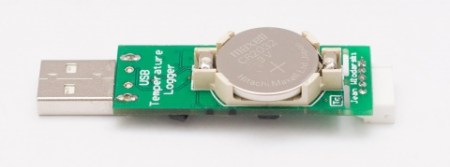
[Jean] wrote in eager to share his latest project, a standalone temperature logger with USB connectivity. Back in November, [Jean] found himself wanting a temperature logger that was roughly the size of a USB memory stick. What he found on the market was not quite adequate in terms of price or size, so he decided to design his own. His would be the size he wanted and wouldn’t require any software or drivers to run. You simply plug it in, edit the configuration text file to set your intervals, and off you go!

You can follow along through the entire design and fabrication on his site. He’s really great about discussing why he made each decision and how he resolved any errors he ran into. You can download the schematics and source code on his site.

Continue reading “Standalone USB Temperature Logger”

Hacking The Kingston Wi-Drive

[Andrew] got his hands on a Kingston Wi-Drive, and being the responsible Hackaday reader he is, spent the better part of a weekend figuring out how to get root on this shiny new toy

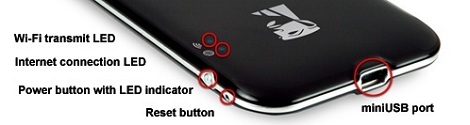
The Kingston Wi-Drive is a small battery-powered Flash drive with a wi-fi adapter in a small, compact case. Even though Kingston is going after a fairly niche market by advertising the Wi-Drive to expand the storage of iOS and Android devices, a network attached storage solution that can fit in a pocket is somewhat interesting. Unfortunately, Kingston decided to lock down the Wi-Drive; [Andrew] can’t even get a terminal running on this little box.

After a weekend, [Andrew] is no closer to his goal of getting root on the Wi-Drive. He suspects the problem may be there simply isn’t a terminal for Telnet to bind to. [Andrew] realized he was a bit out of his league on this hack and decided to open up his research to people much more experienced in embedded Linux environments. If you’ve been playing around with a Wi-Drive, or you want a tiny battery-powered NAS, send us something on the tip line and we’ll follow up on this post.

Defying Gravity For New User Interfaces

[Jinha Lee] at the MIT Media Lab created a new interface allowing new ways to modify and play with 3D objects. It’s called ZeroN, and it’s nothing short of a futuristic device straight out of Star Trek.

ZeroN is simply a platform for levitating a small spherical permanent magnet in 3D space. It does this by mounting a hall effect sensor on an electromagnet. The hall sensor measure the strength of the magnetic field of the ball every few milliseconds and keeps the spherical magnet levitated. To move the object in 3D space, a few webcams track the ball over the platform and tell the electromagnet to move on a CNC-like x y table.

[Jinha] showed off a lot of cool stuff that is possible with the ZeroN; ping-pong is by far the coolest implementation, but it’s also possible to use the magnetic sphere to demonstrate n-body gravity or as a camera flying around a digital scene.

It’s a really amazing piece of work with an exceptional demo video. You can check that video out after the break. Thanks, [ferdinand] for sending this one in.

Continue reading “Defying Gravity For New User Interfaces”