DIY Inkjet Printer Begs To Be Hacked

diy_inkjet

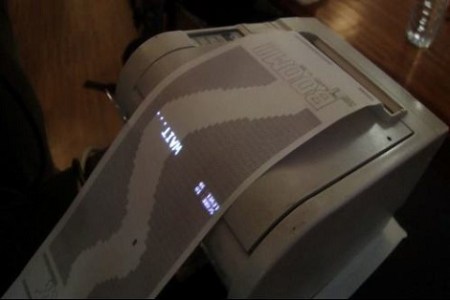
[Nicholas C Lewis, Patrick Hannan, Jared Knutzen, and Joy Markham], students from the University of Washington, have recently taken the wraps off a project which they have been collaborating on, a DIY inkjet printer. The group set out to construct a low cost, open source inkjet printer for personal use that utilizes standard inkjet technology. Their working prototype, pictured above, satisfies all of those requirements, making it an ideal device for the at-home hobbyist.

The printer was constructed from easy to obtain components such as steel rods and stepper motors, along with other parts that can be printed using a RepRap or similar machine. An Arduino Mega manages the steppers and repurposed print head, recreating whatever Processing-generated image it has been given.

The printer is quite a hit so far, and people are already talking about adapting the design to print on spherical objects (think EggBot), to create direct etch resist PCBs, and more. We think it would make a great direct to garment printer with just a few small tweaks.

Check out the short video embedded below to see the printer in action.

[via Make]

Continue reading “DIY Inkjet Printer Begs To Be Hacked”

Fixing POST Errors With A Single Key

one_key_keyboard

Instructables user [Mike Craghead] was in the middle of building a very compact public computer kiosk when he ran into a problem with the processor fan. It was too big for the enclosure and had to be swapped out with a fan that did not allow the motherboard to monitor its rotational speed.

Motherboards don’t like this situation very much, and each time the computer was started, it would hang at the BIOS screen waiting for someone to press the F1 key to continue. Knowing that everything was just fine, and that there were no BIOS options which would allow him to ignore the error, he crafted a simple solution to the problem.

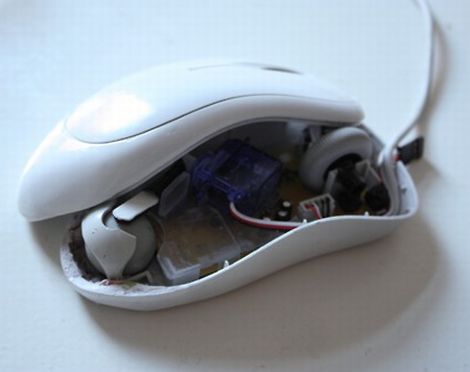
Since the computer just needed someone to press the F1 key, he figured he could rig up a small dongle that would always hold down the key for him. After verifying that the OS would ignore the stuck key, he tore apart a keyboard and traced the circuit matrix to identify which pins he had to short in order to represent the F1 key press.

Satisfied with his handiwork, he plugged the board into his computer and found that everything worked just fine. Sure it might not be the most elegant solution to the problem, but it gets the job done at a cost of zero dollars – you can’t beat that!

Quick Project: Hard Drive System Meter

[Ginge] sent in this fun little project. He gave himself 3 hours to complete a hack (not including research time) and managed to come up with this cool activity meter. He handles the entire project like it is some kind of contest. Ground rules are laid out, requiring practicality of the final product, minimum investment, and almost complete use of junk pile pieces.

Using an old hard drive for the frame of the project as well as the “dial” part of the meter, he hacked together a system load/ hdd and proc activity meter. The brains of the project are an AVR and he even implemented some PWM to smoothing things out. He goes into some fair detail on the construction of the thing (was the writeup included in your build time? -50 points!). Even though he’s using a piece that he manufactures and sells (OSIF), you could probably figure out how to do it without.

You can see a video of it in action after the break

Continue reading “Quick Project: Hard Drive System Meter”

Hardware Handshaking For AVR

Serial communication is still an important part of our embedded world. Typically we use a 3 wire setup (RX TX and GROUND) and hope that everything goes according to plan. Though this works for most experimenters, sometimes its not the most ideal situation.  This is where [simmonmt’s] handiwork comes in adding hardware handshaking to a AVR.

The hardware setup is pretty typical, an Atmega644 sits on one end of the connection, passes through a SP3232EB level shifter and out to a PC. 5 lines are used, again one for RX, TX and GROUND, but also RTS and CTS. When the PC is ready to transmit data it inverts the line (normally held high), the micro controller notices this it pulls CTS low and transmission can commence whenever it darn well feels like it. Handy!

Bluetooth Media Remote In An N64 Controller

[Phik] wrote in to share his very first microcontroller project with us. He built a bluetooth remote in an old Nintendo 64 controller to control an audio application on his computer. He had been building up the individual modules with the controller in mind for some time, but initially had no idea what kind of enclosure to put it in. After a failed attempt at stuffing it into an XBox controller(surely there was enough space), he realized he had a broken N64 controller lying around that he cold use. We think he did a fantastic job of mounting it, it looks almost like a commercial product. He documented the construction and testing of each individual module. You can find each of those broken into their own post on his site by checking out the archives. Great job [Phik], especially for your first project!

Continue reading “Bluetooth Media Remote In An N64 Controller”

Photon Banner

The Revision 2011 demo party that brought us” table for two” a little while ago along with some super demos for PC’s, retro, and state of the art, has also brought us the Photon Banner(google translate). The Photon Banner is a 96X24 led matrix that was made with (of course) 2304 5mm leds, and a atmega 644 clocked at 20MHz.

The end result is a 192cm X 48cm display area that uses the single micro controller, that has been beefed up with 2 megs of SPI flash memory, 6 driver boards, and took about a month just to construct. The software to drive the show took another 15 days, and it is pretty darn impressive.

The website above contains a bunch of photos, parts lists, and schematics. Before you go running off you should join us after the break for a couple of quick videos.

Continue reading “Photon Banner”

Thrift Store Hard Drive Enclosure

[Ken] visited our site looking for case modding stuff a little while back, but more importantly he came back to show off his latest project. Using a jewelry box found at our favorite place, the thrift store, he converted it into a 2.5 inch USB drive enclosure.

Almost instantly he found that this particular jewelry box is a perfect fit for a 2.5 inch SATA laptop drive. Taking that as a sign he whipped up some acrylic mounts and cut some holes for power and USB . The electronics are provided by another enclosure with a dead drive, again acrylic is used to insulate the drive from the decorative metal box and some rubber washers were used to help cancel out vibrations and noise.

The end result is a classy looking 150gig usb drive that looks nice on the desk, and a little reminder that if your not hitting up your local thrift / second hand stores, you could be missing out on some real gems.