Is That A Large Smartwatch? Or A Tiny Cray?

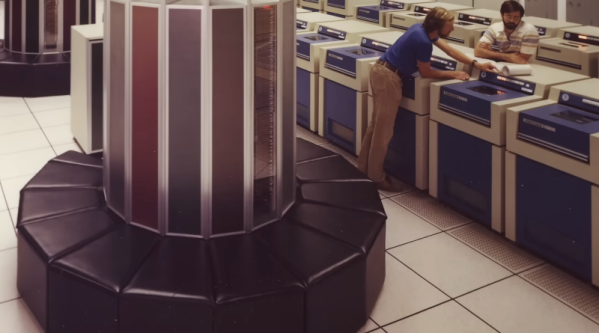
While we aren’t typically put off by a large wristwatch, we were taken a bit aback by [Chris Fenton]’s latest timepiece — if you can call it that. It’s actually a 1/25th-scale Cray C90 worn as a wristwatch. The whole thing started with [Chris] trying to build a Cray in Verilog. He started with a Cray-1 but then moved to a Cray X-MP, which is essentially a Cray-1 with two extra address bits. Then he expanded it to 32 bits, which makes it a Cray Y-MP/C90/J90 core. As he puts it, “If you wanted something practical, go read someone else’s blog.”

The watch emulates a Cray C916 and uses a round OLED display on the top. While the move from 22 to 32 address bits sounds outdated, keep in mind the Cray addresses 64-bit words exclusively, so we’re talking access to 32 gigabytes of memory. The hardware consists of an off-the-shelf FPGA board and a Teensy microcontroller to handle mundane tasks like driving the OLED display and booting the main CPU. Interestingly, the actual Cray 1A used Data General computers for a similar task.

Of course, any supercomputer needs a super program, so [Chris] uses the screen to display a full simulation of Jupiter and 63 of its moons. The Cray excels at programs like this because of its vector processing abilities. The whole program is 127 words long and sustains 40 MFLOPs. Of course, that means to read the current time, you need to know where Jupiter’s moons are at all times so you can match it with the display. He did warn us this would not be practical.

While the Cray wouldn’t qualify as a supercomputer today, we love learning about what was state-of-the-art not that long ago. Cray was named, of course, after [Seymour Cray] who had earlier designed the Univac 1103, several iconic CDC computers, and the Cray computers, of course.

ESP32 Powers Single-PCB ZX Spectrum Emulator

When word first got out that the Chinese board houses were experimenting with full color silkscreens, many in our community thought it would be a boon for PCB art. Others believed it would be akin to cheating by removing the inherent limitations of the medium. That’s not a debate that will be solved today, but here we have an example of a project that’s not only making practical application of the technology, but one that arguably couldn’t exist in its current form without it: a single-PCB ZX Spectrum emulator developed by [atomic14].

There basics here are, well, they’re pretty basic. You’ve got an ESP32-S3, a TFT display, a micro SD slot, and the handful of passives necessary to tie them all together. What makes this project stand out is the keyboard, which has been integrated directly into the PCB thanks to the fourteen pins on the ESP32-S3 that can be used as touch sensor input channels. There are issues with detecting simultaneous keypresses, but overall it seems to work pretty well.

Continue reading “ESP32 Powers Single-PCB ZX Spectrum Emulator”

Early “Computer Kit” Really Just A Fancy Calculator

We’re big fans of calculators, computers and vintage magazines, so when we see something at the intersection of all three we always take a look. Back in 1966, Electronics Illustrated included instructions in their November issue on building, in their words, a “Space-Age Decimal Computer!” using neon lamps, a couple of tubes, and lots of soldering. The article starts on page 39 and it’s made fairly clear that it will be an expensive and complicated project, but you will be paid back many times over by the use and experience you will get!

Our modern idea of a computer differs greatly from the definitions used in the past. As many readers likely know, “Computer” was actually a job title for a long time. The job of a computer was to sit with pen, paper, and later on electromechanical devices, and compute and tabulate long lists of numbers. Imagine doing payroll for large companies completely by hand, every month. The opportunity for errors was large and was just part of doing business. As analog and later transistor-based computers started to be developed, they replaced the jobs of human computers in calculating and tabulating numbers. This is why IBM was originally called the Computing, Recording and Tabulating Company!

Continue reading “Early “Computer Kit” Really Just A Fancy Calculator”

Giant Brains, Or Machines That Think

Last week, I stumbled on a marvelous book: “Giant Brains; or, Machines That Think” by Edmund Callis Berkeley. What’s really fun about it is the way it sounds like it could be written just this year – waxing speculatively about the future when machines do our thinking for us. Except it was written in 1949, and the “thinking machines” are early proto-computers that use relays (relays!) for their logic elements. But you need to understand that back then, they could calculate ten times faster than any person, and they would work tirelessly day and night, as long as their motors keep turning and their contacts don’t get corroded.

But once you get past the futuristic speculation, there’s actually a lot of detail about how the then-cutting-edge machines worked. Circuit diagrams of logic units from both the relay computers and the brand-new vacuum tube machines are on display, as are drawings of the tricky bits of purely mechanical computers. There is even a diagram of the mercury delay line, and an explanation of how circulating audio pulses through the medium could be used as a form of memory.

All in all, it’s a wonderful glimpse at the earliest of computers, with enough detail that you could probably build something along those lines with a little moxie and a few thousands of relays. This grounded reality, coupled with the fantastic visions of where computers would be going, make a marvelous accompaniment to a lot of the breathless hype around AI these days. Recommended reading!

Homebrew Reader Brings Paper Tape Programs Back To Life

We may be a bit biased, but the storage media of yesteryear has so much more personality than that of today. Yes, it’s a blessing to have terabyte SD cards smaller than your pinky nail and be able to access its data with mind-boggling speed. But there’s a certain charm to a mass storage device that can potentially slice off your finger.

We’re overstating the dangers of the venerable paper tape reader, of course, a mass storage device that [David Hansel] recreated a few years back but we only just became aware of. That seems a bit strange since we’ve featured his Arduino-based Altair 8800 simulator, which is what this tape reader is connected to. Mechanically, the reader is pretty simple — just a wooden frame to hold the LEGO Technic wheels used as tape reels, and some rollers to guide the tape through a read head. That bit is custom-made and uses a pair of PCBs, one for LEDs and one for phototransistors. There are nine of each — eight data bits plus the index hole — and the boards are sandwiched together to guide the paper tape.

The main board has an ATmega328 which reads the parallel input from the read head and controls the tape motor. That part is important thanks to Altair Basic’s requirement for a 100- to 200-ms delay at the end of each typed line. The tape reader, which is just being used as sort of a keyboard wedge, can “type” a lot faster than that, so the motor speed is varied using PWM control as line length changes.

Continue reading “Homebrew Reader Brings Paper Tape Programs Back To Life”

Shipping Your Illicit Software On Launch Hardware

In the course of a career, you may run up against projects that get cancelled, especially those that are interesting, but deemed unprofitable in the eyes of the corporate overlords. Most people would move, but [Ron Avitzur] just couldn’t let it go.

In 1993, in the midst of the transition to PowerPC, [Avitzur]’s employer let him go as the project they were contracted to perform for Apple was canceled. He had been working on a graphing calculator to show off the capabilities of the new system. Finding his badge still allowed him access to the building, he “just kept showing up.”

[Avitzur] continued working until Apple Facilities caught onto his use of an abandoned office with another former contractor, [Greg Robbins], and their badges were removed from the system. Not the type to give up, they tailgated other engineers into the building to a different empty office to continue their work. (If you’ve read Kevin Mitnick‘s Ghost in the Wires, you’ll remember this is one of the most effective ways to gain unauthorized access to a building.)

We’ll let [Avitzur] tell you the rest, but suffice it to say, this story has a number of twists and turns to it. We suspect it certainly isn’t the typical way a piece of software gets included on the device from the factory.

Looking for more computing history? How about a short documentary on the Aiken computers, or a Hack Chat on how to preserve that history?

[Thanks to Stephen for the tip via the Retrocomputing Forum!]

Restoring A Vintage CGA Card With Homebrew HASL

Right off the bat, we’ll stipulate that what [Adrian] is doing in the video below isn’t actual hot air solder leveling. But we thought the results of his card-edge connector restoration on a CGA video card from the early 80s was pretty slick, and worth keeping in mind for other applications.

The back story is that [Adrian], of “Digital Basement” YouTube fame, came across an original IBM video card from the early days of the IBM-PC. The card was unceremoniously dumped, probably due to the badly corroded pins on the card-edge bus connector. The damage appeared to be related to a leaking battery — the corrosion had that sickly look that seems to only come from the guts of batteries — leading him to try cleaning the formerly gold-plated pins. He chose naval jelly rust remover for the job; for those unfamiliar with this product, it’s mostly phosphoric acid mixed with thickeners and is used as a rust remover.

The naval jelly certainly did the trick, but left the gold-plated pins a little worse for the wear. Getting them back to their previous state wasn’t on the table, but protecting them with a thin layer of solder was easy enough. [Adrian] used liquid rosin flux and a generous layer of 60:40 solder, which was followed by removing the excess with desoldering braid. That worked great and got the pins on both sides of the board into good shape.

[Adrian] also mentioned a friend who recommended using toilet paper to wick up excess solder, but sadly he didn’t demonstrate that method. Sounds a little sketchy, but maybe we’ll give it a try. As for making this more HASL-like, maybe heating up the excess solder with an iron and blasting the excess off with some compressed air would be worth a try.

Continue reading “Restoring A Vintage CGA Card With Homebrew HASL”