Drill Holes In Your Tablet For Better Sound Quality

diy_tablet_speaker_grilles

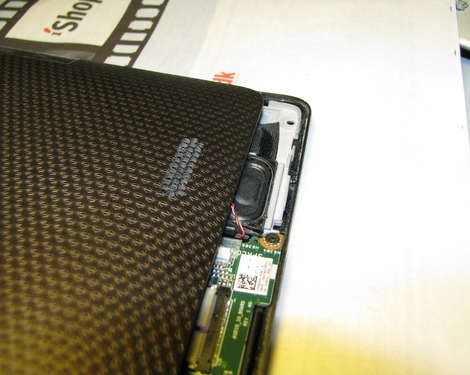
As devices get smaller and smaller, it becomes a bigger challenge for engineers to squeeze a product’s components into an ever shrinking footprint. [Bulgarien] certainly found this to be the case with his Asus Eee Pad Transformer. He was not impressed with the volume or clarity of the tablet’s audio, so he disassembled it to see if he could somehow improve its performance.

Once he got the Eee Pad apart, he noticed that the tiny speakers were mounted directly against the back of the tablet’s LCD screen, muffling the audio. He flipped the speaker over to face the back side of the tablet in hopes that it might improve the sound just a bit, but he didn’t think that was a sufficient solution. Using an old speaker as a template, he drilled through the Eee Pad’s case to create his own speaker grilles, lining the inside with a fine cloth to prevent dust from getting inside the case.

He says that the tablet’s audio is far clearer than it was originally, which makes this a pretty compelling modification for anyone that uses their Transformer on a daily basis.
Adding GPS To A Viewsonic G-Tablet

gtablet_gps

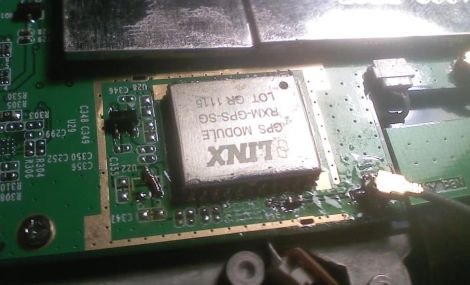
The hackers over at the xda-developers forum always seem to have something awesome brewing, and [fosser2] is no exception. He bought himself a Viewsonic G-tablet, but was a bit disappointed in its lack of a GPS module. He pried the tablet open in hopes of finding a spot where he might be able to cram one in, and was happily surprised at what he found.

It turns out that either Viewsonic had plans to include a GPS module and scrapped them, or they are planning on adding GPS to a future SKU. The tablet’s mainboard already had a spot laid out for the module, as well as the GPS antenna. He carefully soldered in a compatible module from Digikey, and then got to work adding the various other components required to get it working properly.

While the hack doesn’t require that you add a ridiculous amount of parts to the board, you had better make sure your soldering skills are up to snuff before giving it a shot. Those who can’t reliably solder SMD components should probably stay away from this one.

[via Engadget]

RoboTouch Adds Physical Game Controls To The IPad

robotouch

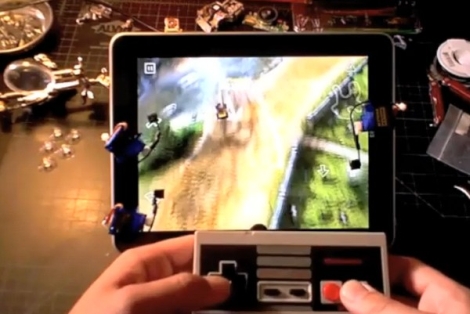
[ProtoDojo] wanted to play a racing game on his iPad, but he was not a big fan of using the touch interface for this particular title. Instead, he put together a pretty neat little hack that allows him to play games on his iPad using an old NES controller.

He built a set of custom conductive arms which he mounted on three micro servos. The servos were attached to the iPad screen using small suction cups in the locations where it expects to receive button presses. They are also wired to an Arduino that interprets button presses from the attached NES controller. When the Arduino senses that the D-pad or buttons have been pressed, it triggers the servos, which in turn press the virtual buttons on the screen.

In the video below, you can see that after adjusting the servo positions, the setup seems to work pretty well. You might expect to see some sort of lag with a setup like this, but we didn’t notice any. The [ProtoDojo] web site is currently down due to heavy traffic, but you should be able to find some more build details there, once it becomes functional again.

Continue reading “RoboTouch Adds Physical Game Controls To The IPad” →

Speeding Up A ThinkPad X41 Via A SATA SSD Conversion

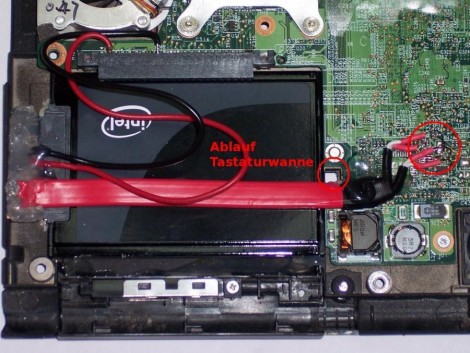
[Marek Walther] uses a ThinkPad x41 tablet for business on a daily basis. Since he’s on the go with the device he figures that hardware failure is eventually going to strike and with that in mind he purchased a second unit – slightly broken – to fix as a backup. He had never been excited about the speed of the tablet so he set out to find improvements. One of the options was to replace the traditional hard drive with a solid state model (translated). But simply dropping in an SSD isn’t going to make things faster. That’s because the stock drive uses a PATA interface. After a bit of snooping [Marek] discovered that the motherboard has a SATA interface that has a bridge connecting to the PATA plug. By removing the bridge and soldering a SATA cable to the board he was able to improve performance while increasing storage capacity at the same time.

Nook Color Gets Honeycomb

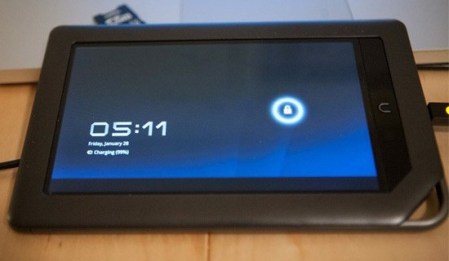
[Deeper-blue] has released all the files necessary to get Android honeycomb working on your nook color. We had a chance to play with the nook color for a bit, but ours was only on Android version 2.1. It seems like they’ve come a long way with the capabilities of this simple e-reader since then.  While he’s built out the majority of the features, it is still lacking some fundamentals, like sound. As you can see in the video after the break, the scrolling is a tiny bit choppy but the applications themselves see to be fairly snappy. We can’t wait to see how this works after a little improvement.


Continue reading “Nook Color Gets Honeycomb” →

Making MSATA Work With Mini PCI Express

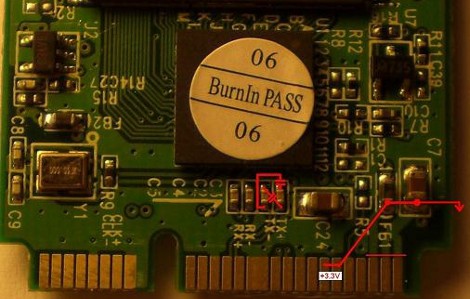
[Trucki] wanted to upgrade the internal storage on his JooJoo. There’s an mSATA connector inside but devices that use that protocol are hard to come by and when you do they’ll cost you and arm and a leg. He knew he could get solid state drives cheaply that use the mini PCI Express standard, which is mechanically compatible with mSATA. So he set out to alter a mini PCI Express device to work with the mSATA protocol. This entails swapping the transmission lines and rearranging the voltage traces on the connector. To handle the TX- and TX+ lines he desoldered their decoupling capacitors and realigned them to trade their signals. For the 3.3V lines he had to cut the feed and solder jumper wire to the correct pads.

This is some nice work which let him add a 32 GB drive for just sixty Euros. Since the device only comes with a 4 GB SSD an upgrade is almost mandatory if you’re planning to install an alternate OS on the Joojoo.

$169 Linux Tablet… Sortof

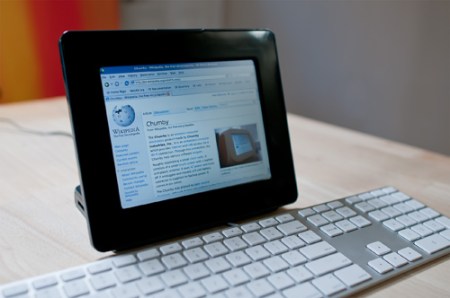
The Insignia Infocast is a $169 simple media device being sold at Best Buy. Marketed as a way to share photos and run Chumby apps, hackers are starting to release packages to extend its features. [Bunnie] shows us one package in particular that allows it to be used as a web browser with an external keyboard. With an 800Mhz processor, an 800×600 touch screen, and 2 GB of memory, we can see that this is just scratching the surface of what is possible. [Bunnie] points out that some people are working on porting Android to the device, and if you really feel adventurous, you can dig into the hardware.