Cameo Cutter Makes SMD Stencils

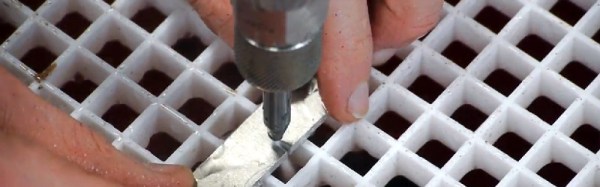
You never know what you might find in an arts and craft store. A relatively recent addition to crafting is automatic cutting machines like the Cricut and Cameo cutters. These are typically used to cut out shapes for scrapbooking, although they will cut or engrave almost anything thin. You can think of them as a printer with a cutting blade in place of the print head. [Mikeselectricstuff] decided to try a Cameo cutter to produce SMD stencils. The result, as you can see in the video below, is quite impressive.

If you’ve ever wanted to do SMD soldering with a reflow oven, stencils are invaluable for putting solder paste on the board where you want it quickly. The board [Mike] has contains a boat-load (over 2,000) of LEDs and dropping solder on each pad with a syringe would be very time consuming (although he did do some touch up with a syringe).

The board he’s using doesn’t have any extreme fine-pitched parts. However, he did some test patterns and decided he could get down to a finer pitch, especially with a little tweaking. However, the stencil he used didn’t need any changes. All he did was export the solder paste layer as a DXF and bring it straight into the Cameo software.

This isn’t the first time we’ve seen one of these cutters pressed into stencil service. You can also get some use out of your 3D printer.

Continue reading “Cameo Cutter Makes SMD Stencils”

Cheap Helping Hands: Just Add Time

We think of helping hands as those little alligator clips on a metal stand. They are cheap and fall over, so we tend to buy them and don’t use them. However, if you are willing to put $35 or $40 into it, you can get the newer kind that have–well–tentacles–on a heavy base.  [Archie_slap] didn’t want that kind of investment, so he made his own for about $10. We think that’s Australian dollars, so that’s even less in the United States.

What’s better is he documented every step in meticulous detail and with great pictures. You probably won’t directly duplicate his project because you will probably pick up a slightly different base, but that’s not hard to figure out. The arms are actually coolant hose, [Archie_slap] picked up almost everything but the base plate on eBay.

It’s obvious [Archie] is a frugal guy, based on his drill press. It gets the job done, though. The build is attractive and looks like a much more expensive commercial product. Some of us around the Hackaday lab are old enough to wish there was a magnifying glass attached, but maybe that’s version two.

We’ve looked at a lot of different helpers recently. We couldn’t help but think about a somewhat similar Gorillapod holder we covered last year.

Learn Advanced PCB Design For $200–Worth It?

[Helentronica] has been using Altium Designer to lay out PC boards since he was a student. Now as a freelancer, he felt like he didn’t quite know all that he wanted to know. Keep in mind he’d done multilayer boards with BGAs and LVDS routing, so he was no neophyte. He decided to spend about $200 on an advanced course from Fedevel Academy. In this day where everything is free on the Internet, is it worth paying $200 to watch some videos?

[Helentronica] probably weighed the same question. However, he was interested in the course project which is an open-source computer module with an i.MX6 processor, 1 GB of DDR3 SDRAM and lots of expansion options. In fact, the ad copy that sold him was:

You will be practicing on a real high-speed board with 1.2GHz CPU and DDR3, PCIE, SATA, HDMI, LVDS, 1Gb Ethernet and more

He completed the course. Was it worth it? We won’t spoil the story, but you should check out his post and find out. Even if you don’t want to drop $200 or you don’t use Altium, you will probably pick up some tips on PC board layout.

Continue reading “Learn Advanced PCB Design For $200–Worth It?”

Tweezing Diodes

Surface mount diodes are simple enough — all you need to do is make sure you have the anode and cathode in the right order when you place them on the pad when you solder them. These SMD diodes come in industry-standard packages, but do you think there’s an industry-standard way of marking the cathode? Nope, not by a long shot. To solve the problem of figuring out which way the electrons go through his LEDs, [Jesus] built a simple pair of LED tweezers.

The purpose of these tweezers is to figure out which way is up on a LED. To do this, [Jesus] picked up a pair of multimeter and power supply compatible SMD test clips that are sufficiently tweezy. These tweezers come with red and black wires coming out the back, but cutting those leads off, peeling back the insulation and adding a CR2032 battery holder and 220Ω resistor turns these tweezers from a probe into an electrified poker.

To figure out what the arcane symbols on the bottom of an SMD diode mean, all [Jesus] has to do is touch each side of the pair of tweezers to one of the contacts on a LED. If it lights up, it’s that way around. If it doesn’t light up, the battery is dead, or the diode is backwards. It’s a great project, especially since these SMD test clip tweezer things can be had from the usual online retailers for just a few bucks. We would recommend a switch and marking which tweeze is ground, though.

The Mother Of All Belt Grinders

It seems like everyone is building belt grinders these days. You might think [Jeremy Schmidt] is just hoping on the bandwagon, but you’d be wrong. He took a full two years to design the perfect belt grinder for his needs. Now he’s built his perfect beast, and we must say, it’s quite impressive!

[Jeremy] had seen grinders which can tilt, but most of them tilt the entire machine, including the table. He designed his machine with an independent table. This means the belt can be placed at any angle, while the table remains flat. He’s achieved some really interesting finishes with a course grind on a 45-degree angle to the workpiece.

No build is without its problems. In [Jeremy’s] case it was building the box which acts as a receiver for the machine and the tables. Regular square tube stock wasn’t quite rigid enough, so bar stock was the way to go. The first attempt at building the box resulted in a warped tube, due to the stresses of welding. [Jeremy] was more careful the second time, moving from section to section of the four welds. This kept the heat from building up, and the box stayed straight.

The final result is an incredibly rigid machine which definitely will withstand anything that [Jeremy] can throw at it.

If you want to see more belt grinders at work, check out [Bob]’s treadmill belt grinder, or [Mike’s] conversion.

Continue reading “The Mother Of All Belt Grinders”

Help Wanted: Open Source Oscilloscope On Rigol Hardware

We’ve often heard (and said) if you can’t hack it, you don’t own it. We noticed that [tmbinc] has issued a call for help on his latest project: developing new firmware and an FPGA configuration for the Rigol DS1054Z and similar scopes. It isn’t close to completion, but it isn’t a pipe dream either. [tmbinc] has successfully booted Linux.

There’s plenty left to do, though. He’s loading a boot loader via JTAG and booting Linux from the USB port. Clearly, you’d want to flash all that. Linux gives him use of the USB port, the LCD, the network jack, and the front panel LEDs and buttons. However, all of the actual scope electronics, the FPGA functions, and the communications between the processor and the FPGA are all forward work.

Continue reading “Help Wanted: Open Source Oscilloscope On Rigol Hardware”

Get Up Close To Your Soldering With A Pi Zero Microscope

Do your Mark 1 Eyeballs no longer hold their own when it comes to fine work close up? Soldering can be a literal pain under such conditions, and even for the Elf-eyed among us, dealing with pads at a 0.4-mm pitch is probably best tackled with a little optical assistance. When the times comes for a little help, consider building a soldering microscope from a Pi Zero and a few bits and bobs from around the shop.

Affordable commercial soldering scopes aren’t terribly hard to come by, but [magkopian] decided to roll his own by taking advantage of the streaming capabilities of the Raspberry Pi platform, not to mention its affordability. This is a really simple hack — nothing is 3D-printed or custom milled. The stage base is a simple aluminum project box for heat resistance and extra weight, and the arm is a cheap plastic dial caliper. The PiCam is mounted to the sliding jaw of the caliper on a scrap of plastic ruler. The lens assembly of the camera needs to be hacked a little to change the focal length to work within 10 centimeters or so; alternatively, you could splurge and get a camera module with an adjustable lens. The Pi is set up for streaming, and your work area is presented in glorious, lag-free HDMI video.

Is [magkopian]’s scope going to give you the depth perception of a stereo microscope? Of course not. But for most jobs, it’ll probably be enough, and the fact that it can be built on the cheap makes it a great hack in our book.

Continue reading “Get Up Close To Your Soldering With A Pi Zero Microscope”