Microsoft Finally Ups FAT32 Size Limit

You probably don’t spend a lot of time using the FAT32 file system anymore, since it’s thoroughly been superseded many times over. Even so, Microsoft has seen fit to deliver an upgrade for FAT32 for the latest Windows 11 Insider Preview build. Finally, the stock Windows tools will let you format a FAT32 drive up to 2 TB instead of locking you to a 32 GB maximum!
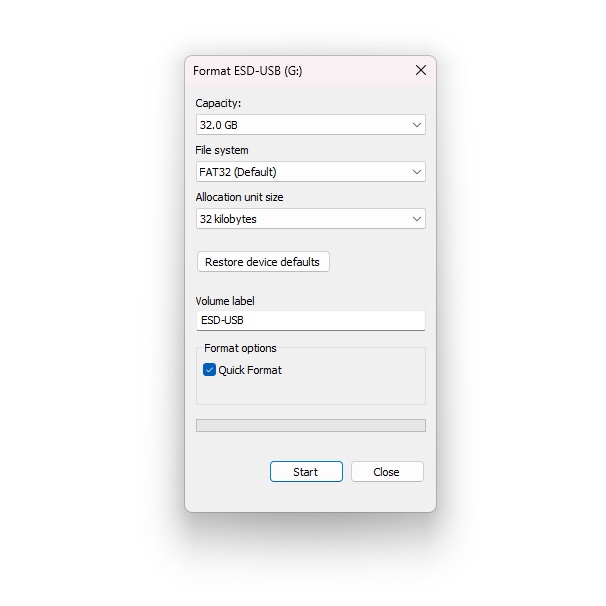
The size limit was never baked into the FAT32 spec itself. With a 32-bit field for counting sectors, the file system supports up to 2 TB volumes with 512-byte sectors. However, as explained by former Microsoft developer [Dave Plummer], it just so happened that the 32 GB limit came about because of a random decision made when slapping together the Format dialogue box over 30 years ago.

The pending change was first announced in 2024, affecting the command line format tool as well. It’s actually been possible to create larger FAT32 volumes for some time, you just couldn’t easily do it with Microsoft’s standard formatting tools.

FAT32 is still a terrible file system to use in 2026, mostly because it has a hard limit on file size that tops out at 4 GB. It’ll ruin your life if you’re shooting HD or 4K video. We often don’t spend a lot of time musing over file systems in detail, but they’re right at the heart of everything we do on our computers on a daily basis. Sometimes, it bears thinking about!


Comparing 12 VDC Air Fryers With Regular 240 VAC Ones

That boiling water is a contentious topic of discussion is clear, but what about hot air? When you take a 12 VDC, 280 Watt-rated air fryer and pit it against a bog-standard 240 VAC, 1400 Watt unit, which one would you want to use when you’re doing some camping or other exciting off-the-grid opportunities? Unlike with boiling water the physics aren’t as clear-cut here, so [Cahn] did some testing to figure out exactly what the efficiency numbers look like

Since air fryers rely on the transfer of thermal energy from the resistive heating element into the food, any thermal energy that’s not immediately transferred is effectively wasted. This, combined with the relatively low power rating and thus much higher time demand of the low-voltage air fryer is enough to set one’s expectations pretty low.

As scientific test samples chicken nuggets were used with the test, following a preheating period for the 12 VDC unit. Both units managed to hit a safe temperature inside the nuggets after 20 minutes, thus successfully staving off food poisoning, but the browning with the 240 VAC air fryer was much better.

As for the efficiency, the 12 VDC unit required 150 Wh for 20 minutes plus the 10 minutes of preheating, with 45 minutes total at 225 Watt to get proper browning. Meanwhile the 240 VAC unit burned through 250 Wh in 20 minutes, with no pre-heating, though only 230 Wh with no inverter losses included. As a final test, the 12 VDC unit was run at 400 Watt using 14.6 VDC input, which did indeed get it up to temperature much faster.

Thus both are equivalent, just with the caveat that the low-voltage unit will take considerably more time to get the same result. This mirrors the results with boiling water, where most options mostly vary in how much time they require to get water up to a boiling temperature.

Continue reading “Comparing 12 VDC Air Fryers With Regular 240 VAC Ones”

The Kentucky Cave Wars, And Going Viral In 1925

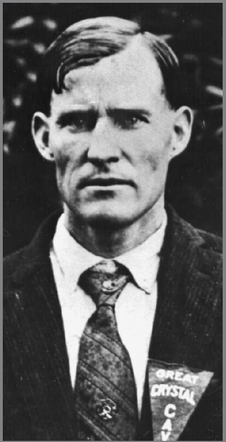
Floyd Collins, the unfortunate star of this post. (Public Domain)

Information, it seems, flows at the speed of media. In the old days, information traveled with people on ships or horses, so if, say, a battle was won or lost, it could be months or even years before anyone back home knew what happened. While books and movable type let people store information, they still moved at the speed people moved. Before the telegraph, there were attempts to use things like semaphores to speed the flow of information,  but those were generally limited to line-of-sight operations. Carrier pigeons were handy, but don’t really move much faster than people.

The telegraph helped, but people didn’t have telegraph stations in their homes. At least not ordinary people. But radio was different. It didn’t take long for every home to have a radio, and while the means of broadcasting remained in the hands of a few, the message could go everywhere virtually instantly. This meant news could go from one side of the globe to the other in seconds. It also meant rumors, fads, and what we might think of today as memes could, too.

You might think that things “going viral” is a modern problem, but, in reality, media sensations have always been with us. All that changes is the number of them and their speed.

One of the earliest viral media sensations dealt with William Floyd Collins, an unfortunate man who was exploring caves during the Kentucky Cave Wars.

Continue reading “The Kentucky Cave Wars, And Going Viral In 1925”

Trying To Build Your Own Consumer-Grade Router In 2026

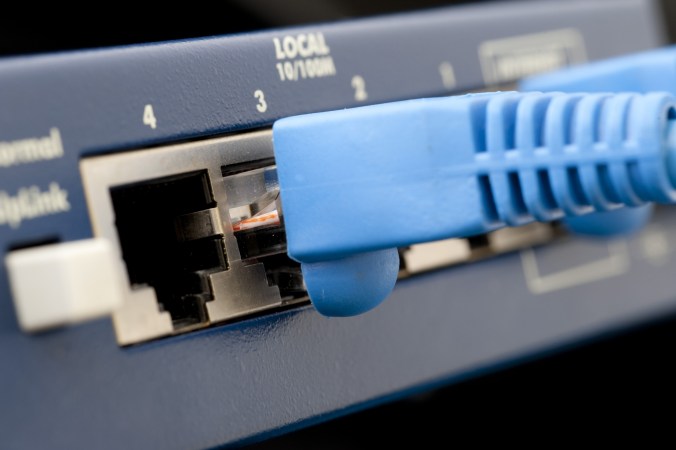
Although we have many types of networking equipment with many unique names, at their core they can usually be reduced to just a computer with some specific peripherals. This is especially the case for something like a router, a device found in just about any home these days. Certain consumer-grade routers may contain something special like a VDSL modem, but most of them just have a WAN Ethernet jack on one end and one or more LAN-facing Ethernet ports.

All further functionality is implemented in software, including any firewall, routing and DHCP features. What this means is that any old PC with at least two Ethernet ports or equivalent can be a router as long as you install the appropriate software.

In this article we’ll be taking a look at what consumer-level options there exist here today, ideally something so simple that the average home user could set it up with a bit of coaching.

Continue reading “Trying To Build Your Own Consumer-Grade Router In 2026”

A 6502 All In The Data

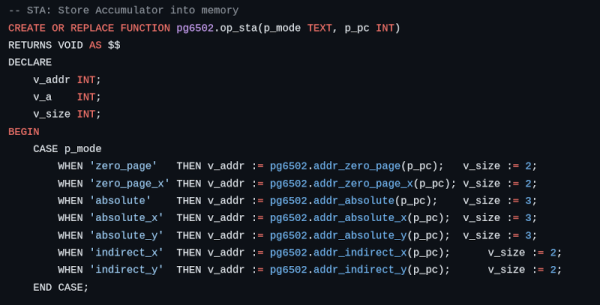
Emulating a 6502 shouldn’t be that hard on a modern computer. Maybe that’s why [lasect] decided to make it a bit harder. The PG_6502 emulator uses PostgreSQL. All the CPU resources are database tables, and all opcodes are stored procedures. Huh.

The database is pretty simple. The pg6502.cpu table has a single row that holds the registers. Then there is a pg6502.mem table that has 64K rows, each representing a byte. There’s also a pg6502.opcode_table that stores information about each instruction. For example, the 0xA9 opcode is an immediate LDA and requires two bytes.

The pg6502.op_lda procedure grabs that information and updates the tables appropriately. In particular, it will load the next byte, increment the program counter, set the accumulator, and update the flags.

Honestly, we’ve wondered why more people don’t use databases instead of the file system for structured data but, for us, this may be a bit much. Still, it is undoubtedly unique, and if you read SQL, you have to admit the logic is quite clear.

We can’t throw stones. We’ve been known to do horrible emulators in spreadsheets, which is arguably an even worse idea. We aren’t the only ones.

ESP32 Weather Display Runs Macintosh System 3

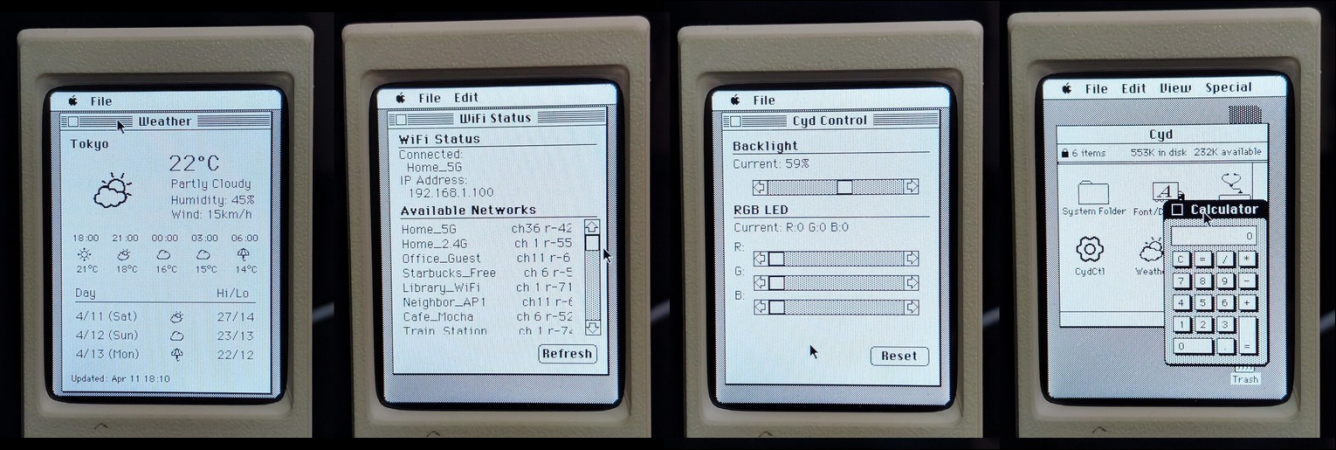
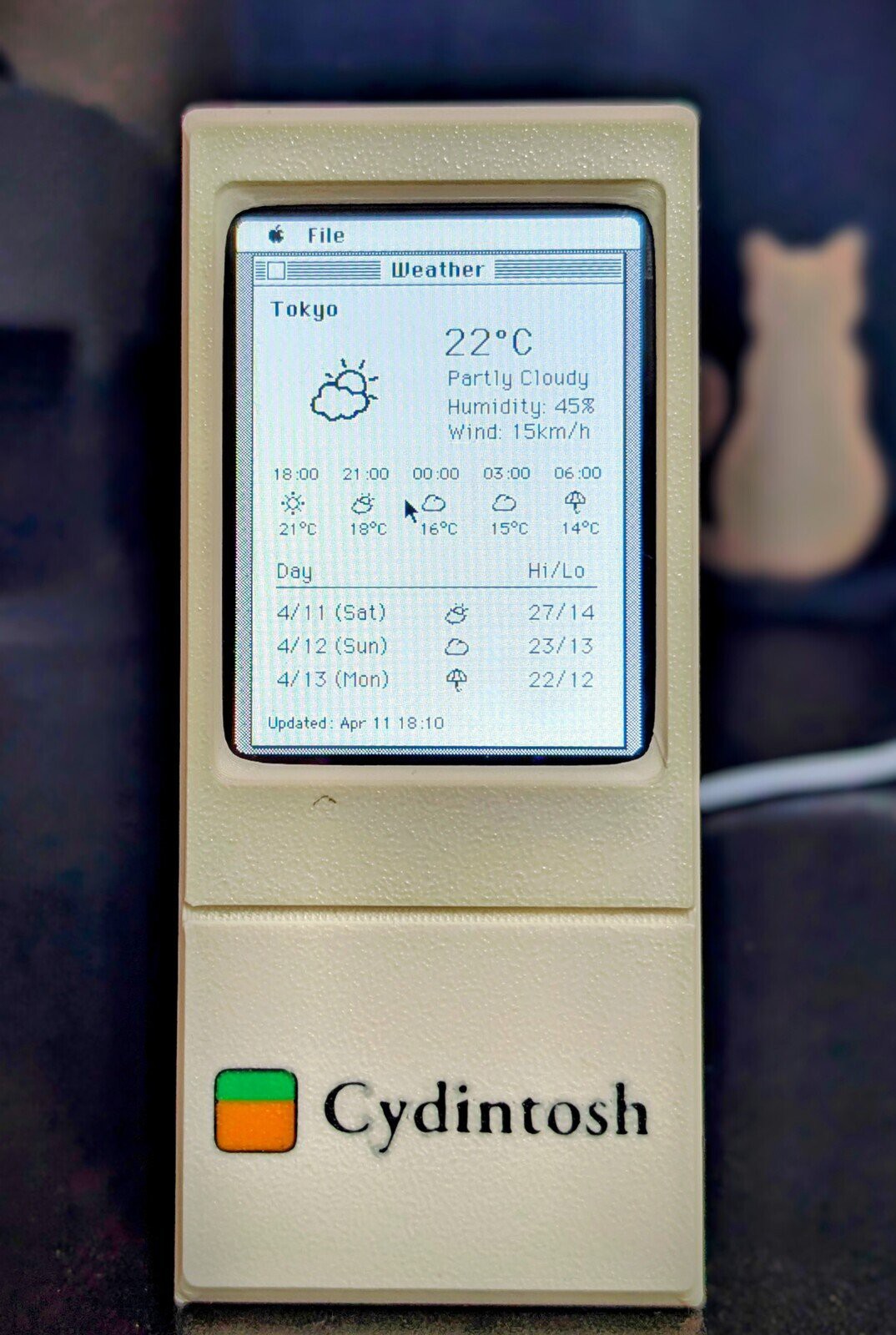
It seems like everybody takes their turn doing an ESP32-based weather display, and why not? They’re cheap, they’re easy, and you need to start somewhere. With the Cheap Yellow Display (CYD) and modules like it, you don’t even need to touch hardware! [likeablob] had the CYD, and he’s showing weather on it, but the Cydintosh is a full Macintosh Plus Emulator running on the ESP32.

Honey, I stretched the Macintosh!

The weather app is his own creation, written with the Retro68k cross-compiler, but it looks like something out of the 80s even if it’s getting its data over WiFi. The WiFi connection is, of course, thanks to the whole thing running on an ESP32-S3. Mac Plus emulation comes from [evansm7]’s Micro Mac emulator, the same one that lives inside the RP2040-based PicoMac that we covered some time ago. Obviously [likeablob] has added his own code to get the Macintosh emulator talking to the ESP32’s wireless hardware, with a native application to control the wifi connection in System 3.3. As far as the Macintosh is concerned, commands are passed to the ESP32 via memory address 0xF00000, and data can be read back from it as well. It’s a straightforward approach to allow intercommunication between the emulator and the real world.

The touchpad on the CYD serves as a mouse for the Macintosh, which might not be the most ergonomic given the Macintosh System interface was never meant for touchscreens, but evidently it’s good enough for [likeablob]. He’s built it into a lovely 3D printed case, whose STLs are available on the GitHub repository along with all the code, including the Home Assistant integration.

Trying To Install Haiku On A 2009 Mac Mini

Although the number of uses for a 2009-era Mac Mini aren’t very long, using them to run new-and-upcoming operating systems like Haiku on would seem to be an interesting use case. This is what [The Phintage Collector] recently took a swing at, using both the 2024 Beta 5 release and a current nightly build. The focus was mostly on the 32-bit build, as this has binary compatibility with BeOS applications, but the 64-bit version of Haiku was of course also installed.

One of the main issues with these Mac systems is that they use EFI for the BIOS, so you’re condemned to either take your chances with the always glitchy CSM ‘classical BIOS’ mode, or to make Haiku and EFI get along. While for the 64-bit version of Haiku this wasn’t too much of a struggle, the 32-bit version ran into the problem that the 64-bit EFI BIOS really doesn’t like 32-bit software. After a while the 32-bit version of Haiku was thus abandoned for a later revisit.

With the 64-bit version a lot of things just work, though audio couldn’t be made to work even with a USB dongle, and there’s no hardware acceleration for graphics, so gaming isn’t really going to happen either. The positive thing here is probably that as a test system for 64-bit Haiku such a Mac Mini isn’t too crazy, it being just an Intel system with an Apple-flavor EFI BIOS.

If you’re into giving it a shot yourself, the video description page contains a lot of resources to consult.

Continue reading “Trying To Install Haiku On A 2009 Mac Mini”