3-Sweep: Turning 2D Images Into 3D Models

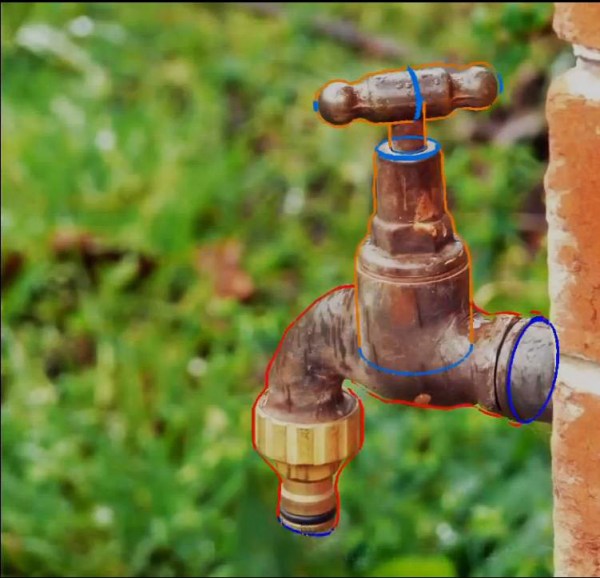
As 3D printing continues to grow, people are developing more and more ways to get 3D models. From the hardware based scanners like the Microsoft Kinect to software based like 123D Catch there are a lot of ways to create a 3D model from a series of images. But what if you could make a 3D model out of a single image? Sound crazy? Maybe not. A team of researchers have created 3-Sweep, an interactive technique for turning objects in 2D images into 3D models that can be manipulated.

To be clear, the recognition of 3D components within a single image is a bit out of reach for computer algorithms alone. But by combining the cognitive abilities of a person with the computational accuracy of a computer they have been able to create a very simple tool for extracting 3D models. This is done by outlining the shape similar to how one might model in a CAD package — once the outline is complete, the algorithm takes over and creates a model.

The software was debuted at Siggraph Asia 2013 and has caused quite a stir on the internet. Watch the fascinating video that demonstrates the software process after the break!

Continue reading “3-Sweep: Turning 2D Images Into 3D Models”
TightLight: A 3D Projection Mapping Assistant

tightLight

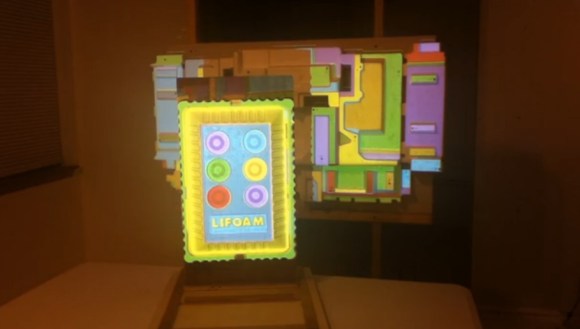
Anyone can grab a projector, plug it in, and fire a movie at the wall. If, however, you want to add some depth to your work–both metaphorical and physical–you’d better start projection mapping. Intricate surfaces like these slabs of styrofoam are excellent candidates for a stunning display, but not without introducing additional complexity to your setup. [Grady] hopes to alleviate some tedium with the TightLight (Warning: “music”).

The video shows the entire mapping process of which the Arduino plays a specific role toward the end. Before tackling any projector calibration, [Grady] needs an accurate 3D model of the projection surface, and boy does it look complicated. Good thing he has a NextEngine 3D laser scanner, which you’ll see lighting the surface red as it cruises along.

Enter the TightLight: essentially 20 CdS photocells hooked up to a Duemilanove, each of which is placed at a previously-marked point on the 3D surface. A quick calibration scan scrolls light from the projector across the X then Y axis, hitting each sensor to determine its exact position. [Grady] then merges the photocell location data with the earlier 3D model using the TouchDesigner platform, and bam: everything lines up and plays nice.

Blending Real Objects With 3D Prints

It’s very subtle, but if you saw [Greg]’s 3D printed stone to Lego adapter while walking down the street, it might just cause you to stop mid-stride.

This modification to real objects begin with [Greg] taking dozens of pictures of the target object at many different angles. These pictures are then imported into Agisoft PhotoScan which takes all these photos and converts it into a very high-resolution, full-color point cloud.

After precisely measuring the real-world dimensions of the object to be modeled, [Greg] imported his point cloud into Blender and got started on the actual 3D modeling task. By reconstructing the original sandstone block in Blender, [Greg] was also able to model Lego parts.After subtracting the part of the model above the Lego parts, [Greg] had a bizarre-looking adapter that adapts Lego pieces to a real-life stone block.

It’s a very, very cool projet that demonstrates how good [Greg] is at making 3D models of real objects and modeling them inside a computer. After the break you can see a walkthrough of his work process, an impressive amount of expertise wrapped up in making the world just a little more strange.

Continue reading “Blending Real Objects With 3D Prints”

Help Computer Vision Researchers, Get A 3d Model Of Your Living Room

Robots can easily make their way across a factory floor; with painted lines on the floor, a factory makes for an ideal environment for a robot to navigate. A much more difficult test of computer vision lies in your living room. Finding a way around a coffee table and not knocking over a lamp present a huge challenge for any autonomous robot. Researchers at the Royal Institute of Technology in Sweden are working on this problem, but they need your help.

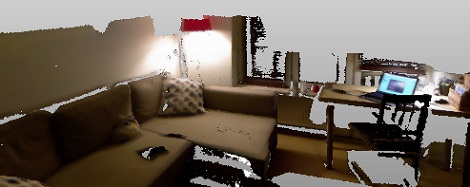
[Alper Aydemir], [Rasmus Göransson] and Prof. [Patric Jensfelt] at the Centre for Autonomous Systems in Stockholm created Kinect@Home. The idea is simple: by modeling hundreds of living rooms in 3D, the computer vision and robotics researchers will have a fantastic library to train their algorithms.

To help out the Kinect@Home team, all that is needed is a Kinect, just like the one lying disused in your cupboard. After signing up on the Kinect@Home site, you’re able to create a 3D model of your living room, den, or office right in your browser. This 3D model is then added to the Kinect@Home library for CV researchers around the world.

Turning [M. C. Escher] Prints Into Real Objects

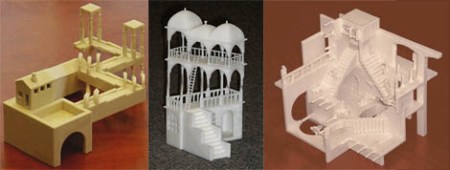
September is coming, and soon college freshmen the world over will be decorating their dorm room walls with Dark Side of the Moon posters and [M.C. Escher] prints. Anyone can go out and simply buy a prism, but what if you wanted a real-life version of objects and buildings from [Escher]’s universe? Professor [Gershon Elber] at the Technion at the Israel Institute of Technology decided to turn [Escher]’s prints into reality.

First beginning with simple shapes such as a Penrose Triangle and a Necker Cube, [Elber] decided to branch out into much more impossible shapes such as [Escher]’s Waterfall, Belvedere, and Relativity. These buildings are extremely hard to visualize in any traditional computer design program, so [Elber] wrote a plugin for his IRIT computer modeling program to design the buildings before committing them to a 3D printer.

In the video after the break, you can see a few rotating views of the resulting [Escher] buildings. Of course they only work from exactly one point of view – and even then, only with one eye closed – but it’s amazing to see these famous architectural studies brought into the real world.

Continue reading “Turning [M. C. Escher] Prints Into Real Objects”

Getting A Textured 3D Scan From Just A Webcam

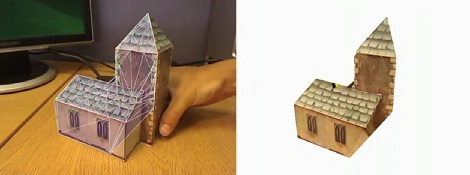
Here’s an oldie but a goodie that passed us up the first time it went around the Internet. [Qi Pan], (former) PhD student at Cambridge, made a 3D modeling program using only a simple webcam. Not only does this make very fast work of building 3D models, the real texture is also rendered on the virtual object.

The project is called ProFORMA, and to get some idea of exactly how fast it is, the model of a church seen above was captured and rendered in a little over a minute. To get the incredible speed of ProFORMA, [Qi] had his webcam take a series of keyframes. When the model is rotated about 10°, another keyframe is taken and the corners are triangulated with some very fancy math.

Even though [Qi]’s project is from 2009, it seems like it would be better than the ReconstructMe, the Kinect-able 3D scanning we saw a while ago. There’s a great video of [Qi] modeling a papercraft church after the break, but check out the actual paper for a better idea of how ProFORMA works.

Continue reading “Getting A Textured 3D Scan From Just A Webcam”

3D Render Live With Kinect And Bubble Boy

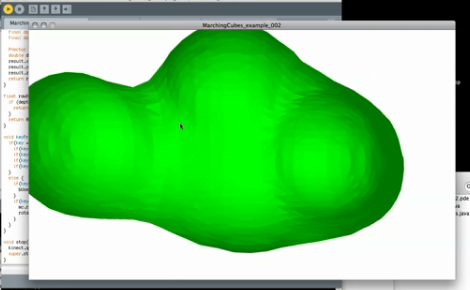
[Mike Newell] dropped us a line about his latest project, Bubble boy! Which uses the Kinect point cloud functionality to render polygonal meshes in real time.  In the video [Mike] goes through the entire process from installing the libraries to grabbing code off of his site. Currently the rendering looks like a clump of dough (nightmarishly clawing at us with its nubby arms).

[Mike] is looking for suggestions on more efficient mesh and point cloud code, as he is unable to run any higher resolution than what is in the video. You can hear his computer fan spool up after just a few moments rendering! Anyone good with point clouds?

Also, check out his video after the jump.

Continue reading “3D Render Live With Kinect And Bubble Boy”