Tricking Tinder With A 3D Printed Finger

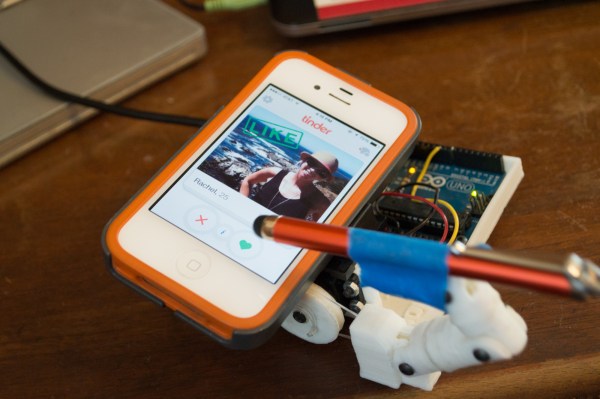
Online matchmaking has taken the internet by storm as mobile dating applications like Tinder attempt to take the work out of locating a soul mate. As of mid-2014, Tinder is rumored to have around 10 million daily active users making it a prime target for automated spam bots. The real spammers surely use coded attacks, but this robot is a fun example of a hardware-based attack. [Andrew] built it to be an automatic heart-shaped, button presser.

The device began as a single finger robot-hand project that was inspired by ‘InMoov’, which as their website states is “the first life-size humanoid robot you can 3D print and animate.” An Arduino Uno and servo motor laid the foundation for the system. After which, the joints of the 3D printed finger were assembled in place so that a touchscreen stylus could be attached. Once coded, the little robot was able to ‘like’ a new profile every 4 seconds. This adds up to approximately 900 likes per hour.

The project is cute, and shows one way that fake profiles can be elevated on the Tinder platform. An article written on Symantec’s blog describes a few other instances of spammers flirting with you via the Android app. This post is a continuation of an article released a year prior, yet Tinder has not addressed the issues relating to fake profiles since then.

Let’s try to focus in on the good. With a bit of additional ingenuity, this device could be transformed into a love searching robot that could choose between people. Get a camera hooked up with a face-recognition program, and add some user preferences so that the robot isn’t just hitting ‘like’ over and over, and we might be able to get some interesting research done. Still, it feels like it would be better to go meet people face-to-face.

Check out the video of the bot in action after the break, then let us know what other silly things you could do by targeting different apps.

Continue reading “Tricking Tinder With A 3D Printed Finger”

The Handsfree Icebucket Challenge Backpack

20140824_131835-1024x768

The ALS Ice Bucket Challenge has taken the internet by storm as tv stars, musicians, athletes, kids, students and everyone in between have thrown freezing water all over themselves in an effort to raise awareness (and millions of dollars) to help cure the neurodegenerative disease. So when [Christopher] was challenged by a friend, he decided to make an icebucket backpack that would pour the liquid from above without having to use his hands.

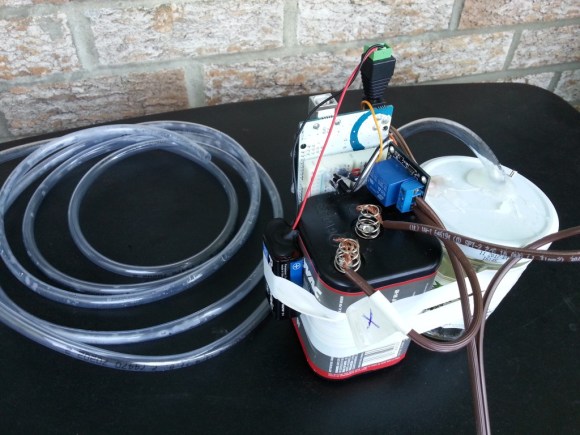
The wearable device uses a Barometric pressure sensor that is triggered when air is blown into a tube. This sensor is attached to an Arduino Uno. Once activated, the pouring process begins drenching the person below in ice cold water. It’s a little unnecessary, but it gets the job done in a fun, maker-style way. Now if you make something similar, don’t forget to actually support the cause and donate money.

To see the icebucket backpack in action, check out the video after the break:

Continue reading “The Handsfree Icebucket Challenge Backpack”

Faucet Add-On Attempts To Save Water By Changing Colors

FU8WVVBHW6T8E8I.LARGE

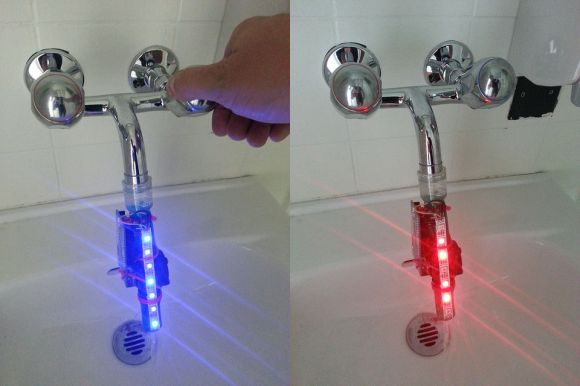
This augmented water device was rapidly developed during an H2O hackathon in Lausanne, Switzerland. It was built by a software engineer code-named [tamberg]. His creation contained an Arduino Uno, a strip of NeoPixels, a liquid flow sensor, and a tiny lithium-ion battery attached to a cut medical tube that was re-purposed for monitoring water use.

From the looks of it, this project addressed a specific problem and went on to solve it. The initial prototype showed a quick and dirty way to monitor precious water that is literally being flushed down the drain.

To see how the device was made, click the first link posted above for a set of Instructables. Code for the device can be found on [tamberg]’s bitbucket account. A demo video of the device being tested on a sink can be seen after the break.

Continue reading “Faucet Add-On Attempts To Save Water By Changing Colors”

An Auto-Leveling Gyro Camera For Motorcycle Enthusiasts

FB2XXIQHF23RIUW.LARGE

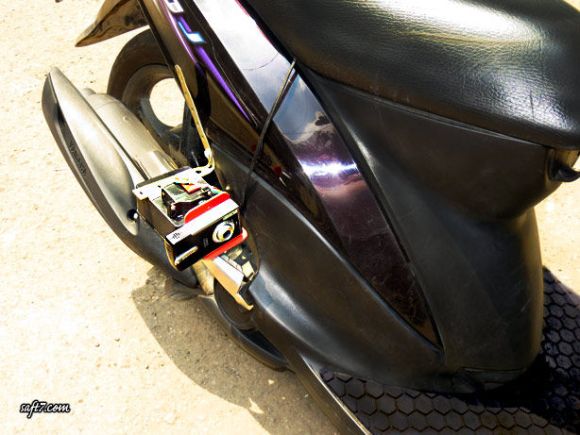
[Saftari] was inspired by the technology used to capture video in the MotoGP World Championship races to create these instructables on how to build an auto-leveling Gyro camera. The setup he developed maintains the camera at a consistent level perpendicular to the earth no matter how much the motorcycle angles against the ground when turning.

The components involved include an Arduino Uno, a Triple Axis Accelerometer, a digital servo, and a Gyro breakout board. A bracket was built to house and secure the camera to the side of the vehicle. 2mm acrylic was used for this and was bent by heating up the material. Once complete, test runs were completed showcasing the capabilities of this type of Do-It-Yourself rig.

The quality of the video after the break is a little bit blurry, but it proves the point that a Gyro camera setup can be built at home:

Continue reading “An Auto-Leveling Gyro Camera For Motorcycle Enthusiasts”

Flex Sensing For A DIY Data Glove

cyber

[Cyber] has been testing out intuitive input methods for virtual reality experiences that immerse the user further into the virtual world than archaic devices like a keyboard or mouse would allow. One of his biggest interests so far was the idea of a data glove that interacts with an Arduino Uno to interface with a PC. Since commercial products are yet to exist on a readily available level, [Cyber] decided to build his own.

He started out with a tiny inertial measurement unit called a Pololu MinIMU-9 v2 that tracks orientation of the 3-axis gyro and accelerometer. The USB interface was soldered into place connecting the wires to an Arduino Uno. From there, he hooked up a flex sensor from Spectra Symbol (which were supposedly used in the original Nintendo Power Gloves) and demoed the project by tracking the movement of one of his fingers. As the finger bent, the output printed on the serial monitor changed.

[Cyber] still needs to mount a glove on this system and construct a proper positional tracking method so that physical movement will be mirrored in a simulation.

[Cyber’s] day job has had him busy these last few months, which has forced the project into a temporary hold. Recently though, [Cyber] has been an active member and an influence in the local Orange County VR scene helping to build a nice development culture, so we’re hoping to see more updates from him soon.

To view what he has done up to this point, click the link at the top of the page, and check out the video after the break:

Continue reading “Flex Sensing For A DIY Data Glove”

Creepy Cat Eyes With A Microsoft Kinect

F8X0VISHV3Q1HLI.LARGE

Ever feel like someone is watching you? Like, somewhere in the back of your mind, you can feel the peering eyes of something glancing at you? Tapping into that paranoia, is this Computer Science graduate project that was created during a “Tangible Interactive Computing” class at the University of Maryland by two bright young students named [Josh] and [Richard], with the help of HCIL hackerspace.

Their Professor [Dr. Jon Froehlich] wanted the students to ‘seamlessly couple the dual worlds of bits and atoms’ and create something that would ‘explore the materiality of interactive computing.’ And this relatively simple idea does just that, guaranteeing some good reactions. 

As you’ve probably gathered from the title, this project uses a Microsoft Kinect to track the movement of nearby people. The output is then translated into actionable controls of the mounted eyeballs producing a creepy vibe radiating out from the feline, robot poster.

Continue reading “Creepy Cat Eyes With A Microsoft Kinect”

The BlueOkiris Gameduino Console

3011851406903369314

[Dylan] created an easy to make gaming console with an Arduino Uno, a makeshift button, an analog stick, and a TFT LCD touchscreen shield. Plus, he fashioned together a simple button with some duct tape.

So far, he has made 2 games. One is the infamous Pong. The other is a ‘Guess the Number’ type experience. The whole project is run within the code, and does not access the bootloader directly like you would with 2boots or a regular Gameduino adapter.

Build instructions can be found on [Dylan]’s hackaday.io project page (linked above). Essentially, all that is needed is to gather up the supplies, then take the button and analog stick and complete a circuit, fitting the open wires into the slots at digital pin 9. Solder the wires in place and connect ground to ground, 5v to 5v, x to A4, and y to A5. Add the TFT shield, insert a micro SD card, and upload a game.

To see it in action, check out the video after the break:

Continue reading “The BlueOkiris Gameduino Console”