Quick And Easy IoT Prototyping With Involt

IoT, web apps, and connected devices are all becoming increasingly popular. But, the market still resembles a wild west apothecary, and no single IoT ecosystem or architecture seems to be the one bottle of snake oil we’ll all end up using. As such, we hackers are keen to build our own devices, instead of risking being locked into an IoT system that could become obsolete at any time. But, building an IoT device and interface takes a wide range of skills, and those who are lacking skill in the dark art of programming might have trouble creating a control app for their shiny new connected-thing.

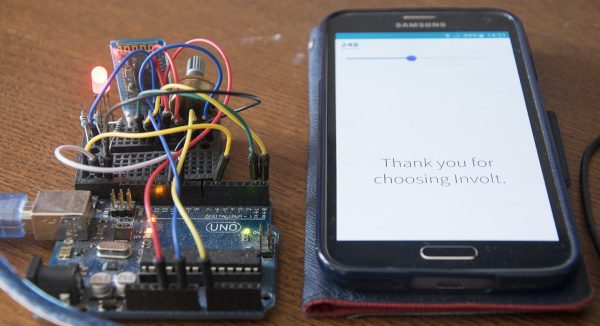
Enter Involt, which is a framework for building hardware control interfaces using HTML and CSS. The framework is built on Node-Webkit, which means the conventions should be familiar to those with a bit of web development background. Hardware interactions (on Arduinos) are handled with simple CSS classes. For example, a button might contain a CSS class which changes an Arduino pin from high to low.

Involt can take that CSS and convert it into a function, which is then sent to the Arduino via serial or Bluetooth communication. For more advanced functionality, Javascript (or really any other language) can be used to define what functions are generated — and, in turn, sent to the Arduino. But, all that is needed for the basic functionality necessary for many IoT devices (which might only need to be turned on and off, or set to a certain value) is a bit of HTML and CSS knowledge. You’ll create both the interface and the underlying hardware interactions all within an HTML layout with CSS styling and functionality.

While Involt isn’t the only framework to simplify hardware interaction (it’s not even the only Node.js based method), the simplicity is definitely laudable. For those who are just getting started with these sorts of devices, Involt can absolutely make the process faster and less painful. And, even for those who are experienced in this arena, the speed and efficiency of prototyping with Involt is sure to be useful.


A Very MIDI Christmas Lightshow

Christmas light displays winking and flashing in sync to music are a surefire way to rack up views on YouTube and annoy your neighbours. Inspired by one such video, [Akshay James] set up his own display and catalogued the process in this handy tutorial to get you started on your own for the next holiday season.

[James], using the digital audio workstation Studio One, took the MIDI data for the song ‘Carol of the Bells’ and used that as the light controller data for the project’s Arduino brain. Studio One sends out the song’s MIDI data, handled via the Hairless MIDI to serial bridge, to the Arduino which in turn sets the corresponding bit to on or off. That gets passed along to three 74HC595 shift registers — and their three respective relay boards — which finally trigger the relay for the string of lights.

From there, it’s a matter of wiring up the Arduino shift register boards, relays, and connecting the lights. Oh, and be sure to mount a speaker outdoors so passers-by can enjoy the music:

Continue reading “A Very MIDI Christmas Lightshow” →

Acoustic Accordion Becomes MIDI; Oh The Complexity!

Everyone knows accordions are cool — they look fly, make neat noises, and get your romantic interests all hot and bothered. What isn’t cool is being relegated to acoustics only. How are you going to play a packed stadium or lay down a crystal clear track like that? You could go out and buy an electric accordion, but even low-end models carry a hefty price tag. But, this is Hackaday, and you know we’re going to be telling you about someone who found a better way.

That better way, shown in a build by [Brendan Vavra], was to take an acoustic accordion and convert it to MIDI. The base for his build was a decent full-size acoustic accordion purchased on eBay for just $150. Overall, it was in good mechanical condition, but some of the reeds were out of tune or not working at all. Luckily, that didn’t matter, since he wouldn’t be using them anyway. Don’t be fooled in the demo video below; it sounds like he’s playing the acoustic according but notice he’s not pumping those bellows! However, the bellows isn’t useless either since it can feed data back as a MIDI input.

[Brendan’s] build plan called for an Arduino Mega to be tied to a series of photo-interrupters that would detect button pushes and fire MIDI signals. But, first he had to take the thing apart — no small task, given the complexity of the instrument. The accordion has 120 buttons, and they’re not interchangeable, which means he had to carefully keep track of them as they were disassembled.

Continue reading “Acoustic Accordion Becomes MIDI; Oh The Complexity!” →

Annoy Your Neighbors With MIDI Musical Siren

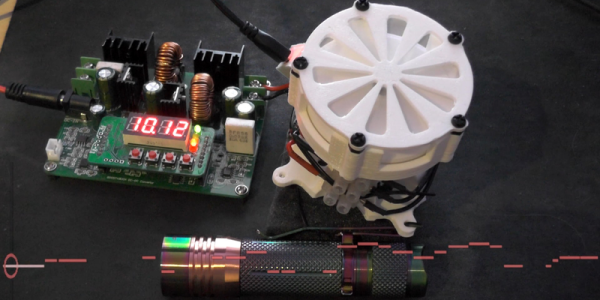
[Yannick], aka [Gigawipf] brings us this (mostly) musical delicacy: a 3D-printed siren that’s driven by a brushless quadcopter motor, and capable of playing (mostly) any music that you’ve got the MIDI score for. This is a fantastic quickie project for any of you out there with a busted quad, or even some spare parts, and a 3D printer. Despite the apparent level of difficulty, this would actually be a great quickie weekend build.

Continue reading “Annoy Your Neighbors With MIDI Musical Siren” →

Talking Arduino Tells GoPro What To Do

It’s 2017 and even GoPro cameras now come with voice activation. Budding videographers, rest assured, nothing will look more professional than repeatedly yelling at your camera on a big shoot. Hackaday alumnus [Jeremy Cook] heard about this and instead of seeing an annoying gimmick, saw possibilities. Could they automate their GoPro using Arduino-spoken voice commands?

It’s an original way to do automation, for sure. In many ways, it makes sense – rather than mucking around with trying to make your own version of the GoPro mobile app (software written by surfers; horribly buggy) or official WiFi remote, stick with what you know. [Jeremy] decided to pair an Arduino Nano with the ISD1820 voice playback module. This was then combined with a servo-based panning fixture – [Jeremy] wants the GoPro to pan, take a photo, and repeat. The Arduino sets the servo position, then commands the ISD1820 to playback the voice command to take a picture, before rotating again.

[Jeremy] reports that it’s just a prototype at this stage, and works only inconsistently. This could perhaps be an issue of intelligibility of the recorded speech, or perhaps a volume issue. It’s hard to argue that a voice control system will ever be as robust as remote controlling a camera over WiFi, but it just goes to show – there’s never just one way to get the job done. We’ve seen people go deeper into GoPro hacking though – check out this comprehensive guide on how to pwn your GoPro.

The Soda Locker Vending Machine

With the rising popularity of electronic textbooks and laptops being used for schoolwork, the ubiquitous high school locker is becoming less and less necessary. So, students are left with a private storage space that they don’t really need. Why let it go to waste when you’re an enterprising young man with budding electronics and fabrication skills?

[Mistablik] is one such high school student who decided to take advantage of his unused locker. After a “wouldn’t it be cool if…” discussion with his friends, [Mistablik] decided to use his summer break to construct a soda vending machine that fit entirely within his school locker. Quite an ambitious project for a high school student, but the result speaks for itself.

Continue reading “The Soda Locker Vending Machine” →

Tiny Morse Code USB Keyboard

We’ve featured quite a few of [mitxela]’s projects here in the past, and many of them have the propensity to be labelled “smallest”. His Morse Code USB Keyboard Mk II adds to that list. It’s a Saturday afternoon project, with a few parts slapped onto a piece of perf-board, that allows using a Morse key as a USB keyboard. This project isn’t new or fresh, but we stumbled across it while trying to figure out a use for a Morse key lying in the author’s bin of parts. You can practise transmitting, by reading text and typing it out on the key, and then look it up on your computer to see if you made any mistakes. Or you can practise receiving, by asking a friend to punch it out for you. Either way, it’s a great way to hone your skills and prepare for your radio operators license exam.

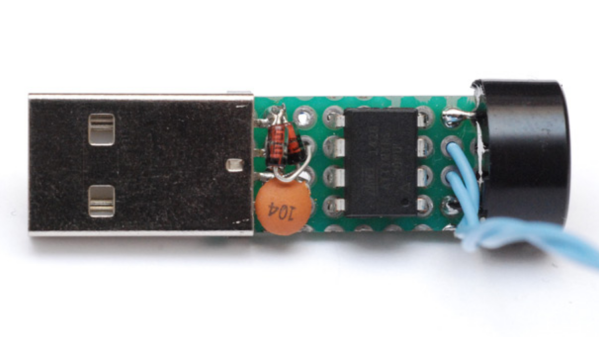
The project is a follow up to his earlier one where he hooked up the Morse key via a RS-232 — USB converter directly to a computer and let the code do all the work. That turned out to be a very resource hungry, impractical project and made him do it right the next time around. The hardware is dead simple. An ATtiny85, a piezo buzzer, some decoupling capacitors, and a few resistors and zeners to allow a safe USB interface. The design accommodates a straight key, but there is one spare pin left over in the ATtiny to allow for iambic or sideswiper keys too. There is no speed adjustment, which is hardcoded at the moment. That isn’t very user friendly, and [mitxela] suggests adding a speed potentiometer to that last remaining pin on the ATtiny. This would prevent use of iambic/sideswiper keys. Or, you could use the RST pin on the ATtiny as a (weak) IO. The RST pin can read analog values between 5V and 2.5V, and will reset when voltage falls below 2.2V. Or just use another microcontroller as a last resort.

For the USB interface, [mitxela] is using the V-USB library after wasting some time trying to reinvent the wheel. And since this is designed to work as a HID, there are no drivers required – plug it in, and the OS detects it as a keyboard. He’s borrowed code from the EasyLogger project to use the internal oscillator and help free up the IO pins. And to detect the characters being typed, his code uses a long string of compare statements instead of a dictionary lookup. Writing that code was tedious, but it makes the identification quicker, since most characters can be identified in less that five comparisons (one dit = E, two dits = I, three dits = S and so on). This “tree” makes it easier to figure it out.

If you’d like to look up some of his other “tiny” projects, check out The smallest MIDI synthesizer, Smallest MIDI synth, again! and the ATtiny MIDI plug synth.

Continue reading “Tiny Morse Code USB Keyboard” →