Rooting A Motorola Actv (Android Wristwatch)

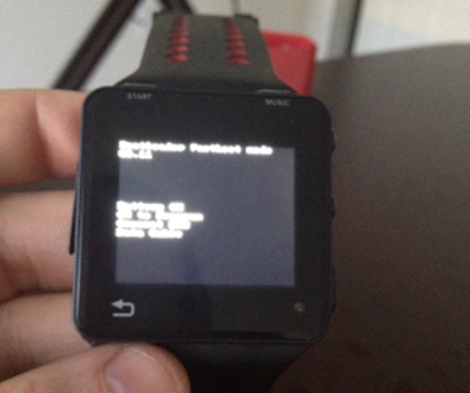
[Chris’] family made the mistake of giving him a hackable Christmas gift. We’d bet they didn’t see much of him for the rest of the day as he set about rooting this Android wristwatch.

This thing has some pretty powerful hardware under the hood. It’s sporting an OMAP3 processor running at 600 MHz along with 256 MB of RAM. [Chris] needed to get his hands on a firmware image in order to look for security holes. He found a way to spoof the update application in order to intercept an upgrade image from the Internet.

He dumped the firmware locations and got to work searching for a way to exploit the device. Details are a bit scarce about want exactly he did, but you can download his modified image, letting you root your own Motorola Actv using the Android Debug Bridge.

We’ve embedded a demo video after the break. The OS is pretty snappy on the tiny device. We’re not sure what will come of this functionality, but we assume [Chris] was really only interested in the challenge of rooting process itself.

Continue reading “Rooting A Motorola Actv (Android Wristwatch)”

Researchers Claim That HP Laser Printers Can Be Hijacked To Steal Data And Catch Fire

hp-laserprinter-security-holes

The news was abuzz yesterday with coverage of a study released by Columbia University researchers warning consumers that HP laser printers are wide open to remote tampering and hacking. The researchers claim that the vast majority of printers from HP’s LaserJet line accept firmware updates without checking for any sort of digital authentication, allowing malicious users to abuse the machines remotely. The researchers go so far as to claim that modified firmware can be used to overheat the printer’s fuser, causing fires, to send sensitive documents to criminals, and even force the printers to become part of a botnet.

Officials at HP were quick to counter the claims, stating that all models built in 2009 and beyond require firmware to be digitally signed. Additionally, they say that all of the brand’s laser printers are armed with a thermal cutoff switch which would mitigate the fuser attack vector before any real fire risk would present itself. Despite HP’s statements, the researchers stand by their claims, asserting that vulnerable printers are still available for purchase at major office supply stores.

While most external attacks can easily be prevented with the use of a firewall, the fact that these printers accept unsigned firmware is undoubtedly an interesting one. We are curious to see if these revelations inspire anyone to create their own homebrew LaserJet firmware with advanced capabilities (and low toner warning overrides), or if this all simply fizzles out after a few weeks.

Modifying DD-WRT’s Protected GUI

hacking_the_ddwrt_gui

[Craig] is always keeping busy by deconstructing and poking around in various firmware images. This time around he has taken on the task of modifying the DD-WRT package, a popular replacement firmware for SOHO routers.

While the firmware is released under the GPL, [Craig] cites that it’s pretty difficult to build from source. Instead, he says that the typical course of action is to extract files from the firmware image, alter them, then reconstruct the image. This works for most things, but the DD-WRT GUI files are protected in order to prevent modification.

Since the phrase “you are not allowed to do that” doesn’t exist in his vocabulary, [Craig] set out to see if he could make his way around the protections and change the GUI code. It took quite a bit of digging around using IDA Pro and readelf, but he was eventually able to extract, tweak, then reinsert individual pages back into the firmware image.

The process is pretty time consuming, so he put together a tool called webdecomp that automates the extraction and rebuilding of DD-WRT’s web page file. If you’re interested in rocking a custom Hackaday-branded router interface like the one shown above, be sure to swing by his site and grab a copy of webdecomp.

Hacking Into Your Router’s Administrative Interface

zte_zxdsl_router_hack

[Arto] recently upgraded his home Internet subscription from an ADSL to VDSL, and with that change received a shiny new ZTE ZXDSL 931WII modem/wireless router. Once he had it installed, he started to go about his normal routine of changing the administrator password, setting up port forwarding, and configuring the wireless security settings…or at least he tried to.

It seems that he was completely unable to access the router’s configuration panel, and after sitting on the phone with his ISP’s “support” personnel, he was informed that there was no way for him to tweak even a single setting.

Undaunted, he cracked the router open and started poking around. He quickly identified a serial port, and after putting together a simple RS232 transceiver, was able to access the router’s telnet interface. It took quite a bit of experimentation and a good handful of help from online forums, but [Arto] was eventually able to upload an older firmware image to the device which gave him the configuration tools he was looking for.

Aside from a few Ethernet timeout issues, the router is now performing to his satisfaction. However, as a final bit of salt in his wounds, he recently read that the admin panel he was originally seeking can be accessed via the router’s WAN interface using a well-known default password – frustrating and incredibly insecure, all at the same time! He says that he learned quite a few things along the way, so not all was lost.

Run Kindle 3 Firmware On Kindle 2 Hardware

After about six weeks of testing [Yifanlu] has released a stable version of the Kindle 3 firmware for use with Kindle 2 hardware. Everything seems to be working just fine with the patched firmware. We immediately jumped to the conclusion that the upgrade must run pretty slow on the older hardware. [Yifanlu] addresses that assumption in his post. The Kindle 2 hardware is not as fast as the Kindle 3, but it sounds like the upgraded firmware is no slower than the stock firmware was on the older units.

Since the firmware is proprietary, the upgrade method requires that you own both Kindle 2 and Kindle 3. Three scripts will pull the firmware image from the older hardware, copy it over to the new hardware and patch it at the same time, then copy the fully patched package back to the old hardware for use.

After the break you can see a video of a Kindle DX running 3.1 firmware. There’s also a link to the Reddit post where commenters have linked to pre-compiled versions of the patched package.

Continue reading “Run Kindle 3 Firmware On Kindle 2 Hardware”

reverse_engineering_firmware

Reverse Engineering Embedded Device Firmware

While not necessarily an easy thing to learn, the ability to reverse engineer embedded device firmware is an incredibly useful skill. Reverse engineering firmware allows you to analyze a device for bugs and vulnerabilities, as well as gives you the opportunity to add features if you happen to be so inclined. When it comes to things such as jailbroken iPhones, Android phones, and Nooks, you can guarantee that a close look at the firmware helped to move the process along.

[Craig] works with embedded systems quite frequently and put together a detailed walkthrough demonstrating how he reverse engineers device firmware. The subject of his hacking was a new firmware package he obtained for a Linksys WWAG120 Wireless-N router.

His tutorial walks through some of the most common reverse engineering methods and tools, which allow him to slowly unravel the firmware’s secrets. When finished, he had a working copy of the router’s boot loader, kernel, and file system – all ready to be further analyzed. His writeup includes tons of additional details, so be sure to swing by his site if reverse engineering is something you are interested in.

Using Google’s ADK On Standard Arduino Hardware

adk_on_arduino

When we heard that Google’s open accessory development standard was forthcoming, we were pretty excited. However once we heard that the reference hardware kit was going to cost nearly $400, our thoughts changed to, “Surely you can’t be serious.”

Well, Google is dead serious (and we hear they don’t take kindly to being called Shirley either.)

With such a ridiculous asking price, it was only a matter of time before someone tried getting the ADK software running on vanilla Arduino hardware. [Inopia] wrote in letting us know that he did just that.

Using an Arduino Uno and a Sparkfun USB shield, he was able to get the ADK working without a lot of fuss. He tweaked the ADK firmware image in order to bypass a couple of hardcoded pin assignments Google made, and he was good to go. The image boots just fine, though he can’t necessarily guarantee that his setup works with an Android handset, as he doesn’t currently own one that supports accessory mode.

Now that just about anyone can get their hands on the ADK at a reasonable price, we look forward to seeing what you can put together!