BAMF2011: Keyboards Built From Scratch

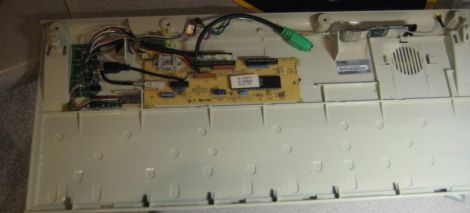
As the most direct interface between computer and programmer, keyboards can be a deeply personal, sometimes almost religious thing. Some find solace in their vintage IBM Model M, or luxurious leather keyboard, but maker [Carol Chen] took things into her own hands, quite literally. [Carol]’s Maker Faire exhibit has a half dozen specimens of interesting commercial tactile and ergonomic options…but [Chen]’s personal keyboard, where she commits to her work as a full-time coder, has been made to her own exacting specifications.
Continue reading “BAMF2011: Keyboards Built From Scratch”

Uber Keyboard Hides Security Tools In Plain Sight

uber_keyboard

[EverestX] works in the Security industry and is often required to recover or penetrate various systems for a variety of reasons. He wanted to create an all-in-one tool that he could easily carry from job to job which would provide him with several essential functions. He required that the device house a bootable operating system through which he can perform his work, have an Internet connection capable of injection, and have enough storage capacity to back up passwords, images, etc.

He decided to build the system inside an old IBM M-type keyboard, which provides a solid typing experience and plenty of real estate for his various components. After converting the keyboard from PS/2 to USB, he installed a USB hub along with his flash drive and WiFi card.

Once he gets everything reassembled, it should prove to be a pretty stealthy and useful piece of equipment. A word to the wise – if you happen to see someone sneaking around your office with a 20-year old Type-M keyboard, be wary.

USB Keyboard Prankster

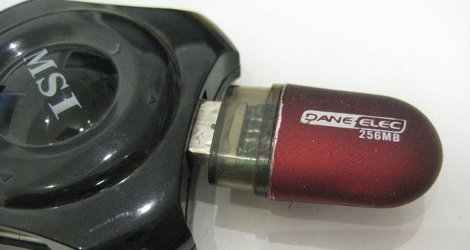
Being a long time prankster, [cyclonite] came up with this pretty clever hack in an old USB flash drive.

The drive was removed from its case, and the stock memory and controller was removed. On the back, an attiny 2313 is glued to the pcb, while resistors are swapped to work with the VUSB library. Wirewap wire is used to jumper all the needed points to the new micro controller on the back, and a temporary ICSP header was fitted on the end to load software.

What your’re left with is an innocent looking usb drive that, when plugged in, sets itself up as a keyboard then proceeds to toggle the caps lock on your victims computer every few minuets. Classic.

Join us after the break for a quick video.

Continue reading “USB Keyboard Prankster”

Alternate Keyboard Layouts – For Geekiness And Other Reasons

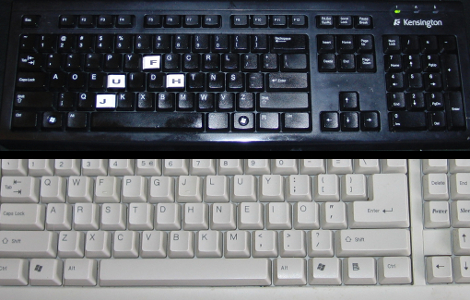
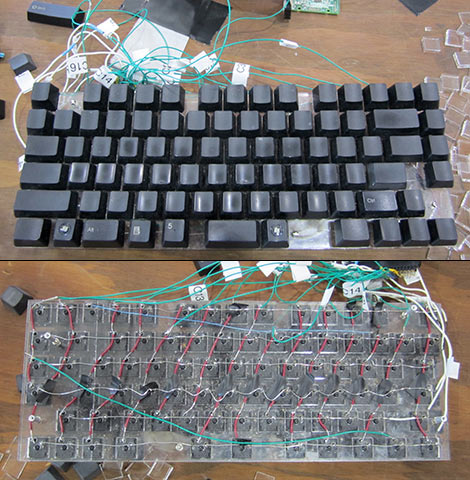
[BiOzZ] wanted to try a different keyboard layout than the ubiquitous Qwerty, so he grabbed an old keyboard and converted it to the Dvorak setup. This was accomplished by first popping off all of the keys from the black keyboard seen above, and boy did he find a mess underneath. It was nothing that a trip through the dishwasher (for the case only) wouldn’t fix, and the next step was to replace the keys in a different order. He found that a couple of them wouldn’t just go back in a different place, but had to be rotated 90 degrees to fit. Not a huge problem, you can see that he overcame the visual speedbump of letters facing the wrong way by adding his own letter labels. From there he walks us through the process of getting Windows to switch to the Dvorak layout.

I went through a similar process at the end of last year. I was experiencing a lot of pain in my hands from my prolific feature writing here at Hackaday so I chose to try out the Colemak keyboard. The white keyboard above is the one I repurposed using that layout. I found it quite easy to switch between two keyboard layouts using Ubuntu. After you’ve set it up in the keyboards dialog a layout icon appears on the panel. It wasn’t hard to pick the new key locations up, but it did reduce my typing speed by a factor of 8. In the end I found that adjusting my chair height and keeping my hands warm did the trick and I’m back on the Qwerty where I belong.

Jittering Hexapod Dances To The Strokes Of Your Bluetooth Keyboard

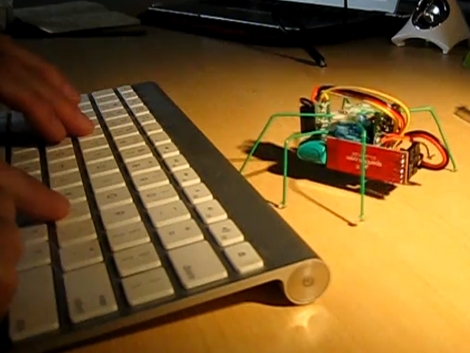
Here’s a small but functional hexapod that is controlled via Bluetooth. [Sigfpe] started with the hexapod kit sold by Polulu and added a BlueSMiRF modem to get the little guy’s communications up and running. But since the bot is merely three servos, a microcontroller board, sensors, and miscellaneous parts it’s an easy build for most electronic hobbyists.

Check out the video after the break to see the delightful dance it can perform at your bidding. When we first looked at the project we thought that the keyboard was directly paired with the bot for control, but a look at the code makes us think the computer is controlling it after processing keystrokes. Either way the BlueSMiRF should have no problem pairing with other Bluetooth devices so it’s just a matter of coding to get it taking commands from your device of choice. We’d love to see Android control but for the really hard-core code monkeys we think this should be voice controlled with a Bluetooth headset.

Continue reading “Jittering Hexapod Dances To The Strokes Of Your Bluetooth Keyboard”

Theremin Midi Board Is Like Using Autotune

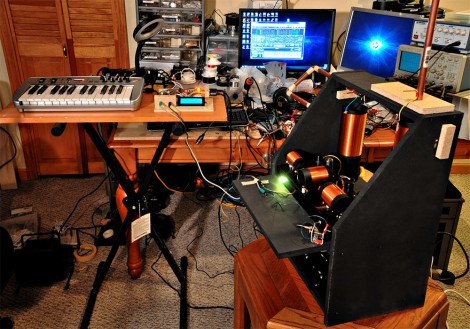
[Steve Hobley] built a Theremin interface board that tracks pitch and volume. Using this setup he’s able to pass data over a midi interface which effectively converts the instrument into a non-contact midi controller. As we joked in the headline, this does allow for the use of autotune, by snapping notes that are sharp or flat to the center of the nearest pitch. But you should watch the video after the break to see [Steve] show off the other features as well. A keyboard can be used to seed a starting pitch, with arpeggios of several different tonalities built on top of it based on the input from the Theremin.

Want the details? Unfortunately you’ll have to pay for the schematics. But the concept is still just as interesting to read about, even if you don’t know what went into the system. Continue reading “Theremin Midi Board Is Like Using Autotune”

Sniffing RF Hardware Communication Packets

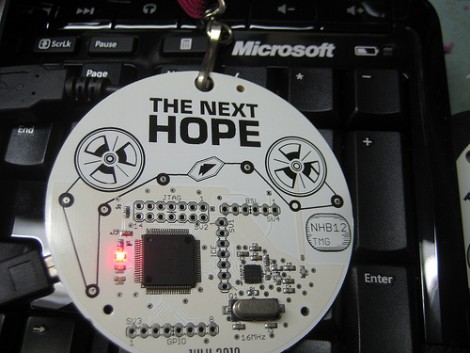
[Travis Goodspeed] put together a proof of concept hack that sniffs wireless keyboard data packets. He’s using the Next HOPE badge that he designed as the hardware platform for these tests. It has an nRF24L01+ radio on-board which can easily communicate with 2.4 GHz devices.

The real trick comes in getting that radio to listen for all traffic, then to narrow that traffic down to just the device from which you want data. He covers the protocol that is used, and his method of getting around MAC address verification on the hardware. In the end he can listen to all keyboard data without the target’s knowledge, and believes that it is possible to inject data using just the hardware on the badge.