Microsoft Engineers Reinvent The Optimus Keyboard

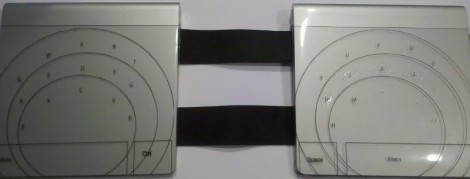
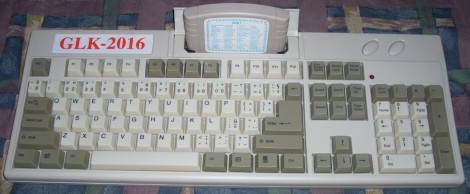
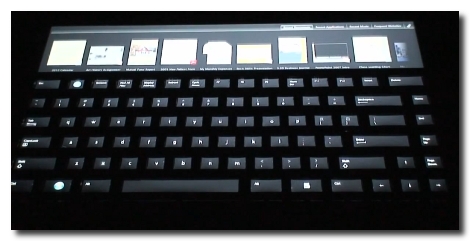
Looks like Microsoft has come up with a pretty slick little keyboard. It’s very much like the Optimus, which has an OLED screen in every key, except that it doesn’t have a screen in every key. Instead there’s just one screen on the whole unit and they keys have been overlayed on top while allowing the image to show through. Brilliant really, since this should drastically reduce the $2400 price tag of the original. That is, if you could buy the device. Microsoft’s not selling this hardware (yet anyway), but offering it up as test hardware for the UIST Innovation Contest. It will be interesting to see what the students come up with. This keyboard should be easier to program for since it involves manipulating just one screen. There is also extra space at the top that is touch-sensitive. See for yourself after the break.

Continue reading “Microsoft Engineers Reinvent The Optimus Keyboard”

A Desktop Made Of Air

Deskbook Air Guts

[Bart] managed to get his hands on a Macbook Air for free. The catch was that the monitor hinge was broken and the laptop wasn’t in too great of a condition. Rather than scrapping it or using it as a cake cutter, he decided to turn it into a keyboard PC. By removing the internals he was able to fit all of the components with minimal modification. [Bart] has added a few things to make it a functional desktop, such as integrating a USB hub under the the keyboard and fitted the keyboard with a Magic Trackpad. As with any great hack, the project is still in progress, and we can’t wait to see the final touches as it comes together.

USB Morse Code Keyboard

Looking for motivation to practice morse code [BenB] built this morse code keyboard. It uses USB and is recognized as a standard keyboard thanks to the V-USB stack running on the ATmega168. The project is rounded out with a clean look thanks to the chewing gum container that serves as an enclosure.

His design is simple enough that any morse key you have on hand can be used. You could even adapt that glove coder you built a couple of years back.

Keyboard Input For PlayStation

Anyone who has tried their hand at RPG Maker 1 (or any text input with a controller) knows how difficult it can be typing long paragraphs into the console. [Thutmose] is here to save the day with Kupid 1.0 (2.0 in production). A PICAXE takes ps/2 keyboard input and converts it to a series of d-pad button presses for PS1 and PS2 controllers, providing quick data entry compared to the previously monotonous task.

We’re happy to learn that the source code and hardware is released, meaning it has the potential to be easily adapted to any controller/console.

PC Side IM-ME Hacks


[Paul Klemstine] is working on some PC-side software hacks for the IM-ME. We’ve seen a lot of hardware hacks for this device, such as controlling the display, firmware flashing, and using it as a spectrum analyzer, but if you don’t want to alter the device right away you can try [Paul’s] collection of hacks. Working with the code developed by [Ben Ryves] there is support for using the IM-ME as a command prompt, to control Win amp, and as a wireless keyboard. Crack out your C# skills and develop the next feature for this inexpensive device.

Keyboard Keepalive

[youtube=http://www.youtube.com/watch?v=Zq25CTEJEMQ]

We’re not going to debate the necessity of this one. [Todd] plays online games that will log you out after a few minutes of inactivity. To resolve this, he has created a circuit that mimics keyboard activity at a preset interval. While he notes that there is software for this, he points out that many games block the software. They can’t block legitimate keyboard activity.

[via HacketGadgets]

Adding A Netbook Keyboard Light

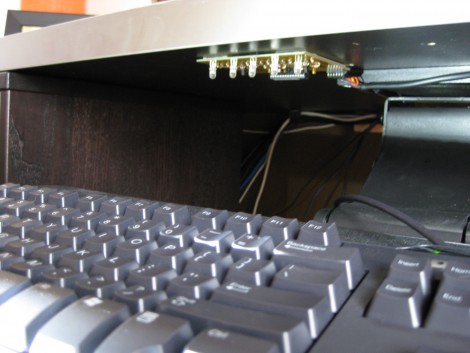
[Vikash] was having trouble using his netbook in the dark so he added a keyboard light. He’s got a Dell Vostro A90 which is the same hardware as the popular Dell Mini 9. We agree that the condensed keyboard layout makes it hard to type without looking; just try to find the quotation mark, brackets, and tilde keys! He added an LED to the bezel around the LCD screen in order to shed light on the situation. Now the LED can be turned on using CTRL. An ATtiny13 microcontroller monitors pins 1 and 11 of the keyboard, waiting for the CTRL keypress, then turns on the light when it receives it. This hardware solution means it doesn’t matter if you’re running a Hackintosh (like he is), Ubuntu (like we are), or that other OS.