
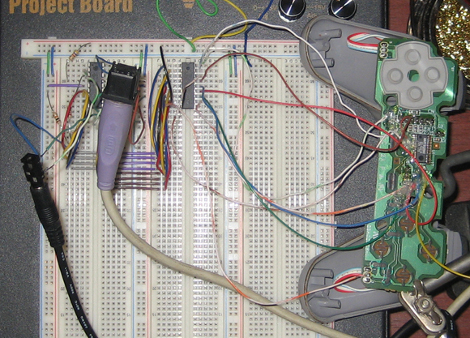
Keyboard Input For PlayStation

Anyone who has tried their hand at RPG Maker 1 (or any text input with a controller) knows how difficult it can be typing long paragraphs into the console. [Thutmose] is here to save the day with Kupid 1.0 (2.0 in production). A PICAXE takes ps/2 keyboard input and converts it to a series of d-pad button presses for PS1 and PS2 controllers, providing quick data entry compared to the previously monotonous task.

We’re happy to learn that the source code and hardware is released, meaning it has the potential to be easily adapted to any controller/console.
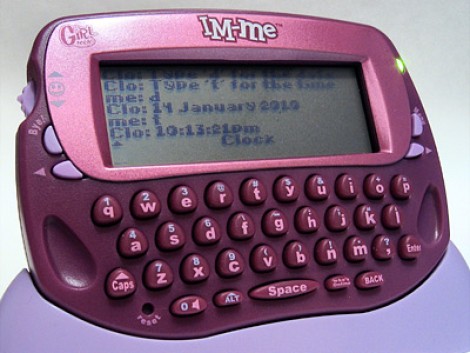
PC Side IM-ME Hacks


[Paul Klemstine] is working on some PC-side software hacks for the IM-ME. We’ve seen a lot of hardware hacks for this device, such as controlling the display, firmware flashing, and using it as a spectrum analyzer, but if you don’t want to alter the device right away you can try [Paul’s] collection of hacks. Working with the code developed by [Ben Ryves] there is support for using the IM-ME as a command prompt, to control Win amp, and as a wireless keyboard. Crack out your C# skills and develop the next feature for this inexpensive device.

Keyboard Keepalive

[youtube=http://www.youtube.com/watch?v=Zq25CTEJEMQ]

We’re not going to debate the necessity of this one. [Todd] plays online games that will log you out after a few minutes of inactivity. To resolve this, he has created a circuit that mimics keyboard activity at a preset interval. While he notes that there is software for this, he points out that many games block the software. They can’t block legitimate keyboard activity.

[via HacketGadgets]

Adding A Netbook Keyboard Light

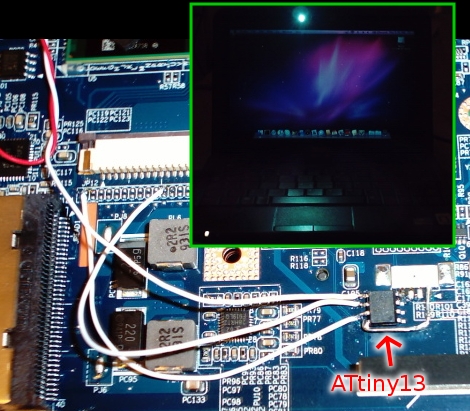
[Vikash] was having trouble using his netbook in the dark so he added a keyboard light. He’s got a Dell Vostro A90 which is the same hardware as the popular Dell Mini 9. We agree that the condensed keyboard layout makes it hard to type without looking; just try to find the quotation mark, brackets, and tilde keys! He added an LED to the bezel around the LCD screen in order to shed light on the situation. Now the LED can be turned on using CTRL. An ATtiny13 microcontroller monitors pins 1 and 11 of the keyboard, waiting for the CTRL keypress, then turns on the light when it receives it. This hardware solution means it doesn’t matter if you’re running a Hackintosh (like he is), Ubuntu (like we are), or that other OS.

FPGA Keyboard Synthesizer

This synthesizer relies solely on an FPGA for key detection and sound synthesis. [Chris] and [Joe] built it for their final project at Cornell. The hardware implementation includes velocity sensing for the keys. While at rest, each key contacts a strip of copper foil. A matching strip of foil contacts the key when it is depressed. The velocity data is extrapolated by detecting when a key leaves the rest state and arrives at the depressed state. Sound synthesis is handled in hardware using the Karplus-Strong string synthesis method.  If you want to hear what it sounds like, they’ve posted a video (MP4) that shows off the creation. It sounds like an electric piano to us, so mission accomplished.

Creating Wooden Enclosures

[Matthias] built a wooden enclosure for his keyboard. He’s used to using a Commodore 64 keyboard and decided he didn’t need the num pad found on modern keyboards.

It’s not the finished product that interests us, but the methods he used to create such a nice looking enclosure. From the wooden binary adder he produced we know he’s a talented woodworker. He takes us step-by-step through the use of a scroll saw, table saw, and router tabled to turn out this one-of-a-kind. You may not own these tools but someone you know does. Follow his example and turn out your own wooden wonders.

[Thanks Harald]

Melloman Tape-looping Keyboard

[Michael] tipped us off about an incredible build from back in 2005. The Melloman is a keyboard that uses a different tape loop for each key. The instrument is generally known as a Mellotron, and consists of a different looping tape for each key. When a key is depressed, the head comes into contact with the key and plays the sound sample.

This particular implementation uses 14 Walkmans to supply the tape loops. The Walkman units are constantly playing but the audio output is not enabled until a key is depressed. The main description of the instrument is on the final project page linked above but there are many construction photos available in the build log.

Update: After the break we’ve embedded a video that will take you on a tour of the components of the Melloman. To clear up the looping issue: a Mellotron uses tape loops, but the Melloman uses tapes that are 30 minutes on each side instead of loops.

Continue reading “Melloman Tape-looping Keyboard” →








