

Linux Fu: Sharing Your Single WiFi

If you are trying to build a router or access point, you’ll need to dig into some of the details of networking that are normally hidden from you. But, for a normal WiFi connection, things mostly just work, even though that hasn’t always been the case. However, I ran into a special case the other day where I needed a little custom networking, and then I found a great answer to automate the whole process. It all comes down to hotel WiFi. How can you make your Linux laptop connect to a public WiFi spot and then rebroadcast it as a private WiFI network? In particular, I wanted to connect an older Chromecast to the network.

Hotel WiFi used to be expensive, but now, generally, it is free. There was a time when I carried a dedicated little box that could take a wired or wireless network and broadcast its own WiFi signal. These were actually fairly common, but you had to be careful as some would only broadcast a wired network connection. It was more difficult to make the wireless network share as a new wireless network, but some little travel routers could do it. Alternatively, you could install one of the open router firmware systems and set it up. But lately, I haven’t been carrying anything like that. With free WiFi, you can just connect your different devices directly to the network. But then there’s the Chromecast and the dreaded hotel login.

Continue reading “Linux Fu: Sharing Your Single WiFi”

What’s Old Is New Again: A Linux PC From A Set Top Box

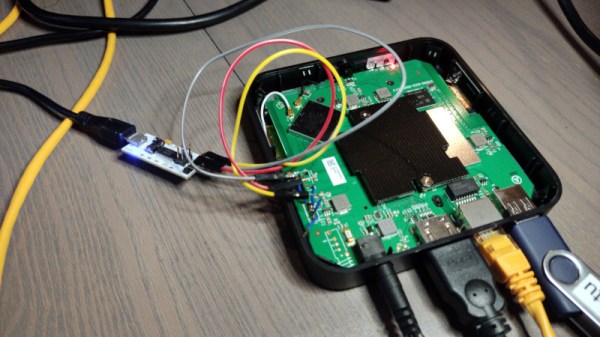
There was a time around two decades ago, when the new hotness was taking control of home routers to use as small Linux computers. An echo of this era lives on in the name of the OpenWrt minimal Linux distribution, in reference to the Linksys WRT54G router which started it all. Routers as small computers were displaced by small cheap Linux machines from the likes of Raspberry Pi, and the promise of discarded home network gear doing interesting stuff receded. Now it might just be back, as [Jasper Devreker] shows us an Android TV set-top box from a mobile carrier repurposed as a Linux computer that can even run a desktop environment.

The method starts as you might expect, by identifying a mystery connector as a debug serial port. This outputs all sorts of interesting boot information, but can be dropped into a uBoot shell. From here with a bit of effort the eMMC storage could be dumped, and from that the nature of the machine could be deduced. The CPU is an Amlogic quad core ARM Cortex-A53 SoC, which by a stroke of luck is a target for which an Armbian build is available. From there a Linux installation could be assembled, and even an AFCE desktop.

These boxes are handed out in the hundreds of thousands by home connectivity providers, so there’s value in this type of hack as they become available for experimenters. Perhaps it’s more useful as a small headless Linux machine than as a desktop, but we sense there are more machines to come in this line.

If you’d like a little bit of history on hackable Linux devices, have a read of one of our earliest posts featuring the Linksys WRT54G.

Linux Fu: The Shell Forth Programmers Will Love

One of the most powerful features of Unix and Linux is that using traditional command line tools, everything is a stream of bytes. Granted, modern software has blurred this a bit, but at the command line, everything is text with certain loose conventions about what separates fields and records. This lets you do things like take a directory listing, sort it, remove the duplicates, and compare it to another directory listing. But what if the shell understood more data types other than streams? You might argue it would make some things better and some things worse, but you don’t have to guess, you can install cosh, a shell that provides tools to produce and work with structured data types.

The system is written with Rust, so you will need Rust setup to compile it. For most distributions, that’s just a package install (rust-all in Ubuntu-like distros, for example). Once you have it running, you’ll have a few new things to learn compared to other shells you’ve used. Continue reading “Linux Fu: The Shell Forth Programmers Will Love”

Ask Hackaday: The Ten Dollar Digital Mixing Desk?

There comes a point in every engineer’s life at which they need a mixing desk, and for me that point is now. But the marketplace for a cheap small mixer just ain’t what it used to be. Where once there were bedroom musicians with a four-track cassette recorder if they were lucky, now everything’s on the computer. Lay down as many tracks as you like, edit and post-process them digitally without much need for a physical mixer, isn’t it great to be living in the future!

This means that those bedroom musicians no longer need cheap mixers, so the models I was looking for have disappeared. In their place are models aimed at podcasters and DJs. If I want a bunch of silly digital effects or a two-channel desk with a crossfader I can fill my boots, but for a conventional mixer I have to look somewhat upmarket. Around the three figure mark are several models, but I am both a cheapskate and an engineer. Surely I can come up with an alternative. Continue reading “Ask Hackaday: The Ten Dollar Digital Mixing Desk?”

Linux Fu: UEFI Booting

Unless your computer is pretty old, it probably uses UEFI (Unified Extensible Firmware Interface) to boot. The idea is that a bootloader picks up files from an EFI partition and uses them to start your operating system. If you use Windows, you get Windows. If you use Linux, there’s a good chance you’ll use Grub which may or may not show you a menu. The problem with Grub is you have to do a lot of configuration to get it to do different things. Granted, distros like Ubuntu have tools that go through and do much of the work for you and if you are satisfied with that, there’s no harm in using Grub to boot and manage multiple operating systems.

An alternative would be rEFInd, which is a nice modern UEFI boot manager. If you are still booting through normal (legacy) BIOS, the installation might be a hassle. But, in general, rEFInd, once installed, just automatically picks up most things, including Windows, Mac, and Linux operating systems and kernels. The biggest reasons you might change the configuration is if you want to hide some things you don’t care about or change the visual theme.

Continue reading “Linux Fu: UEFI Booting”

This Week In Security: Adblock For Security, ProxyNotShell Lives, And CVSS 10 To Not Worry About

The ubiquity of ransomware continues, this time with The Guardian announcing they were partially shut down from an attack. Staff are working from home as the incident is being investigated and data is recovered. Publishing seems to be continuing, and the print paper ran as expected.

There have been a couple reports published recently on how ransomware and other malware is distributed, the first being a public service announcement from the FBI, detailing what might be a blindly obvious attack vector — search engine advertising. A bad actor picks a company or common search term, pays for placement on a search engine, and then builds a fake web site that looks legitimate. For bonus points, this uses a typosquatted domain, like adobe[dot]cm or a punycode domain that looks even closer to the real thing.

The FBI has a trio of recommendations, one of which I whole-heartedly agree with. Their first suggestion is to inspect links before clicking them, which is great, except for the punycode attack. In fact, there are enough lookalike glyphs to make this essentially useless. Second is to type in URLs directly rather than using a search engine to find a company’s site. This is great so long as you know the URL and don’t make a typo. But honestly, haven’t we all accidentally ended up at website[dot]co by doing this? Their last recommendation is the good one, and that is to run a high-quality ad-blocker for security. Just remember to selectively disable blocking for websites you want to support. (Like Hackaday!) Continue reading “This Week In Security: Adblock For Security, ProxyNotShell Lives, And CVSS 10 To Not Worry About”

Linux Fu: Miller The Killer Makes CSV No Pest

Historically, one of the nice things about Unix and Linux is that everything is a file, and files are just sequences of characters. Of course, modern practice is that everything is not a file, and there is a proliferation of files with some imposed structure. However, if you’ve ever worked on old systems where your file access was by the block, you’ll appreciate the Unix-like files. Classic tools like awk, sed, and grep work with this idea. Files are just characters. But this sometimes has its problems. That’s the motivation behind a tool called Miller, and I think it deserves more attention because, for certain tasks, it is a lifesaver.

The Problem

Consider trying to process a comma-delimited file, known as a CSV file. There are a lot of variations to this type of file. Here’s one that defines two “columns.” I’ve deliberately used different line formats as a test, but most often, you get one format for the entire file:

Slot,String 
A,"Hello" 
"B",Howdy 
"C","Hello Hackaday" 
"D","""Madam, I'm Adam,"" he said." 
E 100,With some spaces!
X,"With a comma, or two, even"

Continue reading “Linux Fu: Miller The Killer Makes CSV No Pest”










