Bringing Achievements To The Nintendo Entertainment System

Microsoft made gaming history when it developed Achievements and released them with the launch of the Xbox 360. They have since become a key component of gaming culture, which similar systems rolling out to the rest of the consoles and even many PC games. [odelot] has the honor of being the one to bring this functionality to an odd home—the original Nintendo Entertainment System!

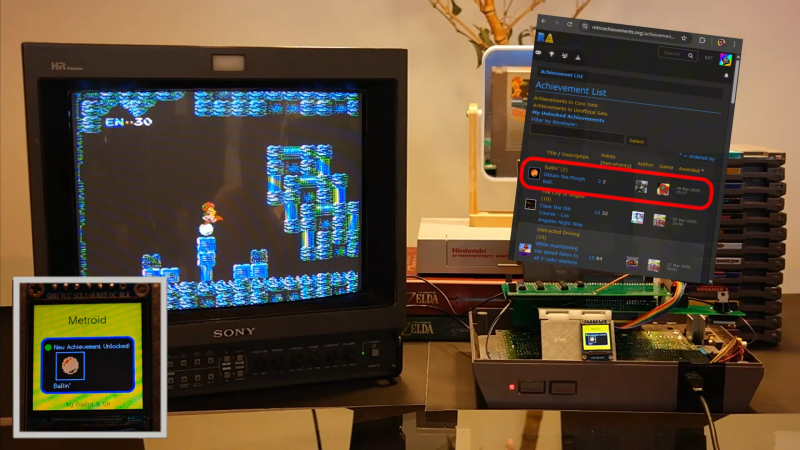
It’s actually quite functional, and it’s not as far-fetched as it sounds. What [odelot] created is the NES RetroAchievements (RA) Adapter. It contains a Raspberry Pi Pico which sits in between a cartridge and the console and communicates with the NES itself. The cartridge also contains an LCD screen, a buzzer, and an ESP32 which communicates with the Internet.

When a cartridge is loaded, the RA Adapter identifies the game and queries the RetroAchievements platform for relevant achievements for the title. It then monitors the console’s memory to determine if any of those achievements—such as score, progression, etc.—are met. If and when that happens, the TFT screen on the adapter displays the achievement, and a notification is sent to the RetroAchievements platform to record the event for posterity.

It reminds us of other great feats, like the MJPEG entry into the heart of the Sega Saturn.

Continue reading “Bringing Achievements To The Nintendo Entertainment System”

A SNES CPU Replacement Via FPGA

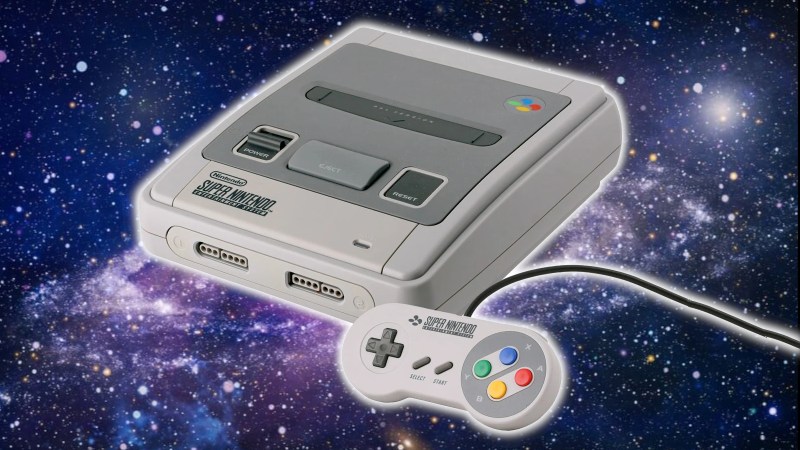
Let’s say you had a SNES with a busted CPU. What would you do? Your SNES would be through! That is, unless, you had a replacement based on an FPGA. [leonllr] has been developing just such a thing.

The project was spawned out of necessity. [leonllr] had purchased a SNES which was struck down with a dead CPU—in particular, a defective S-CPU revision A. A search for replacements only found expensive examples, and ones that were most likely stripped from working machines. A better solution was necessary.

Hence, a project to build a replacement version of the chip using the ICE40HX8K FPGA. Available for less than $20 USD, it’s affordable, available, and has enough logic cells to do the job. It’s not just a theoretical or paper build, either. [leonllr] has developed a practical installation method to hook the ICE40HX8K up to real hardware, which uses two flex PCBs to go from the FPGA mainboard to the SNES motherboard itself. As for the IP on the FPGA, the core of the CPU itself sprung from the SNESTANG project, which previously recreated the Super Nintendo on Sipeed Tang FPGA boards. As it stands, boards are routed, and production is the next step.

It’s nice to see classic hardware resurrected by any means necessary. Even if you can’t get a whole bare metal SNES, you might be able to use half of one with a little help from an FPGA. We’ve seen similar work on other platforms, too. Meanwhile, if you’re working to recreate Nintendo 64 graphics chips in your own basement, or something equally weird, don’t hesitate to let us know!

The SNES Seems To Be Getting Faster Over Time

Every Super Nintendo console should run at the same speed. They were all built in factories with the same components so they should all operate at the steady clip mandated by Nintendo all those years ago. Except, apparently, the SNES is speeding up as it gets older.

The matter was brought to the public’s attention by the [TASBot] team, a group within the speedrunning community. If anyone was going to notice vintage consoles suddenly running a hair faster, you could bet it would be the speedrunners. Soon enough, a call was put out to crowdsource some data. Submitters were asked to run a set piece of code to test the DSP sample rate on consoles when cold and warm, to get the best idea of what was going on.

As reported by Ars Technica, the group seems to have pinned down the problem to the SNES’s Audio Processing Unit. It’s supposed to run at 24.576 MHz, with a sample rate of 32,000 Hz. However, over the years, emulator developers and speedrunners had noticed that 32,040 Hz seemed to be a more realistic figure for what real consoles were actually running the DSP sample rate at. Developers found that building emulators to run the DSP at this rate was important to run commercial games as expected, suggesting the hardware might have always been a little faster than expected.

However, more recently, it seems that the average speed of the DSP sample rate has increased further. The average result collected by [TASBot] from modern consoles is 32,076 Hz. What’s more interesting is the range of submitted figures—from 31,976 Hz to 32,349 Hz. It seems that the DSP’s ceramic resonator—used instead of a quartz crystal—might degrade over time, causing the speedup. [TASBot] team members also tested temperature changes, but only found a 32 Hz variation from a frozen SNES to one at room temperature.

The fact that console components degrade over time isn’t exactly news; we’ve featured plenty of articles on leaky batteries and corroded traces. Still, for speedrunners, the idea that the hardware standard itself can shift over time? It’s like feeling quicksand under your feet. What even is reality anymore?

[Thanks to s7726 for the tip!]

A picture of the Alarmo running a tweaked firmware, showing a theme with (Debug) added to its name, obviously a firmware modification

Making The Alarmo Customizable, By Any Means Necessary

Last year, Nintendo has released the Alarmo, a bedside-style alarm clock with a colourful display. Do you own one? You deserve full control over your device, of course. [KernelEquinox] has been reverse-engineering an Alarmo ever since getting one, and there’s no shortage of cool stuff you’ll be able to do with an Alarmo thanks to this work.

Now, just how can you improve upon the Alarmo? Looking through the Alarmo dev community site and threads on the subreddit, there are plenty of ideas, from themes to a ton of possible behaviour tweaks! In particular, Nintendo has already changed Alarmo’s behaviour in a way that is jarring to some users – a third-party development community will help us all make sure our Alarmos work exactly like we expect them to. Want to replace the sound files,  tie your Alarmo into your smart home setup, write your apps, tweak the UI or default behaviour, fix a bug that irks you real bad, or access a debug menu? Or, ensure that Alarmo doesn’t contribute to light pollution in your room? All appears to be doable.

Like the Alarmo, but don’t own one yet? They’re limited-release for now, but it will be more widely available this March; we thank [KernelEquinox] for the work in making Alarmo hacker-friendly. If you’ve forgotten, this project started off thanks to the efforts of [Gary] last year. We covered it back then — cat pictures included!

Hackaday Links Column Banner

Hackaday Links: February 2, 2025

All things considered, it was a very bad week for aviation here in the United States. Three separate crashes, two of which involved US military aircraft, have left over 70 people dead. We’ll spare you the details since there are plenty of other places to get news like that, but we did want to touch on one bright spot in this week’s aviation news: the first successful supersonic flight by a US-made civilian aircraft. There are a lot of caveats to that claim, but it’s clear that Boom Supersonic is on a path to commercializing supersonic air transportation for the first time since the Concorde was retired. Their XB-1 “Baby Boom” test aircraft managed three separate supersonic runs during the January 28 test flight over the Mojave test range. As usual, Scott Manley has excellent coverage of the test flight, including a look at how Boom used a Starlink terminal and an iPhone to stream cockpit video.

Continue reading “Hackaday Links: February 2, 2025”

Illustrated Kristina with an IBM Model M keyboard floating between her hands.

Keebin’ With Kristina: The One With The Hardware-Layered Keyboard

You know (or maybe you didn’t), I get super excited when y’all use the links at the bottom of this round-up we call Keebin’ to communicate with your old pal Kristina about your various labors of love. So just remember that.

Case in point: I was typing up this very issue when I heard from [Jay Crutti] and [Marcel Erz]. Both are out there making replacement keyboards for TRS-80s — [Jay] for Models 3 and 4, and [Marcel] for the Model 1. Oooh, I said to myself. This is going at the top.

A TRS-80 Model 4 with a replacement keyboard.
A TRS-80 Model 4. Image by [Jay Crutti] via JayCrutti.com
Relevant tangent time: I remember in the 90s having a pile of computers in my parents’ basement of various vintages, a TRS-80 Model 2 among them. (Did I ever tell you about the time I got pulled over for speeding with a bunch of different computers in the backseat? I was like no, officer, first of all, those are old machines that no one would really want, and I swear I didn’t steal them.)

I think the TRS-80 is probably the one I miss the most. If I still had it, you can bet I would be using [Jay] and [Marcel]’s work to build my own replacement keyboard, which the 40-year-old machine would likely need at this point if the Model 4 is any indication with its failing keyboard contacts.

To create the replacements, [Jay] used Keyboard Layout Editor (KLE), Plate & Case Builder, and EasyEDA. Using the schematic from the maintenance manual, he matched the row/column wiring of the original matrix with Cherry MX footprints. Be sure to check out [Jay]’s site for a link to the project files, or to purchase parts or an assembled keyboard. On the hunt for TRS-80 parts in general? Look no further than [Marcel]’s site.
Continue reading “Keebin’ With Kristina: The One With The Hardware-Layered Keyboard”

Game boy with custom cartridge mounted on car dashboard

A Game Boy Speedometer, Just Because You Can

From a practical standpoint, [John] may be correct that his recent creation is the “world’s worst digital dash”, but we’re still oddly enamored with the idea of using a Nintendo Game Boy as a digital speedometer. Pulling it off meant interfacing the handheld with the vehicle’s CAN bus system, so whether you’re into retro gaming or car hacking, this project has something to offer.

Showing real-time vehicle speed on the Game Boy sounds like it should be relatively easy, but the iconic game system wasn’t exactly built for such a task. Its 2 MHz CPU and 160×144 pixel dot-matrix screen were every kid’s dream in 1989, but using it as a car dashboard is pushing it. To bridge that gap, [John] designed two custom circuit boards. One interfaces with the Game Boy, intercepting its memory requests and feeding it data from a microcontroller. The other processes the CAN bus signals, translating speed information into a form the Game Boy can display. [John] used inexpensive tools and software to read the CAN bus data, and used GBDK-2020 to write the software in C. His video goes in great detail on how to do this.

Months of work have gone into decoding the Game Boy’s data bus and creating a schematic for the interface board. Tricking the Game Boy into thinking it was loading a game, while actually displaying incoming speed data. The screen’s low resolution and slow refresh rate rendered it barely readable in a moving vehicle. But [John]’s goal wasn’t practicality — it was just proving it could be done.

Want to dive deep into the Game Boy?  Have you seen the Ultimate Game Boy talk?

Continue reading “A Game Boy Speedometer, Just Because You Can”