Truthsayer Uses Facial Recognition To See If You’re Telling The Truth

It’s hard to watch [Mark Zuckerberg]’s 2018 Congressional testimony and not come to the conclusion that he is, at a minimum, quite a bit different than the average person. Of course, having built a multibillion-dollar company that drastically changed everything about the way people communicate is pretty solid evidence of that, but the footage at least made a fun test case for this AI truth-detecting algorithm.

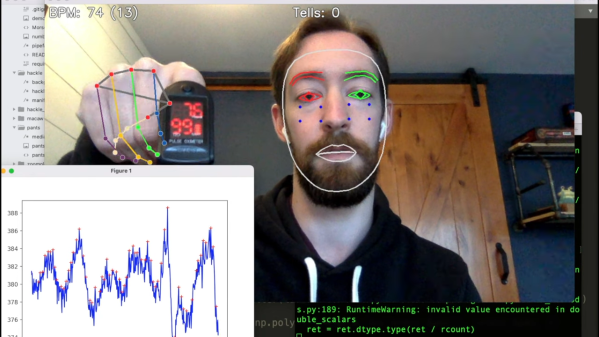
Now, we’re not saying that anyone in these videos was lying, and neither is [Fletcher Heisler]. His algorithm, which analyzes video of a person and uses machine vision to pick up cues that might be associated with the stress of untruthfulness, is far from perfect. But as the first video below shows, it is a lot of fun to see it at work. The idea is to capture data like pulse rate, gaze direction, blink rate, mouth posture, and even hand position and use them as a proxy for lying. The second video, from [Fletcher]’s recent DEFCON talk, has much more detail.

The key to all this is finding human faces in a video — a task that seemed to fail suspiciously frequently when [Zuck] was on camera — using OpenCV and MediaPipe’s Face Mesh. The subject’s pulse is detected by watching for subtle changes in the color of a subject’s cheeks as blood flows through them, which we’ve heard about plenty of times but never before seen presented so clearly and executed so simply. Gaze direction, blinking, and lip compression are fairly easy to detect too. [Fletcher] also threw in the FER library for facial expression recognition, to get an idea of the subject’s mood. Together, these cues form a rough estimate of the subject’s truthiness, which [Fletcher] is quick to point out is just for entertainment purposes and totally shouldn’t be used on your colleagues on the next Zoom call.

Does [Fletcher]’s facial mesh look familiar? It should, since we once watched him twitch his way through a coding interview.

Continue reading “Truthsayer Uses Facial Recognition To See If You’re Telling The Truth” →
Purpose-Built Plotter Pitches In To Solve Wordblitz On Your Phone

It seems like most hackers have never played a game without at least wondering how to cheat at it. It’s not that we’re a dishonest lot, at least not as a rule. It’s more that most games hold less challenge for us than does figuring out how to reverse engineer the game’s mechanics. We don’t intend to cheat; it just sort of happens.

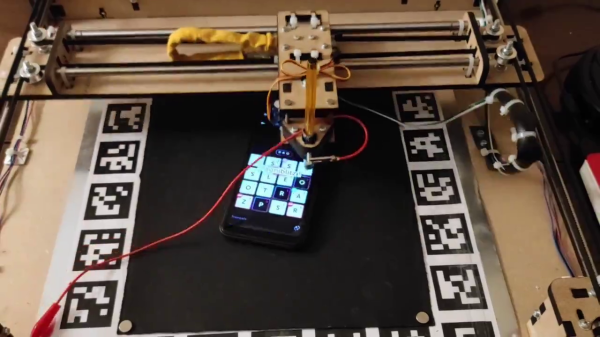
Or at least that’s the charitable way to look at such smartphone game cheats as this automated word-search puzzle solver. The game is Wordblitz, which is basically an implementation of classic Boggle along with extra features to release more dopamine and keep you playing. Not one to fall for that trick, [ghettobastler] whipped up a quick X-Y gantry from MDF using a laser cutter, added a stylus in the form of a cotton swab tipped with aluminum foil, and a vision system based on a simple web camera. The bed of the gantry has a capacitive plate so the stylus can operate the phone, along with a frame of ArUco fiducial marker to aid in locating the phone.

A Raspberry Pi handles the machine vision part of the process, which uses OpenCV to estimate the phone’s location and extract the current game tiles. The words in the game field are located by a solver that [ghetto] had previously written; a script then streams G-code to the plotter to peck out the answers at blazing speed, or at least faster than even [Peggy Hill] could manage. See the video below for a sample game being solved.

One word of warning if you choose to build this: [ghettobastler]’s puzzle-solving algorithm is based on a French dictionary, so you’ll have to re-teach it for other languages. But whatever language it’s in, this reminds us a bit of some of the Wordle solvers we’ve seen recently.

Continue reading “Purpose-Built Plotter Pitches In To Solve Wordblitz On Your Phone” →

No Tool Left Behind With The Help Of Homemade Shadow Boards

Shadowed tool storage — where a tool outline shows at a glance what’s missing from storage — is a really smart way to keep your shop neat. They’re also super important for cases where a tool left behind could be a tragedy. Think, where’s-that-10-mm-socket-while-working-on-a-jet-engine? important. (It’s always the 10-mm socket.)

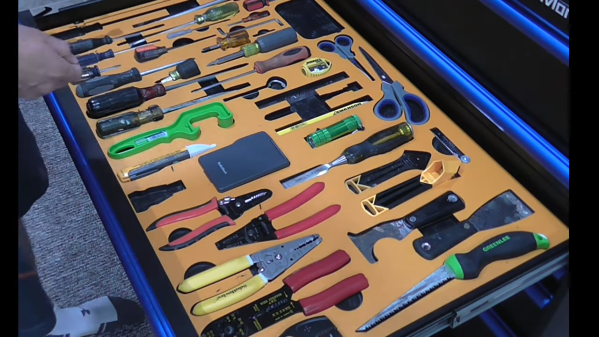
But just because shadow boards are smart, doesn’t mean they’re easy to make. That’s why [Scott Prince] came up with this semi-automated method for making toolbox shadow boards. The job of tracing around each tool on some sort of suitable material and cutting out the shapes seems straightforward, but the trick comes in organizing the outlines given the space available and the particular collection of tools.

[Scott]’s method starts with capturing images of each individual tool. He used a PiCam and a lightbox housed, strangely enough, in a storage bench; we’d love to hear the full story behind that, but pretty much any digital camera would do for the job. After compensating for distortion with OpenCV, cropping the images, and turning the image into a vector outline of the tool, [Scott] was left with the task of putting the tools into logical groups and laying them out sensibly. After tweaking the tool outlines and adding finger cutouts for easy pickup, [Scott] put his CNC router to work. He chose to use a high-density polyethylene product made by his employer, which looks fantastic, but MDF would work fine too.

We have to admit to a fair degree of toolbox envy now that we’ve seen what shadow boards can do. We’re a bit torn, though — [Zach Friedman]’s Gridfinity storage system has a lot going for it, too.

Point Out Pup’s Packages With This Poop-Shooting Laser

When you’re lucky enough to have a dog in your life, you tend to overlook some of the more one-sided aspects of the relationship. While you are severely restrained with regard to where you eliminate your waste, your furry friend is free to roam the yard and dispense his or her nuggets pretty much at will, and fully expect you to follow along on cleanup duty. See what we did there?

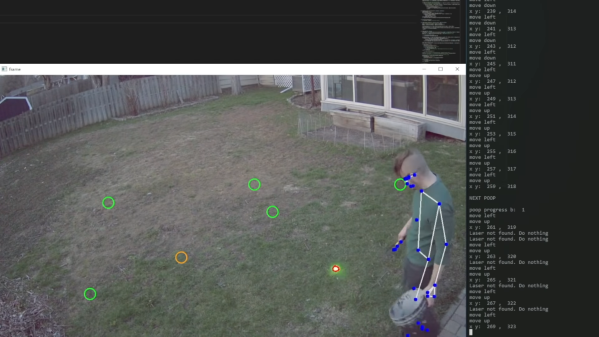
And so dog people sometimes rebel at this lopsided power structure, by leaving the cleanup till later — often much, much later, when locating the offending piles can be a bit difficult. So naturally, we now have this poop-shooting laser turret to helpfully guide you through your backyard cleanup sessions. It comes to us from [Caleb Olson], who leveraged his recent poop-posture monitor as the source of data for where exactly in the yard each deposit is located. To point them out, he attached a laser pointer to a cheap robot arm, and used OpenCV to help line up the bright green spot on each poop.

But wait, there’s more. [Caleb]’s code also optimizes his poop patrol route, minimizing the amount of pesky walking he has to do to visit each pile. And, the same pose estimation algorithm that watches the adorable [Twinkie] make her deposits keeps track of which ones [Caleb] stoops by, removing each from the worklist in turn. So now instead of having a dog control his life, he’s got a dog and a computer running the show. Perfect.

We joke, because poop, but really, this is a pretty neat exercise in machine learning. It does seem like the robot arm was bit overkill, though — we’d have thought a simple two-servo turret would have been pretty easy to whip up.

Continue reading “Point Out Pup’s Packages With This Poop-Shooting Laser” →

OpenCV Running On A Tiny Microcontroller

At first blush, it might seem like projects that make extensive use of computer vision or machine learning would need to be based on powerful computing platforms with plenty of clock cycles and memory to handle this type of application. While there is some truth to this, as the field progresses it becomes possible to experiment with these tools on low-power devices as well. Take this OpenCV project which is built entirely on an ESP32 for example.

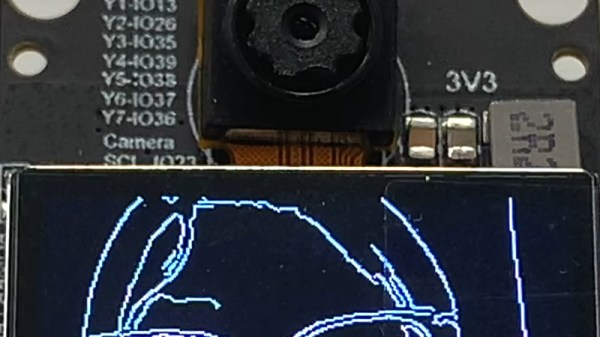
With that being said, there are some modifications that need to be made to the ESP32 in order to use OpenCV in any meaningful way. The most important of these is the use of the ESP32-DOWDQ6 module which increases the available memory of the ESP32 to allow it to make better use of camera functions. Even then, the ESP32 can’t run the entire OpenCV application, so a shrunken version of OpenCV is required before the device can run it natively. Once those two obstacles are out of the way, though, doing things like edge detection, as this project demonstrates, are well in the realm of possibility.

If running OpenCV on something as small as an ESP32 is possible, it is even easier to run on something orders of magnitude more powerful and yet still inexpensive, such as the Raspberry Pi. While the project’s code is available on its GitHub page for those interested, there are plenty of other OpenCV projects that we have featured on more powerful platforms as well, like this clock which falls off of the wall whenever someone looks at it.

Continue reading “OpenCV Running On A Tiny Microcontroller” →

Engineering Vs Pigeons

We’ve all been there. Pigeons are generally pretty innocuous, but they do leave a mess. If you have a convertible or a bicycle or even just a clean car, you probably don’t want them hanging around. [Max] was tired of a messy balcony, so like you might approach any engineering problem, he worked his way through several possible solutions. Starting with plastic crows, and naturally ending with an automated water gun.

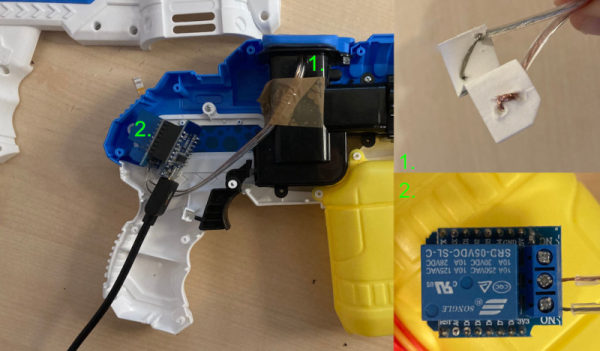
The resulting robotic water gun that targets pigeons with openCV is a dandy project and while we don’t usually advocate shooting at neighborhood animals, we don’t think a little water will be any worse than the rain for the pigeons. The build started with a cheap electric water pistol. A Wemos D1 Mini ESP8266 development board provides the brainpower. The water pistol wouldn’t easily take rechargeable batteries, plus it is a good idea to separate the logic supply and the pump motors, so the D1 gets power from a USB power bank separate from the gun’s batteries.

That leaves the camera. An old iPhone 6S with a 3D printed bracket feeds video to a Python script that uses openCV. If looks for changes using a very particular algorithm to detect that something is moving and fires the gun. It doesn’t appear that it actually tracks the pigeons, so maybe that’s a thought for version 2.

Was it successful? Maybe, but it does seem like the pigeons learned to avoid it. We still think azimuth and elevation on the gun would help.

Most of the time when we see pigeon hacking it is to use them for nefarious purposes. [Max] should be glad he doesn’t have to deal with lions.

Learn Sign Language Using Machine Vision

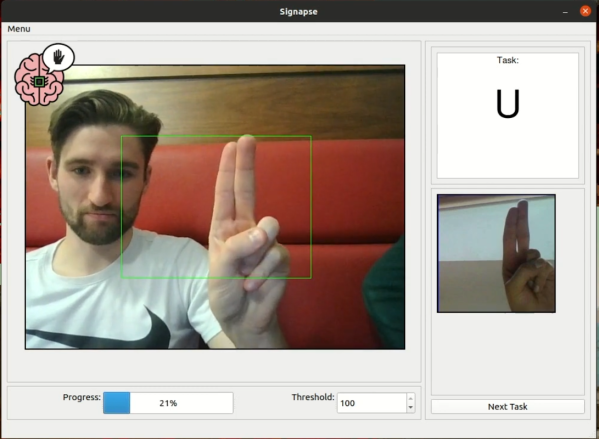
Learning a new language is a great way to exercise the mind and learn about different cultures, and it’s great to have a native speaker around to improve the learning experience. Without one it’s still possible to learn via videos, books, and software though. The task does get much more complicated when trying to learn a language that isn’t spoken, though, like American Sign Language. This project allows users to learn the ASL alphabet with the help of computer vision and some machine learning algorithms.

The build uses a computer vision model in MobileNetV2 which is trained for each sign in the ASL alphabet. A sign is shown to the user on a screen, and the user needs to demonstrate the sign to the computer in order to progress. To do this, OpenCV running on a Raspberry Pi with a PiCamera is used to analyze the frames of the user in real-time. The user is shown pictures of the correct sign, and is rewarded when the correct sign is made.

While this only works for alphabet signs in ASL currently, the team at the University of Glasgow that built this project is planning on expanding it to include other signs as well. We have seen other machines built to teach ASL in the past, like this one which relies on a specialized glove rather than computer vision.

Continue reading “Learn Sign Language Using Machine Vision” →