Adding A Laser Sight To Your Drill Press In Just A Few Easy Steps

drill-press-laser-sight

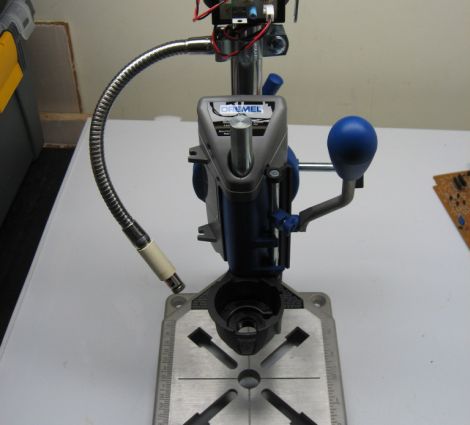
[Derek] was using his Dremel drill press to prep a bunch of PCBs, and found that it was getting difficult to focus on the spinning drill bit each time to line it up with the solder pads on the boards. He figured that a laser sight would help move the process along, but since no off the shelf solution was available for his press, he built one of his own.

He bought a cheap desk lamp with a flexible metal neck, which he disassembled, saving the flexible metal sheath. He installed a conduit clamp on one end of the neck, and a laser module at the other. [Derek] then mounted the laser arm on the press’ crow’s nest aiming it at the tip of the drill bit.

As you can see in the video below, the ability to easily position the drill bit using the laser helps him make quick work of any PCB.

Continue reading “Adding A Laser Sight To Your Drill Press In Just A Few Easy Steps”
All PCB Quadcopter Makes The Most Of Each Component

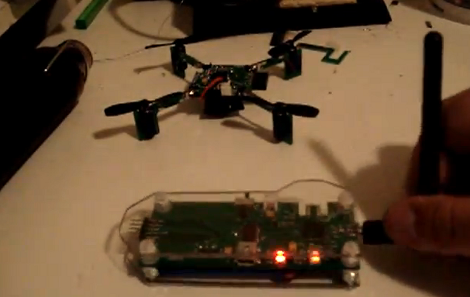
It’s difficult to contain our excitement for this tiny quadcopter project called the Picopter. [Frank] managed to pull together an impressive collection of features when developing the project. First off, the quadcopter itself uses all-PCB construction. Even the supports for the motors are PCBs with keyed slots to mate perpendicular to the main control board, then held firm with solder joints. We think this will be a more resilient option than this other all-PCB build.

The control board seen in the foreground has an edge connector which mates with a Wii classic controller connector. This is what you use for flight control. But there’s even more. The pinheader just visible on the left side of the controller mates with a socket on the ‘copter board. This allows you to sync the two so that there’s no radio frequency interference, and recharge the batteries from a USB connection. Speaking of those wireless communications, [Frank] chose to use an ATmega128RFA1. This is a newer microcontroller from Atmel that has a radio built into it. Add a gyroscope sensor and some motor control and you’re in business.

Don’t miss [Frank’s] video after the break when he explains all of the goodies found in his build. Continue reading “All PCB Quadcopter Makes The Most Of Each Component”

384-LED Ball Receives Animation Wirelessly And Knows Its Orientation

We get a ton of tips about Kickstarter projects. Here is a great example of what we need to see in order to feature one of them. This LED Blinky Ball developed by Null Space Labs is the target of a rather ambitious fundraising campaign. But in addition to the fundraising write-up they’ve shared extensive details about the prototype.

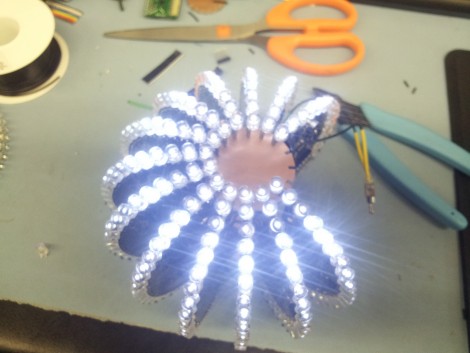
The ball is made up of sixteen slices; each is its own circuit board hosting an LED driver. All slices use the same PCB design, but one of them has an ATmega328 populated on the board to act as master. Optional components on the master board include an accelerometer, and a Bluetooth module to receive animation data. To get the full effect of the most recent prototype you’re going to want to see the video on their Kickstarter page.

Think this ball looks familiar to you? The original design was developed by [Nikolai] as a performance piece for a friend. This version was inspired by our feature of that earlier project.

So, use this as a template if you’re planning to submit your Kickstarter links to Hackaday’s tips line. We want to juicy details on the project!

Etching PCBs With Vinegar

When we hear about etching PCBs at home we assume that either Ferric Chloride or Cupric Chloride were used to eat away unmasked copper from the boards. But [Quinn Dunki] just wrote up her PCB etching guide and she doesn’t use either of those. Instead, she combines vinegar, hydrogen peroxide, and salt. It’s easier to find vinegar than muriatic acid (Cupric Chloride is made using this, peroxide, and adding the copper) so this is something to keep in mind if you’re in a pinch (or a Macgyver situation).

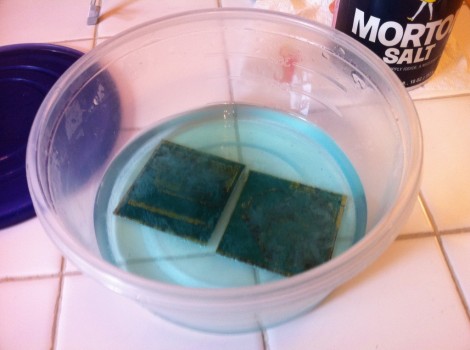
The rest of the process is what we’re used to. She’s using photoresistant boards which can be masked with a sheet of transparency instead of using the toner-transfer method. Once they take a bath in the developer solution she puts them in a shallow dish of vinegar and hydrogen peroxide along with a teaspoon of salt. She wipes the surface with a foam brush every minute or so, and inspects them every ten minutes to see if they’re done.

She does discuss disposal. Seems that she throws the solution in the garbage after each use. The liquid will contain copper salts which are bad for wildlife. We’ve heard that you should neutralize the acid and make a block of concrete using the liquid, then throw it in the garbage. Does anyone have a well-researched, ethical, and environmentally friendly way of getting rid of this stuff?

Gold Leaf Circuit Board

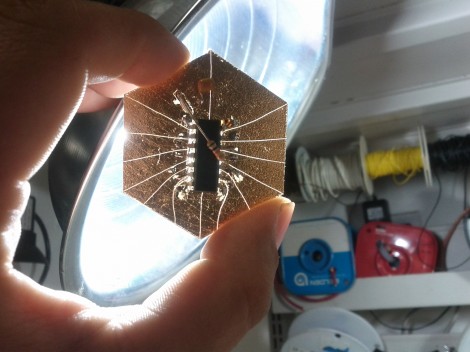
Ah, the glitter of gold… or fake gold, we’re not really sure. But [Mike Hogan] and [PJ Santoro] have been working with faux gold leaf as a conductor on circuit boards. The device you see above is mounted on metal-covered paper substrate and it really works.

They started by applying spray adhesive to heavy paper to make the gold-clad they needed. This was cut down into hexagons in homage to their hackerspace, Hive76 in Philadelphia. From there the shape of the microcontroller (an MSP430 G2211 in this case) to prevent shorts under the chip. The leads were flattened to interface well with the gold contacts, and a hobby knife was used to score the traces. Some careful soldering made up the final connections, and they were in business.

Oh, wait; chip on board but nothing on chip. They forgot to program it first! Since there’s no header they needed an easy way to interface with the board. The clever guys used the power of magnets to hold alligator clips in place. See how they did that in the demo video after the break.

They’re also working on some boards that use conductive ink similar to this hack but we haven’t seen a write-up from these two about those experiments… yet.

Continue reading “Gold Leaf Circuit Board”

Create PCBs In Just Minutes With This Awesome Spray Etching Machine

pcb-sprayer

If you have ever produced your own PCBs at home, you know that it can be somewhat of a time consuming process. Spending 20 or so minutes manually agitating a board is a drag, and while aquarium bubbler setups improve the process, they are far from ideal. [Christian Reed] knew that if he really wanted to streamline his PCB production he had to emulate the big boys and build a PCB sprayer of his own.

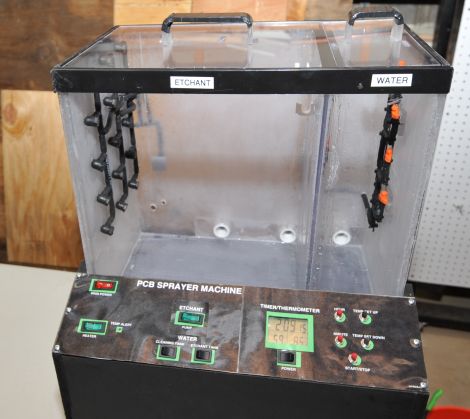
His spray etcher is contained in a custom acrylic case built mostly of scraps from previous projects. It contains two compartments – one for spraying etchant on the PCBs, and another for rinsing the finished work. The system is impressive to say the least, featuring a maze of tubes and piping which allow him to etch boards and manage his chemicals with ease.

[Christian] says that although the parts list might seem daunting at first, it really is pretty easy to assemble the device. Seeing as he can etch and wash a board in about two minutes flat, we think that any amount of effort would be worth the results.

[Christian] points out that he was unable to find a guide for building this type of PCB sprayer anywhere online, so he documented the process in painstaking detail in order to make it as easy as possible to replicate his work. Be sure to check out the video below to see his etch tank in action – we’re pretty sure it will have you itching to build one this weekend.

Continue reading “Create PCBs In Just Minutes With This Awesome Spray Etching Machine”

NES Controller Uses Capacitive Touch Instead Of Buttons

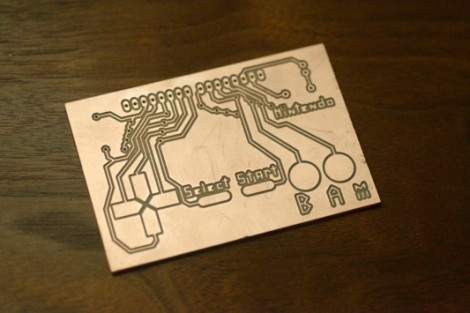
Here’s one way to really keep the component count low. [David] developed an NES controller that doesn’t use any buttons. The copper clad has been milled to provide a pad which registers a button push based on capacitance. The board has a SIL header at the top, making it easy to plug into the Arduino board that reads the inputs.

[David] had trouble getting the Arduino pin read functions to respond fast enough for he NES console’s expectations. He ended up using commands to access the ATmega’s peripherals directly in order to achieve the target timing. Speaking of, he did his own sniffing of the communication scheme using a logic analyzer. The results of that work, as well as the board files and code are available at the site linked above. And there’s a demo of the controller used to play Super Mario Bros. in the clip after the break.

This is actually a tangential project using a PCB mill which he’s developing through Kickstarter. This certainly shows that the mills works as designed.  Continue reading “NES Controller Uses Capacitive Touch Instead Of Buttons”