Aux-in On A 30 Year Old Boombox

finished

[Michael] just sent us this nice example of some good ol’ fashioned radio hacking.

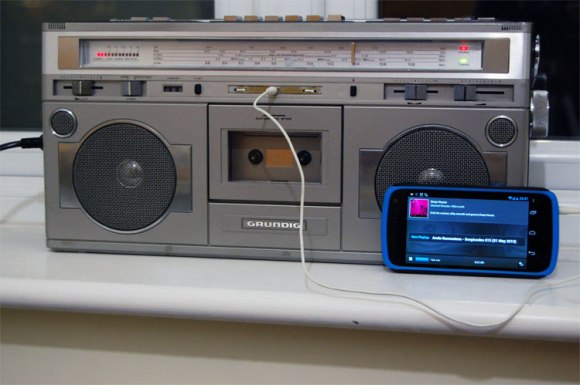
He originally received the radio from his grandmother, and while he doesn’t listen to the radio much, he felt he couldn’t just let it go to waste. So like any good hacker he cracked open the case and took a look inside.

The beauty with radios from the 80’s is the simplicity of it all. They typically have single layer PCBs and nice big components which makes it so much easier to tinker with.

He used a bench power supply to bypass the main transformer for safety’s sake, and began probing the various points. The cassettes audio output was the easiest to find, but unfortunately it required the play button to be activated. Not wanting to lose functionality (or have an annoying rattling cassette mechanism), he continued probing and eventually found similar wires coming from the radio part of the PCB. Upon further probing he discovered he could trick the radio band button so that the radio would be off, but the output could still be used. After that it was just a matter of wiring, soldering, and adding an auxiliary plug to the case.

We’ve covered lots of auxiliary port hacks in the past, but this one is a great example of saving old technology from the dump.

[Thanks Michael!]

Digital Camera Becomes Video Transmitter

canon

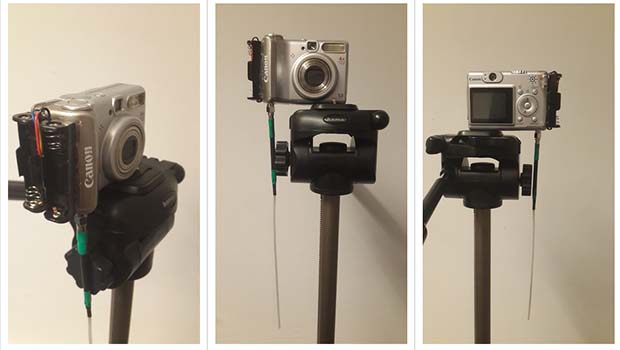
In the arena of high altitude balloons, Canon’s PowerShot series of digicams are the camera du jour for sending high into the stratosphere. There’s a particular reason for this: these cameras can run the very capable CHDK firmware that turns a $100 digicam into a camera with a built-in intervalometer along with a whole bunch of really cool features. It appears this CHDK firmware is much more powerful than we imagined, because [Chris] is now transmitting pictures taken from a Canon a530 to the ground, using only the CHDK firmware and a cheap radio module.

These PowerShot cameras have an ARM processor inside that runs VxWorks, a minimal but very capable OS for embedded devices and Mars rovers. By tying in to the Tx and Rx lines of the camera, [Chris] can issue commands to the OS, change settings, and even install his own code.

With the help of [Phil Heron]’s SSDV encoder written in C, [Chris] was able to get the camera to transmit images  with a small radio transmitter that fits in the battery compartment. Right now, [Chris] has only built the CHDK + SSDV for the Canon a530, but with how useful this build is, we expect to see an improved version very shortly.

A Crystal Radio Amplifier In A Jar

The cool thing with crystal radios is that they are solely powered by the incoming radio waves. However, it usually means listening to your AM radio station with an earpiece and even then, depending on the antenna length, ground connection, and radio station, it can be quite hard to hear.

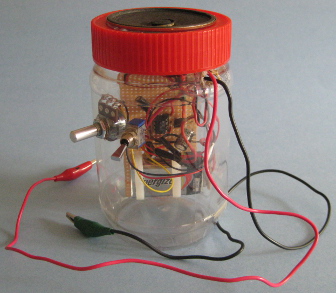
Even though it is cheating, [Steven] decided to make an amplifier for all the different crystal radios he had made over the years. His design, based on an LM386 amplifier was firstly tested on a breadboard and then permanently soldered onto a perfboard. To make the complete system easy to transport, he opted for a peanut butter jar where he embedded the speaker in the cap. The on/off switch and volume controls are mounted on the side, and easy alligator clips are used for the antenna connection.

The final result is not the one shown in the picture above as [Steven] painted the jar black, giving it a sweet look.

Retrotechtacular: A Tour Of WLW, A 500,000 Watt Radio Transmitter

retrotechtacular-wlw-transmitter-tour

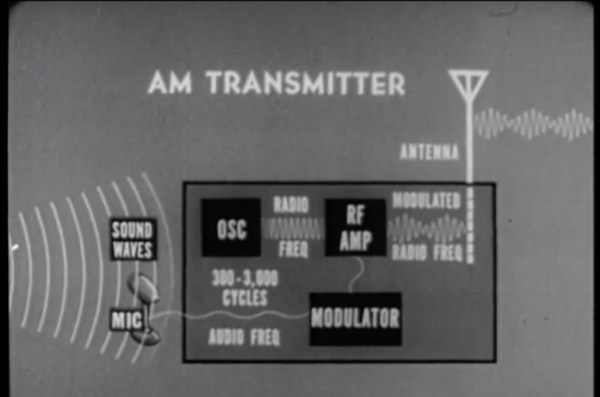
This is an overview of a 500,000 Watt radio transmitter site. It’s one of the slides shared in a guided video tour of the transmitter’s hardware. The radio station — whose call sign was WLW — called itself the Nation’s Station because of its ability to reach so much of the country.

It operated at the 500 kW level starting back in the 1930’s. The technology at the time meant that there were a lot of challenges involved with transmitting at this level of power. It took 750 kW input to achieve the 500 kW output. To reach that the station had a set of AC motors in the basement generating the 4500 Amps at 33 Volts DC needed to power the transmitter to heat each filament. Obviously there was a lot of heat generated at the same time. The system was water-cooled. An elaborate network of Pyrex pipes carried distilled water to and from the tubes to handle the heat dissipation.

The video tour lasts about thirty minutes. It’s just packed with interesting tidbits from the experts leading the tour so add it to your watch list for some geeky entertainment over the weekend.

Continue reading “Retrotechtacular: A Tour Of WLW, A 500,000 Watt Radio Transmitter”

Packing A Jeep Wrangler Full Of Hacks

Picking just one image to show off all of the hacks done on this Jeep Wrangler is a tough order. We decided to go with this custom ceiling console as it features the most work done in a confined area.

Give the video walk-around a bit of time before you decide it’s not for you. [Eddie Zarick] spends the first moments touting his “Oakley” branding of the vehicle in decals, emblems, embroidered seats, zipper pulls, and more. But after that you’ll get a look at the pressurized water system we previously saw. Pull open the back gate and there’s a nice cargo cover he built that includes a cubby hole which stores the soft sides when he wants to take the top off. There are several other interesting touches, like the police radar spoofer that he uses to scare the crap out of speeders. Ha!

The ceiling console we mentioned earlier was completely custom-built. It includes a CB, scanner, HAM, and seven-inch Android tablet. There is also a set of push buttons which control the various bells and whistles; well, spotlights and inverter actually. Just add a commode and he’s ready to live out of his car.

Continue reading “Packing A Jeep Wrangler Full Of Hacks”

Reverse Engineering A Wireless Protocol

logic

Like all good tinkerers, [Andrew] decided to figure out how his wireless security system worked. Yes, it’s an exercise in reverse engineering, and one of the best we’ve seen to date.

After breaking out the handheld spectrum analyzer and TV tuner SDR, [Andrew] cracked open a few devices and had a gander at the circuit boards. The keypad, PIR sensor, and base station all used a TI radio chip – the CC11xx series – that uses SPI to communicate with a microcontroller.

Attaching a logic analyzer directly to the radio chip and reading the bits directly, [Andrew] started getting some very good, if hard to understand data. From the security system specs, he knew it used a ’20-bit code’, but the packets he was reading off the SPI bus were 48 bits long. The part of this code was probably the system’s address, but how exactly does the system read its sensors?

The easiest way to figure this out was to toggle a few of the sensors and look at the data being transmitted. With a good bit of reasoning, [Andrew] figured out how the alarm system’s code worked. This theory was tested by connecting one of the radios up to an Arduino and having his suspicions confirmed.

While [Andrew]’s adventure in reverse engineering is only a benefit for people with this model of security system, it’s a wonderful insight into how to tear things apart and understand them.

Wireless Microcontroller/PC Interface For $3

uc

Sending data from a microcontroller to a PC usually requires some sort of serial connection, either through fiddly on-chip USB, FTDI chips, or expensive radio ICs. [Scott] didn’t want to deal with this when creating a network of wireless temperature sensors, so he hacked up a few cheap 433 MHz radio transmitters and receivers to transmit data to a PC for about $3.

After sensor data is collected on a microcontroller and sent over radio, there’s still the issue of getting it into a PC. For this, [Scott] piped the data into the microphone port of a cheap USB sound card. We’ve seen this trick before both in the world of microcontrollers and loading programs onto a Commodore 64 via a cassette interface.

Once the data is sent into the sound card, it’s decoded with a a small Python app. Given the range and quality of the RF transmitters and receivers  [Scott] says it’s not an extremely reliable way to send data to a PC. It is cheap, though, and if you need to read sensors wirelessly on a budget, it’s hard to do much better.

Check out [Scott]’s demo of his creation below.

[youtube=http://www.youtube.com/watch?v=GJHFldPwZvM&w=580]