DIY Video Microscopy

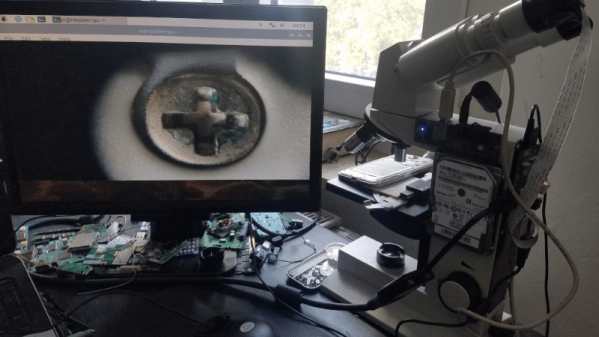
Owning a Microscope is great fun as a hobby in general, but for hackers, it is a particularly useful instrument for assembly and inspection, now that we are building hardware with “grain of sand” sized components in our basements and garages. [voidnill] was given an Eduval 4 microscope by a well-meaning friend during a holiday trip. This model is pretty old, but it’s a Carl Zeiss after all, made in Jena in the erstwhile GDR. Since an optical microscope was of limited use for him, [voidnill] set about digitizing it.

He settled on the Raspberry-Pi route. The Pi and a hard disk were attached directly to the frame of the microscope, and a VGA display connected via a converter. Finally, the Pi camera was jury-rigged to one of the eyepieces using some foam. It’s a quick and dirty hack, and not the best solution, but it works well for [voidnill] since he wanted to keep the original microscope intact.

The standard Pi camera has a wide angle lens. It is designed to capture a large image and converge it on to the small sensor area. Converting it to macro mode is possible, but requires a hack. The lens is removed and ‘flipped over’, and fixed at a distance away from the sensor – usually with the help of an extension tube. This allows the lens to image a very small area and focus it on the (relatively) large sensor. This hack is used in the “OpenFlexure” microscope project, which you can read about in the post we wrote earlier this year or at this updated link. If you want even higher magnification and image quality, OpenFlexure provides a design to mate the camera sensor directly to an RMS threaded microscope objective. Since earlier this year, this open source microscope project has made a lot of progress, and many folks around the world have successfully built their own versions. It offers a lot of customisation options such as basic or high-resolution optics and manual or motorised stages, which makes it a great project to try out.

If the OpenFlexure project proves to be an intimidating build, you can try something easier. Head over to the PublicLab where [partsandcrafts] shows you how to “Build a Basic Microscope with Raspberry Pi”. It borrows from other open source projects but keeps things simpler making it much easier to build.

In the video embed below, [voidnill] gives a brief overview (in German) of his quick hack. If you’ve got some microscope hacks, or have built one of your own, let us know in the comments section.

Continue reading “DIY Video Microscopy”

660 FPS Raspberry Pi Video Captures The Moment In Extreme Slo-Mo

Filming in slow-motion has long become a standard feature on the higher end of the smartphone spectrum, and can turn the most trivial physical activity into a majestic action shot to share on social media. It also unveils some little wonders of nature that are otherwise hidden to our eyes: the formation of a lightning flash during a thunderstorm, a hummingbird flapping its wings, or an avocado reaching that perfect moment of ripeness. Altogether, it’s a fun way of recording videos, and as [Robert Elder] shows, something you can do with a few dollars worth of Raspberry Pi equipment at a whopping rate of 660 FPS, if you can live with some limitations.

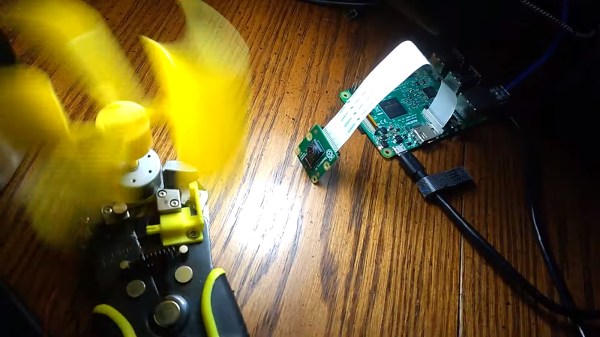
Taking the classic 24 FPS, this will turn a one-second video into a nearly half-minute long slo-mo-fest. To achieve such a frame rate in the first place, [Robert] uses [Hermann-SW]’s modified version of raspiraw to get raw image data straight from the camera sensor to the Pi’s memory, leaving all the heavy lifting of processing it into an actual video for after all the frames are retrieved. RAM size is of course one limiting factor for recording length, but memory bandwidth is the bigger problem, restricting the resolution to 64×640 pixels on the cheaper $6 camera model he uses. Yes, sixty-four pixels height — but hey, look at that super wide-screen aspect ratio!

While you won’t get the highest quality out of this, it’s still an exciting and inexpensive way to play around with slow motion. You can always step up your game though, and have a look at this DIY high-speed camera instead. And well, here’s one mounted on a lawnmower blade destroying anything but a printer.

Continue reading “660 FPS Raspberry Pi Video Captures The Moment In Extreme Slo-Mo”

Raspberry Pi Catches The Early Bird

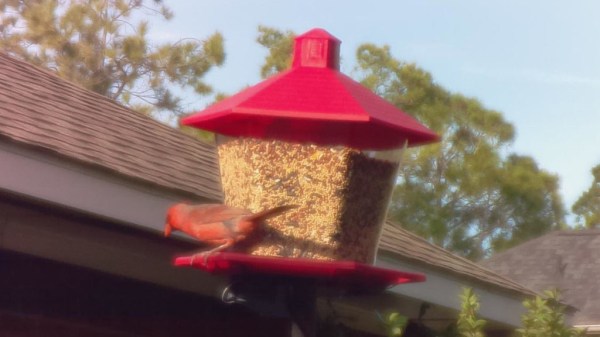
If you live in an area with high bird activity, setting up a bird feeder and watching some hungry little fellows visit you can be a nice and relaxing pastime. Throw in a Raspberry Pi with some sensors and it can also be the beginning of your next IoT project, as it was the case for [sbkirby] with his Bird Feeder Monitor project.

To track the arrival and departure times of his avian visitors, [sbkirby] attached a set of capacitive touch sensors to each side of his bird feeder, and hooked them up to a Raspberry Pi Zero W via a CAP1188 breakout board. The data is published via MQTT to another Raspberry Pi that serves as backend and stores the data, as well as to an optional additional camera-equipped Pi that will take a picture of each guest along the way. Taking into account that precipitation might affect the sensor readings, he also checks the current weather situation to re-calibrate the sensors if necessary, and also to observe a change in the birds’ presence and eating behavior based on weather conditions.

It seems that sensor-based animal feeding will always serve as inspiration for some new projects, whether feeding the animal itself is the goal, like most recently this fish feeder has shown, or whether the eating behavior is monitored and used for further research such as this squirrel-based weather forecast system.

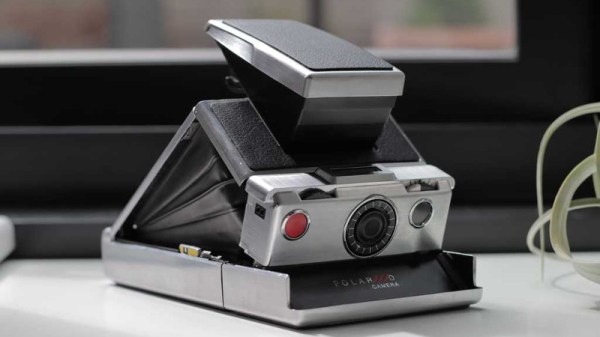
The Digital Polaroid SX-70

What do you do if you own an iconic and unusual camera from decades past? Do you love it and cherish it, buy small quantities of its expensive remanufactured film and take arty photographs? Or do you rip it apart and remake it as a modern-day digital camera in a retro enclosure? If you’re [Joshua Gross], you do the latter.

The Polaroid SX-70 is an iconic emblem of 1970s consumer technology chic. A true design classic, it’s a single-lens reflex design using a Polaroid instant film cartridge, and its party trick is that it’s a folding camera which collapses down to roughly the size of a pack of 1970s cigars. It was an expensive luxury camera when it was launched in 1972, and today it commands high prices as a collector’s item.

[Joshua]’s build is therefore likely to cause weeping and wailing and gnashing of teeth among vintage camera enthusiasts, but what exactly has he done? In the first instance, he’s performed a teardown of the SX-70 which should be of interest to many readers in itself. He’s removed the mirror and lens, mounted a Raspberry Pi camera behind the lens mount, and a small LCD monitor where the mirror would be.

A new plastic lens in the original lens housing completes the optics, and the electronics come courtesy of a Pi Zero, battery, and USB hub in the space where the Polaroid film cartridge would otherwise be. Some new graphics and a fresh leather cover complete the  build, giving what we’d say is a very tidy electronic Polaroid. On the software side there is a filter to correct for fisheye distortion, and the final photos have a slightly Lomographic quality from the plastic lens.

We like what he’s created with his SX-70 even if we can’t help wincing that he did it to an SX-70 in the first place. Maybe it’s less controversial when someone gives the Pi treatment to a more mundane Polaroid camera.

Guardin, Guarding The Garden: Turn Raspberry Pi Into A 3rd Eye

If you are a gardener, you’ll know only too well the distress of seeing your hard work turned into a free lunch for passing herbivorous wildlife. It’s something that has evidently vexed [Jim], because he’s come up with an automated Raspberry Pi-controlled turret to seek out invading deer, and in his words: “Persuade them to munch elsewhere”.

Before you groan and sigh that here’s yet another pan and tilt camera, let us reassure you that this one is a little bit special. For a start, it rotates upon a set of slip rings rather than an untidy mess of twisted cables, so it can perfom 360 degree rotations at will, then it has a rather well-designed tilting cage for its payload. The write-up is rather functional but worth persevering with, and he’s posted a YouTube video that we’ve placed below the break.

This is a project that still has some way to go, for example just how those pesky deer are to be sent packing isn’t made entirely clear, but we think it already shows enough potential to be worthy of a second look. The slip ring mechanism in particular could find a home in many other projects.

It’s worth reminding readers that while pan and tilt mechanisms can be as impressive as this one, sometimes they are a little more basic.

Continue reading “Guardin, Guarding The Garden: Turn Raspberry Pi Into A 3rd Eye”

Four Pi Zeros, Four Cameras, One Really Neat 3D Scanner

Sometimes when you walk into a hackerspace you will see somebody’s project on the table that stands so far above the norm of a run-of-the-mill open night on a damp winter’s evening, that you have to know more. If you are a Hackaday scribe you have to know more, and you ask the person behind it if they have something online about it to share with the readership.

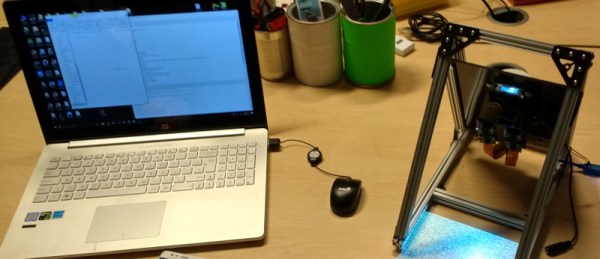
[Jolar] was working on his 3D scanner project on just such an evening in Oxford Hackspace. It’s a neatly self-contained unit in the form of a triangular frame made of aluminium extrusions, into which are placed a stack of Raspberry Pi Zeros with attached cameras, and a very small projector which needed an extra lens from a pair of reading glasses to help it project so closely.

The cameras are arranged to have differing views of the object to be scanned, and the projector casts an array of randomly created dots onto it to aid triangulation from the images. A press of a button, and the four images are taken and, uploaded to a cloud drive in this case, and then picked up by his laptop for processing.

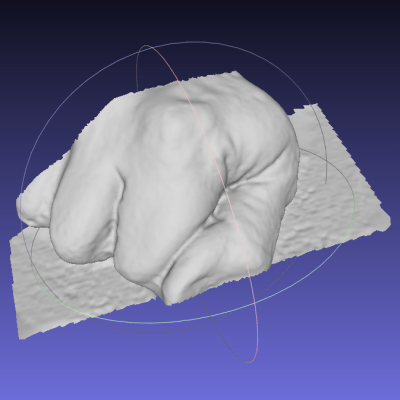
A Multi-view Stereo (MVS) algorithm does the processing work, and creates a 3D model. Doing the processing is VisualSFM, and the resulting files can then be viewed in MeshLab or imported into a CAD package. Seeing it in action the whole process is quick and seamless, and could easily be something you’d see on a commercial product. There is more to come from this project, so it is definitely one to watch.

Four Pi boards may seem a lot, but it is nothing to this scanner with 39 of them.

Raspberry Pi Offers Soulless Work Oversight

If you’re like us, you spend more time than you care to admit staring at a computer screen. Whether it’s trying to find the right words for a blog post or troubleshooting some code, the end result is the same: an otherwise normally functioning human being is reduced to a slack-jawed zombie. Wouldn’t it be nice to be able to quantify just how much of your life is being wasted basking in the flickering glow of your monitor? Surely that wouldn’t be a crushingly depressing piece of information to have at the end of the week.

With the magic of modern technology, you need wonder no longer. Prolific hacker [dekuNukem] has created the aptly named “facepunch”, which allows you to “punch in” with nothing more than your face. Just sit down in front of your Raspberry Pi’s camera, and the numbers start ticking away. It’s like the little clock in the front of a taxi: except at the end you don’t have to pay anyone, you just have to come to terms with what your life has become. So that’s cool.

It doesn’t take much hardware to play along at home. All you need is a Raspberry Pi and the official camera accessory. Though for the full effect you should add one of the displays supported by the Luma.OLED driver so you can see the minutes and hours ticking away in real-time.

To get the facial recognition going, all you need to do is take a well-lit picture of your face and save it as a 400×400 JPEG. The Python 3 script will take care of the rest: checking the frames from the camera every few seconds to see if your beautiful mug is in the frame, and incrementing the counters accordingly.

Even if you’re not in the market for an Orwellian electronic supervisor, this project is a great example to get you started in the world of facial recognition. With a little luck, you’ll be weaponizing it in no time.