Interactive KiCAD BOMs Make Hand Assembly A Breeze

We’ve all been there; you finally get the last DigiKey box and now your desk is covered in parts to stuff into a shiny new PCB you’ve been working on. First stop? Passive town, population endless waves of 1uF capacitors. The first one goes in the upper left, then a little below that, then… once you get to C157 it’s getting pretty hard to remember exactly which parts go where. Enter the literally named InteractiveHtmlBom (IHB) to smooth this process out.

IHB makes the frustrating task of mapping lines in a BOM to a physical position on a board easy. The classic method is of course, to look at the BOM, then search the board for that designator and place the component. (You left the designators in the silk, right?) Or to look at the BOM, ask your CAD package to search for that part in the layout, then place. IHB generates a document that does this automagically.
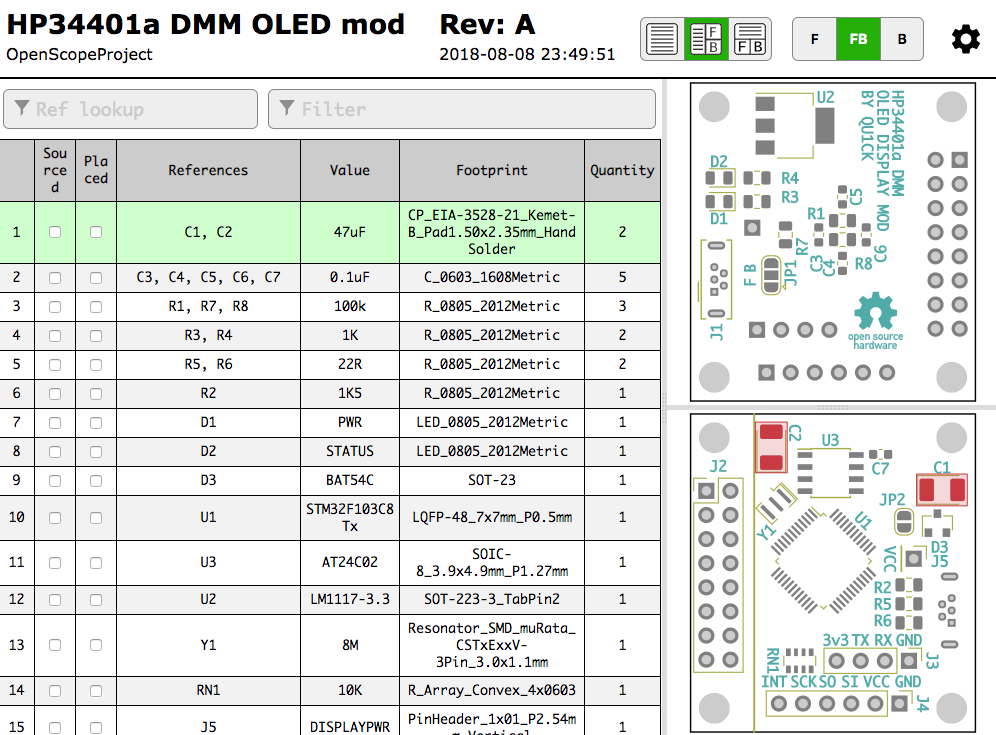
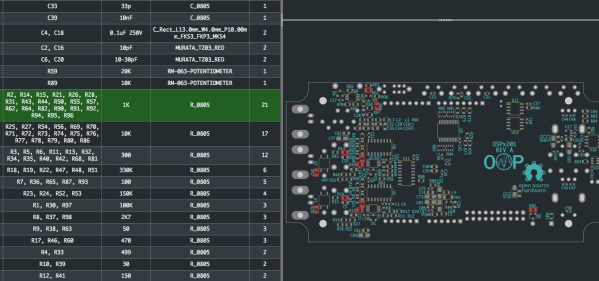
A sample file from a familiar project

Run the tool, either standalone or as a plugin for KiCAD 5.0, and you get a folder with the new interactive BOM in it. There are a few view options but generally it presents a view of the BOM with designators and value in one pane and a wonderful render of the top and/or bottom of the board in another pane. When you hover over a BOM line it highlights the relevant parts in the board view! There are toggles for filtering by top and bottom of board, marking which parts have been placed, light and dark mode, etc. Plus the ability to filter and sort by designator and value. We would have been impressed if it was just a generator/viewer for those slick scrollable/pannable board renders!

Check out a very long GIF demo after the break, or explore one of many pre-created demo BOMs here. We’re partial to the OSPx201.

Thanks [GregDavill] for the tip!

Continue reading “Interactive KiCAD BOMs Make Hand Assembly A Breeze”
Hardware Store White Balance Reference

We live in a time in which taking pictures is preposterously easy: take out your phone (assuming it wasn’t already in your hands), point it at something, and tap the screen. The camera hardware and software in even basic smartphones today is good enough that you don’t need to give it much more thought than that to get decent pictures. But what if you want to do better than just decent?

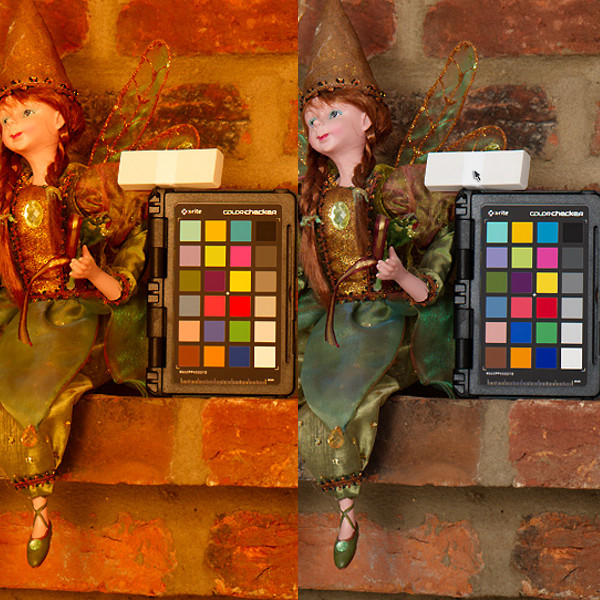
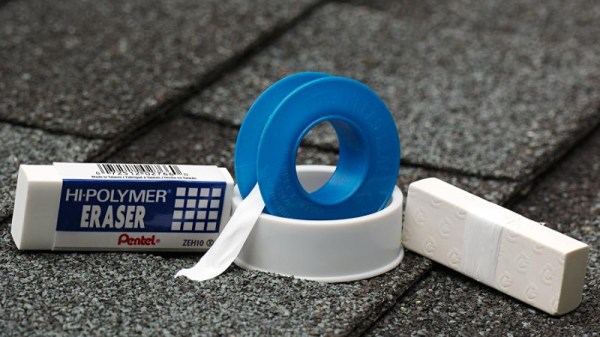
Ideally you’d take photos lit by high temperature lights, but failing that, you might need to compensate by adjusting the white balance during post-processing. But to accurately adjust white balance you need a pure white reference point in the image. Thanks to some diligent research by the folks at the FastRawViewer blog, we now have a cheap and widely available source for a pure white reference material: PTFE pipe tape.

Alright, we know what you’re thinking: how hard could it be to find a white object? Well, if you’re talking about really white, it can actually be quite difficult. Take a walk down the paint aisle of your local hardware store and see just how many “whites” there actually are. Think the shirt your subject is wearing is really white? Think you can use the glossy white smartphone in their hand as a reference? Think again.

By taking a rubber eraser and wrapping it with a few layers of the PTFE tape, you can create a white reference that’s so cheap it’s effectively disposable. Which is good, because protecting your white reference object and keeping it clean can be a challenge in itself. But with a PTFE tape reference, you can just chuck the thing when the photo shoot is done.

Combine this cheap white reference with some of the DIY photography lighting setups we’ve covered in the past, and you’ll be well on the way to getting better images to document all your projects. Just remember to submit them to us when you’re done.

[Thanks to Keith Olson for the tip.]

Before Google There Was The Chemical Rubber Company

Quick. What’s the difference in conductivity between silver and copper? Today, that’s easy to find out. You just ask Google (maybe even out loud if you have a phone handy). But it wasn’t that long ago that you needed another option. Before the Internet age, a big part of being “that guy” (or gal) was knowing where to go to find things. You had to be a master of the library’s reference section, know what might be in an encyclopedia or an almanac.

However if you were a hardcore math, science, or engineering geek you probably had, at least, one edition of CRC handbooks. Today, we usually think of CRC as cyclic redundancy check, but back then it was the Chemical Rubber Company.

The Chemical Rubber Company dates back to 1903 when brothers Arthur, Leo, and Emanuel Friedman were selling rubber lab aprons in Cleveland, Ohio (Arthur, apparently, had been in a similar business from 1900). In 1913, the brothers offered a short (116-page) booklet called the Rubber Handbook free with the purchase of a dozen aprons.

Continue reading “Before Google There Was The Chemical Rubber Company”

TI Releases New Edition Analog Engineer’s Pocket Reference

We aren’t sure that a PDF with 100 pages in it qualifies as a pocket reference, but TI’s Analog Engineer’s Pocket Reference is certainly a good read. You do have to register with TI (use a disposable address if you are too paranoid to do that), but the free download is well worth the effort. The document’s been around for awhile, but TI recently released a new 4th edition.

The first few pages might underwhelm you. You probably know the standard decimal prefixes and are more likely to ask Google to convert circular mils to square millimeters, for example. The second part, though, gets more into electronics. There’s standard values for resistors and quick reminders about the difference between X7R and Y5V ceramic in capacitors, for example.

Things get progressively more interesting, covering measurements and phase shifts, and then amplifiers. The little circuits are pithy but cover the bases including things like frequency response.

Continue reading “TI Releases New Edition Analog Engineer’s Pocket Reference”

ElectroDroid – Your Android Electronic Reference App

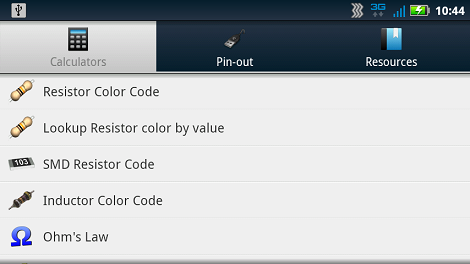
Earlier this week, fellow Hack a Day-er [Mike Nathan] reviewed Adafruit’s new iPhone/iPad app Circuit Playground. The comments on [Mike]’s review turned to suggesting ElectroDroid as an alternative to Circuit Playground. Surprisingly,  Hack a Day authors actually pay attention to the comments, so I’ve decided to throw my hat into the ring and offer up my review of ElectroDroid. For purposes of full disclosure, I have to add that I paid the $2.59 donation for a copy of ElectroDroid without ads, and have had no contact with the developers.

Continue reading “ElectroDroid – Your Android Electronic Reference App”

Circuit Playground – An Electronics Reference App From Adafruit

It’s not everyday that we review software around here, but the folks at Adafruit recently put together an iOS app that I figured might be of interest. Their iPad/iPhone compatible application is called “Circuit Playground”, and it includes all sorts of handy electronics reference tools. For the context of this review, it should be noted that I paid for the application myself, and that I have had no communication with the Adafruit team regarding my assessment of the app.

Continue reading “Circuit Playground – An Electronics Reference App From Adafruit”