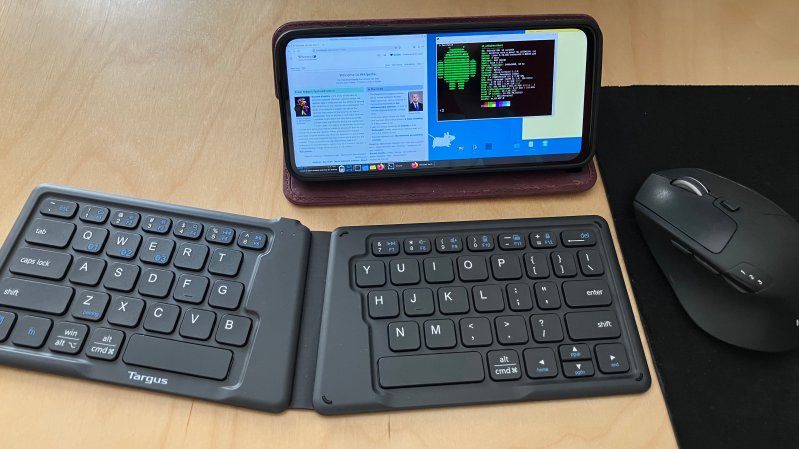
A phone running the XFCE desktop environment is placed on a desk, with a wireless keyboard in front of it.

Linux On Android Provides Inexpensive, Powerful Computing

In some parts of the world it’s common for cell service providers to sell new phones at a price significantly below market value, with the caveat that these phones are locked to that service provider alone. It’s questionable whether this practice is good for consumers, but as [Gabriel Broussard Korr] notes, it’s an opportunity for hackers: since it’s possible to run a Linux environment on these phones, they make an inexpensive source of quite powerful computing hardware.

In this case, [Gabriel] was using the Moto G Power 2024, which has 128 GB of storage, 12 GB of RAM, and costs less than $50 when carrier-locked. Rather than trying to install a mobile-oriented Linux distribution (such as postmarketOS), [Gabriel] installed Termux, a terminal emulator which provides a Linux environment within Android. Before doing this, he set up the phone and configured a number of settings for a better Linux experience. Since automatic updates can interfere with these settings, and since none of the provided settings effectively disable these, he used NetGuard to block Internet access from the updater app and from Google Play services.

The next step was to actually install Termux, as well as an X11 extension and an app which exposes an API for Termux. The desktop environment (XFCE in this case) was installed through Termux, and [Gabriel] wrote a shell script to go through the steps of starting it. XFCE worked well on mobile devices because of its full-desktop zoom capability. Even running Linux indirectly, the experience was smooth; [Gabriel] found that GIMP, Shotcut, and VS Code all performed well.

It’s not quite the same set of software, but we’ve previously featured a guide to setting up a similar Linux environment using Termux and AnLinux. Lindroid provides a similar containerized Linux environment; on the other hand, you can also use postmarketOS to make a server from an old phone.

Webserver Runs On Android Phone

Android, the popular mobile phone OS, is essentially just Linux with a nice user interface layer covering it all up. In theory, it should be able to do anything a normal computer running Linux could do. And, since most web servers in the world are running Linux, [PelleMannen] figured his Android phone could run a web server just as well as any other Linux machine and built this webpage that’s currently running on a smartphone, with an additional Reddit post for a little more discussion.

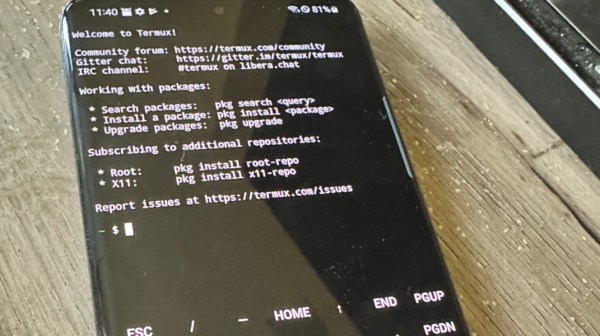
The phone uses Termux (which we’ve written about briefly before) to get to a Bash shell on the Android system. Before that happens, though, some setup needs to take place largely involving installing F-Droid through which Termux can be installed. From there the standard SSH and Apache servers can be installed as if the phone were running a normal Linux The rest of the installation involves tricking the phone into thinking it’s a full-fledged computer including a number of considerations to keep the phone from halting execution when the screen locks and other phone-specific issues.

With everything up and running, [PelleMannen] reports that it runs surprisingly well with the small ARM system outputting almost no heat. Since the project page is being hosted on this phone we can’t guarantee that the link above works, though, and it might get a few too many requests to stay online. We wish it were a little easier to get our pocket-sized computers to behave in similar ways to our regular laptops and PCs (even if they don’t have quite the same amount of power) but if you’re dead-set on repurposing an old phone we’ve also seen them used to great effect in place of a Raspberry Pi.

This Week In Security: Updraft, Termux, And Magento

One of the most popular WordPress backup plugins, UpdraftPlus, has released a set of updates, x.22.3, that contain a potentially important fix for CVE-2022-23303. This vulnerability exposes existing backups to any logged-in WordPress user. This bug was found by the guys at Jetpack, who have a nice write-up on it. It’s a combination of instances of a common problem — endpoints that lacked proper authentication. The heartbeat function allows any user to access it, and it returns the latest backup nonce.

A cryptographic nonce is a value that’s not exactly a cryptographic secret, but is only used once. In some cases, this is to mitigate replay attacks, or is used as an initialization vector. In the case of UpdraftPlus, the nonce works as a unique identifiers for individual backups. The data leak can be combined with another weak validation in the maybe_download_backup_from_email() function, to allow downloading of a backup. As WordPress backups will contain sensitive information, this is quite the problem. There are no known in-the-wild instances of this attack being used, but as always, update now to stay ahead of the game.

Continue reading “This Week In Security: Updraft, Termux, And Magento”