Hackaday Retro Edition: TRS Wiki

1977 was a special year for computing history; this year saw the release of the 8085 following the release of the Z80 a year before. Three companies would launch their first true production computers in 1977: Apple released the Apple II, Commodore the PET 2001, and Tandy / Radio Shack the TRS-80 Model I. These were all incredibly limited machines, but at least one of them can still be used to browse Wikipedia.

[Pete]’s TRSWiki is a Wikipedia client for the TRS-80 Model I that is able to look up millions of articles in only uppercase characters, and low resolution (128×48) graphics. It’s doing this over Ethernet with a very cool Model I System Expander (MISE) that brings the lowly Trash-80 into the modern era.

The MISE is capable of booting from CF cards, driving an SVGA display and connecting to 10/100 Ethernet. Connecting to the Internet over Ethernet is one thing, but requesting and loading a web page is another thing entirely. There’s not much chance of large images or gigantic walls of text fitting in the TRS-80’s RAM, so [Pete] is using a proxy server on an Amazon Web Services box. This proxy is written in Java, but the code running on the TRS-80 is written entirely in Z80 assembly; not bad for [Pete]’s first project in Z80 assembly.


vt100normal The Hackaday Retro Edition is our celebration of old computers doing something modern, in most cases loading the old, no CSS or Javascript version of our site.
If you have an old computer you’d like featured, just load up the retro site, snap some pictures, have them developed, and send them in.

VCF East X: The Not Trashy Eighty

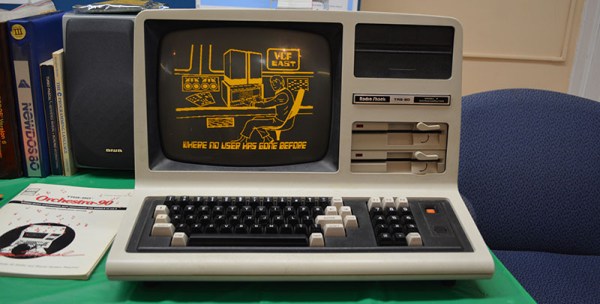
The lowly TRS-80 doesn’t get much love in most circles; it’s constantly overshadowed by the popularity of the Apple II or computers that had graphics that weren’t terrible. For [Mike Loewen]’s VCF exhibit, he’s turning his TRS-80 into something good with SD card disk drives and custom graphics adapters.

The -80 in question is a Model 4, the fancy all-in-one version that could run CP/M. The disk drives in this computer were replaced with half-height 5 1/4″ drives, the 200ns RAM was replaced with 100ns RAM and modified to get rid of the wait states, and a hard drive is emulated on a SD card adapter thanks to an add-on from [Ian Mavric].

[Ian] is somewhat prolific in the world of TRS-80s; he reverse engineered the original hi-res graphics board and reimplemented it with video RAM chips of a more modern vintage.

Continue reading “VCF East X: The Not Trashy Eighty”

VCF East: Old Computers, New Games

While the vintage computer festival in Wall, NJ had just about every vintage app you could imagine – multiple varities of *NIXes, pre-Zork Dungeon, BASIC interpreters of all capabilities, and just about every game ever released for 8-bit Commodore systems – there was, perhaps unsurprisingly, a distinct lack of modern programs written for these retro systems. Yes, despite there being people still curled up to keyboards and writing games for vintage systems, modern software was a strange oddity last weekend.

There were two wonderful exceptions, however. The first was Fahrfall, a game for the TRS-80 Color Computer. We’ve seen Fahrfall before when [John Linville] wrote it for the 2012 RetroChallenge Winter Warmup. The game itself is a re-imagining of Downfall for the Atari Jaguar, with the graphics scaled down immensely. The basic idea of the game is to jump down, ledge to ledge, on a vertically scrolling screen. Hit the walls or the bottom, and you’re dead. It’s a great game that probably would have sold well had it been a contemporary release.

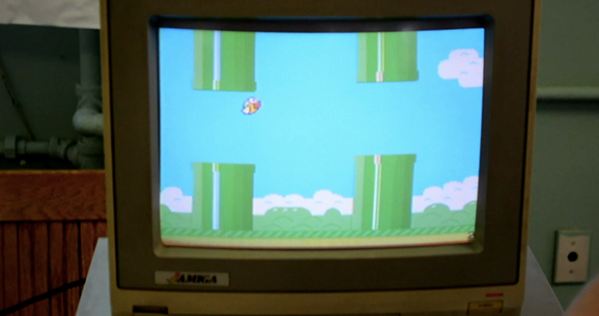
Next up is a rather impressive port of Flappy Bird for the TI-99. The video does not do this game justice, although part of that might just be the awesome Amiga monitor used for the display. This game was brought in by [Jeff Salzman] of Vintage Volts who isn’t the author of the game. Honestly, the video doesn’t do the graphics any justice. It really is a great looking port that’s just as addictive as the Android/iDevice original.

Continue reading “VCF East: Old Computers, New Games”

Building A New Motherboard For A TRS-80

Trash80

The TRS-80 Model 100 was an amazing piece of kit when it was released. Able to run for a week with just four AA batteries and smaller than some laptops today, this portable version of the TRS-80 saw action with war correspondents covering the Falklands invasion. A pedigree a MacBook Pro will never be able to live up to, it seems.

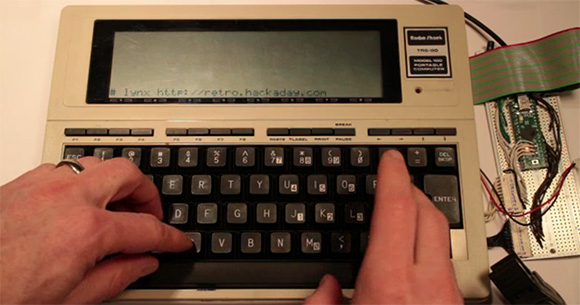
[Hudson] picked up a non-functioning Model 100 with the express goal of replacing the 30-year-old electronics inside with an updated motherboard – and also pull up our retro site in the process. Armed with a Teensy++, [Hudson] pried open his ancient computer and set to work interfacing the display and keyboard to his AVR dev board.

The LCD display in the Model 100 has a resolution of 240×64, driven by ten Hitachi HD44102 display drivers. Each of these display drivers are responsible for the pixels in a 50×32 rectangle on the screen and are interfaced with a 30-bit wide bus consisting of chip select lines, and 8-bit data bus, and a few other random control lines. [Hudson] plugged this 30 pin header into his Teensy++ and after a bit of ingenuity regarding the strange electrical requirements of the LCD, was able to control every pixel on this 30-year-old display.

The next order of business was interfacing the keyboard with a modern microcontroller. The keyboard is laid out in a normal matrix, but with a few oddities: characters like ~, |, and curly brackets aren’t present on the Model 100. After working these problems out, [Hudson] set to work on a VT100 terminal emulator. This allowed him to run vi and lynx, enabling him to pull up the Hackaday retro site in a wonderful forty-column text mode.

Future improvements to this redesign include designing a proper PCB to replace the current protoboard design. The original Model 100 included a text editor and programming language, and adding a Forth implementation isn’t out of [Hudson]’s grasp. It’s an awesome build, and an excellent improvement that will allow [Hudson]’s Trash-80 to see another 30 years of use.

Giving The TRS-80 CoCo A 44 Color Display

As a relic of the early 80s, the TRS-80 Color Computer couldn’t display very many colors. By default, the CoCo could only display 8 colors on the screen at a time, but [John] figured out a way to increase the number of colors displayed using a very simple trick that surprisingly isn’t found in original CoCo games.

The TRS-80 Color Computer uses a Motorola 6847 video display generator to produce color graphics on its display. There are several graphics modes available to CoCo programmers, including a high-resolution black and white mode, and two four-color modes using red, green, blue, and yellow or buff, cyan, magenta, and orange.

These color palettes are extremely limiting, and usually switching between these modes produces a lot of flicker. [John] figured out if he switched the color pallets every 1/60th of a second (i.e. during the vertical blanking interval), he could display 44 colors on the CoCo.

It’s a clever little hack to increase the color palette of the CoCo, and in our opinion should be in the running for winning this season’s Retrochallenge. Sadly, [John] is judge for the Retrochallenge this time around, so he’ll have to settle for earning a Hackaday merit badge.

Arduino Taipan! Clone Stays True To The Original

taipan

Fans of vintage Apple ][ and TRS-80 games will undoubtedly recognize the image above in short order. Taipan! was a popular game in its time, and [Simon] decided it was a great title to try recreating with an Arduino.

His goal was to use a standard Arduino Duemilanove to reproduce the game, rather than opting for a Mega or something like the Raspberry Pi. Seeing those two options as “too easy”, he ventured into the project with some self-imposed limitations, making it a more fruitful adventure.

In the end, [Simon] had to use two Arduinos – one to control the gameplay and another to run the display. Simon tucked both boards, a keypad, and an LCD screen inside a first run copy of Tai-Pan, a move that is sure to please Apple aficionados and Xzibit fans alike.

[Simon] made sure that no detail was overlooked during the port, making sure to include every line of text as well as every bug found in the original game.

Check out a video of the finished project below, and be sure to swing by his site for a very thorough build log.

Continue reading “Arduino Taipan! Clone Stays True To The Original”

Raspberry Pi Finds Itself Inside A TRS-80 Model 100

This TRS-80 Model 100 is a lot more powerful than you might think. That’s because [Karl Lunt] is using it as an enclosure for his Raspberry Pi board. Since the ARM-powered device comes sans-enclosure it’s fun to see a retro choice like this one. And having had to go out and buy a USB keyboard to use our own RPi, we appreciate [Karl’s] solution for using the original keyboard as an input device.

Above you can see that he’s using an LCD tv as the display. For now that connection is made using the composite video output, which explains the fuzzy image. To the right of the TRS-80 a standard wall wart connects to the barrel jack to provide power. [Karl] scrapped a USB cellphone charger in order to connect from the barrel jack to the micro-USB jack on the Pi board. The ribbon cable to the left lets him get at the I/O header without opening the case.

In order to use the keyboard he patched into it with a Teensy board. That connects to the USB port on the RPi, sending HID keyboard commands based on what it received from the user. We like this option as it give you the ability to pre-process keystrokes (ie: you can code your own custom macros that the Teensy will listen for). Right now the Model 100’s LCD screen isn’t hooked up but he may add that in the future.