

The FPGA Chronicles: Open Source It

Last time, we looked at getting started with the GOWIN tools and a Tang Nano 20K FPGA. The software from GOWIN isn’t bad, but it isn’t open source, and there are a few oddities about it. In addition, simulation is through a third-party simulation package that has undergone some changes since an acquisition. There are tons of free simulation programs that are extremely good, and there is an open-source toolchain for the FPGA.

You could go grab everything you need piece by piece. But you don’t have to. There are several efforts to produce a toolchain from all the different pieces. We’re going to look at APIO.

APIO

APIO isn’t so much an FPGA toolchain project as it is an aggregator of toolchain projects. It reminded us of PlatformIO, and notes that it was inspired by it. It updates the tools you need, includes its own libraries, and gives you a common workflow across the FPGAs it supports.

You can download it for the command line, but you can also install it as a Visual Studio Code extension, which is what I did. You have to create a simple file that describes your project, and that’s about it.

Install Problems

Since APIO has its own libraries, it is possible that you will find some conflicts with your system libraries. In my case, the libreadline.so.8 file (in ~/.apio/bin/_internal) was causing problems that prevented anything from working. I simply renamed it out of the way, or you can just delete it. That took care of the problem.

Keep in mind that APIO just orchestrates a bunch of other tools like Yosys and GTKWave. Even if you have your own versions, APIO expects to use its private copies. For example, GTKWave on my system is a different version than the APIO copy, and if I try to read wave files without using APIO, I get error messages. You can, however, open a shell from the Tools/Misc menu of the APIO panel in Visual Studio Code.

Continue reading “The FPGA Chronicles: Open Source It” →

Porting Video Games To VHS

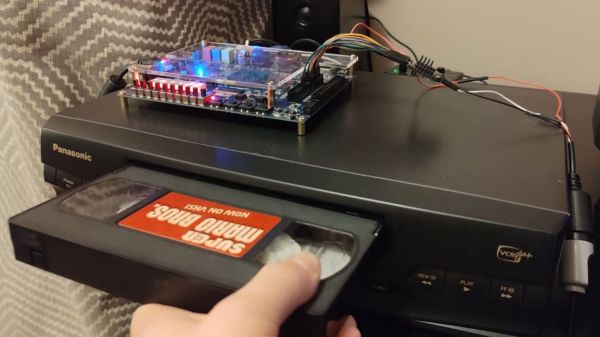
Although VHS-based games have existed for about as long as VHS players have sat in millions of living rooms, they always tended to be rather sparse gaming experiences. For example, the ActionMax gaming “console” that [Throaty Mumbo] shows off in his most recent video. You use a zapper to purportedly shoot down on-screen targets in “games” like Sonic Fury. After this disappointing experience, he figured he should probably make his own interpretation of a VHS-based video game.

This involves a DE1-SoC FPGA board along with an RP2350 MCU. There’s also an in-progress GitHub repository for those who wish to follow along. Rather than the simplistic Action Max system that plays exactly the same every time along with a basic light gun feature, this actually allows for interactive gameplay.

The video shows that the VHS tape contains both binary data for the game, as well as a number of video streams. This is decoded using the DE1’s composite input, with the RP2350 then acting on the decoded game data and handling input from the controller. With this, interesting effects can be accomplished, such as background video streams for the original Super Mario Bros.

Other demos include Night Trap and a variant of Doom that uses prerecorded video segments along with action events requiring you to press a specific button. Since there’s actual bytecode involved, quite a few more options are available for game development that could have been interesting to a 1980s audience.

It is hard to imagine how hard it was to get the VCR into homes, only for it to vanish again.

Continue reading “Porting Video Games To VHS” →

Conveyor Belt GBoard Brings The Keys To You

It must be April in October again, because Google Japan has a new, hilariously impractical reimagining of the keyboard: a conveyor belt. This time it’s on GitHub with firmware, STLs, and a full build guide if you, too, want to wait a full cycle to get the ‘backspace’ key whenever you make a typo, or to write such fun words as “ooid” or “princesship”.

You can watch it in action in the video embedded below, but just the photo probably gives you the idea: the four staggered rows of keys are each 3D-printed chains holding mechanical key switches, driven from a motor in the base. Each row also has a flexible PCB to keep everything wired together, though it’s unclear how those electrical impulses from the key presses get off the conveyor belt and into your computer. That part of the build guide is “TBD” and the source code doesn’t appear to be complete.

Those details may be forthcoming, or it might never be revealed because this is obviously a joke, but now that they’ve gone to the effort of providing STLs, we’re now invested in figuring out how to actually make it work. A BLE-equipped microcontroller in each belt? RFID tags on each key, with readers in the base? SMD LEDs on the flex PCB that flash out the ASCII code of each pressed key as they whiz past a sensor? In theory, any of those should work, but which should we use? You decide!

We like Google Japan and their weird keyboards, and we have to say that compared to the hat from a few years ago, this one is almost practical, though the rotary-phone one wins on style points. In some ways, it occurs to us that this is the exact inverse of the chain printers of yesteryear.

Thanks to [CityZen] for the tip! If October for you is more “spooky” than “silly”, we still want to know about it. Or if you build any of the Gboards. Either way, let us know on the tips line what you’re up to.

Continue reading “Conveyor Belt GBoard Brings The Keys To You” →








