Analyzing The 6502 With Python And Cheap Dev Boards

The Before Times were full of fancy logic analyzers. Connect the leads on these analyzers to a system, find that super special ROM cartridge, and you could look at the bus of a computer system in real time. We’ve come a long way since then. Now we have fast, cheap bits of hardware that can look at multiple inputs simultaneously, and there are Open Source solutions for displaying and interpreting the ones and zeros on a data bus. [hoglet] has built a very clever 6502 protocol decoder using Sigrok and a cheap 16-channel logic analyzer.

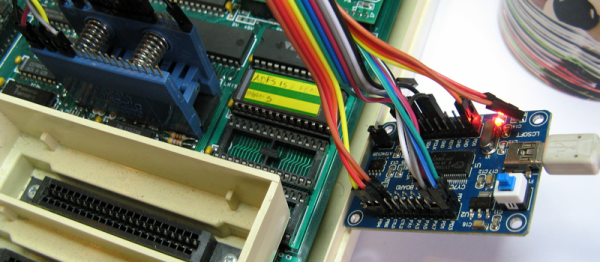
This protocol decoder is capable of looking at the ones and zeros on the data bus of a 6502-based computer. Right now, [hoglet] able to stream two million 6502 cycles directly to memory, so he’s able to capture the entire startup sequence of a BBC Micro. The hardware for this build was at first an Open Bench Logic Sniffer on a Papilio One FPGA board. This hardware was changed to an impressively inexpensive Cypress FX2 development board that was reconfigured to a 16 channel logic analyzer.

The software stack is where this really shines, and here [hoglet] documented most of the build over on the stardot forums. The basic capture is done with Sigrok, the Open Source signal analysis toolchain. This project goes a bit further than simply logging ones and zeros to a file. [hoglet] designed an entire 6502 protocol decoder with Python. Here’s something fantastic: this was [hoglet]’s first major Python project.

To capture the ones and zeros coming out of a 6502, the only connections are the eight pins on the data bus, RnW, Sync, Rdy, and Phy2. That’s only twelve pins, and no connections to the address bus, but the protocol decoder quickly starts to predict what the current program counter should be. This is a really fantastic piece of work, enabling an entire stack trace on any 6502 computer for less than $20 in parts.
A Modern, Upgraded BASIC Stamp

Back in the Before Times, when microcontroller development required ultraviolet light, building anything was a pain. You probably had to burn a ROM onto a chip with a parallel programmer, there was no in-circuit programming, and who knows what would happen if you needed a serial port.

This changed in the early 90s with the introduction of the BASIC Stamp from Parallax. This was a simple microcontroller development board using Microchip PIC. With a little bit of clever firmware developed by Parallax, you could write code in BASIC, upload your code over a serial or parallel port (which every computer had), and blink a LED with just a few lines of code. All microcontroller development boards — including the Arduino — owe a debt to the BASIC Stamp. It is the grandfather to the Arduino, and it is very, very old.

Microchip didn’t update the BASIC Stamp, but that doesn’t mean someone else can’t handle that. [Bruce Eisenhard] is crowdfunding an improved, updated version of the famous 24-pin BASIC Stamp. It’s got modern parts, runs seven hundred times faster than the original, and is still chock full of BASIC interpretation.

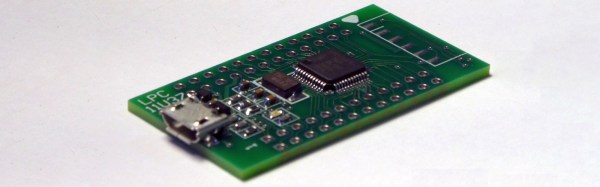
This upgraded Stamp is built around NXP’s LPC11U3 micrcontroller, an ARM Cortex-M0 part with about a hundred times more Flash than the chip in the original Stamp. Programming is done through modern IDEs, and yes, there’s a USB port. This project is pin-compatible with the original BASIC Stamp, so if your microcontroller project from twenty years ago is dying, this is the replacement for you.

The BASIC Stamp was an awesome device for its time, even though it cost more than two hundred dollars in today’s money. [Bruce]’s campaign is offering one of these for $25, which is pretty reasonable for what it is.


Hackaday Prize Entry: Global Positioning Clock

How do you get the attention of thousands of Hackaday readers? Build a clock! There are just so many choices to agonize over. Do you go with a crystal as a clock source, a fancy oven controlled crystal oscillator, or just mains voltage? Should you even think about putting a GPS module in a clock? All these are very interesting questions that encourage discussion or learning, and that’s what Hackaday is all about. Clocks are cool, and the engineering behind them is even cooler.

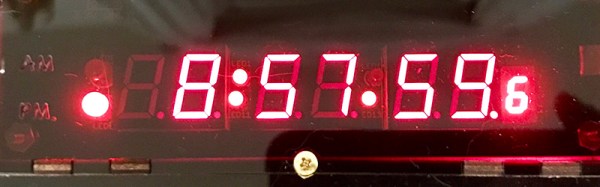
For one of [Nick]’s Hackaday Prize entries, he’s building a minimalist GPS clock. First up, the centerpiece of every clock, the display. There are eight seven-segment displays, two each for the hours, minutes, and seconds, and a smaller digit for tenths of a second. These displays are controlled by an ATXmega32E5, an upgrade on an earlier version of this project that only used an ATtiny and a MAX6951 LED driver.

The GPS wizardry is where this project gets really cool. [Nick] is using a SkyTraq Venus838LPx-T (that’s also available on a breakout board on Tindie). This GPS chip has a handy edge mount SMA connector to receive the signals from a GPS satellite, and has a bidirectional UART to dump the NMEA time codes and a PPS output. By combining the timecode, PPS output, and playing around with the timers on the microcontroller, [Nick] has a fantastically accurate clock that also looks great.

Hackaday Prize Entry: The Minimalist Z80 Computer

The best projects always seem to come from eBay. A few weeks ago, we found a few tiles meant for gigantic LED panel installations, and fifty bucks got you ten tiles. That eBay auction is now sold out. A while ago, [Just4Fun] realized he could build a Z80 microcomputer with $4 worth of parts from everyone’s favorite online auction house. The result is a $4 Z80 home computer, and a great Hackaday Prize entry to boot.

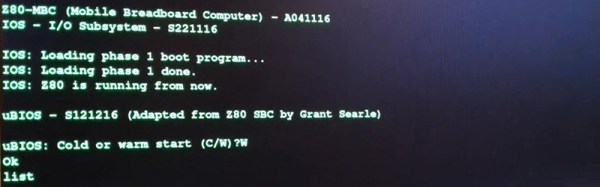
So, what do he need to build a retrocomputer loaded up with Forth, CP/M, and Basic? A CPU is a necessity, and [Just4Fun] found a Z80 (technically a Z84C00) for just a bit more than a dollar. A computer will need some RAM too, and a 128 kiB parallel SRAM was just the ticket for another dollar.

Here’s where things get a bit more interesting. Where the retrocomputers of yore were loaded up with glue logic, PLAs, or other weird chips, modern technology has come a long way. Instead of a massive amount of glue, [Just4Fun] is using an ATmega32A for all the I/O, address decoding, and a serial terminal.

The ATmega thrown into this cornucopia of vintage chips is itself more than a decade old, but it does have 40 pins and 32 kiB of Flash. That’s enough to ‘virtualize’ all the peripherals you’d need on a Z80 bus and provide the clock signal for the rest of the computer.

This home computer was originally designed and laid out on a solderless breadboard, but [WestfW] managed to stuff this all onto a small PCB. That’s a cheap computer that gets you all the retrocomputing goodies, and it’s something that’s just random enough to be a perfect entry for the Anything Goes portion of the Hackaday Prize.

Friday Hack Chat: DMX512 Gon’ Give It To Ya

DMX512 is the standard for theatrical lighting, and it’s best described as, ‘MIDI for lights’. It’s been around since the 80s, and in the decades since it’s been used, abused, and shoved into just about everything imaginable.

For this week’s Hack Chat, we’re talking all about DMX512. What is DMX512? How does it work? What can you control with DMX512? What Open Source projects use it? There’s a wealth of information out there, and a lot of very cool tricks you can pull with this ubiquitous lighting protocol.

Our guest for this week’s Hack Chat is [Martin Searancke], owner of Dream Solutions Ltd. [Martin] was contacted early on in the development of Coca-Cola’s impressive 3D Times Square advertisement to see if Dream Solution’s LightFactory software could be used to drive this 3D screen. This software has pixel mapping and media playback capabilities and was used for the prototypes for the project. A subset of this product made it into the final installation, and is now driving a gargantuan display above Times Square in New York City.

This is a community Hack Chat, and of course we’re taking questions from the community. If you have a question you’d like to ask [Martin], add it to the discussion sheet.

join-hack-chatOur Hack Chats are live community events on the Hackaday.io Hack Chat group messaging. Our Hack Chats usually take place at noon, Pacific time on Friday, but this week is different. [Martin] is in New Zealand, so this Hack Chat is happening at 2pm Pacific, Friday, October 27th. Is that too hard for you? Here’s a time zone converter!

Click that speech bubble to the right, and you’ll be taken directly to the Hack Chat group on Hackaday.io.

You don’t have to wait until Friday; join whenever you want and you can see what the community is talking about.

We’re also looking for new Hack Chat hosts! If you’ve built something cool, you’re working on an interesting project, or you’re about to introduce a really cool product, hit us up! Email our wonderful community managers, and we’ll see if we can slot you in.

Hackaday Superconference Kicks Off With A Party

Begin the Hackaday Superconference a day early this year. Supercon is far more than a conference, it’s a Hacker Village that forms when we all get together and that’s happening on Friday, November 10th with early badge hacking, dinner, and a party all included with your Supercon ticket!

In the last year, Supplyframe (Hackaday’s parent company) moved into a new office. It’s a beautiful space with enough square footage to host a conference itself. This year we’ll be capitalizing on that by hosting some of the larger Superconference workshops there. They’ve also opened their doors and are pulling out all the stops for the meet-and-greet pregame on Friday. Just let us know you’ll be there.

Badge pick up and hacking will begin at noon. If you’re itching to get your hands on the amazing Supercon badge, this is where you want to be. As we move into the five o’clock hour we’ll bring in the catering and the bartenders for a bash that welcomes back your extended family of hackers, designers, and engineers. This an amazing community and you’re a part of it so make your plans to get to town early.

Is a day early not good enough for you? You’re in luck! We’ve opened up a chat room on Hackaday.io. Talk to one another about what to bring, how to get there, what to do, and who exactly already has the Gerbers for the Superconference badge. It’s going to be a fantastic conference, and we can’t wait to see you there!

Hackaday Prize Entry: Programming FPGAs With Themselves

It’s been a few years since the introduction of the first Open Source toolchain for FPGAs. You would think a free and Open way to program FPGAs would be a boon for hardware development, but so far we’re really not seeing much in the way of a small, cheap, clever device that brings FPGAs to the masses.

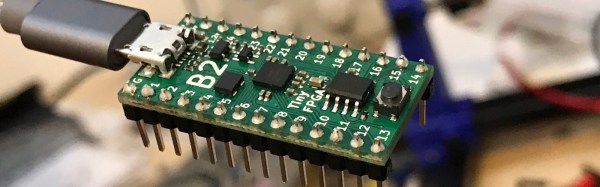
We don’t know if [Luke]’s entry to the Hackaday Prize is the killer project that will do it, but it is very neat. He’s designed a tiny FPGA development board using a Lattice iCE40 FPGA that’s able to program itself over USB. It’s small, it’s cheap, it’s easy to use, and there are working examples of FPGA development using this board.

If you’re thinking this tiny little board looks familiar, you’re right. [Luke] has been working on a similar board, the A-Series, but this latest version has a USB port instead of pins for a JTAG adapter. This USB functionality is pretty clever — instead of using a seperate microcontroller, [Luke] is using the FPGA itself to reprogram the user configuration into a Flash chip. Once that’s up and running, the bootloader is removed and doesn’t consume any FPGA resources.

[Luke] is also working on an amazing hobbyist guide to FPGAs that leans heavily on the Open Source toolchain available for these Lattice FPGAs and his board. That’s a huge benefit to the community, and an excellent entry to the Hackaday Prize.