Hackaday Links: April 16, 2017

Guess what’s going on at the end of the month? The Vintage Computer Festival Southeast is happening April 29th and 30th. The event is being held at the Computer Museum of America and is, by all accounts, a really cool show.

Walk into any package sorting facility or Amazon fulfillment center and you’ll find a maze of conveyor belts, slides, and ramps that move boxes from one point to another. Conveyor belts are so last century, so here’s a fleet of robots.

In 2017, the CITES treaty — an international treaty for the protection of endangered species — changed a lot. While the original treaty protected individual species, in 2017, enforcement of this treaty on tropical hardwoods changed to an entire genus. This is a problem when it comes to rosewood; previously only Dalbergia nigra was covered under CITES, now the entire Dalbergia genus is covered. This sucks for guitar makers, but a Dutch guy is making guitars out of newspaper. We’re probably looking at some sort of micarta thing here, but it sounds acceptable.

Where did Apple’s Spinning Beach Ball of Death come from? 1984, or thereabouts. The ubiquitous Apple ‘wait’ cursor is from the first versions of the Macintosh Toolbox, and it has remained mostly unchanged all this time. This is Apple Wait, a demonstration of this first spinny ball of death. It’s a Raspberry Pi connected to an Apple monochrome monitor that just displays a spinny wait logo. Check out the video.

How do you make strips of RGB LEDs turn a corner? Wire, usually. Here are some corner pieces for WS2812B LED strips. It looks very handy if you’re building a gigantic RGB LED matrix.

SHA2017 is an outdoor hacker conference that’s happening this summer. They’re working on a badge, but they need some help. They’re looking for some funding for their ESP32-powered, touch controller, sunlight-readable ePaper badge. If you have a job that likes to sponsor stuff like this, it’s a worthy cause.

Hackaday Prize Entry: Hot Logic

A few weeks ago, [Yann] was dumpster diving and found something of interest. Two vacuum tubes, an ECC83S and an EL84. This was obviously the droppings of a local guitarist, but [Yann] wanted to know if he could build something useful out of them. An amplifier is far too pedestrian, so he settled on a vacuum tube computer.

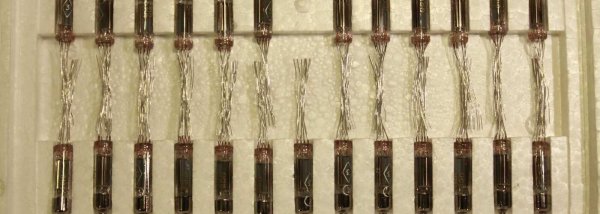
The normal pentodes and triodes you’ll find in a tube amp require a lot of support components like output transformers, tube sockets, and high voltage power supplies. This was a little too complicated for a tube computer, but after a little bit of searching, [Yann] found a better option for his MINIVAC — subminiature vacuum tubes. These require fewer support components, and can be found for very reasonable prices through the usual component suppliers. His entry for this year’s Hackaday Prize is Hot Logic. It’s a computer — or at least computer components — built out of these tubes.

The tubes in question are a few 1Ж29Б-В and 6Н21Б tubes, a vacuum pentode and dual triode, respectively. Add in a few diodes, and that meets the requirements for being sufficient to build a computer. As a neat little bonus, these tubes have requirements that are very easy to meet. The filament on the 1Ж29Б-В tube only needs 1.2 Volts.

These subminiature tubes are a little underappreciated in the world of audiophililia and DIY electronics. That’s a bit of a shame; these tubes are the most technologically advanced vacuum-based technology ever created. They were the heart and the brains of ballistic missiles, and if you look hard enough you source hundreds of them at very reasonable prices. A vacuum tube computer requires a lot of tubes, and if anyone will be able to build a vacuum tube computer it’s going to be [Yann] and his pile of Soviet surplus.

Mains Clocking A Microcontroller

[Lujji] is playing around with the STM8 microcontroller. In reviewing the official documentation for this chip, he read the external clock can be a sine wave, a triangle wave, or a square wave with a 50% duty cycle. The minimum CPU frequency is 0 Hz. [Lujji] doesn’t have a signal generator, and presumably, he’s all out of crystals. He does have mains AC, though, so why not clock a microcontroller with wall power?

Using mains power as a frequency standard is a concept a hundred years old. Synchronous motors turn at a rate proportional to the mains frequency, and this has been used in clocks for decades. If you’re really clever, you can clock digital circuits with mains AC, but we’ve never seen someone replace a tiny crystal in a microcontroller circuit with mains power.

After an experiment to prove the concept, [Lujji] went on to construct a circuit that wasn’t as dumb as connecting the microcontroller directly to a wall socket. The direct approach didn’t work that well anyway — the STM8 didn’t like low frequency clocks with slow edges. [Lujji] needed a clock with cleaner edges, and a 555 configured as a comparator fit the bill.

The completed circuit sends mains power through an optocoupler to drive a 555 configured as a comparator. The output is a clean 50Hz clock that is connected to the OSCIN pin on an STM8. This is now a chip running at 50Hz, and yes, it works. [Lujji] set up a circuit to write ‘Hello World’ on an old Nokia LCD. That took about three minutes. It works, though, even though it’s completely useless. Maybe this can be applied to some novel timekeeping similar to that one-instruction-per-day clock we looked earlier in the year.

An Even Smaller BeagleBone

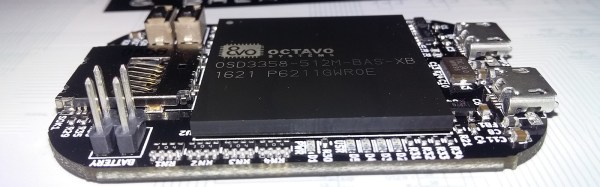
The BeagleBone famously fits in an Altoids tin. Even though we now have BeagleBone Blacks, Blues, and Greens, the form factor for this curiously strong Linux board has remained unchanged, and able to fit inside a project box available at every cash register on the planet. There is another Altoids tin, though. The Altoid mini tin is just over 60×40 mm, and much too small to fit a normal size BeagleBone. [Michael Welling] has designed a new BeagleBone to fit this miniature project box. He’s calling it the Pocketbone, and it’s as small as the mints are strong.

The Pocketbone is based on the Octavo Systems OSD355x family, better known as the ‘BeagleBone on a chip’. This chip features a TI AM355x ARM Cortex A8, up to 1GB of DDR3 RAM, 114 GPIOs, 6 UARTs, 2 SPIs, 2x Gigabit Ethernet, and USB. It’s housed in a relatively large BGA package that makes routing easy, and as a proof of concept [Jason Kridner] built a PocketBone in Eagle.

[Michael]’s version of the Pocketbone is based on the earlier proof of concept, with a few handy additions. There’s an IO expansion header, provisions for a battery input, a few fixes to the USB, and all the parts are on one side of the board facilitating easier assembly. This version of the Pocketbone was created using KiCad, which will endear the project to the Open Source community.

The Improved Luggable PC

There are exactly two types of personal computers available today. If you need a lot of horsepower, a powerful GPU, or a full-power CPU, you’re going to end up with a desktop. If you need something portable, you’re getting a laptop with a wimpy CPU and an underpowered GPU. Historically, there has been a third type of PC, the luggable. The luggable is a desktop PC crammed into a case that makes it slightly more portable than a desktop and a monitor.  You cannot buy a luggable PC case right now. They simply do not exist as a commercial product you can shove your own hardware into. This is a form factor an entire industry forgot.

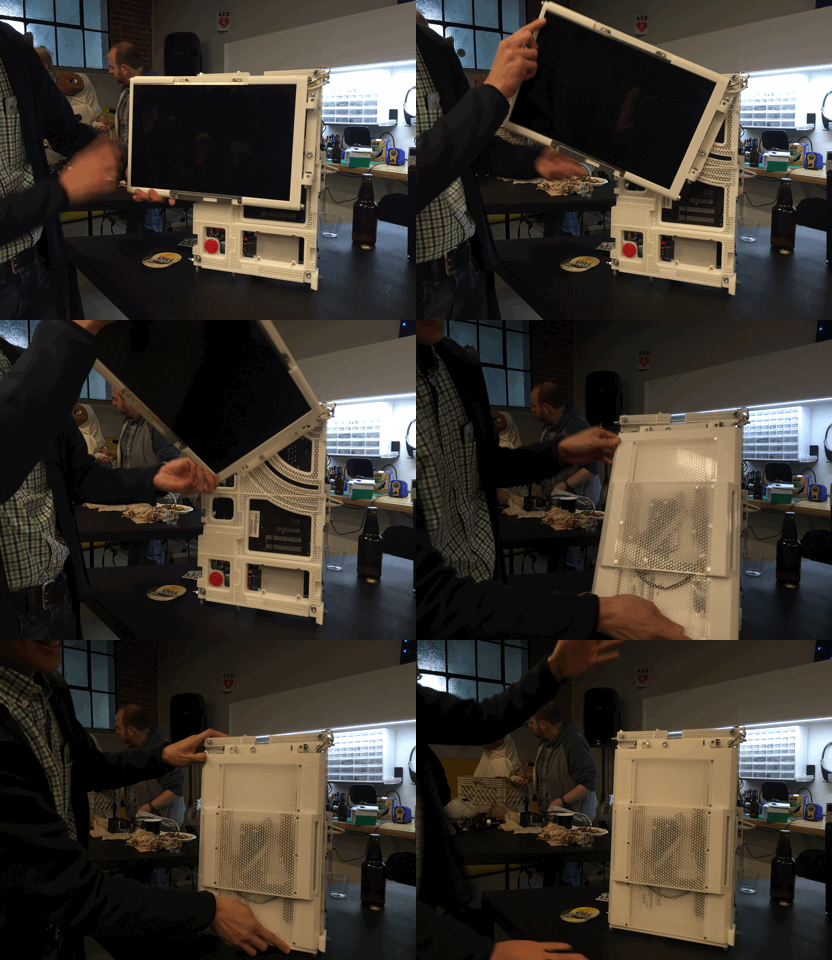
Now there’s a DIY luggable PC. This project from [Roger] packs a standard ATX motherboard, a full-size GPU, a full-size power supply, and everything else that makes a desktop PC powerful into a case that can be stored in an overhead bin.

[Roger] has been working on this project for a while, and it was featured on Hackaday back when it looked like a RepRap Mendel. There have been some significant improvements over the earlier iterations of this project, including a very, very cool hinge mechanism that allows the display to fold in when the computer isn’t being used. It’s a mechanical wonder that prevents scratches. Neat. The rest of the case is constructed out of 2020 aluminum extrusion, and about a one kilogram spool of filament.

Since this is a portable case, there are a few compromises. There are no 5.25″ bays, no 3.5″ bays, and few 2.5″ bays. M.2 SSDs and USB-powered CD drives exist, so this isn’t a big deal.

This is a truly fantastic case in a form factor you can’t buy anywhere else. If you have a spare monitor and a bit of extrusion sitting around, this is one to build yourself.

Hackaday Prize Entry: Real Hard Drives In The Raspberry Pi

‘Boy, I wish the Raspberry Pi had a SATA port’. This is the plea that echoes through the Internet, and for once, the Internet is not wrong. A SATA port — or any connector to a big, dumb spinny disk — would be a great addition to the Raspberry Pi ecosystem.

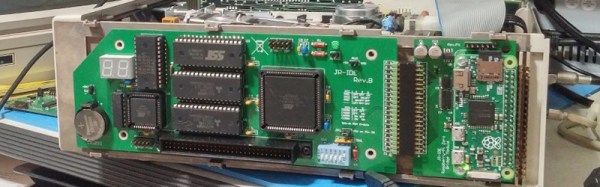
[AlanH]’s entry to the Hackaday Prize is the exact opposite of what everyone wants. The NetPi-IDE is a Parallel ATA IDE disk emulator that turns an inexpensive Raspi Zero into a big, dumb, unspinny hard drive. Drop this machine in your Windows 98 Starcraft battlestation, and you have a hard drive that you can ssh into.

As with any build involving a lot of data, bandwidth is important. The highest bandwidth interface on the Pi’s GPIO ports is the SPI interface. [AlanH] is hanging a Lattice MachXO2 FPGA off the SPI port and using that to emulate a disk. In the future, he’s going to move to the much more open Lattice iCE40HX, compatable with the Open Source IceStorm synthesis chain.

The feature set for this project includes proper IDE disk emulation with sizes ranging from 10 Megabytes to 8 Gigabytes tested so far. If you need anything bigger, you don’t need an IDE drive. A DOS redirector allows mounting any arbitrary directory to a DOS drive letter, a virtual network interface turns this project into The Cloud™, and a serial console is mapped to unused IDE registers, allowing any host system to login to the Pi without any external cables.

While it’s not what everyone wants in a Pi, this is an exceptionally cool project. PATA drives are getting old, and the systems supporting them are too. If you want to keep those retrocomputers running, we have to start planning now, and there’s no better way to do that than with cheap hardware and Open Source toolchains.

Friday Hack Chat: Open Source Silicon

This Friday, Hackaday.io will be graced with purveyors of Open Source Silicon. Join us in the Hackaday.io Hack Chat this Friday, April 14 at noon PDT (19:00 UTC) for a conversation with SiFive, an ‘Open’ silicon manufacturer.

This week, we’re sitting down with SiFive, a fabless semiconductor company and makers of the HiFive1, an Open Hardware microcontroller that you can just go out and buy. Late last year, SiFive released the HiFive1, an Arduinofied version of SiFive’s FE310 System on Chip. This SoC is a RISC-V core and one of the first microprocessors that is completely Open Source. It is an affront to Stallmanism, the best hope we have for truly Open hardware, and it’s pretty fast, to boot.

SiFive isn’t only working on Open Hardware microcontrollers — their business plan is pretty much, ‘OSH Park, but for silicon’. If you have a design for a new type of chip, they’ll work with foundries to turn your design into a cute little epoxy impregnated blob. It’s a fascinating business plan, and you’re going to hear all about it this Friday in the Hack Chat.

Here’s How To Take Part:

join-hack-chatOur Hack Chats are live community events on the Hackaday.io Hack Chat group messaging.

Log into Hackaday.io, visit that page, and look for the ‘Join this Project’ Button. Once you’re part of the project, the button will change to ‘Team Messaging’, which takes you directly to the Hack Chat.

You don’t have to wait until Friday; join whenever you want and you can see what the community is talking about.

Upcoming Hack Chats

We’ve got a lot on the table when it comes to our Hack Chats. On April 21st, we’re going to be talking magnets with Nanomagnetics. Making magnets, collecting magnets, playing with magnets, it’ll all be over on the Hack Chat.