Retrofitting Smoke Alarms With Bluetooth

Everybody should have a few smoke alarms in their house, and everyone should go check the battery in their smoke alarm right now. That said, there are a few downsides to the traditional smoke alarm. They only work where you can hear them, and this problem has been solved over and over again by security companies and Internet of Things things.

Instead of investing in smart smoke alarms, [Johan] decided to build his own IoT smoke alarm. It’s dead simple, costs less than whatever wonder gizmo you can buy at a home improvement store, and reuses your old smoke alarm. In short, it’s everything you need to build an Internet-connected smoke alarm.

Smoke alarms, or at least ionization-based alarms with a tiny amount of radioactive americium, are very simple devices. Inside the alarm, there’s a metal can – an ionization chamber – with two metal plates. When smoke enters this chamber, a few transistors sound the alarm. If you’ve ever taken one apart, you can probably rebuild the circuit from memory.

Because these alarms are so simple, it’s possible to hack in some extra electronics into a design that hasn’t changed in fifty years. For [Johan]’s project, he’s doing just that, tapping into one of the leads on the ionization chamber, measuring the current through the buzzer, and adding a microcontroller with Bluetooth connectivity.

For the microcontroller and wireless solution, [Johan] has settled on TI’s CC2650 LaunchPad. It’s low power, relatively cheap, allows for over the air updates, and has a 12-bit ADC. Once this tiny module is complete, it can be deadbugged into a smoke alarm with relative ease. Any old phone can be used as a bridge between the alarm network and the Internet.

The idea of connecting a smoke alarm to the Internet is nothing new. Security companies have been doing this for years, and there are dozens of these devices available at Lowes or Home Depot. The idea of retrofitting smarts into a smoke alarm is new to us, and makes a lot of sense: smoke detectors are reliable, cheap, and simple. Why not reuse what’s easy and build out from there?
Hackaday Prize Entry: A Cluster Of Exoskeletons

The current trend of 3D printed prosthetic hands have one rather large drawback: you can’t use them if you already have two hands. This might seem like a glib objection, but one of last week’s Hackaday Prize posts pointed this out rather well – sometimes a meat machine needs mechanical assistance.

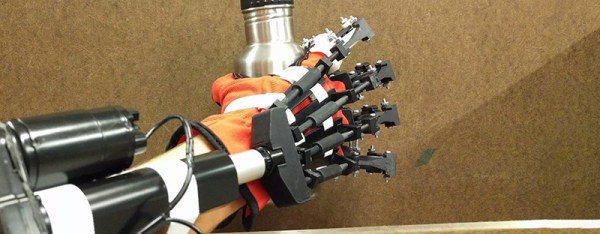
BEOWULF, [Chad Paik]’s entry for the Hackaday Prize, is the answer to this problem. It’s a mechanical exoskeleton for grip enhancement, stroke rehabilitation, and anyone else that doesn’t have the strength they need to get through the day.

This project solves the problem of weak arm strength through – you guessed it – 3D-printed parts, a linear actuator on the forearm, and a few force sensors on the fingertips. Control is obtained through a Thalmic Labs Myo, but the team behind the BEOWULF is currently working on a custom muscle activity sensor that is more compact and isn’t beholden to VC investors. You can check out a video of this exoskeleton below.

Continue reading “Hackaday Prize Entry: A Cluster Of Exoskeletons”

Hackaday Prize Entry: A Big, Inexpensive 3D Printer

When it comes to 3D printers, most machines you’ll see are pretty small. The Ultimaker, Prusa, Lulzbot, and the Rostock Max are desktop devices. While they have entirely usable build volumes, you’re not printing furniture with these machines. Yes, large format 3D printers exist, like the SeeMeCNC Part Daddy (they’ll build you one for ~$90,000, IIRC), a house printer that uses concrete, and a number of very large printers from various other manufacturers with very high price tags.

There is no 3D printer designed to print large objects without spending tens of thousands of dollars on a machine. That’s the focus of this Hackaday Prize entry. [RigTig]’s Big 3D Printer is designed to be big, but also inexpensive.

A big, inexpensive 3D printer can’t use the usual machine setups seen in other large format printers. Big machines with traditional kinematics demand big pieces of aluminum, counterweights, and a design that might spiral out of control. Instead of a thousand pounds of metal, [RigTig] is using something like the Skycam system seen at every NFL game; put a few towers up at the corners of a triangle, run some string or cable through some pulleys, and you have a simple, light movement platform.

With the machine side of the problem figured out, the next question is what material to use. [RigTig] has decided plastic filament is impractical because of cost. A clay extrusion system has a lot of problems. Concrete is a good idea, but the prints would weigh several tons. Right now, [RigTig] is planning on using dirt with a polymer binder. It’s an interesting idea, and one we haven’t seen elsewhere.

Building a 3D printer from scratch is easy. Building a huge 3D printer is one of the most interesting engineering challenges out there. Not only do you need a motion platform that can make it work, but you also need to print in a material that is cheap enough and prints fast enough for the printer to make sense. We don’t know if [RigTig] is on the right track yet, but we’re glad to see him put in the effort for this excellent addition to the Hackaday Prize.

Hackaday Prize Entry: A Modern, Universal Power Glove

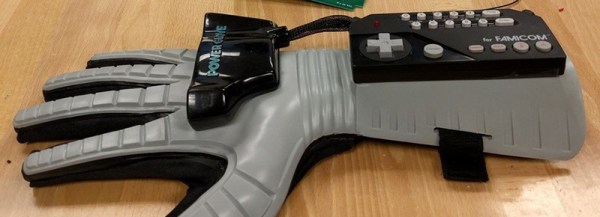
The Nintendo Power Glove was one of the amazing 1980s experiments in alternative user interfaces for video games. It was bad. It was cool, but it was bad. Recently, interest in the Power Glove has grown thanks to an amazing stop motion animator. Prices of these gloves have gone through the roof, and the Power Glove is in the middle of a resurgence not seen since the feature-length motion picture advertisement for Super Mario Bros. 3.

[Nolan Moore] is a fan of the Power Glove, and after finding a highly collectible new in box Power Glove, he decided to take this wearable to the next level. It’s now sporting custom circuit boards, it can control a drone, and talks wirelessly to every device on the planet. It’s also [Nolan]’s entry for the Hackaday Prize.

First up, the glove itself. [Nolan] was lucky enough to find a new, in shrink-wrapped plastic, Famicom Power Glove. His old one had been in storage for 27 years, and this new old-stock version gives him a beautiful matte glove, flex sensors that work, and brand new everything. You can take a look at the unboxing here.

A Power Glove is only as cool as the electronics inside, and that means tearing out the old boards, the old ultrasonic sensors, and a rats nest of wiring. This meant [Nolan] had to spin a few PCBs, integrating a Teensy, an IMU module, battery, and an ESP8266. This is the Power Glove as it would be invented today – perfection in 80s cyberpunk.

We first saw [Nolan]’s Power Glove at the Bay Area Maker Faire last summer. Here, [Nolan] was flying a quad around a netted cage, his replacement Power Glove electronics, and his fist-pumping grin. It’s a great project, and one we’re happy to show off in the Hackaday Prize.

The Animated Gif Camera, Brought To You By A Raspberry Pi

No one watches video anymore. Cable cutters are digging into Verizon’s profits, and YouTube is a shadow of its 2005 self. What are people consuming now? Animated gifs. This is the bread and butter of the meme economy. Personally, all my investments are sunk deep into Gandolf / Balrog gifs, with each character replaced with Trump and Hillary. I expect a tidy profit on November 9th.

With animated gifs being the de facto method of sharing moving pictures, the world will belong to those who can create them. Phones are fine, but strangely video cameras, DSLRs, and other high-end photography equipment are the norm. This is idiotic, of course, because high-definition images are just a fad, and audio is useless.

Finally, there’s an answer. [Nick Brewer] created a camera that only takes animated gifs. I cannot stress this enough: this animated gif cam is a serious contender for a technical Oscar. Kubrick wept.

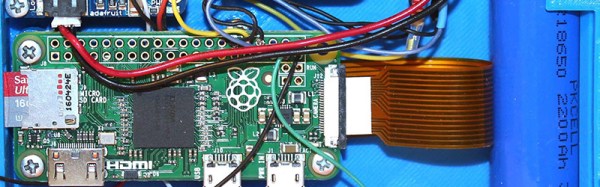
For the hardware, [Nick] went with a Raspberry Pi and Raspberry Pi camera. A combination of software ranging from PiCamera, GraphicsMagick, and GifCam turns this tiny bit of hardware into a machine dedicated to content creation in the hippest new medium. Other hardware includes a battery – either a normal LiPo ‘pouch’ cell, or an 18650 cell. Other hardware includes an Adafruit Powerboost 500 charge controller and a neat illuminated push button.

The 3D-printed enclosure is where this project really shines. Hearkening back to an older time, this camera includes a real viewfinder for all your gonzo giffing. The camera is charged through a completely normal USB port, and even the Pi’s SD card is accessible without disassembling the camera. There are even some paper wrappers for this camera to give it a 90s disposable camera aesthetic.

Of course, this isn’t the first camera dedicated to the creation of animated gifs. Before the C.H.I.P., Next Thing Co released OTTO, a camera designed for gifs. [Nick]’s project, though, is a camera dedicated completely to gifs. It is the greatest technical achievement of our time, for the creation of content in the greatest artistic medium.

Hackaday Links Column Banner

Hackaday Links: October 23, 2016

It’s the Hack ‘O Lantern edition! First up, Slic3r is about to get awesome. Second, Halloween is just around the corner, and that means a few Hackaday-branded pumpkins are already carved. Here’s a few of them, from [Mike] and [yeltrow]:

The latest edition of PoC||GTFO has been released. Holds Stones From The Ivory Tower, But Only As Ballast (PDF and steganography warning). This edition has a reverse engineering of Atari’s Star Raiders, [Micah Elisabeth Scott]’s recent efforts on USB glitching and Wacom tablets, info on the LoRa PHY, and other good stuff. Thanks go to Pastor Manul Laphroaig.

Oh cool, we can be outraged about something. The Freetronics Experimenters Kit is a neat little Arduino-based ‘Getting Started In Microcontrollers’ kit. This kit was sold by Jaycar. Recently, Jaycar ripped off the kit and sold it under the Duiniotech name. The box was copied, the instruction manual was copied, and there’s a lot of IP being violated here. Can Freetronix do anything? Legally, yes, but it’s not worth it.

[Oscar] broke his phone, but it still works great as an SMD soldering camera/microscope thing.

Pobody’s Nerfect in Australia so here’s a 3D printed didgeridoo. What’s a didgeridoo? It’s an ancient instrument only slightly less annoying than bagpipes. It’s just a tube, really, and easily manufactured on any 3D printer. The real trick is the technique that requires circular breathing. That’s a little harder to master than throwing some Gcode at a printer.

[Chris Downing] is the master of mashed up, condensed, and handheld game consoles. His latest is another N64 portable, and it’s a masterpiece. It incorporates full multiplayer capability, uses an HDMI connector for charging and to connect the external breakout box/battery, and has RCA output for full-size TV gameplay. Of note is the breakout board for the custom N64 chip that puts pads for the memory card and a controller on a tiny board.

WarWalking With The ESP8266

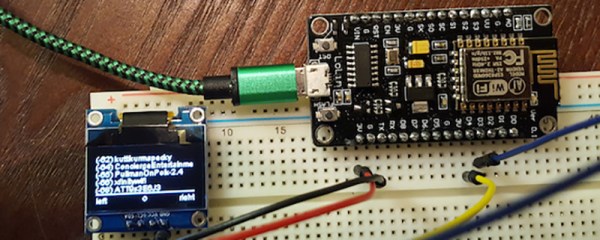
[Steve] needed a tool to diagnose and fix his friend’s and family’s WiFi. A laptop would do, but WiFi modules and tiny OLED displays are cheap now. His solution was to build a War Walker, a tiny handheld device that would listen in WiFi access points, return the signal strength, and monitor the 2.4GHz environment around him.

The War Walker didn’t appear out of a vacuum. It’s based on the WarCollar Dope Scope, a tiny, portable device consisting of an off-the-shelf Chinese OLED display, an ESP8266 module, and a PCB that can charge batteries, provide a serial port, and ties the whole thing together with jellybean glue. The Dope Scope is a capable device, but it’s marketed towards the 1337 utilikilt-wearing, The Prodigy-blasting pentesters of the world. It is, therefore, a ripoff. [Steve] can build his version for $6 in materials.

The core of the build is an ESP-based carrier board built for NodeMCU. This board is available for $3.77 in quantity one, with free shipping. A $2 SPI OLED display is the user interface, and the rest of the circuit is just some perfboard and a few wires.

The software is based on platformio, and dumps all the WiFi info you could want over the serial port or displays it right on the OLED. It’s a brilliantly simple device for War Walking, and the addition of a small LiPo makes this a much better value than the same circuit with a larger pricetag.