Decapsulation Reveals Fake Chips

A while back, [heypete] needed to get a GPS timing receiver talking to a Raspberry Pi. The receiver only spoke RS-232, and the Pi is TTL level serial. [Pete] picked up a few RS-232 to TTL conversion boards from an online vendor in China. These boards were supposedly based on the Max3232, a wonderchip that converts the TTL serial to the positive and negative voltages of RS-232 serial. The converters worked fine for a few weeks, before failing, passing a bunch of current, and overheating.

On Mouser and Digikey, the Max3232 costs about $1.80 in quantity one, and shipping is extra. You can pick up a ‘Max3232 converter board’ from the usual online marketplaces for seventy five cents with free shipping. Of course the Chinese version is fake. [Pete] had some nitric acid, and decided to compare the die of the real and fake Max3232s.

After desoldering two fake chips from their respective converter boards, and acquiring a legitimate chip straight from Maxim, [Pete] took a look at the chips under the microscope. The laser markings on the fakes are inconsistent, but there was something interesting to be found in the date code markings. It took two to four weeks for the fake chips to be etched with a date code, assembled into a converter board, shipped across the planet, put into [Pete]’s project, run for a little bit, and fail spectacularly. That’s an astonishing display of manufacturing, logistics, and shipping times. Update: The date codes on the fakes had 2013 laser etched on the plastic package, and 2009 on the die. The real chips had a date code just a few weeks before [Pete] decapped them — a remarkably short life but they gave in to a good cause.

Following the Zeptobars and CCC (PDF) guides to dropping acid, [Pete] turned his problem into solution and took a look at the dies under a microscope. The legitimate die was significantly larger, and the fake dies were identical. The official die used gold bond wires, but the fake ones didn’t.

Unfortunately, [Pete] isn’t an expert in VLSI, chip design, failure analysis, or making semiconductors out of sand. Anything that should be obvious to the layman is not, and [Pete] has no idea why these chips would work for a week, then overheat and fail. If anyone has an idea, hit [Pete] up and drop a note in the comments.


Hackaday Prize Entry: Aesthetic As Hell

Microsoft Bob was revolutionary. Normally you’d hear a phrase like that coming from an idiot blogger, but in this case a good argument could be made. Bob threw away the ‘files’ and ‘folders’ paradigm for the very beginnings of virtual reality. The word processor was just sitting down at a desk and writing a letter. Your Rolodex was a Rolodex. All abstractions are removed, and you’re closer than ever to living in your computer. If Microsoft Bob was released today, with multiple users interacting with each other in a virtual environment, it would be too far ahead of it’s time. It would be William Gibson’s most visible heir, instead of Melinda Gates’ only failure. Imagine a cyberpunk world that isn’t a dystopia, and your mind will turn to Microsoft Bob.

Metaverse Lab is aesthetic as hell
Metaverse Lab is aesthetic as hell.

Not everyone will laugh at the above paragraph. Indeed, some people are trying to make the idea of a gigantic, virtual, 3D space populated by real people a reality. For the last few years, [alusion] has been working on Metaverse Lab as an experiment in 3D scanning, virtual web browsers, and turning interconnected 3D spaces into habitats for technonauts. The name comes from Snow Crash, and over the past twenty years, a number of projects have popped up  to replicate this convergence of the digital and physical. By integrating this idea with the latest VR headsets, Metaverse Lab is the the closest thing I’ve ever seen to the dream of awesome 80s sci-fi.

I’ve actually had the experience of using and interacting with Metaverse Lab on a few occasions. The only way to describe it is as what someone would expect the Internet would be if their only exposure to technology was viewing the 1992 film Lawnmower Man. It works, though, as a completely virtual environment where potential is apparent, and the human mind is not limited by its physical embodiment.

Hackaday Links Column Banner

Hackaday Links: September 11, 2016

You know about the Hackaday Superconference, right? It’s the greatest hardware con ever, and it’s happening on November 5+6. Details incoming shortly.

The Hackaday Retro Edition exists. It’s the Hackaday blog, HTML-1-izized for weird and old computers? Why did I do this? Because Google is the quickest page to load on a Powerbook 180. There’s a new Retro Success, this time coming from @LeSpocky and his Nokia 3109c phone from 2008.

This is your official notice. The Open Hardware Summit is less than a month away. It’s going down in Portland, OR. Why Portland? The Vaporwavescene, of course. Hackaday, Tindie, and the rest of the crew will be out in Portland next month getting the latest news on the state of Open Hardware. We won’t be sitting in church pews this year, but then again there is no lady made out of soap.

Speaking of OHS, [Dave] just solved all their problems. The ‘problem’ with Open Hardware, if you can call it that, is that people use it as a bullet point on a sales deck. That neat gear logo can be marketing wank, without any of the sources, schematics, or anything else that makes a project Open Hardware. Last year, OSHWA announced they would be creating a certification process, with a trademarked logo, so they can sue people who don’t post schematics and mechanical designs (slightly inaccurate, but that’s the jist of the program). [Dave] is suggesting keeping the cool gear logo, but adding letters the teeth of the gear to designate what makes something Open Hardware. Add an S for schematic, add a B for a BOM, sort of like the creative commons logo/license. Is it a good idea? If OSHWA keeps using the gear logo for the ‘official’ Open Hardware logo/designation, there’s no recourse for when people misuse it. I’m of several minds.

[Colin Furze] is famous for his zany builds. His latest Youtube is anything but. It’s a shed. Of course, it’s the entry for his underground bunker, but this is a quality shed with a concrete pad, a few bits to keep it off the ground, and insulation. The roof is slate (because why not?), but if your design decisions are based on the phrase, ‘you only live once,’ copper may be a better choice.

The ESP32 has been released. The ESP32 is the follow-on to the very popular ESP8266. The ’32 features WiFi and Bluetooth, dual core processors, and a few undisclosed things that will make it very interesting. You can buy ESP32 modules right now, but no one has them on their workbench quite yet. To get you started when they finally arrive, [Adam] created an ESP32 KiCad Library for the ESP32 chip, and the ESP32-WROOM and ESP3212 modules.

Hackaday Prize Entry: Autonomous Kayaks

[Barry] has an expedition planned. He’s going to be exploring coastlines, inlets, and other shallow waters where even small ROVs are too big. [Barry] wants an autonomous vehicle on this expedition, though, and that means he must build his own. This led to The Julius Project, repurposed kayaks, and all the techniques that go into making proper maritime electronics.

The first question [Barry] gets is, ‘why kayaks?’ A quick cruise around Craigslist is enough to answer that – they’re cheap, and they’re available in almost infinite variety from big touring kayaks to small play boats, all built for different conditions and expeditions. With a few motors and modular parts to this build, [Barry] has an autonomous aquatic vessel built for every condition imaginable.

Right now, [Barry]’s focus is getting the propulsion working. This comes in the form of a few brushless motors bolted to the underside of the kayak. A tethered test was very successful, demonstrating this tiny boat can turn on a dime. Integration with an autopilot is coming, but until then [Barry] has a neat little boat puttering around a river. You can check out a video of that below.

Continue reading “Hackaday Prize Entry: Autonomous Kayaks”

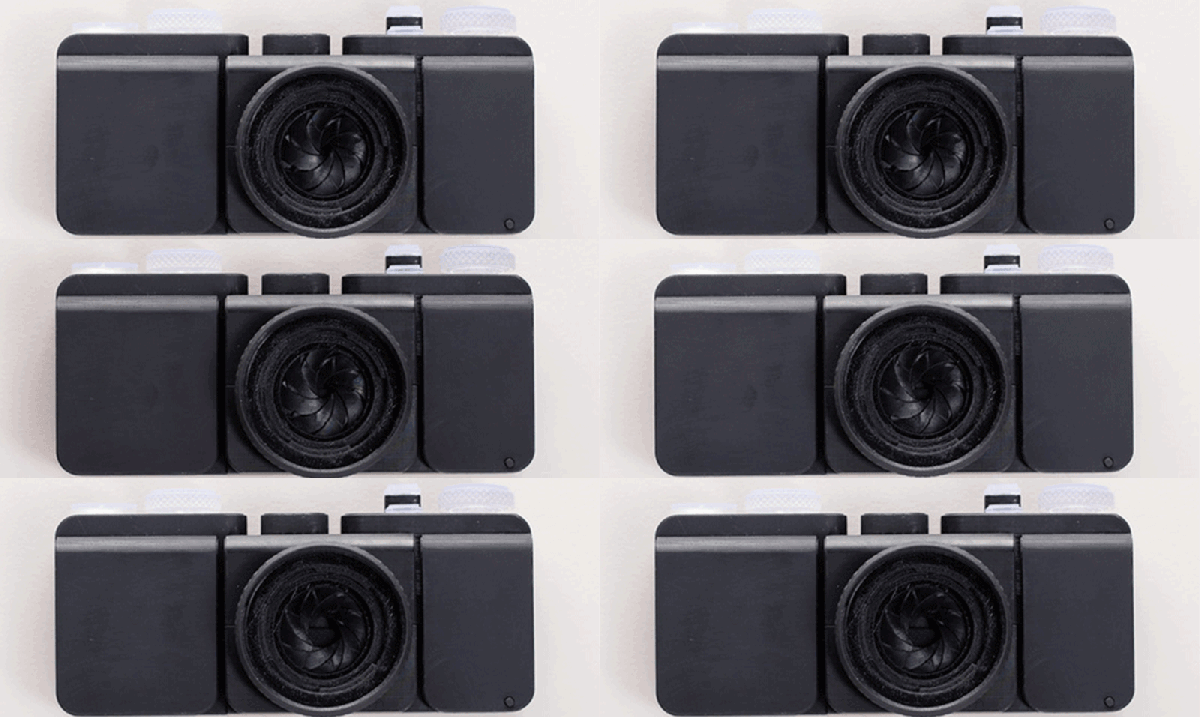
A 3D Printed Camera (Including The Lens)

Barring the RepRap project, we usually see 3D printers make either replacement parts or small assemblies, not an entire finished product. [Amos] is the exception to this rule with his entirely 3D-printed camera. Everything in this camera is 3D printed, from the shutter to the lightproof box to the lens itself. It’s an amazing piece of engineering, and a testament to how far 3D printing has come in just a few short years.

35mm film is the most common film by far, and the only one that’s still easy to get and have developed at a reasonable price. This 3D-printed camera is based on that standard, making most of the guts extremely similar to the millions of film cameras that have been produced over the years. There’s a film cartridge, a few gears, a film takeup spool, and a lightproof box. So far, this really isn’t a challenge for any 3D printer.

The fun starts with the lens. We’ve seen 3D printers used for lens making before, starting with a 3D print used to create a silicone mold where a lens is cast in clear acrylic, 3D printed tools used to grind glass, and an experiment from FormLabs to 3D print a lens. All of these techniques require some surface finishing, and [Amos]’ lens is no different. He printed a lens on his Form 2 printer, and started polishing with 400 grit sandpaper. After working up to 12000 grit, the image was still a bit blurry, revealing microscopic grooves that wouldn’t polish out. This led him to build a tool to mechanically polish the lens. This tool was, of course, 3D printed. After polishing, the lens was ‘dip polished’ in a vat of uncured resin.

The shutter was the next challenge, and for this [Amos] couldn’t rely on the usual mechanisms found in film cameras. he did find a shutter mechanism from 1885 that didn’t take up a lot of depth, and after modeling the movement in Blender, designed a reasonable shutter system.

Building an entire camera in a 3D printer is a challenge, but how are the pictures? Not bad, actually. There’s a weird vignetting, and everything’s a little bit blurry. It’s hip, trendy, and lomo, and basically amazing that it works at all.

Hackaday Prize Entry: Characterizing LED And Laser Diodes

Needless to say, we’re fascinated by LEDs, laser diodes, and other blinkies. Although we can get just about any light emitting thing, the data sheets aren’t always accurate or available. For his Hackaday Prize entry, [Ted] is building a device to characterize the efficiency, I/V curve, and optical properties of all the blinkies. It’s a project to make glowy stuff better, and a great entry for the Hackaday Prize.

The inspiration for this project came from two of [Ted]’s projects, one requiring response curves for LEDs, and laser diodes for another. This would give him a graph of optical output vs. current, angular light output distribution, and the lasing threshold for laser diodes. This data isn’t always available in the datasheet, so a homebrew tool is the only option.

The high-level design of this tool is basically a voltmeter and ammeter measuring a glowy diode, producing IV curves and measuring optical output. That takes care of all the measurements except for the purely optical properties of a LED. This is measured by a goniometer, or basically putting the device under test on a carriage attached to a stepper motor and moving it past a fixed optical detector.

If you’re wondering why this device is needed and a simple datasheet is insufficient, check this out. [Ted] measured the efficiency of a Luxeon Z LED, and found the maximum efficiency is right around 10mA. The datasheet for this LED shows a nominal forward current of 500mA, and a maximum of 1000mA. If you just looked at the datasheet, you could easily assume a device powered for years by a coin cell would be impossible. It’s not, and [Ted]’s device gave us this information.

Hackaday Prize Entry: Boots And Cats And Boots And Cats

Electronic drums are pricey, but the drums themselves are actually very easy to make. By simply putting a few piezos on some rubber mats, you can make a set of electronic drums. The real trick, and the expensive bit, is in the drum module. This module has inputs for the high hat, snare, toms, and bass drum to turn the repetitive thwaking of a stick on a rubber mat into drum sounds.

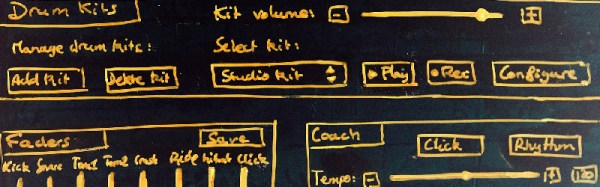
For his Hackaday Prize entry, [Jeremy] isn’t building a set of electronic drums. He’s building a drum module, complete with touchscreen interface and a GUI.

This isn’t [Jeremy]’s first go at building a drum module – his first implementation was RaspiDrums, an add-on for the Raspberry Pi that used accelerometers instead of piezos. The software works well enough with a USB sound card to serve as a set of real electronic snare.

Now [Jeremey] is moving up to a full kit, and the power of the Raspberry Pi means he can easily add a touch screen to his device. Right now the efforts are going into building a GUI using Gtkmm, and wrapping everything up into a front panel that makes sense and is easy to use. The drums themselves are a solved problem, making this Hackaday Prize entry a fantastic polish on an already great project.