An Arduino Programmable Load

Having a big block of hot to dump current into is a very useful thing to have if you’re testing batteries, power supplies, high power LEDs, electroplating, or any thing else that would normally require a huge resistor. [Jakub] found himself in need of an electronic load, and instead of a transistor and a pot, decided to make something more automatic: a programmable load built around an Arduino shield.

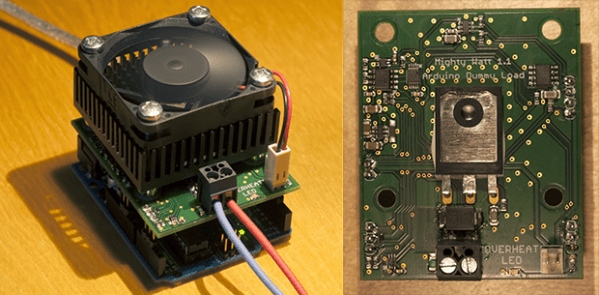
The idea behind this load is pretty simple: connect a device to a FET and shunt resistor to measure current. Drive the gate of the FET with an op-amp that maintains either constant current or constant voltage. Control everything with a DAC, and you have a programmable load controlled by an Arduino.

With such a small form factor, getting rid of all that heat was bound to be a problem. For this, [Jakub] is using a 50×50 mm BGA style heat sink with a 5V fan. If it’s good enough for a big CPU, it should be able to handle dumping 70 Watts into a FET. There’s also a conservative application of thermal paste and a very small thermistor underneath the FET that’s able to be read by the Arduino. It might slowly heat up your room, but it’s not going to catch fire.

With the Arduino sketches [Jakub] wrote for his load he was able to characterize a pair of Idea batteries and figure out how much charge a three-year-old recyclable battery had. It’s a great piece of work, and if [Jakub] is willing to go through the hassle of a Kickstarter, it would make a fine crowdfunded product.
Workbench With Built-In Solder Fume Extractor

Solder

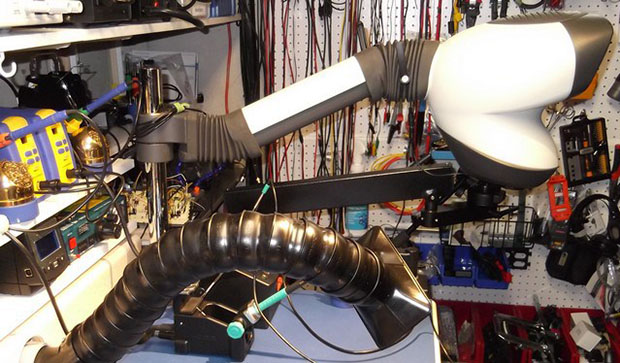
There’s nothing quite like getting an eye full of solder fumes, but when it comes to solder fume extraction, the most common solution take up a whole lot of work area. Here’s a very clever solder fume extractor that doesn’t get in the way, and can be perfectly positioned over the acrid brimstone of a soldering station.

The build consists of a cheap bathroom vent fan built into the back of the workbench feeding into a long PVC pipe that blows the exhaust to the floor a few feet away. The fan is controlled by a simple wall switch, but the intake is where this build really shines. It’s a series of hard, flexible plastic segments that allow the intake to be precisely oriented above the work piece, or wherever it’s most convienent to suck solder fumes from.

This solder fume extractor is just a part of a really amazing electronics workbench. A lot of thought went into this workspace, from threaded inserts in the work surface to mount a panavise to an amazingly thoughtful equipment rack for computers, monitors, and other assorted heavy equipment.

via Hacked Gadgets

Vintage DACs And A Raspberry Pi

DAC

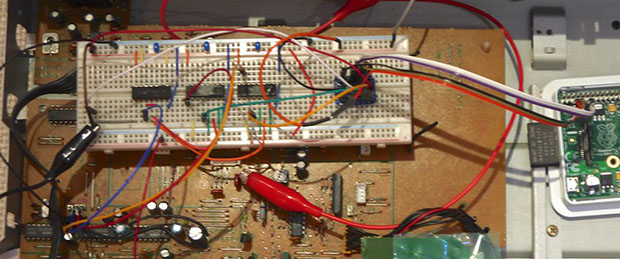
Before the days of iPod docks in every conceivable piece of audio equipment, most devices were actually built very well. Most shelf top equipment usually came with well designed circuits using quality components, and late 90s CD players were no exception. [Mariosis] heard of some very nice DACs found in some of these units and decided to take one out for a spin. He’s using a Raspberry Pi to play audio with the DAC found in a late 90s Kenwood CD player.

After fortune favored a CD player with a dead drive on [Mariosis]’ workbench, he dug up the service manual and found some interesting chips – a PCM56 DAC, a little bit of logic, and an SM5807 oversampling chip that does all the conversion for the DAC.

This oversampling chip uses an I2S – not I2C – bus to carry the data from the CD to the DAC. There is, of course, an I2S driver for the Raspi, but the first attempts at playing audio didn’t result in anything. It turned out there was a problem with what the oversampler expected – the ‘standard’ I2S signal delays the data one tick behind the LRCLK signal.

There are two ways to fix this problem: programming a kernel driver, or building some custom logic to fix the problem. Obviously breaking out some flip-flops and NOR gates was the cooler option, giving [Mariosis] a great sounding stereo with a vintage DAC.

Breadboardable WS2812 LEDs

LED

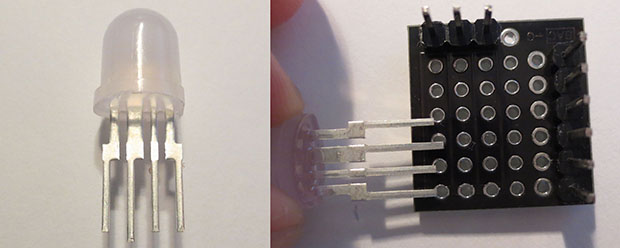
Hackaday sees a ton of projects featuring the WS2812 series of digitally controllable RGB LEDs, in the form of bare chips, RGB LED strips, or some form of Adafruit’s NeoPixels. All these WS2812 LED products have one thing in common – they’re chip LEDs, making some projects difficult to realize. Now there’s a new member of the WS2812 family – a through-hole LED version – that should be available through the usual sources sometime later this year.

The key difference between these and the usual WS2812 LEDs is the packaging; these are 8mm LEDs with pins for power, ground, data in, and data out. With the preexisting libraries, this 8mm LED should work just the same as any other WS2812 LED.

Aside from a through-hole package, these new LEDs are very diffuse and aren’t as blinding as the normal chip LEDs. If you want to pick up a few of these LEDs, they’re available here, 13 LEDs for $15. There’s a lot of potential here for RGB LED cubes, something we hope to see sooner rather than later.

Dual Color Extruder With A Single Stepper

extruder

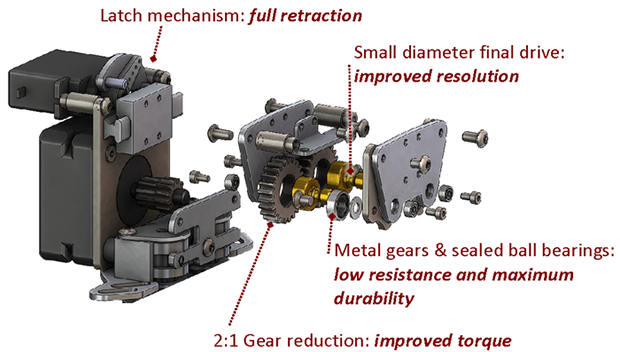
Once you have a 3D printer able to build a few objects in a single color, the next logical upgrade is a dual extruder. A dual extruder allows for multiple color prints, and by adding a dissolvable filament, the ability to print object that would otherwise be impossible. Fitting a dual extruder on an existing 3D printer presents a problem: simply by using a second stepper motor, you reduce the print area of your printer significantly. That’s the problem Dglass 3D aims to solve with their extruder. It’s a dual filament extruder that uses only one stepper motor and takes up less space than some other single filament extruders.

This isn’t the first time the guys at Dglass 3D have tried Kickstarting a dual filament extruder; last year we saw a very similar mechanism that used a single stepper motor to feed two filaments. This older model lacked retraction, though, meaning two colored prints would range somewhere between messy, inaccurate, to impossible.

The new extruder uses a servo to ‘latch’ the filament and drive it into the hot end. This means retraction of the filament is possible and from the sample prints with this extruder, the results look pretty good.

Below You’ll see a few video demos of the dual color/retraction extruder printing an object in black and white filaments at the same time. It’s very cool, and with the addition of a dissolvable filament means very complex objects can be printed very easily.

Continue reading “Dual Color Extruder With A Single Stepper”

We’re Going To The Midwest RepRap Fest

One month from now, Goshen, Indiana – deep in the land of Dairy Queens – will become one of the premier sites for RepRapping, 3D printing and everything involving open source manufacturing. It’s the 2nd annual Midwest RepRap Festival to be held March 14-16. Oh, Hackaday will also be there, cavorting around, distributing some swag, and doing some live videos and posts of the event.

Highlights of the Festival include [Prusa] giving a talk on the state of open source printing, [Sonny Monicou] discussing the challenges of his RepRap workshops, a roundtable discussion of the RepRap project, [Nicholas Seward] and his creations – the Wally, Simpson, and Lisa, along with a few folks from Lulzbot and UltiMachine. Basically, the only way to go to a bigger RepRap convention would be to visit a Maker Faire, and even that would only add a few hundred 9-year-olds astounded by printed Minecraft figurines.

If you’re willing to make the drive, there’s no fee to attend; just register, show up, and you’ll get a table for all that up-til-midnight RepRapping. There’s also a waffle breakfast on Sunday, along with me walking around makin’ it rain Hackaday stickers.

Hackaday 68k: A New Hackaday Project

It’s no secret Hackaday loves retrocomputers, classic hardware, and vintage tech. Now that we have a great way to present long-form projects, it only makes sense that we combine our loves with a new build. Over the next few months, I’ll be developing a homebrew computer based on the Motorola 68000 CPU, documenting everything along the way, and building a very capable piece of hardware that will end up hosting a few Hackaday webpages. I already have a solid start on the project and will be posting on our front page to discuss the major parts already in progress, and those yet to come.

There are a few reasons we’re taking on this project. With few exceptions, most of the homebrew projects we see are based around 8-bit micros – specifically the 6502 and Z80. 16 and 32-bit CPUs really aren’t that much more difficult to work with, and if we can spearhead a renaissance of the 68k, 65816, or even a 386 (!), we’re all for that. Also, it’s been suggested that we host the Hackaday Retro site on retro hardware, and what better way to do that by documenting a build on our new project hosting site?

That’s a very brief introduction to this project. Let’s take a closer look at what hardware we’ll be using, what software we’ll get running, and what you can do to help.

Continue reading “Hackaday 68k: A New Hackaday Project”