The $40 X86 Arduino

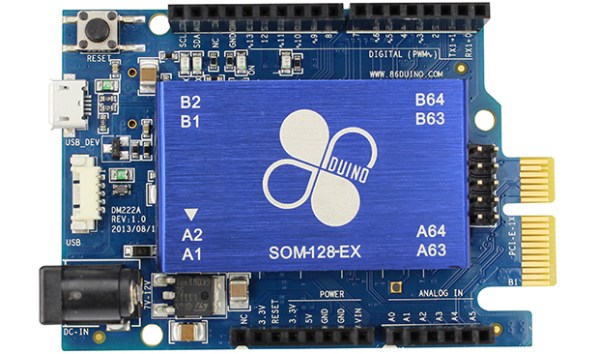
Every week the Hackaday tip line receives an email about a new dev board. The current trend is towards ARM devices, and only once have we seen an x86-based device. Today that count went up to two. It’s called the 86Duino and stuffs an old Pentium II-class machine capable of running DOS, Windows, and Linux into the space of an Arduino,

The 86Duino Zero features, of course, an x86 Vortex86EX processor running at 300 MHz. This board also features 128 MB of RAM, 8MB of Flash and the usual compliment of Arduino pins in a Leonardo-compatible layout. Also on the SoC is a PCIE bus, Ethernet, a USB 2.0 host, and an SD card. There’s a lot of stuff on this board for such a small size.

Compared to the gigahertz-fast ARM boards around, the 86Duino isn’t really that fast, but that’s not the point. There’s obviously a market for extremely tiny x86 boards out there as evidenced by the Intel Galileo, and this board is $30 cheaper than the Intel offering.

There’s no video out on this board, so someone will have to figure out how to attach a graphics card to the PCIE connector before we build a miniaturized old school DOS gaming rig. Still it’s a very neat piece of hardware. If you need to have it now, here’s a vendor.

Thanks [sohaib] for sending this one in.
A Touch Scroll Wheel Via OpenSCAD

touch

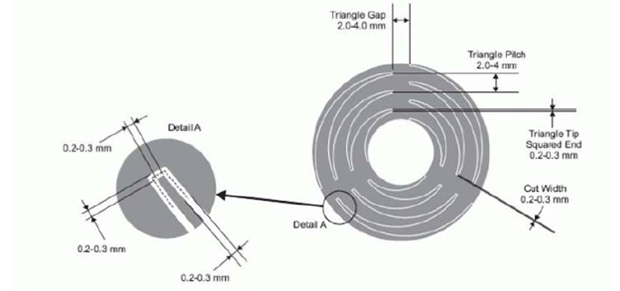
Recent experiments with the Arduino CapSense library led [Bryan] around the Internet looking for interesting applications. He hit upon a very cool touch scroll wheel made entirely with PCB traces, but the geometry – three interleaved zig zags is impossible to build in the decidedly ungeometric Eagle PCB package. One thing leads to another and now [Bryan] has a cap touch wheel Eagle part designed entirely in OpenSCAD.

The touch scroll wheel implementation [Bryan] found came from an ST touch controller datasheet and used oddly-shaped patterns to create a capacities sensor. Eagle is terrible for designing anything that isn’t laid out at a 45 degree angle, so he fired up OpenSCAD to draw these triangles. Importing into Eagle was another challenge, but a quick Ruby script to convert a DXF file into a set of coordinates for Eagle’s POLYGON command made everything very easy.

If OpenSCADing touch sensors isn’t your thing, there’s also an Eagle library full of them – something we found last week.

OpenMV: The Camera For Your Next Project

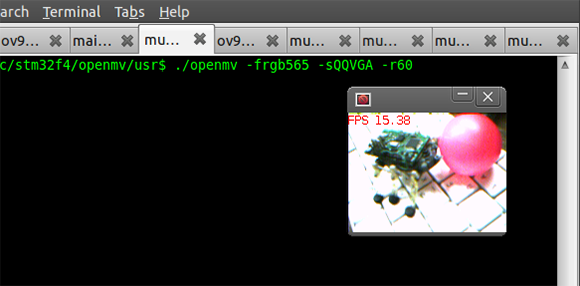
Last month we saw [Ibrahim] tackle the lack of cheap, high speed, high resolution serial cameras with full force. He designed a serial camera based on the STM32F4 microcontroller that’s the perfect solution to anyone wanting to add visual processing or machine vision to a project. It’s cheap, too: instead of the $100 or so you’d spend on a high-end serial camera, [Ibrahim]’s version only has about $15 in parts.

Now he’s back at it again, with 25 FPS face detection, 30 FPS color detection, a new board with a micro SD socket, and support for USB OTG full speed. [Ibrahim] has been hard at work deep in the bowels of the STM32F4 micro, playing around with the core coupled memory. This allows for some very fast image processing, combined with the micro running at 168 MHz makes for very fast face and color detection.

As for a few benchmarks for this camera, the maximum resolution is 1280×1024, and at 88×72 resolution this little board can output at 60 FPS. Of course everything is limited by the speed of the serial connection, but there’s a lot of potential in this small serial camera.

No word on how much this board will cost, but [Ibrahim] may be putting a few boards up on Tindie shortly. Here’s to hoping he’ll send us an email telling us when his store is open.

An Awesome Electric Bike

bike

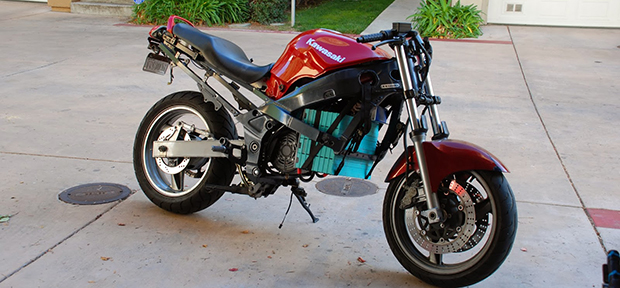
Converting a motorcycle to electric is always a favorite project of ours, and [Peter]’s build is up there with the rest of them.

The bike is a 2002 ZX6E he bought from a salvage shop. It had been parted out over the years and for $250 this very light aluminum frame made the for the perfect electric conversion frame. After learning MIG welding from his brother, [Peter] cut up a few plates and built a motor mount for his new 4.2 kW power plant.

The controller is a 300 amp IGBT he found on eBay, with an extraordinarily sturdy looking circuit built into an ammo box. The motor from the bike was replaced with 16 60Ah LiFe cells providing 52 volts. [Peter] also built his own battery management system using a Cypress PSoC 3 microcontroller and a beautiful custom PCB.

It’s still a long way from being finished, but already [Peter] has a great looking bike and an awesome weekend project on his hands.

Speeding Up BeagleBone Black GPIO A Thousand Times

For both the Raspberry Pi and BeagleBone Black, there’s a lot of GPIO access that happens the way normal Unix systems do – by moving files around. Yes, for most applications you really don’t need incredibly fast GPIO, but for the one time in a thousand you do, poking around /sysfs just won’t do.

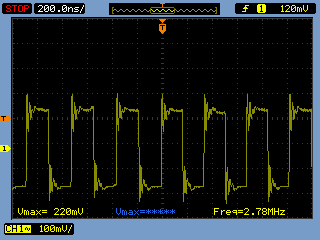
[Chirag] was playing around with a BeagleBone and a quadrature encoder and found the usual methods of poking and prodding pins just wasn’t working. By connecting his scope to a pin that was toggled on and off with /sysfs he found – to his horror – the maximum speed of the BBB’s GPIO was around three and a half kilohertz. Something had to be done.

After finding an old Stack Overflow question, [Chirag] hit upon the solution of using /dev/mem to toggle his pins. A quick check with the scope revealed he was now toggling pins at 2.8 Megahertz, or just about a thousand times faster than before.

Using XBox One And PS4 Controllers With Everything

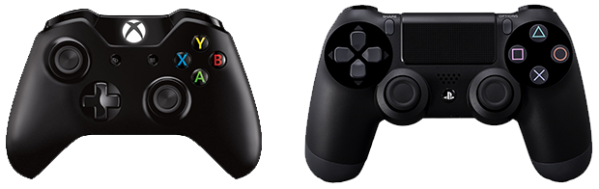
The controllers from the last generation of consoles served their purpose well. They were there for us when we wanted to experiment with an I2C bus, and they stood by when we wanted to build a quadcopter out of parts just lying around. A new generation of consoles is now upon us, and with them come new controllers. Controllers for which Arduino libraries haven’t been written yet. The horror.

Until those libraries are developed, there’s ChronusMAX, a USB dongle that allows you to use XBox One controllers on a PS4, PS4 controllers on the XBox, mice and keyboards on both systems, and both types of controllers on your PC.

The folks behind ChronusMAX put up a video demoing the XBox One controller working on the 360, PS3, and PC, with another video showing the same for the PS4 controller. As far as what we can see from the PC demos, everything on these controllers can be read, right down to the accelerometer data on the DualShock 4.

Although this is a commercial product, we’re surprised we haven’t seen a more open version by now. From the looks of it, it’s a very small device with two USB ports and a firmware upload utility. Microcontrollers with two native USB ports are usually encased in large packages, so there might be some very clever engineering in this device. Let us know when someone does a teardown of one of these.

Thanks [Josh] for sending this one in.

The Sub-$500 Deltaprintr

delta

We’ve seen them before, but only now has the Deltaprinter, a very simple and affordable delta printer finally hit Kickstarter.

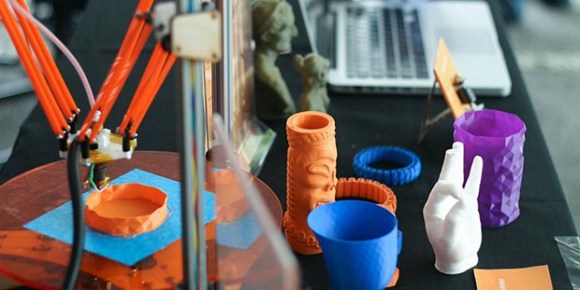
We saw the Deltaprintr at the World Maker Faire last September where the team showed off their fancy new printer and the very nice prints it can produce. The printer itself is unique in that it eschews printed parts and is instead made of lasercut parts. Instead of belts, each arm of the delta bot is lifted with spectra line, and the entire mechanism is billed as not requiring calibration probably due to the accurate laser cut parts.

On a completely different note, we did notice the rewards for the Deltaprintr Kickstarter are limited. Unlike the gobs of 3D printers on Kickstarter, the Deltaprintr team actually wants to stay on schedule for their shipping dates. That’s an admirable dedication to getting their printer out to backers in a reasonable amount of time.