Trimming The Fat From AVR GCC

avr

[Ralph] has been working on an extraordinarily tiny bootloader for the ATtiny85, and although coding in assembly does have some merits in this regard, writing in C and using AVR Libc is so much more convenient. Through his trials of slimming down pieces of code to the bare minimum, he’s found a few ways to easily trim a few bytes off code compiled with AVR-GCC.

To test his ideas out, [Ralph] first coded up a short program that reads the ATtiny85’s internal temperature sensor. Dissassembling the code, he found the a jump to a function called __ctors_end: before the jump to main. According to the ATtiny85 datasheet, this call sets the IO registers to their initial values. These initial values are 0, so that’s 16 bytes that can be saved. This function also sets the stack pointer to its initial value, so another 16 bytes can be optimized out.

If you’re not using interrupts on an ATtiny, you can get rid of 30 bytes of code by getting rid of the interrupt vector table. In the end, [Ralph] was able to take a 274 byte program and trim it down to 190 bytes. Compared to the 8k of Flash on the ‘tiny85, it’s a small amount saved, but if you’re banging your head against the limitations of this micro’s storage, this might be a good place to start.

Now if you want to hear some stories about optimizing code you’ve got to check out the Once Upon Atari documentary. They spent months hand optimizing code to make it fit on the cartridges.


Turning A Pi Into An IBeacon

beacon

Nowadays, if you want to ‘check in with Foursquare’ at your local laundromat, deli, or gas station, you need to take out your phone and manually ‘check in with Foursquare’. It’s like we’re living in the stone age. iBeacon, Apple’s NFC competitor that operates over Bluetooth 4.0 changes all that. iBeacon can automatically notify both iOS and Android users of where they are. [Kevin Townsend] over at Adafruit came up with a tutorial that turns a Raspberry Pi into an iBeacon, perfect for telling you that you’re somewhere in the proximity of a Raspberry Pi, and some other cool stuff too.

The iBeacon protocol is actually very simple. Basically, the only thing the iBeacon transmits is a 128-bit company/entity value, and an optional major and minor values (to differentiate between locations and nodes within locations, respectively). After plugging in a Bluetooth 4.0 USB dongle into the Pi, it’s a simple matter of installing BlueZ and entering the iBeacon data.

iBeacon by itself doesn’t really do anything – the heavy lifting of figuring out exactly which Panera Bread or Starbucks you’re in is left to the apps on your phone. If you’re a mobile developer, though, this is a great way to set up a very useful testing rig.

Logic Analyzers And X11

logic

[Andrew] recently scored an awesome HP 1670A Deep Memory Logic Analyzer, lucky dog. Even though this machine was built in 1992, it was a top of the line device back in the day and had a few very interesting features. This logic analyzer also had a few networking ports implementing FTP, NFS, TCP/IP, and the X11 protocols over a 10Base2 (“thinlan”) and 10BaseT (“ethertwist” seriously, that’s what’s in the manual) connections. The X11 protocol interested [Andrew] so he set this logic analyzer up so he could use it via his Linux box.

X Windows is simply a way to display GUI interfaces over a network. While today we usually only see X Windows apps confined to the desktop, in the bad old days of *NIXes you had to pay for, running a GUI app over a network was considered the wave of the future. The Internet replaced this idea with a palimpsest of JavaScript, but we digress…

[Andrew]’s new toy didn’t support DHCP, so after inputting the IP address manually, he checked the host file – still the same after twenty years – and connected with his Linux Mint box. The result is a remote control panel for the ‘ol girl in a garish color scheme that violates all modern sensibilities.

A Collective Pitch Quadcopter

Quadcopters aren’t a new thing, but for all the advances in multi-rotor craft, they all still fall into the paradigm of, ‘stick a prop on a motor and repeat three more times. [Curtis Youngblood], one of the top RC heli pilots in the world, came up with a very cool drive system for a quad, requiring only one motor and granting each blade collective pitch that allows for absolutely insane acrobatic ability.

There’s only one motor inside the Stingray 500, as [Curtis] calls his new toy. It’s at the rear of this quad’s H-frame, attached to a shaft running down the spine with a pair of pulleys. All four rotors are driven by this spinning shaft.

Because [Curtis] is an acrobatic pilot, he needed a way to control his ‘copter in more than one direction. To do this, he added four servos on each arm of the quad, giving each rotor collective pitch, just like the tail rotor of a real helicopter. The result is a quadcopter that can fly upside-down with the greatest of ease, perform barrel rolls, and all the other maneuver a true 3D RC ‘copter can do.

The awesome guys at Flite Test had [Curtis] visit their hangar and had him do an awesome demo flight. You can check out that video below.

Continue reading “A Collective Pitch Quadcopter”

Easy Capacitive Touch Sensors In Eagle

board

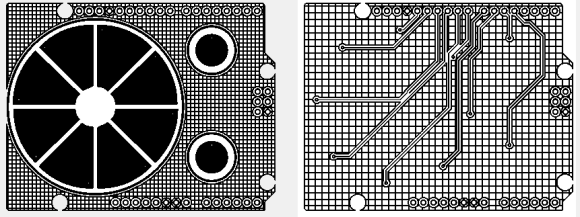
Capacitive sensing libraries for the Arduino and just about every other microcontroller platform have been around for ages now, but if you’d like to put a slightly complex cap sense pad in a PCB without a lot of work, you’re kind of out of luck. Not only do you need a proper education in how capacitors work, but a custom cap sense pad also requires some advanced knowledge of your preferred PCB layout program.

The folks over at PatternAgents have just the solution for this problem. They created an Eagle library of touch widgets that includes everything from buttons, linear and radial sliders, touchpads, and a whole lot more.

The simplest cap sense pad is just a filled polygon on the top layer of a board, but this simple setup isn’t ideal if you want to use Eagle’s autorouter. By playing with the restrict layers in Eagle, PatternAgents were able to create easy cap sense buttons that will work perfectly, without the problems of the autorouter placing traces willy-nilly.

There are more than enough parts to replicate a whole lot of touch interfaces – buttons can easily be made into a smallish keyboard, and the radial touch sensor will emulate the ‘wheel’ interface on an iPod. Very cool stuff, and we can’t wait to see these in a few more boards.

A Speaking Ultrasonic Distance Sensor

speak

[Klaus] wanted some sort of aid for parking his car, and after running across a $4 ultrasonic sensor, decided to build his own speaking distance sensor (.de, Google Translation).

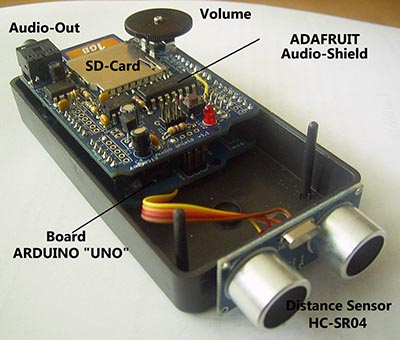
Inside [Klaus]’ device is an Arduino Uno, an HC-SR04 ultrasonic distance sensor, and an Adafruit Wave Shield. Originally, this parking/distance sensor used a small TFT to display the distance to an object, but after a few revisions, [Klaus] redesigned the device to speak the current distance, courtesy of an SD card and a soothing female voice.

Right now, the voice is set up to speak the distance from an object to the sensor from 10 cm to 1 m in 5cm increments. This isn’t the limit of the sensor, though, and the device can be easily reconfigured to sense a distance up to four meters.

The board doesn’t have an amplifier or speaker, but with the addition of a small amplifier, [Klaus]’ device is loud enough to be heard in even the noisiest environments.

Video demo below.

Continue reading “A Speaking Ultrasonic Distance Sensor”

Stealing $100 Million In Bitcoins

In early October of this year, online Bitcoin marketplace and ‘the eBay of drugs’ The Silk Road was taken down by the FBI. Just after the black vans took Silk Road head honcho [Dread Pirate Robberts] away, a new Bitcoin marketplace came onto the scene called Sheep Marketplace. Sheep Marketplace closed after revealing that 5400 bitcoins – or $5.8 million USD were stolen by the user EBOOK101 by exploiting a bug in the Sheep site.

Over this last weekend, it was revealed this bug in the Sheep Marketplace site wasn’t responsible for the loss of 5,400 coins, but instead 96,000 BTC, or $100 million USD, making this one of the largest thefts of all time.

Whoever was responsible for this theft didn’t make a clean getaway. Because the Bitcoin block chain records the history of every transaction, laundering bitcoins is harder than it seems. The most common method is to ‘tumble’ the bitcoins – sending them through multiple wallets, combining and recombining them, until tracking groups of bitcoins just becomes too hard.

[sheeproadreloaded2] over on Reddit managed to track these bitcoins to this bitcoin address, an amazing feat that also means there are 96,000 coins in a wallet somewhere that can’t be spent or cashed out without the thief telling the world who he is.

As far as crimes of the century go, this one is at least in the top ten. Unless the thief behind this heist is extraordinarily smart, though, his identity will most likely be found out eventually.